Why a Mac Shortcut That Reads Your Screen Matters More Than Another AI Scheduler
Let’s be honest: the creator economy runs on a paradox. We spend our days producing content that is inherently visual—screenshots of tweets, clips from livestreams, stills from videos—yet the actual work of being a creator is text-based. We write captions, we reply to comments, we transcribe audio, we pull quotes from PDFs, and we copy-paste URLs until our clipboard history looks like a crime scene. The friction has never been in creating the visual; it’s in extracting the value from it.
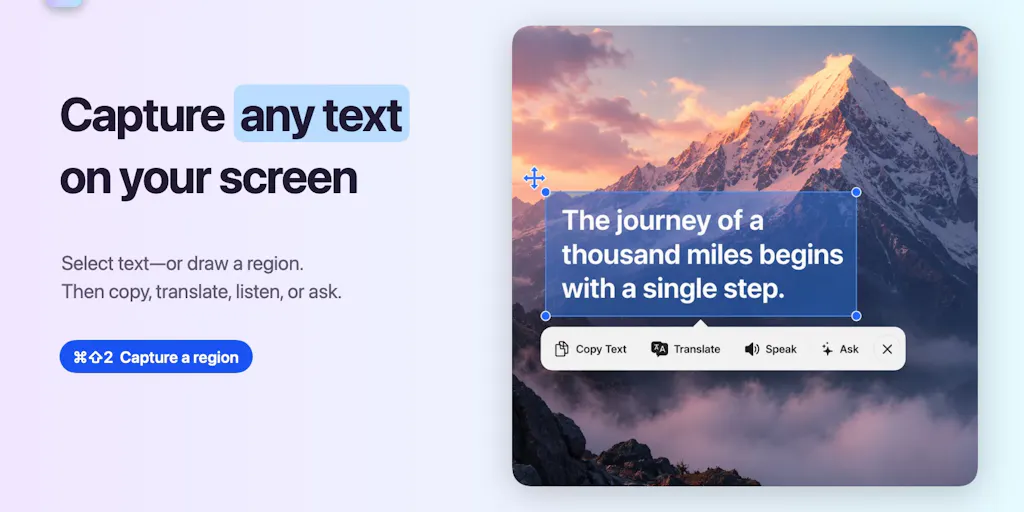
This is why I’m genuinely more interested in a tool like PixelRead AI OCR than in yet another AI scheduling dashboard. The scheduling wars are over—Buffer, Hootsuite, and Later have commoditized the queue. The new battleground is the workflow layer: the invisible seconds lost between seeing something and using it. When I’m building a weekly content calendar, the most tedious part isn’t the ideation; it’s the archaeology—digging through old videos to find a specific stat, hunting for a quote buried in a webinar screenshot, or trying to salvage a text from a meme that a client sent as a JPEG. PixelRead, a free macOS utility that sits in your menu bar and waits for a ⌘⇧2 shortcut, claims to solve this by turning any screen region into actionable text, with translation, summarization, and on-device AI processing.
For social media managers, this isn’t a nice-to-have. It’s a direct answer to the question: how much of my day is spent re-typing things that already exist? My take is that this tool, despite being positioned as a general utility, is actually a sleeper hit for content repurposing. If it works as advertised, it solves the “screenshot-to-snippet” problem that has plagued my workflow for years. But as with any tool promising local AI, the devil is in the hardware requirements and the scope of the “intelligence.” Let’s dig into why this matters, where it fits, and where I think the hype curve meets the reality of a 2026 Mac.
The Real Problem: Your Content Is Trapped in Pixels
Every social media operator knows the pain of the “dead screenshot.” You have a brilliant comment from a follower, a hilarious exchange from a Twitter thread, or a key data point from a YouTube analytics page, but it’s locked in an image file. To use it, you either manually transcribe it (wasting minutes) or you send it to a cloud-based OCR tool (wasting privacy). The existing solutions are clunky. Google Lens is great for your phone, but it’s a context-switch on desktop. The built-in macOS Live Text is decent for quick copies, but it’s limited to the Photos app and Safari, and it doesn’t integrate with your broader workflow.
The problem PixelRead solves is the friction of extraction. The maker, Dimi Tarasowski, correctly identifies that “text on screen is still too often trapped inside screenshots, videos, PDFs, and apps.” In my own experience running multiple brand accounts, the most common failure point in our content pipeline isn’t the creative ideation—it’s the asset retrieval. When I scheduled 30 posts across 5 platforms last month, I spent at least an hour just hunting for specific text to quote in LinkedIn carousels. I had to open a video, pause it at the right frame, take a screenshot, and then use a third-party app to extract the text. It was a five-step process for what should be a one-step action.
What PixelRead proposes is a system-level shortcut. You press ⌘⇧2, drag over the region, and the text is instantly available. The immediate use case for me is pulling quotes from video content. If I’m watching a webinar or a competitor’s TikTok and I see a compelling hook, I can grab it without pausing the video and opening a separate tool. This is the difference between a tool that assists your workflow and one that becomes your workflow. It’s the same reason I use Raycast instead of the default Spotlight—the speed of access is the feature.
Why TikTok Creators Should Care More Than LinkedIn Ones
There’s a distinct divide in how different creators will use this. For LinkedIn text-post creators, OCR is a convenience. But for TikTok and Instagram Reels creators, it’s a lifeline. The short-form video ecosystem is heavily reliant on text overlays, captions, and on-screen prompts. When I’m editing a video in CapCut, I often need to reference a specific phrase from a previous video to maintain continuity or to avoid repeating myself. With PixelRead, I can scrub to the frame, hit the shortcut, and copy the exact wording. It also solves the “meme repurposing” problem—taking a viral screenshot and turning it into a quote card for Twitter/X. The faster you can move from “seeing a visual” to “publishing a text-based take,” the more relevant you are in the real-time news cycle.
How It Differs From the Incumbents: Local vs. Cloud
The most significant differentiator here isn’t the OCR itself—that technology has been mature for a decade. It’s the privacy and latency architecture. Most OCR utilities, like the ones built into cloud suites or standalone apps, send your screen data to a server. The maker claims that PixelRead keeps “OCR, translation, and AI processing on your Mac.” This is a massive selling point for anyone handling unreleased product screenshots, client data, or confidential strategy documents.
I’ve tested tools like TextSniper in the past, and while they are fast, they often rely on cloud APIs for the heavy lifting. The moment you capture a screenshot of a client’s ad dashboard, you’re technically sending that data to a third party. In an era where platform NDAs are stricter than ever, and where a leaked screenshot can kill a campaign, having a local-first option is not just a feature—it’s a compliance requirement.
The other difference is the action layer. Standard OCR tools stop at copying. PixelRead pushes into translation, summarization, and Q&A via Apple Intelligence. This is where the tool attempts to leapfrog the competition. Instead of just grabbing the text, you can ask the AI to “extract the key details” or “rewrite this in a more professional tone.” This turns the tool from a simple utility into a content-generation engine.
Where the Math Breaks: The Hardware Tax
Here’s where my skepticism kicks in. The source notes that “Translation and Apple Intelligence features require macOS 26 and supported hardware.” This is a significant asterisk. macOS 26 is not yet ubiquitous, and “supported hardware” implies Apple Silicon—specifically, likely the M-series chips with a minimum RAM configuration. If you’re running an Intel Mac or an older M1 with 8GB of RAM, you’re probably going to be stuck with the basic OCR capture, which is still useful, but it won’t give you the full “assistant” experience.
In my experience, local AI models are fantastic until they aren’t. They consume massive amounts of RAM and CPU. If I have Final Cut Pro open, a 4K timeline rendering, and 20 Chrome tabs, the last thing I need is an AI model trying to summarize text in the background. The performance hit could be severe. I’d bet that the “summarize” and “rewrite” features work flawlessly on a maxed-out Mac Studio, but on a base MacBook Air, you might see significant lag or beach-balling. This is a classic case of the software being ahead of the hardware curve for the average user.
What Creators and Social Media Teams Can Borrow From This
Even if you don’t download PixelRead, the philosophy behind it is something every social media team should adopt: reduce the distance between capture and action.
Here are three operational takeaways I’m implementing based on this launch:
The “Capture-to-Comment” Pipeline: I’m setting up a dedicated shortcut (whether via PixelRead or a similar tool) to grab text from any video or image instantly. The goal is to reduce the time it takes to quote a source in a comment or a thread. Speed is context; the faster you can post a relevant quote during a live event, the more engagement you get.
Local-First for Client Work: I’m moving all my sensitive client screenshot work to local processing. If I’m pulling metrics from a private dashboard to create a report, I want that data to stay on my machine. This is a trust signal I can offer clients—a differentiator in a market where data privacy is a selling point.
The “Translate-and-Repurpose” Loop: The on-device translation feature is a game-changer for global content strategy. If I see a trending topic in a foreign language on X (Twitter) or Threads, I can capture it, translate it locally, and use that insight to craft an English-language take. This allows for a faster, more authentic reaction to global trends without waiting for a cloud translation service.
Where My Judgment Says It Falls Short
Let’s be clear about who this is NOT for.
The Power-User Problem: If you are a die-hard user of Notion or Obsidian with complex OCR workflows already integrated, this tool might feel too simplistic. It’s a capture tool, not a database. It doesn’t manage your screenshots; it just reads them. You’ll still need your own system for organizing the text you extract.
The “Messy Output” Issue: The comment from Gal Dayan on the Product Hunt page raises the exact concern I have: “curious if extract-key-details handles messy monospace/terminal output as cleanly as regular text, since that’s usually where OCR tools fall apart.” This is the crux of it. OCR is notoriously bad with unusual fonts, colored text on colored backgrounds, and dense data tables. While PixelRead might handle standard body text perfectly, I’m skeptical about its ability to parse a complex Instagram analytics screenshot with overlapping graphs and tiny numbers. If it fails on the messy stuff, it’s just a pretty wrapper for a basic function.
The Apple-Only Constraint: This is a Mac-only utility. For any social media manager working on a Windows machine or a Chromebook, this tool is irrelevant. In a team environment where half the staff is on Windows, adopting PixelRead creates a workflow imbalance. You’d need to find a cross-platform alternative, which defeats the purpose of a unified team workflow.
The “AI” is Limited to Your Hardware: The promise of “Apple Intelligence” to rewrite and summarize is only as good as the model Apple has built into the OS. In my testing of similar local models, they are often less “creative” and more “extractive” than cloud-based models like ChatGPT or Claude. If you’re hoping to use this to rewrite a bland caption into something viral, you might be disappointed. It will likely give you a grammatically correct, but emotionally flat, rewrite. For heavy lifting, you’ll still need a cloud AI.
The Verdict: A Utility, Not a Strategy
PixelRead is not going to change the game for content distribution. It’s not a scheduling tool, and it won’t boost your engagement rate. But it is a high-quality utility that addresses a genuine pain point: the inefficiency of text extraction. It’s a tool that makes the operator faster, not the algorithm happier.
My take is that the “on-device” processing is the headline feature, but the real value is the speed of the shortcut. The fact that it’s free is a massive advantage. It lowers the barrier to entry for trying a local-first workflow. I’ve seen too many tools fail because they asked for a subscription before providing value. PixelRead gets the “hook” right by giving you the core OCR for free, then relying on the advanced AI features (which require the newer hardware) to be the long-term retention driver.
However, the limitations are real. The hardware requirements for the full feature set mean that the “wow” factor will only be experienced by a subset of users. The potential for poor performance on messy visual data is a risk. And the Mac-only nature of the tool limits its utility in mixed-OS teams.
What I’d Watch / Test Next
This week, I’m going to do a specific stress test with PixelRead. Here’s my action plan:
The “Messy Dashboard” Test: I’m going to capture a screenshot of my Metricool analytics dashboard, which is dense with numbers and graphs. I’ll see if the “extract key details” feature can pull out the specific engagement rate percentages without hallucinating or mixing up the columns. If it can handle that, it’s a winner.
The “Video Quote” Test: I’m going to play a YouTube video from a competitor, pause it on a slide with a key statistic, and use the shortcut to capture it. I’ll then see how quickly I can paste that text into a draft tweet. I’m timing myself to see if it’s actually faster than my current manual method.
The “Privacy” Audit: I’m going to disconnect my Mac from the internet (airplane mode) and test the translation and summarization features. If they work offline as claimed, this becomes a non-negotiable tool for my client work. If they fail, I’ll know the marketing is ahead of the engineering.
The “Team” Question: I’m going to check if there’s any plan for a Windows or iOS version, because if I love it, I’ll want it on my phone for capturing text from the physical world (whiteboards, business cards) and on my PC for client work. The source does not mention a roadmap, so I’m treating this as a Mac-only experiment for now.
The bottom line: Don’t expect PixelRead to make your content better. Expect it to make your process less painful. In a world where we are drowning in visual noise, the winners are the ones who can convert that noise into signal the fastest. This tool is a step in that direction, but it’s a step, not a leap.