The approval queue is the new bottleneck — and Velozity wants to own it
If you run social for a living, you already know the dirty secret of the AI content boom: the drafting got fast, but the shipping didn’t. Every AI tool in your stack — the caption generator, the repurposing engine, the thumbnail ideator — spits out a draft that then has to be pasted into a doc, explained to a client or a founder, argued about in a Slack thread, edited, re-approved, and finally scheduled. The AI is single-player. The approval chain is very much multiplayer, and it’s where your week disappears. That’s the specific gap Velozity is aiming at, and even if you never install it, the problem it names is worth stealing from.
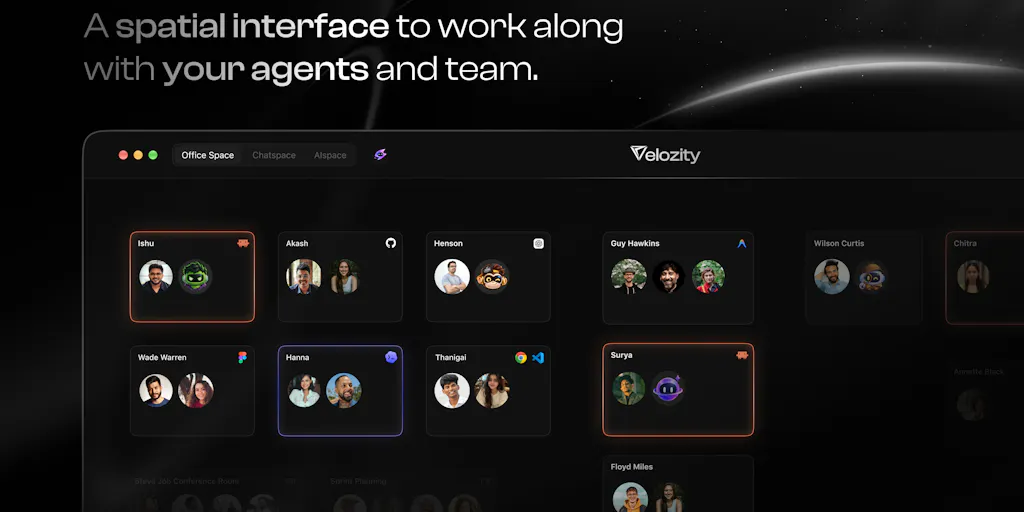
Velozity is a Product Hunt launch from co-founders Ishu Darshan and Akash Mandal under the company name Velozity. The pitch, in the maker’s own framing, is that “AI is single-player. Real work is multiplayer.” The product is a shared workspace — chat, calls, tasks, calendar, notes, files — where each teammate has an AI agent living inside the same space, reading the same context, and doing work that a human approves before it leaves the building. It’s free to start, and the makers are unusually candid that it’s “far from finished.” That candor is the most interesting thing about the launch, and I’ll come back to it.
Why this lands on a social media operator’s desk
Social media management is, structurally, an approval business. You are not the person who decides what the brand says — you’re the person who produces twenty options, routes them through a legal or founder or client filter, and ships the survivors on a schedule. Every tool in the Buffer, Hootsuite, Later, and Metricool category optimizes the scheduling half of that. Almost nothing optimizes the approval half. Drafts sit in Google Docs, feedback arrives as Slack messages, and the actual scheduling tool is the last stop, not the workspace.
That’s why Velozity’s framing is more relevant to a social team than its generic “team collaboration” positioning suggests. If you’ve ever managed a client account where the founder’s AI-drafted LinkedIn post needed three rounds of edits before it could go out — and the edits lived in a thread nobody could find two weeks later — you understand the pain. The maker’s own description of the loop is almost word-for-word the social ops workflow: “prompt an AI, copy the answer into chat, explain the context, wait for feedback, then go do it all over again.”
What it actually is, and what it isn’t
Let me be precise, because the launch page invites confusion. Velozity is not a social media scheduler, and it is not a layer that sits on top of your existing chat tools. When a commenter asked which chat tools it works with, Darshan clarified that “Velozity doesn’t sit on top of other chat tools; it is the chat.” Mandal added that it connects with Slack, Microsoft Teams, Discord, Telegram, and WhatsApp Business so agents can pull context from those conversations into one place — but the product’s own home is a built-in chat with “Spaces.”
The feature list, as the makers describe it: live presence with “knock on a cabin” audio/video (no links, no invites), an agent for every teammate that reads the same mail, files, and calls the team does, bring-your-own-AI-subscription, and a hard rule that nothing is sent, paid, or signed without a human approving it. On the technical side, agents can work in a code repo, raise a PR, and route changes through normal review before merge — Mandal confirmed that in a reply about repositories. There’s also a Pro tier with an admin team activity dashboard, though pricing beyond “free to start” is not disclosed on the launch page.
The approval mechanic, in detail
This is the part worth studying even if you skip the product. Darshan laid out the approval flow in three steps when a commenter asked directly:
- The agent prepares the work — an email or a message — and places it in the Space as a draft. Nothing has gone out.
- The person the agent works for reads the draft and can approve, request changes, or reject.
- Only after that person approves does it send. The rest of the team can see the draft, and if it changes after approval, it needs re-approval.
That last clause — if the draft changes after approval, it needs to be approved again — is the detail that separates a real governance model from a checkbox. In my experience running client social accounts, the failure mode isn’t “AI sent something unauthorized.” It’s “someone tweaked the caption after sign-off and nobody noticed.” A re-approval trigger on post-approval edits is the kind of unglamorous mechanic that actually prevents brand disasters.
Where the access model gets interesting — and where it gets scary
A commenter named Jeetendra Kumar asked the sharpest question on the thread: do agents inherit each person’s file access, or does adding a file to a Space expose it to every agent there? Darshan’s answer was refreshingly honest — “both, depending on what kind of data”:
- A file added to a Space belongs to that Space. Everyone in the Space can open it, and any agent working there can read it. There are no per-file permissions inside a Space today.
- The Space is the boundary. An agent sees only the files in the Space it’s working in. Private Spaces are limited to added people.
- Personal data follows the person. Your connected email, calendar, and meeting notes are read-only by your own agents, never a teammate’s. Files attached in your private assistant chat stay private.
- Agents never widen anyone’s access. Each agent runs only for its owner, and only in Spaces that owner already belongs to.
For a social team, that translates to a practical rule the maker states plainly: put a file in a Space only if everyone there should see it, and use a smaller private Space for anything sensitive. If you’re managing NDAs, embargoed product launches, or unreleased creative, that’s a workflow constraint you need to design around before you onboard, not after.
The comparisons I’d actually make
The maker thread invites a comparison to Google Docs versus desktop Microsoft Office, and a commenter named Ilyas made exactly that analogy. It’s a decent one for the collaboration shift, but it undersells the category Velozity is really entering. The more honest comps are:
- Notion + Notion AI — the “one workspace for everything” pitch, now with AI. Notion’s weakness is that its AI is a drafting assistant, not an agent with tool access and an approval gate.
- Slack + a dozen AI bots — where most teams actually live today. The problem is fragmentation: context is spread across channels, and no single agent sees the whole picture.
- Asana / Linear + AI — task-centric, not conversation-centric. Velozity’s bet is that the conversation is the workspace.
- Zapier / Make — automation without a shared human space. Powerful, but nobody “hangs out” in a Zap.
My take: Velozity’s real differentiation isn’t the agent capability — plenty of tools have that now. It’s the approval gate as a first-class primitive, combined with the agent living in the same space as the humans. That’s a genuinely different architecture from “AI in a sidebar” or “AI in a separate tab.”
Why TikTok creators should care more than LinkedIn ones
Here’s an opinionated sidebar. If you’re a solo TikTok creator, Velozity is probably overkill — you don’t have a team, you don’t have an approval chain, and your bottleneck is your own creative output, not coordination. If you’re running a LinkedIn or X account for a B2B brand with a founder who wants to approve every post, or an agency managing five client accounts with legal review, the approval-gate model is directly relevant. The value scales with the number of humans in the loop, not the number of posts.
What social teams can borrow from this, even without buying it
The most useful thing about this launch isn’t the product — it’s the operating model. Three things I’d steal this week:
1. Treat “leaves the workspace” as the approval boundary, not “every step.” The makers’ design principle is that agents can draft, prepare, and stage freely, but anything that exits the workspace — an email, a message, a calendar invite, a code commit — needs a human yes. Applied to social: let your AI generate, schedule-draft, and stage as much as it wants. Gate only the publish action. That’s a much faster loop than approving every intermediate step, and it’s how the commenter Hisashi described their own support workflow — AI drafts, human sends.
2. Make the draft visible to the whole team, not just the approver. Darshan emphasized that “the rest of the team can see the draft too, so nothing happens behind anyone’s back.” In social ops, that’s the difference between a client asking “who approved this?” and being able to answer in ten seconds.
3. Log every agent run. Mandal said every agent run is recorded in the Space — who asked, what it did, what changed. If you’re using AI to draft social copy at any scale, you want that trail. Not for compliance theater, but because when a post underperforms, you’ll want to know whether a human or an agent wrote the hook.
Where the math breaks
I want to be balanced here, because the launch page is a launch page. A few things give me pause:
- The “one workspace to replace five tabs” pitch is the hardest sell in software. Every tool that promises to consolidate your stack becomes another tab. Velozity connecting to Slack, Teams, Discord, Telegram, and WhatsApp Business is smart for context-pulling, but it also means you’re now maintaining integrations and a new home base.
- No per-file permissions inside a Space is a real limitation for agencies. If you’re running multiple client accounts, you’ll be spinning up a lot of Spaces, and the maker’s own advice — “use a smaller private space for anything sensitive” — is a workaround, not a feature.
- “Bring your own AI subscription” is a clever cost move, but it also means your agent’s capability is capped by whatever plan each teammate pays for. Not disclosed: what happens when a teammate’s subscription lapses, or whether agents can share a single team plan.
- Automatic overload detection isn’t there yet. When asked whether managers can spot who’s overloaded, Darshan said partly — tasks are assigned by person and admins get an activity dashboard on Pro, but “a dedicated view that flags overload automatically isn’t there yet.” Fair answer, but it’s a gap.
Who this is not for
Solo creators. People who already have a clean approval workflow in Frame.io or Planable and don’t want to move. Teams that live entirely inside Google Workspace and have no appetite for a new home base. And anyone who needs granular per-file permissions today — that’s a “not yet,” not a “no,” but it’s a “not yet.”
What I’d watch / test next
If you’re curious, here’s what I’d actually do this week, in order:
- Audit your own approval chain. Count how many handoffs a single post goes through from draft to publish. If it’s more than three, the Velozity thesis applies to you regardless of whether you use the tool.
- Open a free office at getvelozity.com — the makers say it’s free to start — and bring in one agent. Don’t migrate your team. Just run one real piece of work through it and watch where it breaks.
- Test the re-approval trigger specifically. Draft something, approve it, then change it. Does it actually require re-approval? That’s the mechanic that matters most for brand safety.
- Ask the hard access question early. Before you put any client file in a Space, confirm with your team that everyone in that Space should see it. The maker’s own guidance is explicit: no per-file permissions inside a Space today.
- Watch the roadmap for overload detection and per-file permissions. Those two gaps are the ones that will determine whether this becomes an agency tool or stays a small-team tool.
The broader lesson: the next wave of social tooling isn’t going to be won by better drafting. It’s going to be won by whoever solves the approval bottleneck without adding friction. Velozity is one bet on that. Whether it wins or not, the problem it’s pointing at is real, and it’s costing you hours every week.