The Creator Stack Is Getting an Ops Layer — and That Should Worry You a Little
Here’s the thing nobody tells you when you start treating content like a business: the moment you have real distribution, you stop being a creator and start being an infrastructure operator. You’re not just posting Reels — you’re managing a CMS, a scheduler, an analytics pipeline, a repurposing workflow, a monetization stack, and increasingly, a small fleet of AI agents that touch all of it. So when I see a product like CtrlOps — a Linux server management tool with an AI terminal, launched on Product Hunt by CtrlOps — my first instinct as a social media observer isn’t “that’s for DevOps, not for me.” It’s “this is the shape of the tooling that’s coming for my stack next.” And that’s worth paying attention to, even if you never open a terminal.
What CtrlOps Actually Is (and Why a Creator Should Care)
Let me be precise, because the framing matters. CtrlOps is not a social media tool. It’s a desktop app for managing Linux servers — SSH connections, file management, deployments, monitoring, log management, process control, access management, and an AI terminal that translates plain English into shell commands you approve before they run. The team behind it describes their mission in one line: “Simplify DevOps.” That’s not my words — that’s from the maker’s own launch post, and it’s worth linking to the launch page so you can read the full pitch yourself.
So why am I writing about it? Because the pattern here is the pattern everywhere. The winning tools of the next 18 months won’t be the ones that do one thing well. They’ll be the ones that collapse five browser tabs into one interface, that put an AI layer on top of a workflow you used to do manually, and that respect your approval before taking irreversible action. That’s exactly what CtrlOps is doing for server management. And that’s exactly what’s happening — right now — to scheduling, repurposing, analytics, and monetization tools across the creator economy.
If you run a content operation that touches YouTube uploads, a self-hosted newsletter, a link-in-bio page, a Shopify storefront, or a custom analytics dashboard, you already have infrastructure. You may not call it that. But you do. And the tooling that manages it is about to get an AI terminal, an approval step, and a one-click fleet view. CtrlOps is a preview of that future, packaged as a DevOps product.
The “one interface” thesis, applied to creators
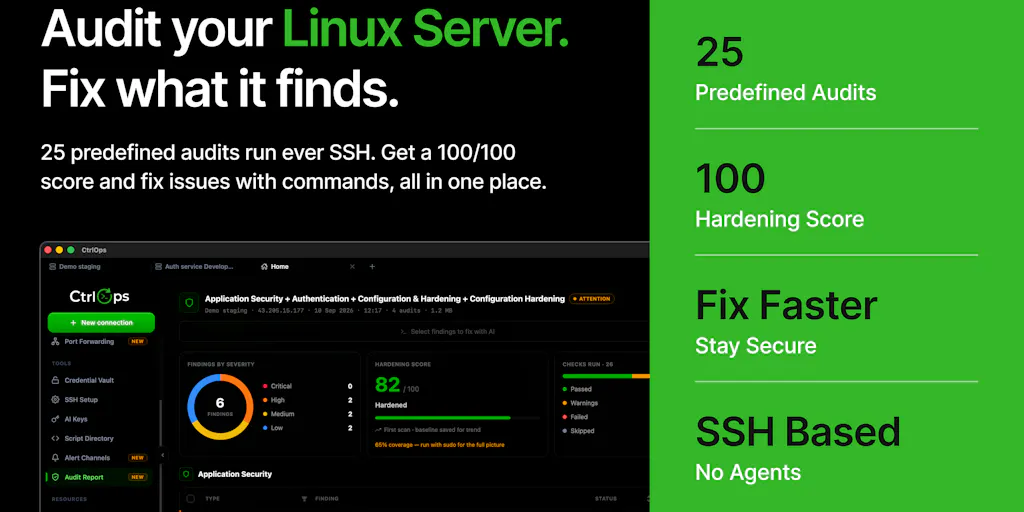
Look at what the maker actually shipped in this second launch, per the launch page: security audit reports that run 25 checks over SSH and produce a hardening score plus a downloadable PDF; global access management that shows who can log into every server and lets you onboard or offboard someone across the whole fleet in one action; custom user roles you can create from the UI; log management that finds, groups, searches, tails, and downloads logs without SSH; a PM2 process manager with live CPU and memory per process and one-click restart; Vault Lock, a passphrase that seals the app so your keys stay protected on a shared or stolen machine; a Termius migration that imports hosts and SSH keys in about 30 seconds; and centralized backup and restore.
Now translate that pattern into creator tooling. “One interface” for a creator means: one dashboard for scheduling across Instagram, TikTok, YouTube, X, LinkedIn, Facebook, Threads, and Pinterest. One place to see engagement rate, watch time, and UTM-attributed conversions. One approval step before an AI-generated post goes live. One click to repurpose a long-form video into Shorts, Reels, and a LinkedIn carousel. The tools that win will be the ones that own the whole loop, not a slice of it. Buffer, Hootsuite, Later, and Metricool all know this — they’ve been racing toward “all-in-one” for years. CtrlOps is the same race, run by a smaller team in a less glamorous category.
How It Differs From the Incumbents (and What That Teaches Us)
The maker’s pitch is explicit: this is “beyond SSH clients.” The comparison they invite is against the “usual SSH + terminal workflow” and against Termius, which they explicitly built a migration path for. One reviewer on the launch page — a user named Piyush Kalathiya — framed the alternative as “a combination of traditional SSH clients, terminal tools, and separate server monitoring platforms,” and said CtrlOps “stood out because it brings these workflows together in one interface.” Another reviewer, Tejas Rathod, said the same thing in different words: “instead of switching between multiple tools.”
That’s the entire thesis of modern SaaS, and it’s the entire thesis of modern creator tooling. The reason Canva ate a dozen design categories isn’t that it was the best at any one of them — it’s that it collapsed them. The reason CapCut became the default mobile editor for a generation of TikTok creators is that it collapsed shooting, editing, captioning, and exporting into one app. The reason Notion keeps expanding into project management, wikis, and AI is that the switching cost of a second tool is higher than the marginal quality gain of a specialist.
Why the “approval step” is the most important feature
Here’s where I want to slow down, because this is the part creators should steal directly. The single most-discussed feature on the CtrlOps launch page isn’t the AI terminal. It’s the approval step. A forum thread titled “How do you prove a generated server command is safe to run?” asks exactly the right question: “the scary moment is not command generation; it is deciding whether the next command is allowed.” The maker’s answer, in a reply to a user asking about AWS EC2: the AI “shows you the exact command it wants to run, explains what that command does, and waits for you to approve it before anything runs. Nothing executes without your yes.”
That is the correct design pattern for AI in any high-stakes workflow — and publishing is a high-stakes workflow. If you’ve ever watched an AI scheduling tool auto-post a draft that wasn’t ready, or an AI repurposing tool clip a video into something that misrepresents the original, you know why. The future of AI in creator tooling is not “autonomous agents that post for you.” It’s “agents that draft, explain, and wait for approval.” The tools that get this right will earn trust. The ones that don’t will generate a lot of apology threads.
Where the math breaks
I want to be balanced here, because the launch page is full of five-star reviews and I’ve been around long enough to be suspicious of unanimous praise. The reviews on the CtrlOps launch page are detailed and specific — Piyush Kalathiya notes the local-first credential handling as a plus; Bhavesh notes that it “works locally and doesn’t require installing an agent on every server.” Those are real architectural advantages. But the sample is small — the page shows a 5.0 rating based on 4 reviews — and the reviewers are clearly early adopters who self-selected into trying a new DevOps tool. That’s not a knock on the product. It’s a note on how much weight to give the rating.
The same skepticism applies to creator tools. A 5.0 rating on a scheduling app with 12 reviews tells you almost nothing. What tells you something is whether the tool survives a platform API change, whether it handles rate limits gracefully, whether its analytics match the native dashboards, and whether it still works six months after launch. I’d bet most of the AI-native creator tools launched this year will not clear that bar.
What Creators and Social Teams Should Actually Borrow
Even if you never install CtrlOps, there are four operational patterns in this launch that map cleanly onto content work. I’ve been running these patterns manually for years, and seeing them productized in a DevOps tool is a useful reminder of how universal they are.
1. Fleet view over per-account view. CtrlOps’ global access management shows “who can log into every server” and lets you onboard or offboard someone across the whole fleet in one action. The creator equivalent: a single view of who has access to which brand accounts, which scheduling tools, which ad accounts, and which analytics properties. If you’ve ever had a contractor leave and spent a week chasing down which passwords they still had, you know why this matters. Most social teams manage this in a spreadsheet. That’s a vulnerability, not a workflow.
2. Audit before you optimize. The security audit feature runs 25 checks and produces a hardening score plus a fix command for every finding. The creator equivalent: a quarterly audit of your content operation — which posts actually drove conversions (not just likes), which platforms are worth the effort, which repurposing workflows are actually saving time versus creating rework. Most creators optimize the thing they enjoy doing, not the thing that moves the metric. An audit forces the question.
3. Approval gates for anything irreversible. The CtrlOps approval step is the model. In creator tooling, the irreversible actions are: publishing, deleting, spending ad budget, and sending email. Everything else can be automated. I’d argue the best AI content tools of the next year will be the ones that let you automate the reversible stuff aggressively and gate the irreversible stuff behind a human yes.
4. Migration as a feature. CtrlOps built a Termius importer that moves hosts and SSH keys in about 30 seconds. That’s a trust signal — it says “we know you’re locked into another tool, and we’re not going to punish you for trying us.” Creator tools should do the same. If a scheduling tool can’t import your Buffer queue, or an analytics tool can’t pull your historical data, that’s a red flag about how much they respect your time.
Why TikTok creators should care more than LinkedIn ones
This is where I’ll get opinionated. The infrastructure burden of a creator operation scales with the number of platforms and the complexity of the content pipeline. A LinkedIn-only ghostwriter has almost no infrastructure — a doc, a scheduler, done. A TikTok-first creator who also runs YouTube Shorts, Instagram Reels, and a newsletter has a pipeline: shoot, edit, caption, schedule, cross-post, track, repurpose, monetize. That pipeline is infrastructure, whether or not you call it that. The more platforms you’re on, the more the “one interface, approval-gated, fleet-view” pattern matters. LinkedIn creators can ignore this essay. Multi-platform operators can’t.
Where My Judgment Says CtrlOps Falls Short
Two limitations stand out from the launch page itself. First, the makers acknowledge that deeper monitoring, alerting, and cloud/deployment integrations are still on the roadmap — Piyush Kalathiya’s review asks for “even more automation options for repetitive server tasks, along with deeper monitoring and alerting capabilities,” and the maker replies that they’re “actively working on expanding CtrlOps in these areas.” That’s honest, but it means the product is not yet a full replacement for a dedicated monitoring stack. Second, the maker’s reply to a question about access management describes role-based access control with Administrator, Developer, Operator, and Auditor roles — which is solid for small teams but is not the same as the compliance-grade access governance that larger organizations require. If you’re managing infrastructure for a regulated company, this is not your tool yet.
And the biggest limitation is the one the source is silent on: pricing. The maker’s launch post says “try CtrlOps free for one month at ctrlops.io. No credit card, no catch.” Everything beyond that — the paid tiers, the per-seat cost, the enterprise pricing — is not disclosed on the launch page. That’s fine for a launch, but it’s the first thing I’d want to know before recommending it to a team.
The same transparency standard applies to creator tools. When a scheduling app says “10x your reach,” that’s a maker claim, not a fact. When an AI repurposing tool says “save 10 hours a week,” that’s a marketing number until you’ve measured it yourself. I’d rather see a tool publish its API rate-limit handling, its data-export policy, and its pricing page than its growth claims.
What I’d Watch / Test Next
If you’re a creator or social media operator reading this, here’s what I’d actually do this week — not with CtrlOps specifically, but with the pattern it represents.
First, audit your own stack for the “five tabs” problem. Open every tool you use to publish, schedule, analyze, and monetize. Count them. If it’s more than five, you have a consolidation opportunity, and the next tool you evaluate should be judged on how many of those tabs it replaces, not how good it is at one thing.
Second, demand an approval step from every AI tool you use. If an AI scheduling or repurposing tool will publish without your explicit yes, that’s a risk you’re taking on. Ask the vendor how their approval flow works. If they can’t answer clearly, that’s your answer.
Third, test the migration story before you commit. Ask any new tool to import your existing data — your Buffer queue, your historical analytics, your asset library. If the import is painful or nonexistent, the export will be worse.
Fourth, watch the DevOps-to-creator crossover. The tooling patterns that show up in infrastructure products — fleet views, audit scores, approval gates, one-click migrations — tend to arrive in creator tools 12 to 18 months later. CtrlOps is a useful early signal of what’s coming. If you want to see the current state of the product, the launch page is the place to start, and the maker’s forum thread is where the real conversation is happening. My take: the AI terminal is table stakes by now. The approval step is the differentiator. And the fleet view is the feature that will decide whether this category produces a durable business or a dozen acqui-hires.