The quiet bottleneck every creator hits after the content goes live
Here’s a thing nobody tells you when you start publishing across eight platforms: the content is the easy part. The hard part is everything that happens after someone raises their hand. The waitlist form. The “work with us” inquiry. The collab request. The sponsor brief. The affiliate application. The podcast guest intake. Every one of those is a form, and every one of those forms is a place where a creator with momentum loses people to friction. So when I saw Cube Forms launch on Product Hunt — a tool built by Bonan Kou around the idea that “every form is one link” that both humans and AI agents can fill — I didn’t read it as a form-builder story. I read it as an infrastructure story for the creator economy, and a slightly uncomfortable one at that. Because the moment your inbound pipeline becomes agent-readable, your funnel math changes in ways most social media operators haven’t priced in yet.
What Cube Forms actually is, and why it’s not just another Typeform clone
Let me strip the launch copy down to its mechanics, because the framing matters more than the feature list.
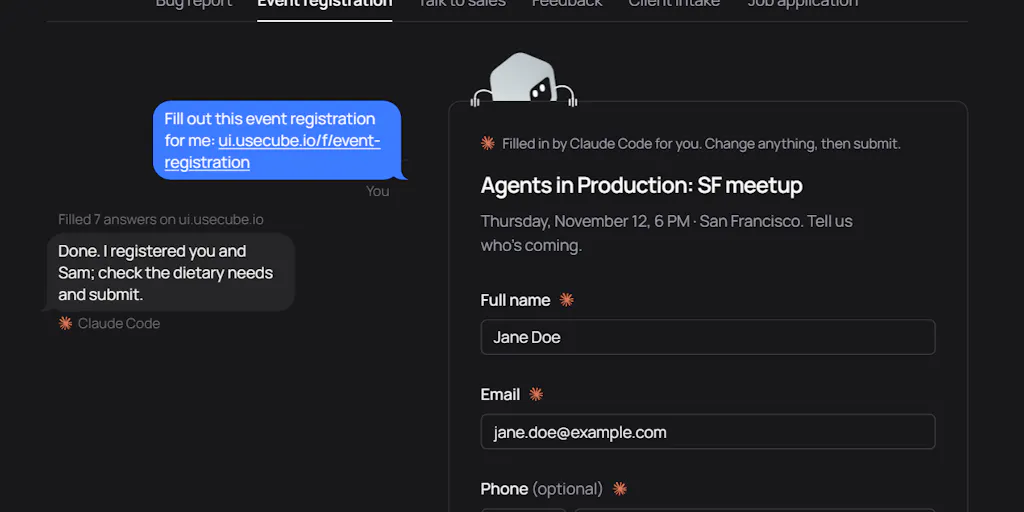
The pitch, in the maker’s own words, is this: “every form is one link. People fill the page; agents read it and submit it directly, no browser.” The origin story is almost too on-the-nose — Bonan says submitting the Product Hunt launch itself took him half an hour of PH’s own forms, and that his agent “knew every answer and couldn’t fill a single field.” That’s the gap he’s targeting. Not form building. Form submission as an agent-native primitive.
The way you try it is deliberately frictionless: you tell your agent something like “Fill out this form for me: ui.usecube.io/f/early-access” and it goes and does it. No signup required, per the maker. It’s free and early.
Now, if you’ve spent any time in the no-code form space, your brain immediately pattern-matches this to Typeform, Tally, Fillout, Google Forms, or the form modules baked into HubSpot and Airtable. Fair. But the differentiator isn’t the builder UI — it’s the assumption about who the respondent is. Every incumbent above assumes a human with a browser, a mouse, and enough patience to type their email for the fourth time this week. Cube assumes the respondent might be an agent acting on a human’s behalf, and designs the submission path around that.
That’s a meaningful architectural bet, and it’s the reason I think creators should pay attention even if they never touch the product.
The “no browser, no CAPTCHA” line is doing a lot of work
One commenter — Gal Dayan, who’s building Dial — put his finger on the exact tension I felt reading the launch. He flagged that “no browser, no CAPTCHA” is great for the agent doing the filling, but a waitlist or signup form is precisely the thing CAPTCHA exists to protect. His question, paraphrased: if any agent can hit the endpoint over plain HTTP with no human in the loop, what stops the same mechanism from submitting a form a thousand times instead of once? Is there rate limiting? Identity on the submitting agent? Or is the trust model simply “whoever has the link can use it as many times as they want”?
That’s the sharpest question on the page, and as of the scrape I’m working from, the maker hadn’t answered it publicly. I want to flag that clearly: not disclosed. I’m not going to pretend I know the answer, and neither should you if you’re evaluating this for a real funnel.
My take: this is the single most important thing to resolve before you point Cube at anything that matters — a paid waitlist, a sponsor intake form, a gated lead magnet. If the trust model is link-based and open, then your form is effectively a public API endpoint with no auth, and the first person to notice will be a bot farm, not a customer.
Where this fits in a creator’s actual stack
Let me get concrete about the workflows, because “agent-fillable forms” sounds abstract until you map it to the boring stuff you do every week.
Use case 1: Sponsor and brand inquiry forms
If you’re a creator with any audience size, you’ve got a “work with me” page. Right now it’s probably a Calendly link plus a Notion form plus an email address, and the actual intake happens over three rounds of email tag. A brand manager’s assistant — increasingly an agent — could fill a structured Cube link in one shot with budget range, deliverables, timeline, and usage rights. That’s a real time save on both sides.
Use case 2: Waitlists and launch funnels
This is the use case a commenter named Robert Smith called out directly: “Waitlists are a good use case for this. Filling out the same details over and over gets old fast.” The maker agreed and said he’s planning to add more ways to embed Cube forms on your own site plus more “agent-friendly components.” If you’re an indie founder or creator running a product waitlist off the back of a TikTok or Reels spike, an agent-fillable waitlist form is genuinely interesting — provided the abuse question above gets answered.
Use case 3: Affiliate and creator-program applications
Every affiliate program, every creator marketplace, every podcast guest intake is a form. If applicants can delegate the tedious fields to their agent and just review the edge cases, your completion rate goes up. The maker’s own framing here is honest: “agents are great at filling out the boring part of a form but human intervention is still required for edge cases.” That’s the right mental model. Agent does the typing; human does the judgment.
Why TikTok creators should care more than LinkedIn ones
This is a heuristic, not a law, but I’d bet on it. TikTok-native creators tend to run higher-volume, lower-touch inbound: link-in-bio waitlists, drop notifications, affiliate signups, UGC briefs. Those are exactly the forms where repetition is the enemy and an agent-fillable link shines. LinkedIn-native operators, by contrast, are usually running lower-volume, higher-touch sales conversations where the form is a qualification filter — and where you want friction, because friction is how you screen out tire-kickers. If your form’s job is to slow people down and make them prove intent, making it frictionless is actively bad for you. Know which form you’re running.
The part that should make social media operators nervous
Here’s where I stop being a curious observer and start being the person who’s run paid acquisition and watched a lead form get absolutely wrecked by bots.
Forms are the front door of your funnel. Every UTM parameter you’ve ever set, every conversion event you’ve ever fired back to Meta Ads Manager or TikTok Ads or Google Ads, every lead-score threshold in your HubSpot or Klaviyo workflow — all of it depends on the assumption that a form submission represents a real human with real intent. Break that assumption and you don’t just get spam. You get corrupted attribution. Your cost-per-lead looks great, your downstream conversion rate collapses, and you spend a week debugging a problem that’s actually a trust-model problem.
The other thing I’d flag: the maker told Oleksii Sekundant (building SonOf) that he believes “we need a new kind of internet, built with components that work for both agents and humans, unlike traditional forms like the one we all have to go through to post on PH.” I love the ambition. I also note that the entire security model of the current web — CAPTCHA, rate limits, email verification, honeypots — exists because “open endpoint, no human in the loop” is a known-bad pattern. Reinventing that needs a credible answer, not just a good origin story.
Where the math breaks
Let me be specific about the failure modes I’d test for, because “it might get spammed” is too vague to be useful:
- Volume attacks. One link, no auth, no rate limit → a single script can submit your form thousands of times. If the answer is “there’s rate limiting,” ask what the limit is and whether it’s per-IP, per-link, or per-agent-identity.
- Identity spoofing. If agents can claim to be a human, your “human-only” forms are meaningless unless the receiving side can distinguish them. Dayan’s question about whether the receiving side can see a submission came from an agent is unanswered in the scrape — and it’s the one that determines whether this is usable for anything gated.
- CRM integrity. Mertcan Sağlam asked whether forms can connect to a CRM. Not answered in the scrape. If you can’t pipe submissions into your existing CRM with the same field mapping and dedupe logic you use today, you’re adding a manual step, which defeats the point.
- Edge-case handling. The maker is upfront that human intervention is still needed for edge cases. Good. But “edge cases” in a sponsor intake form can be 30% of submissions. Budget for review time.
The edit-after-submit detail is genuinely good
One thing I want to give credit for: Vhim Jana noted that “being able to jump in and fix an answer without starting over makes a lot of sense,” and the maker confirmed the human-in-the-loop review step. That’s the right design instinct. The best agent workflows aren’t fully autonomous — they’re draft-and-review. Agent fills, human approves, then it submits. If Cube leans into that pattern hard, it becomes a genuinely useful layer rather than a bot magnet.
What I’d steal from this for your own stack, regardless of whether you adopt Cube
You don’t have to use Cube to learn from it. Here’s what I’m taking away:
1. Audit your forms for repetition. Every field you ask for that the respondent has already typed somewhere else this week is a drop-off point. Cut it or pre-fill it.
2. Separate your “friction is good” forms from your “friction is bad” forms. Qualification forms should stay high-friction. Waitlists, newsletters, affiliate signups, and UGC briefs should be as close to zero-friction as you can make them.
3. Add agent-readability to your own properties. Even if you’re not using Cube, make sure your link-in-bio, your media kit, and your rate card are structured enough that an agent can parse them. Plain text beats a JPEG of your pricing every time.
4. Instrument the receiving end, not just the form. If you can’t tell whether a submission came from a human or an agent, you can’t debug your funnel. Add a hidden field, a source tag, or a UTM convention that captures it.
What I’d watch / test next
Three concrete things to do this week, in order of effort:
First, spend ten minutes with the demo. Tell your agent to fill ui.usecube.io/f/early-access — the maker says it’s free, early, and doesn’t require signup. Watch where it stumbles. That single test tells you more than any launch page.
Second, read the unanswered questions as a to-do list. Dayan’s abuse question, Sağlam’s CRM question, and the agent-identity question are all still open in the scrape. If you’re considering Cube for anything gated, get written answers before you point it at a live funnel.
Third, run the math on your own inbound. Count how many forms you ask people to fill in a month, and how many fields each one demands. If the number is high and the fields are repetitive, agent-fillable forms are a real category to watch. If your forms are low-volume and high-intent, this is interesting but not urgent — and honestly, that’s most creators reading this.
My overall read: Cube Forms is pointing at something real. The “every form is one link, for humans and agents” framing is the kind of primitive that, if the trust model holds up, becomes invisible infrastructure the way Stripe links or Calendly links did. But “if the trust model holds up” is doing enormous work in that sentence, and right now the maker hasn’t shown his hand on the security side. Watch it. Test it on something low-stakes. Don’t put it in front of your paid traffic until the abuse question has a public answer.