The Ops Layer Nobody Talks About: What a Docker Manager Taught Me About Running a Creator Business
If you run a serious social media operation, you already know the dirty secret of this industry: the hardest part isn’t creating content, it’s the infrastructure underneath. The scheduling calendar that breaks when you add a fourth platform. The analytics export that takes forty minutes and still comes out malformed. The repurposing pipeline that requires three different tools and a spreadsheet to track what went where. We spend so much time talking about hooks and hashtags that we forget the actual machinery of publishing is what separates a solo creator from a sustainable media business.
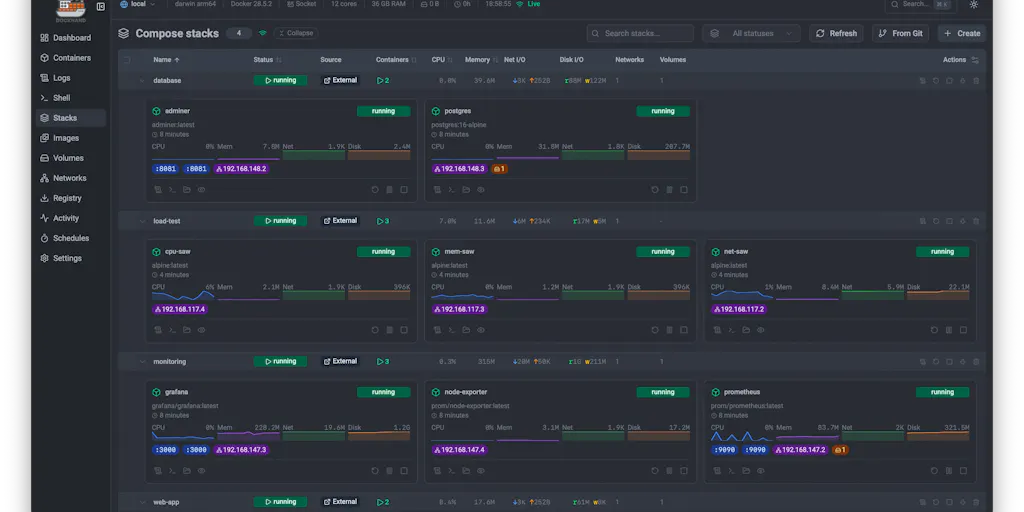
That’s why I found myself unexpectedly fascinated by Dockhand, a self-hosted Docker management tool that launched on Product Hunt this week. On its face, it has nothing to do with content creation. It’s built for developers who run containers across homelabs and enterprises, juggling terminal tabs and SSH sessions. But as I read through the launch thread, I realized the founder, Jarek Krochmalski, was solving the exact same class of problem I deal with every week: the chaos of managing distributed systems with too many moving parts and not enough visibility.
Every creator who’s scaled past posting from their phone has hit this wall. You start with one Instagram account, then add TikTok, then YouTube, then a newsletter, then a Pinterest presence because someone told you it drives evergreen traffic. Suddenly you’re managing five platforms, each with its own scheduling quirks, analytics dashboards, and algorithm updates. The tools you started with — the free Buffer plan, the basic Canva templates, the manual cross-posting — stop scaling. You need something that gives you a single pane of glass over your entire operation, with the safety rails to prevent you from breaking what’s already working.
Dockhand is that tool, but for Docker containers instead of social accounts. And the more I dug into how it works, the more I realized its architecture offers a masterclass in how any creator tool should be built.
The Problem: Terminal Tabs and Half-Abandoned Dashboards
The launch post opens with a confession that hit uncomfortably close to home: “managing Docker across a homelab or enterprise meant juggling terminal tabs, half-abandoned dashboards, and SSH sessions — and none of them did everything we needed in one place.” I’ve been there with social media tools. Last month alone, I was running three different scheduling platforms because each one handled a different platform well: one for Instagram’s carousel format, another for TikTok’s video scheduling, and a third for LinkedIn’s article publishing. None of them talked to each other. My content calendar was a Notion page that required manual updates every time I scheduled something.
The core insight here is that fragmentation isn’t a feature problem, it’s a workflow problem. The tools exist. The features exist. What’s missing is the integration layer that makes them feel like one system instead of five separate ones. Dockhand’s pitch is that it consolidates every host — local, remote, or NAT’d behind an agent — into one clean UI. For a creator, the equivalent would be a tool that pulls your Instagram, TikTok, YouTube, and LinkedIn analytics into a single dashboard, with the ability to schedule across all of them without switching contexts.
The comment thread reveals what operators actually care about. Gal Dayan asks about CVE scanning, specifically whether the tool will just flag vulnerabilities every time or let you “accept/allowlist a specific CVE on a specific image so it stops nagging you about something you’ve already decided is an acceptable risk.” This is the exact same conversation I have with every analytics tool I’ve ever used. The platform flags a dip in engagement, and I know it’s because I posted at 2 AM instead of 6 PM, but there’s no way to tell the tool “I know, I did it on purpose, stop alerting me.” The result is alert fatigue. You either ignore the notifications entirely or you disable them, and then you miss the one genuinely important alert that actually requires action.
The maker’s response — “a whitelist of CVEs is on the roadmap” — is the right answer, but Dayan’s follow-up is even sharper: “will the allowlist be scoped per-image, or global across the fleet? global is faster to set up but it’s also how a genuinely new CVE in a different image quietly gets ignored because it shares a CVE ID with something you already accepted elsewhere.” That’s the kind of nuanced thinking that separates tools built by people who’ve actually operated systems from tools built by product managers who’ve only read about them. The same logic applies to analytics alerts: if I suppress an alert for one account because I know the dip is seasonal, I don’t want that suppression applied globally to every account I manage.
Why the Allowlist Question Matters More Than It Seems
The CVE allowlist debate is a microcosm of a bigger issue in creator tools: the tension between automation and control. Every scheduling tool I’ve tested wants to automate everything — the best time to post, the optimal hashtags, the ideal caption length. But automation without override capability is just a different kind of prison. I need to be able to say “I know TikTok is recommending three posts a day, but I’m only doing two because my production capacity doesn’t support three without burning out.” The tool should respect that decision, not fight it.
Dockhand’s approach — flagging vulnerabilities but letting you decide which ones to accept — is the right philosophy. It treats the operator as the decision-maker and the tool as an advisor, not a dictator. That’s a lesson every social media platform should learn. The algorithm shouldn’t decide what I post; it should inform what I post. The human makes the final call.
What Dockhand Actually Does Differently
The maker’s response to the inevitable “how does this compare to Docker Desktop or Portainer?” question is where the real meat is. He doesn’t trash the incumbents. He acknowledges that “Docker Desktop is a local dev tool; Portainer is a general orchestration UI.” Then he positions Dockhand for “people running real services across hosts who want ops to be safe and pleasant.”
The feature list reads like a creator’s wishlist for their own tooling:
- Unlimited hosts in one dashboard — local socket, remote TLS daemons, and NAT’d/VPS boxes via a small outbound agent. For creators, this maps to managing multiple brand accounts or client accounts from one interface, without logging in and out constantly.
- Compose from Git with auto-sync — redeploys on change, with a diff of what’s about to change before it does. This is the content calendar version of version control. You can see what’s changing before it goes live, and you can roll back if something breaks.
- CVE scanning in the update loop — Grype/Trivy per image, with the ability to block an auto-update if the new image is more vulnerable than the current one. The social media equivalent: checking whether a platform’s new algorithm update is likely to hurt your engagement before you change your posting strategy to accommodate it.
- Compose validator — catches host-network/root-mount/secret mistakes before you deploy. This is the “preview before publish” feature that every scheduling tool claims to have but rarely implements well.
- Secrets from your vault — 1Password, Vault, Infisical, Doppler, Bitwarden, Proton Pass — injected at deploy, never written to disk. For creators, this is the API key management that becomes critical when you’re connecting multiple tools to multiple platforms and don’t want credentials scattered across team members’ devices.
- Encrypted backups of volumes and stack files to local/S3/GCS. The content library backup that every creator knows they should have but most don’t, until the day Instagram randomly bans an account and all their content is locked behind a login they can’t access.
The key differentiator is the update-gating logic. The ability to block an auto-update if the new version is more vulnerable than the current one is the exact feature that’s missing from every social media scheduling tool I’ve used. When Buffer or Hootsuite rolls out a new feature, they don’t ask if I want it. They just push it, and I have to scramble to figure out whether it broke my workflow. Dockhand’s approach — showing you the diff before you deploy — is the only sane way to handle system changes.
The Git Integration Is the Killer Feature
The “Compose from Git with auto-sync” feature deserves special attention because it’s the one thing that would genuinely transform how I run my content operation. Imagine a content repository where every post is a file, every platform is a branch, and every publish is a merge request. You’d have version history, rollback capability, and a clear audit trail of what went live, when, and why. That’s the infrastructure that Later and Metricool should be building but aren’t, because they’re too focused on the visual calendar and not enough on the underlying workflow.
The diff-before-deploy feature is especially powerful. When I’m repurposing a YouTube video into a TikTok clip, a LinkedIn post, and an Instagram carousel, I’m making changes across multiple formats. A diff view would show me exactly what’s changing in each version before I commit to publishing. That’s the kind of safety net that prevents the embarrassing “I accidentally posted the YouTube-length caption on Instagram and it got cut off mid-sentence” moment that every creator has experienced.
What Creators Can Borrow From Dockhand’s Philosophy
The most valuable thing Dockhand offers isn’t the product itself — it’s the operational philosophy. Here’s what I’m taking away from the launch thread and applying to my own creator workflow:
Single pane of glass. The pitch of “unlimited hosts in one dashboard” is exactly what I need for my social presence. I don’t want to check five different analytics dashboards every morning. I want one view that shows me what’s working across all platforms, with the ability to drill down when something needs attention. The tools that get this right — and I’d say Metricool comes closest — are the ones that survive my quarterly tool audit. The ones that don’t are the ones that require me to maintain a separate login and a separate mental model for each platform.
Safety rails over speed. The compose validator that catches mistakes before deployment is the feature I wish every scheduling tool had. I’ve lost count of the times I’ve scheduled a post with a broken link or a missing image because the tool didn’t validate my content before it went into the queue. The best tools are the ones that catch my mistakes before my audience does.
Human override capability. The CVE allowlist debate is really about who’s in control. The best creator tools are the ones that give me the information I need to make decisions, then get out of my way. They don’t nag me about things I’ve already decided. They don’t force me to accept their recommendations. They present the data and let me choose.
Version control for content. The Git-based workflow is the future of content management. We’re already seeing hints of this in tools like Notion and Google Docs, but nobody has built a true version-control system for social content. When I publish a post and it performs poorly, I want to be able to see exactly what I changed from the version that performed well last week. That’s the kind of analysis that turns content creation from a guessing game into a systematic process.
Why TikTok Creators Should Care More Than LinkedIn Ones
The update-gating feature has different implications depending on which platform you’re creating for. TikTok creators live and die by algorithm changes. When TikTok shifts its recommendation logic — which it does with alarming frequency — your entire content strategy can become obsolete overnight. The creators who survive are the ones who can quickly identify what changed and adapt. Dockhand’s approach to update-gating — showing you the diff before you deploy — is the model TikTok creators need for algorithm changes. You can’t block the algorithm update, but you can prepare for it by understanding what’s changing before it fully rolls out.
LinkedIn creators, by contrast, operate in a more stable environment. The platform’s algorithm changes are less frequent and less drastic. But LinkedIn creators are also more likely to be managing multiple client accounts, which means they need the “unlimited hosts” feature more than anyone. If you’re managing social for three different B2B clients, you need a dashboard that shows you all three accounts at once, with clear separation between them. That’s the Dockhand model: unlimited hosts in one dashboard, with the ability to drill down into each one.
Where Dockhand Falls Short — and What It Teaches Us About Tooling
I’m not going to pretend Dockhand is perfect. The launch thread reveals a few obvious gaps:
The CVE allowlist is still on the roadmap. The most requested feature — the ability to accept and allowlist specific vulnerabilities — isn’t built yet. The maker says it’s coming, but for now, users are stuck with a scanner that flags everything, which means they’ll eventually start ignoring it. This is the classic MVP problem: you ship the feature that detects problems but not the feature that lets users manage those problems, and the result is alert fatigue.
The tech stack is niche. The maker mentioned the remote agent is built in Go and the UI uses Svelte on Node.js. That’s fine for developers, but it means the tool has a limited maintenance community. If the founder gets hit by a bus, the tool dies. For a self-hosted tool that you’re relying on for production infrastructure, that’s a real risk.
It’s not for everyone. The maker is clear about this: “If you just poke at containers on your laptop, Docker Desktop is great.” Dockhand is for people running real services across hosts. The same distinction applies to creator tools. If you’re a solo creator posting once a day to Instagram, you don’t need a complex scheduling system. You need something simple that works. Tools like Buffer and Later are perfect for that use case. The complexity of Dockhand’s approach is only justified when you’re managing multiple accounts, multiple platforms, and multiple clients.
The bigger lesson here is about the lifecycle of creator tools. Every tool starts with a founder scratching their own itch. The best tools are the ones built by people who’ve actually done the work — who’ve managed the chaos of multiple platforms, multiple accounts, and multiple clients. Dockhand’s founder clearly built this because he was frustrated with the existing options. The same is true for the best creator tools. Canva was built by someone who couldn’t find a good design tool for non-designers. CapCut was built by someone who understood that video editing needed to be accessible to everyone, not just professionals.
Where the Math Breaks
The pricing question is interesting because the source doesn’t disclose it. The launch post says “free for personal use,” which is a strong hook, but the enterprise pricing is not disclosed. For creators, this is a critical consideration. Tools that start free often become expensive as you scale. The question isn’t whether Dockhand is worth paying for — it’s whether the pricing model will scale with your needs. The same question applies to every creator tool I evaluate. The free plan gets me hooked, but what happens when my content volume grows and I need the advanced features? Does the price jump 10x? Does the free tier become useless?
I’ve been burned by this before with scheduling tools that started free and then moved their best features behind a paywall. The lesson is to evaluate tools not just on their current pricing but on their pricing trajectory. If the company’s business model depends on converting free users to paid, the free tier will eventually become a loss leader. That’s fine as long as I know what I’m signing up for.
What I’d Watch / Test Next
If you’re a creator or social media operator, here’s what I’d actually do this week based on what I learned from the Dockhand launch:
Audit your tool stack for fragmentation. Count how many different tools you’re using to manage your social presence. If it’s more than three, you have a workflow problem, not a tool problem. Look for tools that consolidate functions — scheduling plus analytics plus content management — rather than adding another point solution.
Test the “diff before deploy” concept in your own workflow. Before you publish your next post, write down what you’re changing from the previous post and why. That’s the manual version of Dockhand’s auto-sync feature. The discipline of articulating changes before you make them will improve your content strategy even if you never adopt a version-control tool for content.
Check whether your tools have an override capability. Can you tell your analytics tool to stop alerting you about a known issue? Can you tell your scheduling tool to respect your posting frequency decisions without fighting you? If not, that’s a feature request worth making — or a reason to switch tools.
Try the self-hosted approach for one aspect of your operation. Dockhand is free for personal use, and it’s worth testing even if you’re not a developer. The experience of managing your own infrastructure — even just for a side project — will make you appreciate what good tooling does and what it doesn’t.
Watch the CVE allowlist rollout. The maker says it’s on the roadmap. How they implement it — whether it’s scoped per-image or global — will tell you a lot about their design philosophy. If they get it right, it’s a signal that they understand the difference between building features and building tools that respect their users’ judgment. That’s the same signal I look for in every creator tool I evaluate.
The creator economy is maturing, and that means the tools we use need to mature too. We’re past the era of “post to all platforms with one click” — that was the 2015 version of the problem. The 2024 version is about managing distributed systems: multiple platforms, multiple accounts, multiple clients, multiple content formats, all with different requirements and constraints. Dockhand’s approach to Docker management offers a template for what creator tools should look like: unified dashboards, safety rails, human override, and version control. The tools that adopt this philosophy will win. The ones that don’t will become another half-abandoned dashboard in a long list of tools we tried and moved on from.