Why Creators Need to Stop Thinking About “Search” Like a Librarian and Start Thinking Like a Data Journalist
Every social media operator I know has a dirty secret: a hard drive (or cloud folder) holding thousands of unsorted video clips. Raw footage from that weekend event. B-roll from last quarter’s campaign. The 47 takes of a talking-head script that you swear had one perfect one. Finding the right 10-second clip is a tax on your time that compounds daily. Most tools try to solve this by throwing AI at it — upload everything to a cloud service, wait for it to transcribe and tag, then search by “woman smiling at sunset.” That works, but it’s slow, it assumes you want to upload your entire camera roll to a server you don’t control, and it rarely understands the context of why you shot a clip in the first place.
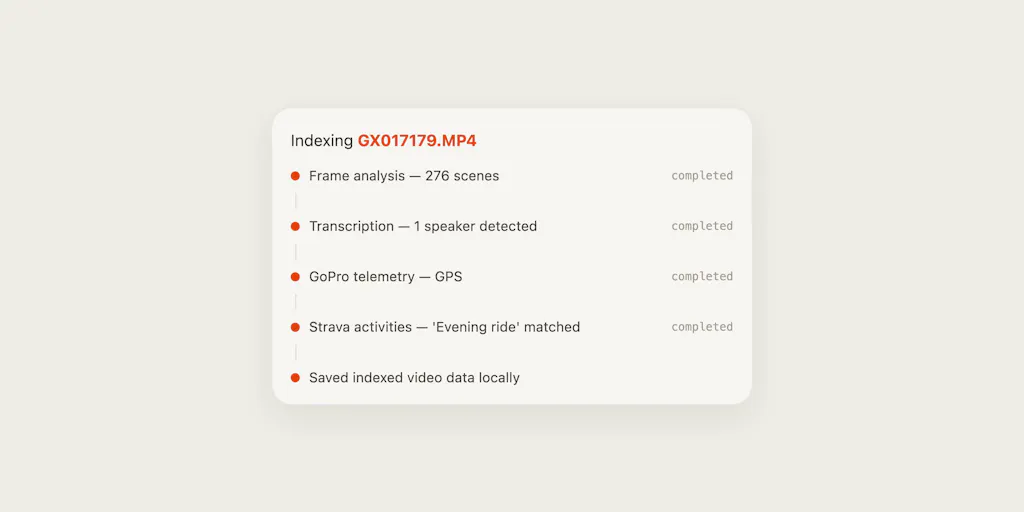
Edit Mind takes a completely different bet. Instead of analyzing the video itself, it analyzes the metadata around the video — specifically the kind of rich sensor data that Strava records when you run, bike, or hike. It then lets you search your footage using natural-language queries like “show me the moment my heart rate peaked” or “find clips from the steepest hill segment.” That is a fundamentally different approach to video retrieval, and even though its current scope is narrow, it points to a future I think every creator should be watching closely.
The Problem That Metadata-Driven Search Actually Solves
The “Sifting Tax” on Creators
When I schedule 30 posts across 5 platforms in a single week, the biggest bottleneck is rarely the idea. It’s the footage. I have a library of 500+ clips from a product launch — raw clips from a GoPro mounted on a drone, close-ups of packaging, handheld walkthroughs from a smartphone. If I need a specific shot of someone’s hands unboxing, I either have to remember the approximate timeline or scrub through every file. That’s not creative work; that’s data entry.
Existing tools like Google Photos or Apple Photos try to surface clips by object recognition or face detection. They’re good for “find a clip with a dog,” but they don’t know why that clip was important — the emotional arc, the physical effort, the moment of peak intensity. That’s where Edit Mind’s thesis is brilliant: it treats video as a correlated data stream, not just a visual file. If you record a bike ride with a GoPro and a Strava export, you now have a timeline of speed, elevation, heart rate, and cadence synced to every frame. Searching for “the moment I hit 45 km/h” or “the section where my heart rate stayed above 170 bpm” becomes a database query, not a visual scan.
How Edit Mind Differs From the Incumbents
Most video search tools today are cloud-based. Frame.io lets you search by text comments and timecodes, but that requires human annotation. Descript uses automatic transcription for spoken word — brilliant for interview footage, useless for action sports. Adobe Premiere Pro has a text-based search for dialogue, but again: not for sensor data.
Edit Mind flips the model. It runs entirely locally (“100% local” per the launch page), so you never have to upload your raw video anywhere. That’s a massive trust signal for creators who work with sensitive client footage or who simply don’t want to pay for cloud storage. The maker, Ilias Haddad, describes using GPS data from action cameras to sync footage to Strava activity, and falling back to file creation dates for smartphone videos (as he explained in a comment on the Product Hunt launch). That fallback is imperfect — one commenter rightly pointed out that phone clocks drift, especially across timezones — but the principle is sound. The real power is in the query layer: instead of typing “bike clip with trees,” you type “the hardest part of the climb.” That’s a semantic understanding of context that no cloud AI I’ve tested can match, because it requires domain-specific metadata.
Where the Math Breaks: Why Strava-Only Search Is a Double-Edged Sword
If you’re a fitness vlogger, an action-sports creator, or a brand that films outdoor endurance events, Edit Mind is a no-brainer. I can imagine a running influencer using it to cut together a “highlights reel” from a marathon — pulling only the segments where heart rate exceeded 180 bpm, which likely correspond to the final push. That’s a compelling workflow that no other tool on the market offers.
But for 95% of social media operators, Strava is not part of the stack. I don’t record my morning coffee routine with a GoPro. I don’t have GPS telemetry for the unboxing video I shot in my living room. The product’s current narrow focus means it’s solving a very specific problem for a very specific audience — and that’s fine for a niche indie tool. But if you’re a TikTok creator who needs to find the clip where you said “and then the algorithm changed,” Edit Mind won’t help you. It can’t search by speech, by visual composition, or by emotional tone. The launch page includes a comment from Ruby James asking outright for “waveform or audio-based search” — a feature that the maker hasn’t addressed yet. That’s a gap that will limit adoption.
What Creators and Social Media Teams Can Borrow From This Approach
Think in Metadata, Not Just Files
Even if you never use Edit Mind, the underlying lesson is valuable: the more metadata you bake into your footage at capture time, the easier it becomes to find later. I’ve started adding geotags to all my event footage using phone location services. I log the exact start/end time of each interview segment in a spreadsheet. That’s primitive compared to Strava telemetry, but it already saves me hours when I need to pull “the part where she talked about audience retention.” If Edit Mind ever expands to support custom metadata fields (like chapter markers or notes), it could become a universal search tool for any creator who bothers to tag footage at recording.
The local-processing angle also has implications for privacy and speed. I’ve experimented with cloud AI tagging tools, and the latency of uploading a 4K file and waiting for processing is a dealbreaker in deadline crunch. Edit Mind’s promise of “search instantly because it’s all local” — which a commenter named jasmine_che called “weirdly fast” — is a reminder that not every problem needs a cloud solution. For creators who work in Sensitive Mode (client NDA footage, unreleased product shots), a fully offline search engine is a selling point that larger SaaS vendors haven’t prioritized.
One Workflow I’m Testing This Week
I don’t have a Strava account, but I do have a Garmin watch and I often film bike commutes with a chest-mounted phone. I’m going to export a Garmin FIT file, convert it to Strava-compatible format (or just use the Strava app), and sync a few short clips to see if Edit Mind’s GPS matching works across different devices. The maker mentioned using GPS data for action cameras, but didn’t specify compatibility with other wearable platforms. My guess: if the device exports a GPX or FIT file that includes timestamps and GPS tracks, the matching logic should work — but I’ll need to manually align timezones if they differ between my phone and my watch. That’s an extra step that breaks the “it just works” promise, but it’s a familiar pain point for anyone who’s ever synced footage to an external GPS track.
Where My Judgment Says It Falls Short (And Who Should Skip This)
Limitations I Can’t Ignore
No audio or visual search. This is the biggest missing piece. A creator’s video library is mostly spoken word or visual moments — laughs, reactions, product close-ups. Edit Mind ignores all of that. If you’re a podcaster or an interview channel, this tool is irrelevant.
Reliance on Strava. The product is built around one data source. If Strava changes its API, or if you (like many creators) use Apple Health, Fitbit, or no tracking at all, you’re locked out. I’d love to see a future version that accepts arbitrary GPS tracks or even photo metadata like EXIF.
Phone clock drift. Several commenters on the launch page raised this. The fallback to file creation date is fragile: travel across timezones, phone battery replacements, or simply having a system clock that’s off by a minute can desync the entire matching process. The maker didn’t describe any sanity checks against the Strava activity’s start/end window, which means users might not notice mismatched playback until they’ve already spent time building a rough cut.
No ecosystem integration. Edit Mind appears to be a standalone app (presumably macOS, based on the local-first nature). It doesn’t integrate with Premiere, Final Cut, Davinci, or any NLE I can see. Even basic export to a common timeline format would make it a bridge tool, not just a search tool. Right now it feels like a proof-of-concept that could be exceptional as a plugin, but as a standalone it’s a one-trick pony.
Pricing and scale. The launch page discloses no pricing — not even a “starting from” figure. That’s a red flag for operators who need to budget. If it’s free while in public beta, that’s fine, but I can’t evaluate ROI without knowing what the eventual cost will be per user or per video.
Who This Is NOT For
- TikTok-first creators who repurpose trending audio and rely on visual hooks. You need speech search, not altitude data.
- Agency teams that manage dozens of client accounts. Edit Mind doesn’t support multi-user libraries or shared metadata.
- Indie filmmakers who shoot narrative scenes. Unless your script involves Strava telemetry, this tool won’t help you find the right take.
- Pinterest or YouTube long-form operators who need to search by title, transcript, or keyword. No text indexing here.
What I’d Watch / Test Next
If you’re an action-sports or fitness creator, download Edit Mind today and test the following:
Sync a single ride. Record a 15-minute bike ride with a GoPro (or action camera with GPS) and a Strava activity on your phone. Import both into Edit Mind and run a query like “find the moments where speed dropped below 10 km/h” (that’s likely a hill climb or a stop sign). See if the clip boundaries match your memory.
Test the phone fallback. Record a short walk with your smartphone (video + Strava app running). Then intentionally change your phone’s time zone setting by one hour. Import the video and Strava export. Does the sync still work? Report back to the maker — this feedback is gold.
Stress the back-to-back scenario. Do two activities with no gap (e.g., bike ride straight into a run). One commenter asked whether Edit Mind cleanly splits footage between the two. Manually check the boundary. If it’s fuzzy, that’s a known limitation you can flag.
For everyone else: don’t dismiss the concept. The idea of searching video by any measurable attribute — not just visual or audio — is a frontier that bigger tools will eventually adopt. I’ve started tagging my own clips with manual timestamps for “high energy” moments using a simple log. It’s not as slick as Edit Mind, but it’s the same principle. If a tool like this ever expands to support custom fields, I’ll be first in line. Until then, it’s a sharp niche play that deserves attention for what it says about the future of video search, even if it’s not the tool that gets us there.