The bookmark graveyard is a content strategy problem, not a storage problem
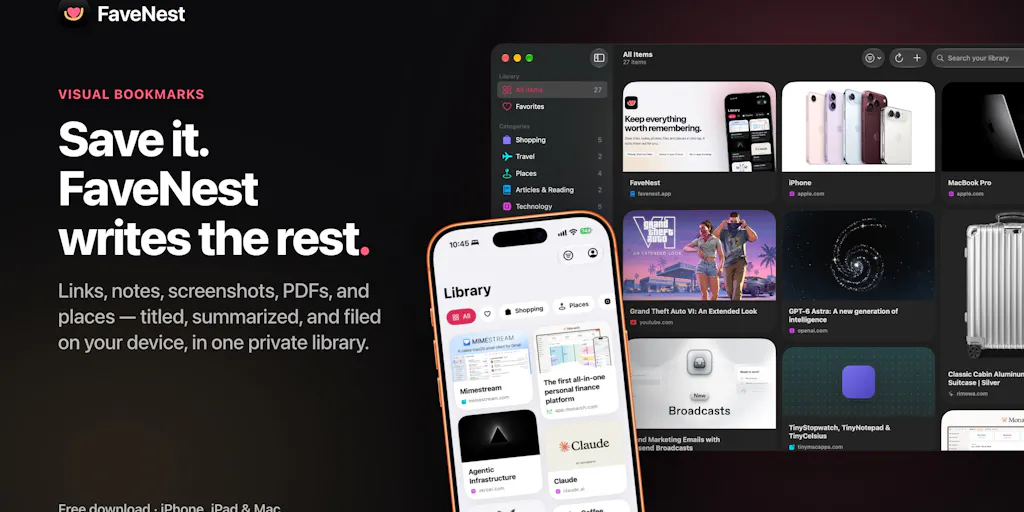
Every creator I know runs the same broken loop: you’re scrolling at 11pm, you see a hook that stops your thumb, you screenshot it, and it vanishes into a camera roll that now holds 4,000 images and zero context. The save button has become a graveyard, and the graveyard is where good content ideas go to die. That’s why I pay attention when someone ships a tool aimed squarely at the capture-and-triage layer of a creator’s workflow. FaveNest, built by Dion Purushotham, launched on Product Hunt this week with a pitch that sounds almost too quiet for the AI era: save anything in one tap, let on-device intelligence title, summarize, categorize, and tag it, and never send your data to a server. For social media operators, the interesting question isn’t whether it’s a nice bookmarking app. It’s whether the “save now, organize later, never lose the thread” pattern is the missing layer in your content pipeline — and what the on-device privacy bet costs you in capability.
What FaveNest actually solves, and why it’s a creator workflow tool in disguise
Strip away the launch-day language and FaveNest is doing three jobs that most creators handle badly or not at all.
First, frictionless capture. Share a link, note, screenshot, PDF, or map pin from any app, or hit the heart in Safari’s toolbar. It saves instantly, even offline. If you’ve ever tried to save a Reel idea while on a train with one bar of signal, you know why “even offline” is the whole ballgame.
Second, automatic triage. Apple Intelligence reads what you saved and writes a real title, a short summary, a category, and a few tags — on your device. The maker is explicit that nothing you save is sent off to be read. That’s the claim that separates FaveNest from the read-it-later incumbents, and it’s the claim I’d test hardest.
Third, retrieval that actually works. Search reads the page text, your notes, and the words inside screenshots, from inside the app or straight from Spotlight. That last part matters more than it sounds: if your saved inspiration isn’t reachable from the same search bar you already use, you will stop using it within two weeks. My take: Spotlight integration is the single most underrated feature on this launch page.
There’s also the no-account architecture. No FaveNest server, no analytics, no ads, no third-party code, sync through your own iCloud. A commenter named Noah Anderson put it bluntly: “Finally a bookmark tool that does not force me to create another account.” That’s not a small thing for someone managing five client logins and three personal ones.
Why this matters more to TikTok and Instagram operators than to LinkedIn ones
Here’s the operational reality. Short-form platforms reward volume and speed of iteration. A TikTok or Reels operator is constantly harvesting hooks, transitions, sounds, and caption structures from competitors and adjacent niches — dozens a day, most of them discarded. That’s a high-volume, low-retention capture problem, and it’s exactly what a one-tap, auto-tagged inbox is built for.
A LinkedIn operator, by contrast, might save three long-form posts a week and spend twenty minutes thinking about each one. The bottleneck there isn’t capture volume; it’s synthesis. FaveNest helps the first persona dramatically more than the second. If you’re a LinkedIn-first ghostwriter, this tool is pleasant but not transformative. If you’re running a TikTok content calendar with a swipe file that lives in twelve screenshots and a broken Notion page, the gap between “saved” and “searchable” is your entire creative advantage.
How it stacks up against the incumbents you’re already paying for
I’ve run bookmarking and swipe-file workflows through a lot of tools, and the honest comparison set here isn’t other AI apps — it’s the mature, boring utilities that already own this space.
Against Raindrop.io, the closest functional analog: Raindrop is cross-platform, browser-first, has strong tagging and a real API, and works on Android. FaveNest is Apple-only — iPhone, iPad, Mac — and leans on Apple Intelligence for the automatic metadata. If you’re a mixed-device team, Raindrop wins on coverage. If you’re an Apple-native solo operator who wants zero manual filing, FaveNest’s automatic title-and-category generation is the differentiator Raindrop doesn’t really match out of the box.
Against Pocket and Instapaper: both are read-later tools, not swipe-file tools. They’re optimized for the article you intend to read, not the screenshot you intend to steal a hook from. Neither handles the words inside an image, which is a real limitation when half your saved inspiration is a screenshot of a caption.
Against Notion or a plain Google Keep board: you can absolutely build a swipe file there, and many creators have. But you’re doing the filing manually, and manual filing is the step that always collapses. The whole thesis of FaveNest is that the tidying should happen without you.
Against MyMind: similar “save anything, it organizes itself” philosophy, but MyMind is a paid, cloud-based service with its own server-side processing. FaveNest’s pitch is the inverse — local processing, no server, no account. Whether that’s better depends entirely on how much you trust the on-device models versus a purpose-built cloud pipeline.
Where the pricing math actually lands
The maker lays pricing out up front, which I respect: saving, sync, search, and export are free with no limit on saves. Pro — which adds the automatic write-ups, Places, Shopping, unlimited categories, and every tint — runs $2.99/month or $19.99/year with a 7-day free trial, or $49.99 once, shared with your family. If you don’t have Apple Intelligence on your device, Pro can use your own OpenAI or Anthropic key instead. And if you stop paying, everything Pro already wrote stays.
That last clause is the trust signal I’d flag to any operator evaluating this. Tools that hold your generated metadata hostage when you churn are a trap. FaveNest explicitly doesn’t. For a solo creator, the $49.99 one-time is roughly the cost of two months of a mid-tier scheduling tool — and unlike Buffer or Later, this isn’t a recurring line item on a client invoice. My take: for a solo operator, the lifetime tier is the obvious buy if the app survives a year. For an agency, the per-seat math gets murkier fast, and I’d want to see how family sharing behaves across a team before committing.
What creators and social teams can steal from this launch
Even if you never install FaveNest, the design decisions here are worth copying into your own content ops.
Separate capture from processing. The reason swipe files rot is that we try to do both at once. Save first, tag later, always. If your current workflow asks you to categorize something the moment you find it, you’ve built a system that fails under time pressure.
Make retrieval search-first, not folder-first. FaveNest indexes page text, your notes, and the words inside screenshots. Most creators organize by folder, which means they can only find things they already remember filing. Search-first means you can find things you forgot you saved. If you’re still running a folder hierarchy for inspiration, try flattening it and leaning on search for a month.
Treat privacy as a feature, not a footnote. The on-device processing claim is doing real marketing work here — a commenter named Stanly Thomas said on-device titles and tags with no server is “what I’d need before trusting it with research saves.” That’s a sentiment you can borrow for your own brand: if you handle client data, saying plainly where it goes (and where it doesn’t) builds more trust than any feature list.
Cross-pollinate your swipe file with your calendar. The real unlock isn’t saving more — it’s connecting saved inspiration to scheduled output. A swipe file that never touches your Metricool or Hootsuite queue is just a nicer graveyard. My take: the creators who win are the ones who build a bridge between “I saved this” and “I’m posting my version of this on Thursday.”
The repurposing angle nobody on the launch page mentioned
Here’s what I’d bet becomes the highest-value use case, and it’s barely implied in the source: turning a saved library into a repurposing engine. If FaveNest can read a long PDF or article and produce a summary, that summary is a first draft. One saved long-form piece could become a carousel, a thread, a short video script, and a newsletter section. The tool doesn’t do the repurposing — but it removes the “I have to re-read the source to remember what it said” tax that kills most repurposing workflows. Pair that with something like CapCut or Canva for the actual asset creation and you’ve got a pipeline where the research layer is finally automated.
Where my judgment says it falls short
I want to be balanced here, because the launch page is genuinely well-constructed and the maker is unusually transparent. But there are real limitations.
It’s Apple-only. iPhone, iPad, Mac. No Android, no web app mentioned in the source. For a solo Apple-native creator, fine. For any team with an Android user or a Windows editor, this is a hard stop. Not disclosed whether an Android or web version is planned.
The PDF handling has a ceiling. In the comments, the maker confirms the app works with files up to 100MB, but the title and summary are “currently based on the first 100,000 characters.” A commenter named Simon Clark asked directly whether it handles large PDFs, and the maker asked back how long those PDFs usually are and whether full summarization would help. Translation: if your research saves are 200-page reports, the summary you get is based on the opening chunk, not the whole document. That’s a real gap for anyone doing deep research, and it’s the single most important thing to test before you trust it with a research library.
No import path yet. Alexandra Protsenko asked whether you can bring in an existing Safari or read-later library. The maker’s answer: imports are “high up on the roadmap” and will be “available soon.” So today, everyone starts from zero. If you have years of bookmarks, you’re not migrating them yet — you’re starting a new pile next to the old one. That’s a meaningful adoption tax.
The on-device bet cuts both ways. Processing locally is a privacy win and a capability trade-off. On-device models are generally smaller and less capable than cloud models, which is likely part of why the PDF summary is capped at 100,000 characters. The maker offers a workaround — Pro can use your own OpenAI or Anthropic key if you don’t have Apple Intelligence — but that reintroduces the cloud dependency the core pitch is built to avoid. Not disclosed: how the two paths compare in output quality.
Who it’s NOT for: Android-first teams, anyone who needs a shared team workspace with permissions and roles, anyone whose research lives in 300-page PDFs, and anyone who needs a public API or Zapier-style automation to pipe saves into a scheduling tool. None of those are on the launch page.
Open questions I’d want answered before recommending it
Does the Spotlight search index update reliably, or does it lag behind new saves? Does the automatic categorization hold up after a few hundred saves, or does it start producing a “Misc” pile that defeats the purpose? What happens to sync conflicts if you save the same link on two devices offline? The source doesn’t say, and these are the questions that determine whether a tool survives month three.
What I’d watch / test next
If you’re a creator or social operator reading this, here’s what I’d actually do this week — not install-and-forget, but a real two-week test.
Pick one platform’s swipe file to migrate. Don’t try to move everything. Take your TikTok or Reels hook collection and start saving new finds into FaveNest for fourteen days. At the end, try to find five specific things you saved using only search. If you can, the retrieval layer works.
Stress-test the PDF cap. Save a long report — something well past 100,000 characters — and read the summary critically. Does it capture the thesis or just the intro? That answer tells you whether this is a swipe-file tool or a research tool. Right now, I’d bet it’s the former.
Test the offline claim on purpose. Save something in airplane mode, then check it after sync. Offline capture is the feature most likely to be overstated across the category, and it’s the one that matters most when inspiration strikes in a dead zone.
Watch the roadmap on imports. If you’ve got years of bookmarks, don’t start from zero until the import path ships. Set a reminder to check back in a month.
Decide your privacy posture first. If on-device processing is the reason you’d switch, verify it holds in practice before you move sensitive client research into it. If you’d rather have cloud-grade summaries, the bring-your-own-key path exists — but then you’re back to trusting a third party, and you should price that into the decision.
The bigger lesson from this launch isn’t FaveNest specifically. It’s that the capture layer of the creator workflow has been neglected for years while everyone fought over scheduling and analytics. The operator who fixes their save-to-publish pipeline — capture, triage, retrieve, repurpose, schedule — will out-iterate the one who just posts more. FaveNest is a credible attempt at the first three steps. The last two are still on you.