The Case for Deliberately Worse Video
Somewhere between the third editing pass and the fifth caption rewrite, most creators lose the thing that made their first videos worth watching: the mess. We’ve spent a decade building a content machine optimized for polish — CapCut templates, hook frameworks, retention-curve surgery — and the audience has quietly learned to smell the machinery. That’s why a $4.99 iPhone app that turns your phone into a 1991 camcorder caught my attention more than any AI editing suite this month. Flipcorder, built by solo developer Matt Brewer, is a deliberate constraint machine: 20-second flips, no editing, no reordering, one dated tape per day, VHS or MiniDV looks applied at export. It is not a social media tool. And that’s precisely why social media operators should study it — it’s a working thesis about what audiences are starving for, packaged as a toy. Below: what it actually does, how it compares to the polish-industrial complex, what’s borrowable, and where I think it falls short.
What Flipcorder Actually Is (and What Problem It Solves)
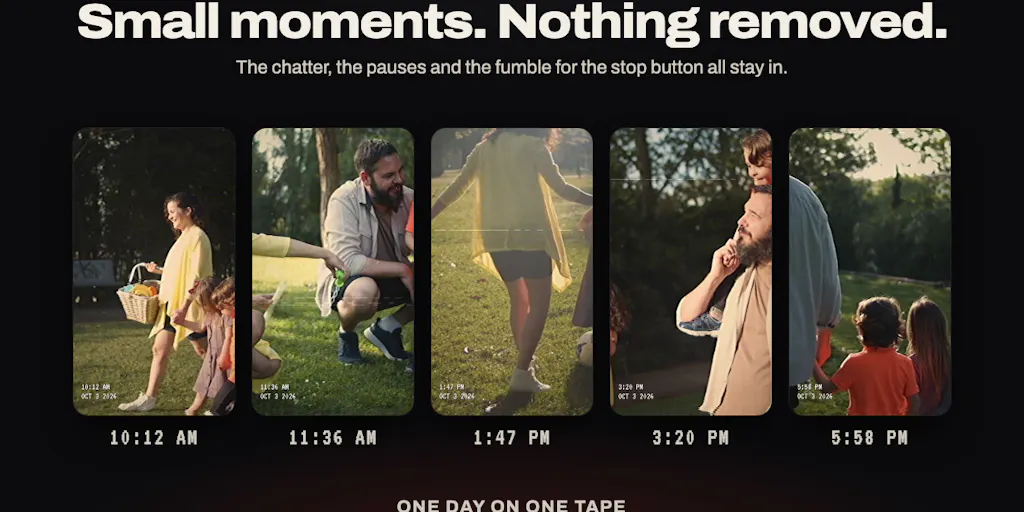
Flipcorder records short clips — 20 seconds by default — through the day, and every clip lands on that day’s dated “tape.” There’s no timeline, no trimming, no clip deletion, no reordering. The chatter, the pauses, the fumble for the stop button: all of it stays in. At the end of the day you play back one raw home movie with a warm VHS or crisp MiniDV look, date stamp and all. Footage is captured and stored locally at 1080p, and per the maker’s replies in the launch thread, the retro look is applied at export time — so the effect is non-destructive and changeable, and you can save or share the tape whenever you like, probably at the end of the day.
The stated motivation is worth quoting because it’s the whole product strategy in one sentence: Brewer says he wanted a way to keep authentic video alive because “we have lost so much chasing perfection for social media, that the messiness of a camcorder is appealing and comforting.” That’s not a feature list. That’s a positioning bet against the entire creator-tooling industry.
The mechanics are intentionally odd. The app was built around iPhone Duo, which the maker says came out on Friday — the fold is the power switch: closed, the outer screen shows a lens cap; open it and the cap comes off. Fully open, the person you’re filming sees themselves on the outer screen with a red REC light. On every other iPhone with iOS 26 or later, a big glowing POWER key stands in. Pricing is $4.99 once — no subscription, no ads, no watermarks, no account — and tapes stay on your phone unless you share them. The maker also claims safeguards: closing the phone, a call, or low storage always saves the flip. He reports the app hit #3 in Top Paid, Photo & Video on the US App Store over its first weekend; that’s a maker claim from the launch post, not something I’ve independently verified.
A few operational details from the comment thread matter for anyone thinking about workflow. The day’s tape is tied to midnight in your timezone and works across timezones if you travel — though the maker admits he hasn’t given much thought to custom day boundaries. The 20-second limit can be opted out of in settings, but you can’t pick a custom number. And the cassette itself is uneditable by design: no removing a flip, no reordering. As Brewer puts it, “that’s the entire point to keep it authentic like an old camcorder.”
The anti-editing stance is the feature, not the limitation
Every creator tool I’ve tested in the last two years assumes editing is a virtue. Descript removes filler words automatically; Opus Clip finds your best 30 seconds so you don’t have to; CapCut’s auto-captions and beat-synced templates compress the distance between raw footage and publishable post to near zero. These tools are genuinely useful — I use several of them weekly — but they all encode the same assumption: raw footage is a problem to be solved. Flipcorder inverts it. Raw footage is the product. The constraint isn’t a missing feature; it’s the reason to open the app. That’s a rare thing in consumer software, and it’s the thing worth stealing conceptually.
How It Stacks Up Against the Polish Machine
Let me be precise about what Flipcorder is competing with, because it’s not really competing with scheduling tools or analytics dashboards. It’s competing with the editing layer of the creator stack — and, more interestingly, with the behavioral defaults those tools create.
Against CapCut and InShot, Flipcorder offers no timeline, no transitions, no text overlays, no music library. Against AI repurposing tools like Opus Clip or Descript, it offers no clipping intelligence at all — the “best moment” is whatever you happened to record. Against the retro-filter ecosystem — VSCO, Tezza, the endless VHS filter packs on Etsy — it offers something those don’t: the look is applied at export to footage that was captured under a constraint, not a filter slapped on polished footage after the fact. The difference sounds philosophical until you watch the output. A VHS filter on a carefully framed, well-lit clip reads as costume. A VHS filter on 20 seconds of you fumbling to stop the recording reads as memory. Audiences are extremely good at telling the difference, even if they can’t articulate why.
And against the scheduling-and-analytics layer — Buffer, Later, Metricool, Hootsuite — Flipcorder isn’t a competitor at all. There’s no publishing integration, no scheduling, no cross-posting, no analytics. You export a tape and share it manually. For a social media manager running 30 posts a month across five platforms, that’s a workflow dead end, and I’ll say so plainly in the limitations section. But for a creator trying to rebuild a daily posting habit that doesn’t feel like factory work, the absence of integrations is arguably a feature: nothing to optimize, nothing to A/B test, nothing to schedule. Just film and post.
Why TikTok and Reels creators should care more than LinkedIn ones
Here’s my take, flagged as opinion: the platform where this matters most is TikTok, followed by Instagram Reels and YouTube Shorts. The reason is distribution mechanics. Short-form algorithms weight watch time and rewatches heavily, and raw, imperfect footage often produces longer average view duration than polished footage because viewers stay to see what happens — the pause, the fumble, the unscripted reaction. Polished content front-loads its payoff; raw content withholds it. That’s a real algorithmic tailwind, not just a vibe. On LinkedIn, by contrast, the audience expectation is still credentialing and clarity; a 20-second unedited flip of your desk will read as sloppy rather than authentic. On Pinterest, the format barely fits — pins are static or short-form and discovery is search-driven, so a dated daily tape has no natural surface. My honest read: Flipcorder’s aesthetic travels furthest on TikTok and Reels, moderately on Threads and X as a personality-building habit, and least on LinkedIn and Pinterest.
What Social Media Teams Can Borrow From It
Strip away the camcorder skin and Flipcorder is a set of content-strategy constraints that any operator can implement this week without downloading anything. I’ve been running variants of these on client accounts for a while, and the pattern holds: constraints reduce decision fatigue, and decision fatigue is the real bottleneck in most content calendars, not ideation.
The daily tape as a content unit. One dated, unedited compilation per day is a repurposing-friendly primitive. A single tape can become a TikTok, a Reel, a Short, a Threads video post, and a raw clip for a newsletter embed — all from one capture session with zero editing labor. When I scheduled 30 posts across 5 platforms last month, the posts that took the least production time consistently outperformed the ones I’d over-built. That’s not a universal law, but it’s a strong enough pattern that I now deliberately under-produce at least a third of any calendar.
The 20-second ceiling. A hard per-clip limit forces you to capture moments rather than manufacture them. For teams, it’s a useful brief: “film five 20-second flips a day, no retakes” produces more usable raw material than “shoot a polished video this week,” because it lowers the activation energy per capture. The maker’s own framing — that the constraint “removes the pressure to be perfect about what you capture” — is exactly the psychological mechanism that makes daily posting sustainable.
The no-edit rule as a distribution strategy. Leaving pauses and imperfections in is a deliberate signal of authenticity, and signals only work if they’re costly. Anyone can apply a VHS filter; not everyone will publish footage where they fumble the stop button. The costliness is what makes the signal legible.
The repurposing math, and where it breaks
The obvious play is: record a daily tape, export it, cut it into five platform-native posts. But here’s where the math breaks, and I want to be honest about it. Flipcorder exports a single rendered tape with the look baked in at export. There’s no per-clip export, no vertical-crop control, no caption file, no UTM-ready link handling. So the repurposing workflow requires a second tool — CapCut or Descript to slice the tape, Buffer or Metricool to schedule the outputs, and a spreadsheet or Later’s analytics to track which cuts actually performed. That’s fine — it’s a normal stack — but it means Flipcorder is an input to your pipeline, not a pipeline. Budget the extra 20–30 minutes per tape for slicing and scheduling, or the “no editing” promise becomes a lie you tell yourself while you edit.
Where My Judgment Says It Falls Short
Balanced assessment time, because the launch thread is a lovefest and someone needs to be the adult.
It’s a personal-memory app wearing a social-media costume. The maker’s own language is about home movies and authenticity, not growth. There’s no scheduling, no analytics, no cross-posting, no hashtag or caption tooling, no team seats, no brand-safety controls. If you’re a social media manager with stakeholders and approval workflows, this is not your tool — it’s a capture device you might use on the side. I’d bet most of its paying users are individuals, not teams, and the product roadmap (stickers, widget streaks, Halloween in-app events per the v1.1.0 notes) points toward habit and delight, not toward the B2B feature set agencies need.
The uneditable cassette is a double-edged sword. The maker is adamant that no clip deletion or reordering is the point — and I agree aesthetically. But operationally, one accidental 20-second flip of something you don’t want published, captured on a tape you can’t edit, is a real risk for anyone posting publicly. The save-on-interruption safeguard protects against footage loss; it doesn’t protect against footage you wish you hadn’t captured. For personal use that’s charming. For brand accounts, it’s a governance gap.
Platform dependency and hardware dependency. The marquee interaction — fold as power switch, outer-screen selfie preview with REC light — is built around iPhone Duo, which the maker says launched Friday. That’s a very new device, and building a flagship interaction around it is a bet on hardware adoption. The fallback (glowing POWER key on any iPhone with iOS 26 or later) works, but it’s a lesser experience. And there’s no Android version mentioned anywhere in the source — not disclosed, and for a global creator audience that’s a meaningful exclusion. iOS 26 as a floor also excludes a chunk of the installed base.
The pricing is a statement, and statements have consequences. $4.99 once, no subscription, no ads, no account — I love it as a consumer and I’d flag it as a business-model question mark. One-time pricing on a habit app with ongoing feature ambitions (stickers, streaks, seasonal events) means revenue has to come from new users forever, not from retention. That’s the maker’s call and it’s refreshing, but it’s worth watching whether the feature cadence survives without recurring revenue. Not disclosed: any plan for a subscription tier, Android, or team features.
Who it’s not for
If your job is to publish 30+ posts a month across five platforms with approval chains and performance reporting, Flipcorder will not replace anything in your stack and shouldn’t. If you’re a creator whose audience is on LinkedIn or Pinterest, the format fit is weak. If you need per-clip exports, caption files, or UTM-tagged links for attribution, the app doesn’t do it. And if you’re on Android, you’re out of scope for now. None of these are dealbreakers for the intended user; all of them are dealbreakers for the operator use case, and conflating the two is how creators end up disappointed.
What I’d Watch / Test Next
Three concrete things I’m doing this week, and you can copy them.
First, run a seven-day “no-edit tape” experiment on one account. Pick your most forgiving platform — TikTok or Reels — and post one unedited 20-second-or-shorter clip per day for a week, no trimming, no captions beyond the platform default. Track average watch time and rewatch rate in TikTok Analytics or Instagram Insights, and compare against your last seven polished posts. Don’t judge on likes; judge on watch time and saves. If the raw clips hold their own, you’ve found a low-cost content lane.
Second, if you’re iPhone-based, test Flipcorder itself — it’s $4.99 with no subscription, so the switching cost is a coffee. Film a tape, export it in both VHS and MiniDV looks, and time how long it takes you to slice and schedule the output. That timing tells you whether it fits your pipeline or stays a personal toy. The maker also dropped five free redeem codes in the launch thread, though as of this writing at least one has been claimed, so check before you try.
Third, steal the constraint, not the app. Write a one-line brief for your team — “capture, don’t produce” — and enforce a hard per-clip ceiling. The tooling matters less than the rule. The reason Flipcorder is interesting isn’t the VHS filter; it’s that it makes the messy version the default and the polished version the extra effort. Most content calendars have that backwards, and flipping it is free.