The audit tool that finally speaks to your AI agent — and why social operators should care
If you run social for a living, you already know the dirty secret of the job: the thing you actually control is a website, and the thing you’re judged on is a feed. Every campaign you ship — a TikTok hook, a LinkedIn carousel, a Pinterest pin, a Threads reply-bait post — eventually routes traffic to a landing page that either converts or quietly leaks. And the leaks are rarely the things you’d guess. A missing meta description. A security header you didn’t know was absent. An accessibility failure that tanks the experience on the exact mobile browser your audience uses. I’ve watched a single broken canonical tag eat a month of paid amplification, and I’ve watched a missing og:image turn a perfectly good Instagram bio link into a grey rectangle in every WhatsApp share.
That’s the context for FreeScan.app, a new site-health scanner from maker Jacob Counsell that launched on Product Hunt this month. The pitch, in his own words, is that he “was tired of stitching together an SEO auditor, accessibility checker, security scanner, AI visibility tool, uptime monitor, and task board just to understand whether a website was actually healthy.” I’ve felt that exact fatigue. So the question for creators and social teams isn’t “is this another audit tool” — there are dozens. It’s whether the output is something a non-engineer can actually act on, and whether the agent handoff is real or marketing.
What FreeScan actually does, and why the framing matters
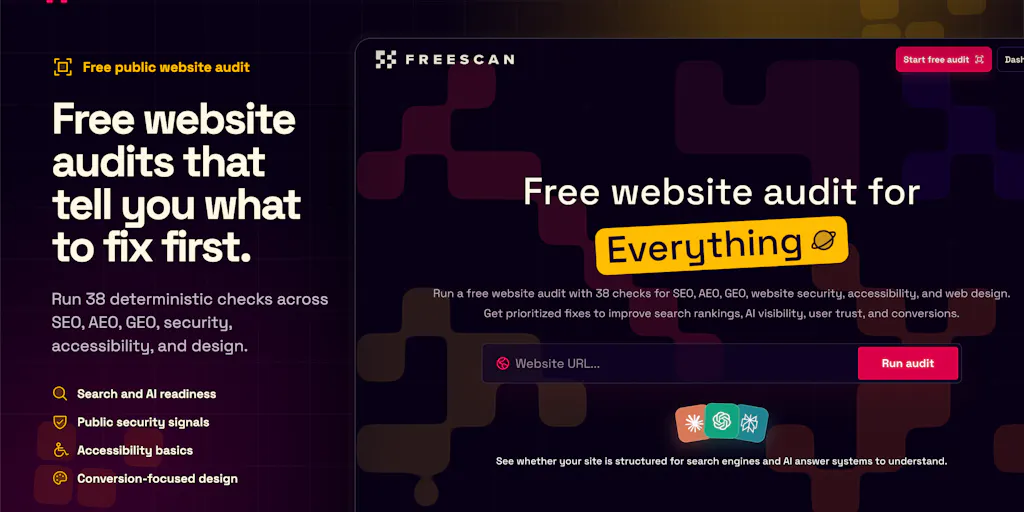
Strip away the launch-page polish and FreeScan is a website health scanner that audits any public page for free across five categories: SEO, AI visibility, security, accessibility, and design. The differentiator the maker keeps hammering is that “every finding includes the evidence, why it matters, a clear fix, and an implementation-ready prompt or Markdown handoff.”
That last clause is the whole product. I’ve used enough audit tools to know that the industry’s default failure mode isn’t detection — it’s translation. Screaming Frog will find 400 issues on a mid-sized site. Ahrefs will bury you in crawl data. Lighthouse will hand you a performance score and a wall of diagnostics that assumes you know what “eliminate render-blocking resources” means. What almost none of them do is say: here’s the finding, here’s the receipt, here’s what to do, and here’s a prompt your coding agent can execute.
The Pro tier — pricing not disclosed on the launch page — adds automated site-wide audits, change history, and dedicated SEO, AI Visibility, and Fixes workspaces. It also creates “agent-ready artifacts,” connects coding agents through MCP (Model Context Protocol), monitors uptime, and sends weekly reports and downtime alerts from one dashboard.
The evidence line is the real feature
A commenter on the launch thread, Rabnoor Singh, nailed the category problem better than the maker’s own copy: “the reason nobody acts on audit tools is that a list of 200 findings with no evidence is indistinguishable from noise.” He ran FreeScan on his own site and reported an 86 overall score with accessibility as the weak spot at 79, plus “a missing meta description i had no idea was gone.” His specific praise: “the evidence lines did the real work, it named which of the five security headers i actually had.”
That’s the operational reality. When I’ve run audits for clients, the bottleneck is never the scan — it’s the triage meeting where someone has to decide which of 200 findings matter. If the tool shows you which security headers are present and which are missing, you can act in five minutes instead of scheduling a call.
Singh also made a sharp suggestion the maker acknowledged: “the thing i would add is a count of findings you chose not to report, so the number means something.” That’s a transparency ask, and it’s exactly the kind of thing that separates a trustworthy audit tool from a scoreboard that flatters you.
Where the MCP handoff gets interesting
The most forward-looking piece is the agent integration. Muhammad Ahmed asked directly whether MCP “allow[s] for automatic application of fixes by agents or just notify a developer about them.” The maker’s answer: “the audit pages are fully readable by agents, via the MCP the agent can pull prompts, markdown files, and actually fix everything. With a Pro account your agent can operate all of the workspaces including the Fixes workspace and pull and fix everything their site-wide / update the workspace and re-audit pages. Your agent can drive everything.”
I’d flag that as a maker claim, not a verified fact — I haven’t tested the MCP loop myself. But conceptually, this is the direction the whole tooling category is heading. Cursor, Claude Code, and GitHub Copilot have made “agent does the boring fix” a normal workflow. An audit tool that outputs a Markdown handoff an agent can consume is genuinely more useful in 2025 than one that outputs a PDF.
How this compares to the incumbents you’re probably already paying for
If you’re a social operator, your audit stack probably looks like some combination of Ahrefs, Semrush, Screaming Frog, Google Search Console, and maybe PageSpeed Insights. That’s a lot of tabs, and each one optimizes for a different persona — the SEO, the dev, the performance engineer.
FreeScan’s bet is consolidation plus narration. Against Ahrefs and Semrush, the obvious tradeoff is depth: those platforms have years of backlink data, keyword databases, and competitive intelligence FreeScan simply doesn’t have and isn’t trying to have. If you need to know who’s outranking you for a keyword, stay where you are. If you need to know whether your landing page is technically healthy and what to fix first, the consolidated view is genuinely attractive.
Against accessibility-specific tools like WAVE or axe, FreeScan is shallower but broader. Against uptime monitors like UptimeRobot or Better Stack, it’s covering similar ground inside a bigger dashboard.
Why social teams should care more than they think
Here’s my take, flagged as opinion: social media managers chronically under-own the landing page. We treat the bio link as someone else’s problem — usually the web team’s — and then wonder why campaign traffic doesn’t convert. But the page is the campaign. If your TikTok drives 50,000 clicks and the page has a broken og:image and a 4-second load time, you didn’t run a campaign, you ran a bounce generator.
A tool that gives you a plain-English health check on the exact URL you’re promoting, with evidence you can paste into a Slack message to the dev team, is a genuine workflow upgrade. The agent handoff matters less for solo creators and more for small teams where “the dev” is a contractor you see twice a month.
What I’d steal for your own workflow, regardless of the tool
Even if you never sign up, the launch thread is a masterclass in how to think about site health as a content operator. Three things I’d borrow:
Audit the link before you amplify it. Every time you schedule a campaign, run the destination URL through a free scanner first. You’re looking for four things: does the page load fast on mobile, does it have a proper title and meta description, does it have a share image, and does the form or CTA actually work. I’ve caught broken CTAs on live campaigns more than once, and it’s always cheaper to find them before the post goes out than after.
Ask for evidence, not scores. When a tool or an agency hands you a number, ask what’s behind it. A “79 accessibility” score means nothing without knowing which specific issues drove it. The maker’s own admission that a “B grade is just for speed insights” — after Dawid Baranowski got confused by it — is a good reminder that scores need labels.
Treat agent-ready output as a real deliverable. If you’re briefing a developer, a Markdown file with the finding, the evidence, and the fix is worth ten screenshots. This is the format shift happening across the whole creator tooling stack, from Notion templates to Zapier automations.
Where the math breaks
The free tier audits a single link at a time. The maker was explicit about this in the thread: “the free audits are only for the link you’re scanning, you can audit multiple links from your website but to truly audit your entire website you should check out the Pro tier.” For a solo creator with one landing page, free is probably enough. For anyone running a multi-page funnel — a Linktree-style hub, a course sales page, a newsletter signup — you’ll hit the paywall fast. Pricing is not disclosed, which makes it hard to judge value against, say, a $99/month Semrush seat.
Where I think it falls short
Three honest concerns, all flagged as my judgment rather than sourced fact.
First, AI visibility is the least defined category on the page. The maker lists it as a core scan area, but the launch thread never explains what “AI visibility” actually measures — is it whether your content gets cited by ChatGPT, surfaced in Perplexity, indexed by Google AI Overviews? That’s a genuinely important question for creators in 2025, and the answer changes what the tool needs to do. I’d want clarity before paying for Pro.
Second, the agent loop is only as good as the agent. The maker says “your agent can drive everything,” but that assumes you have an agent configured with repo access, a staging environment, and a deploy pipeline. That’s a real setup for a dev team and a non-starter for most solo creators. The Markdown handoff is the more universally useful artifact.
Third, consolidation cuts both ways. One dashboard for SEO, security, accessibility, uptime, and AI visibility sounds great until one category lags behind a specialist. Uptime monitoring in particular is a market where Better Stack and UptimeRobot have years of reliability engineering behind them. I’d bet FreeScan’s uptime feature is fine for a personal site and inadequate for anything with an SLA — but that’s speculation, not a tested claim.
What I’d watch / test next
If you’re a creator or social operator curious about this, here’s the concrete week-one plan I’d run.
Audit your three highest-traffic landing pages — the ones your bio links and campaign CTAs point to — and screenshot the findings. Don’t fix anything yet; just see what the tool surfaces that you didn’t know. Then pick the single highest-impact finding (usually a missing meta description or a broken share image, because those directly affect how your links render in feeds) and fix it manually. Re-scan and confirm the score moved. That loop teaches you what the tool is actually good at before you commit money.
If you’re on a team, forward one audit report to your developer and see whether they can act on it without a follow-up call. That’s the real test of the “evidence plus fix” promise. And if you’re agent-curious, ask the maker directly in the Product Hunt thread what the MCP setup requires — the thread is active and the maker is responsive.
My honest read: FreeScan is solving a real pain, and the evidence-first framing is the right bet. Whether it becomes a daily driver depends on pricing transparency and whether the AI-visibility category gets defined. Run the free scan this week and judge for yourself.