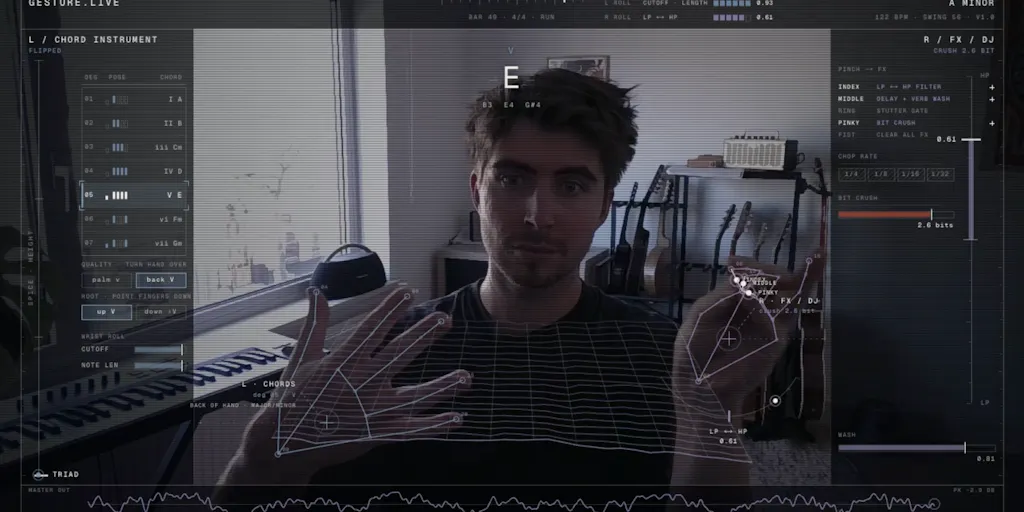
The most useful launch thread I’ve read this month isn’t about AI clip generation or a new social scheduling dashboard. It’s gesture.live, a webcam hand-tracking synth from solo maker Robin van Soelen, and it matters to anyone who runs social accounts because the comments read like a masterclass in feedback loops. One person asks about 30ms jitter. Another asks whether the demo survives stage lighting. The maker answers both with the same composure. That’s the skill that separates creators who grow from creators who burn out: not posting more, but listening to the small number of people who tell you exactly what’s wrong. This essay is about why that thread is worth your attention, and what you can steal from it this week.
What gesture.live Actually Solves (and Why the Problem Is Bigger Than It Looks)
I almost scrolled past the launch page. Another webcam toy, I thought. But the more I read, the more I saw a serious design question hiding under a music app. The maker’s starting point is indecisiveeric.com/gesture-synth, which he says went viral on Instagram a few weeks ago. That predecessor lets users perform chords with both hands. gesture.live takes the same chord language and compresses it to one hand, freeing the other to play melodies, add drum and bass patterns, and control effects. That’s not a small tweak. It’s a thesis about attention and interface.
When you compress an instrument’s harmony into one hand, you reduce the physical effort required to make something that sounds complete. That directly affects content production. I’ve worked with creators who spend an hour setting up a shot and then have nothing to perform. This tool makes performance the default state. Point a webcam at your hands, and the content is already happening.
The problem it solves isn’t “make music easier.” Plenty of apps do that. The problem is “make musical input visible.” For social platforms, visibility is distribution. A demo clip of hands moving in the air and producing sound is instantly engaging in a way that a screenshot of a plugin will never be. That’s why the thread is relevant to a social media operator. The product itself isn’t a social media tool, but it behaves like one: it creates shareable moments on demand.
There’s a deeper lesson here about tool design and content strategy. Most creator tools are optimized for output: faster edits, better templates, more posts. gesture.live is optimized for the live moment. That distinction matters. The best content often comes from tools that don’t feel like content tools at all.
How It Differs From the Tools Creators Actually Use
Most creator tools are built around throughput. Canva turns a blank canvas into a template in seconds. CapCut turns hours of footage into a short vertical video. Buffer turns a finished post into a queue. Those tools are good because they reduce the time between idea and post. gesture.live doesn’t do any of that. It’s closer to Ableton Live or a physical instrument: the output is a live performance, not a file.
That distinction matters more than it sounds. When I run a content calendar, the bottleneck is almost never the scheduling software. It’s the raw material. I can have perfect UTM tracking, clean API rate limits, and a beautiful grid, but if I don’t have a video that makes someone stop scrolling, none of it matters. gesture.live’s value isn’t in distribution; it’s in generating a specific kind of visual performance that short-form video rewards. The algorithm doesn’t care if your post is scheduled through Buffer or published by hand. It cares whether people watch past the first two seconds. A clip of hands moving in the air and producing sound has a better-than-average chance of earning that watch.
Compare that to the scheduling and analytics incumbents I’ve tested over the years. They optimize for reach, not for the moment of creation. gesture.live is an input device for the attention economy, not a distribution platform. Both are necessary, but only one is fun to show in a demo.
Just last month, I found myself manually fixing broken links in a batch of posts because I’d forgotten that one platform rewrites UTM parameters in its own way. That’s the real life of a social media operator. gesture.live is the opposite of that work — a reminder that some tools should be messy, physical, and alive. You can’t schedule a hand gesture. You have to show up and perform it. That rawness is exactly what social feeds are starving for.
What the Launch Thread Teaches About Feedback Loops
The most important part of the launch page isn’t the product; it’s the comments. One commenter, Asad M., asks a question that would never occur to a marketing manager: are note-ons quantized? He explains that webcam hand tracking is 30fps on a good day, so there’s 30ms of jitter before the audio thread even hears you. The maker responds that chords are quantized to the grid because they influence the bass and the notes available to play the melody, while the melody is realtime. That’s a product decision, not a bug report.
Then comes the sharper point. Asad warns that because the maker built the mapping, his hands already know where the notes are before they move. A new learner will read the same 30ms as the instrument being unresponsive rather than themselves being early. That is one of the best product-management lessons I’ve seen on a launch page. It’s the same reason creators who deeply understand their niche often over-deliver until they finally show it to a stranger and get a blank face. The tool isn’t bad; the mental model is missing.
Another commenter, Gal Dayan, asks the live-performance question: has anyone actually tried this on a small stage or at a house party? Will hand tracking hold up under stage lighting or dimmer, colored light? The maker admits he hasn’t tested it with a live audience yet. I love this exchange because it shows a healthy maker who understands scope. He didn’t promise a touring instrument. He said the initial use case was the bedroom, and he’d love to optimize for live performance later. That honesty is rare in a space where every tool claims to be for everyone.
The comment thread is the product
Think about what these comments actually do for the launch. Every reply adds a new layer of signal. Product Hunt’s ranking system rewards engagement, and a thread where the maker actively answers technical questions will outrank a thread with a hundred empty “congrats” comments. The same dynamic exists on TikTok and Instagram. Comments don’t just feed the algorithm; they feed the next version of the product. A public question about quantization becomes a roadmap item. A public question about stage lighting becomes a follow-up video. The maker turned a limitation into content before the launch was even over.
Engagement rate is a lagging indicator. The leading indicator is whether you’re getting specific, unsolicited criticism from people who actually tried the thing. A vague “love this!” comment feels good but tells you nothing. A question about 30ms latency tells you exactly where to spend your next engineering hour. If you’re a content operator, you should be collecting that same kind of signal from your audience — not just comments, but the precise moment in a video where they stop watching, or the exact sentence in a caption they quote back to you.
Why TikTok creators should care more than LinkedIn ones
A hand-tracking synth demo is a short-form video native. On TikTok, the visual of hands becoming a chord language is instantly understandable even with sound off — which is critical in a mute-scrolling world. On LinkedIn, the same video needs a business lesson: “What if your input method shaped your content output?” The demo video’s well-lit desk setting is exactly the aesthetic of a million creator videos. If you’re a TikTok or Reels creator, this is a content prompt generator. If you’re a LinkedIn ghostwriter, it’s a metaphor at best.
That’s why watch time matters. A viewer watches once to understand, then again to verify their ears weren’t fooled. That second watch is pure algorithm fuel. The more your content rewards a double take, the more the platform will push it to new viewers. gesture.live happens to be built for double takes.
Where the Math Breaks (and Who Should Wait)
Let me be clear: this is not a finished instrument for everyone. The maker himself says the initial use case was the bedroom. If you’re planning a world tour, wait. If you’re a performing keyboardist with a MIDI controller, this probably won’t replace your setup. If you’re a social media manager looking for another growth tool, this isn’t one. It’s a source of content and a lesson in feedback, not a scheduling dashboard.
Where the math breaks
The math is unforgiving. 30fps webcam tracking means roughly one frame every 33ms. The thread puts the jitter at 30ms before the audio thread even hears you. That’s enough to make a careful listener feel something is off. Quantizing chords to a 16th grid makes the harmony playable, but as Asad puts it, you lose pushing and laying back — the subtle timing shifts that make a performance feel human. The maker’s compromise is smart: quantize the harmony, keep the melody realtime. But it’s still a compromise. If you’re a musician who lives in the spaces between the grid, this tool will frustrate you.
The lighting issue is even more practical. The demo video looks great in a well-lit room at a desk. That is the best case, not the worst case. Stage lighting, strobes, moving colors, hands moving fast — each one makes webcam hand tracking less reliable. The source thread doesn’t pretend otherwise. The maker hasn’t tested it with a live audience. So the honest review is: works great for a bedroom demo, unproven for a house party, and probably not ready for a stage. That’s not a failure. It’s a scope decision.
Who is this not for? Live performers who need reliability. Professional musicians with latency-sensitive workflows. Social media operators who want a tool to schedule posts. It is for curious creators, kids, and people who want to feel like their hands are an instrument. The launch thread is valuable for everyone else.
Pricing, availability, hardware requirements beyond a webcam? Not disclosed on the launch page. That’s another sign this is an exploration, not a polished commercial product. The maker isn’t promising “10x your engagement.” He’s showing a working idea and asking the internet to push on it. That’s more trustworthy than most product launches I see.
What creators and social media teams can borrow from it
Here’s what I’d borrow immediately:
- Treat every public question as a roadmap item. Someone asking “does this work on stage?” is telling you exactly what video to film next.
- Answer negative comments with product reasoning, not defensiveness. The maker didn’t argue with the latency critique. He explained why quantizing chords made sense for his design.
- Film the next iteration in the conditions people ask about. If one commenter wonders about stage lighting, that’s your next demo video.
- Make content that shows the input, not just the output. The visual of hands driving the sound is the hook.
What I’d Watch / Test Next
Next I’ll track whether gesture.live turns its one-hand chord language into a repeatable format. I’d test three things this week. First, film a short clip with the sound off. If the hands alone are interesting enough to make someone stop scrolling, the project has real visual staying power. Second, use the maker’s public roadmap as a content calendar: ask followers what conditions they’d want to see tested — bad lighting, noisy room, fast movements — and turn those answers into video prompts. Third, if you’re building any kind of tool, study this thread for how a single technical question can become a design principle. The quantization answer wasn’t a patch; it was a philosophy.
I’d also watch for the live-performance update. If stage lighting gets solved, this becomes a different beast — not just a bedroom toy but a touring instrument and a live-streaming companion. Until then, treat it as a masterclass in feedback, not a product to buy. The launch comments are the real deliverable.