The Creator’s Real Remote-Work Problem Isn’t Slack — It’s the Mac in the Other Room
If you run social for a living, your production machine is usually a Mac sitting on a desk somewhere, and your actual job is increasingly done from a phone in the back of a cab, on a train, or on the sofa at 11pm because a TikTok comment thread caught fire. The tools we obsess over — Buffer, Later, Metricool — solve the publishing layer. Almost nothing solves the operating the machine that makes the content layer. That’s the gap I want to talk about, because a small Product Hunt launch called Headroom is poking at exactly that seam, and even if you never install it, the thinking behind it is worth stealing for your own workflow. The pitch, from maker Haru of MusicFlow, is deceptively simple: connect to the Screen Sharing already built into macOS, no install on the Mac, no account, and with Tailscale it works away from home. That’s it. That’s the product. And for a certain kind of creator-operator, that’s a bigger deal than it sounds.
What Problem This Actually Solves (And Why It’s a Creator Problem)
Let me describe a scenario I’ve lived. You’re a one-person content shop. Your Mac Studio or MacBook is the render box, the CapCut and Premiere machine, the place where the Canva exports land and where the raw footage lives on an external SSD. You’re out. A client wants a revision now. A trending audio is spiking and you want to cut a 15-second response before the window closes. Today your options are: remote into the Mac with a third-party tool, drive home, or eat the missed window.
Headroom’s bet is that the third-party tool is the problem. The maker’s framing is that it “connects straight to the Screen Sharing that is built into macOS, so there is nothing to install on the Mac, no account to make, and nothing of mine in between: the screen and your input travel only between your own devices.” That last clause is the whole thesis. No relay server holding your screen, no vendor account, no agent running on the host machine.
For creators specifically, this matters more than it does for a generic remote worker, and here’s the mechanical reason: our machines are full of unreleased client work, embargoed product shots, and half-edited brand assets. Every extra hop a screen frame takes through someone else’s infrastructure is a hop you have to explain in a security questionnaire. A tool that adds zero new attack surface to the host Mac — because it’s using the OS feature that’s already there — is a genuinely different risk posture from installing a background agent.
Why the “no install on the Mac” detail is the actual feature
I’ve set up remote access on enough machines to know that the install step is where most creators give up. It’s not the technical difficulty; it’s the friction of deciding, on a Tuesday, whether you trust a random daemon with full screen-capture and input-injection permissions on the machine that holds your entire content library. Headroom sidesteps that decision entirely by leaning on macOS Screen Sharing, which you already have and already trust (or already distrust) on your own terms. My take: this is the single most defensible thing about the product, and it’s the thing a competitor can’t easily copy without giving up their own relay architecture.
How It Differs From the Incumbents You’d Actually Compare It To
The obvious comparison set is the remote-desktop category — TeamViewer, AnyDesk, Jump Desktop, and Apple’s own Screen Sharing — plus the newer “control your Mac from a phone” apps. I’ve used most of them. Here’s how I’d frame the differences, and where I’d push back on Headroom’s positioning.
The relay question. TeamViewer and AnyDesk are built around routing through their infrastructure for NAT traversal and reliability. That’s why they work through almost any network and why they also require an account and a trust relationship with a third party. Headroom’s model — direct connection, Tailscale for off-LAN access — is the “you own the pipe” approach. It’s more private and, in my experience, occasionally more fiddly, because you’re now responsible for the mesh network being up.
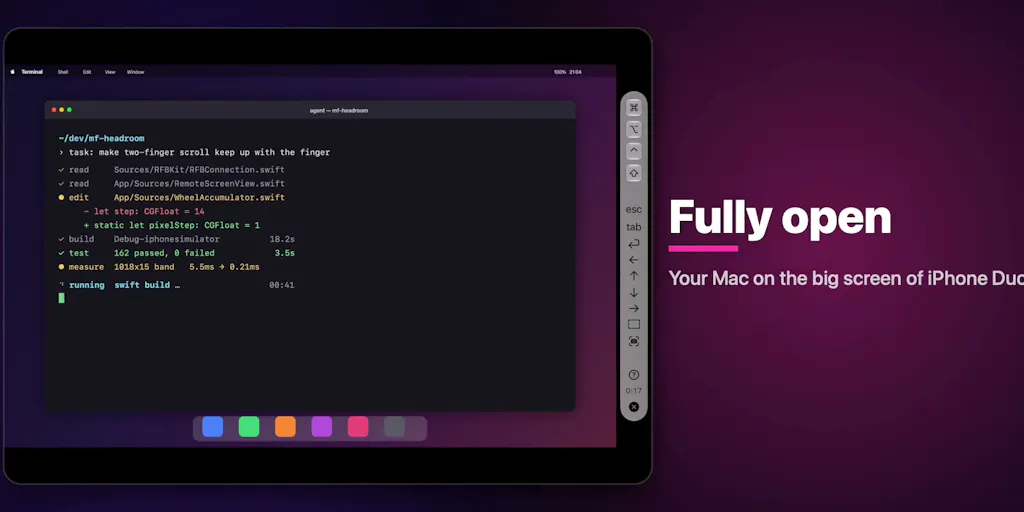
The device-shape question. This is where Headroom gets genuinely interesting and where I think most creators will either love it or shrug. The launch is timed around the iPhone Duo, and the maker lists specific behaviors: “Half open like a laptop: your Mac on the upper screen, the control bar just above the fold, the keyboard on the lower screen. The keyboard comes up by itself when you fold.” With a hardware keyboard in that pose, “the whole lower screen becomes a panel of large keys.” Fully open, the Mac fills the inner screen; held like a book, the control bar moves to the side; closed, the outer screen works on its own. And explicitly: “Nothing is drawn across the fold.”
That last line is the tell that someone actually thought about the hardware instead of just stretching a phone UI. Fold-aware layout is the kind of detail that separates a real product from a port.
Why TikTok creators should care more than LinkedIn ones
Here’s my opinionated split. If your job is mostly text-and-carousel publishing — LinkedIn, X, Threads — your phone already is your workstation, and remote-controlling a Mac buys you very little. If your job is video — TikTok, Reels, YouTube Shorts — the Mac is where the timeline lives, and the ability to scrub a CapCut timeline from a folding phone in a half-open “laptop” pose is a meaningfully different ergonomic than squinting at a mirrored 16:9 desktop on a 6-inch slab. The half-open pose with the control bar “just above the fold” and the keyboard on the lower screen is, functionally, a tiny laptop. For a creator doing last-mile trims on the go, that’s the use case. For a community manager replying to comments, it’s overkill.
What Creators and Social Teams Can Borrow From This
Even if you don’t buy a folding phone or install Headroom, there are three operational lessons here that map directly onto how social teams should think about their stack.
1. Prefer tools that add zero new credentials to the host. Every SaaS you bolt onto your workflow is another account, another OAuth token, another thing in the offboarding checklist when a contractor leaves. Headroom’s “no account to make” stance is the right instinct for any tool that touches your production machine. When I audit a creator’s stack, the tools that survive are the ones that piggyback on infrastructure they already control — the OS, their own cloud, their own mesh VPN — rather than demanding a new tenancy. Apply that filter to your scheduling tools too: does Metricool or Buffer need more access than the platform APIs actually require? Usually the answer is “no, but check.”
2. Build the “operate the machine remotely” layer into your continuity plan. Most solo creators have no plan for “my Mac is at home and I’m not.” A mesh VPN plus native screen sharing is a cheap, boring, reliable answer that doesn’t depend on a vendor staying in business. The Tailscale mention in the launch is the practical bit here — it’s the difference between “works on my couch” and “works from a hotel in another timezone.”
3. Design for the device shape people actually hold. The fold-aware layout rules are a masterclass in thinking about posture, not pixels. Social teams should steal this for their own content: the same asset needs to be composed for a 9:16 full-screen, a half-open fold, a book pose, and a closed outer screen. If your short-form video has critical text in the top 15% or bottom 20%, you’re already losing it to platform UI overlays. Headroom’s “nothing is drawn across the fold” discipline is a good reminder that where the hardware breaks is a design constraint, not an afterthought.
Where the math breaks
I want to be honest about the limits of the “just use native screen sharing” argument. Native macOS Screen Sharing is not a low-latency protocol in the way a purpose-built remote-desktop codec is. The maker notes it’s “built with Metal so the picture stays smooth,” which is a good sign for rendering, but rendering smoothness and input latency are different problems. For scrubbing a video timeline, latency is everything. My bet: Headroom will feel great on a LAN and acceptable over Tailscale for light tasks, and I would not want to color-grade a client deliverable through it. That’s not a knock — it’s the honest boundary of the architecture. If your remote work is “check on the render, nudge a setting, kick off an export,” you’re fine. If it’s “do precise frame-accurate edits,” test it before you commit.
Where My Judgment Says It Falls Short
It’s a niche product with a niche launch. The entire launch narrative is built around the iPhone Duo, a device most creators don’t own and may never own. The maker is candid about this: “I haven’t been able to get my hands on a Duo yet, so I’ve been building on the simulator.” That’s an admirable level of transparency, and it’s also a real caveat — fold-behavior bugs are exactly the kind of thing that only show up on hardware. A commenter, Jaewon Seo, raised a concrete one: he’d want the app to “remember which half was the keyboard last time instead of resetting.” The maker’s reply is that in his build “the software keyboard always comes up when you fold into the laptop pose, even after relaunching Headroom,” and he asks whether the real device behaves differently. That exchange is the most useful thing on the page: it tells you the fold-state persistence is still being validated against real hardware. If you’re an early adopter, expect to be a beta tester for the exact pose the product is sold on.
The value proposition is thin for non-fold users. It “also runs on iPad and Mac, in 17 languages,” but if you’re on a regular iPhone or iPad, you’re comparing Headroom against Apple’s built-in Screen Sharing and against Jump Desktop, and the differentiator narrows to “no install on the host” plus polish. That’s a real differentiator, but it’s a smaller one. I’d bet the product’s fate is tied to whether folding phones become a real creator device, and that’s a market question, not a product question.
Pricing and distribution are not disclosed. The launch page doesn’t state a price, a business model, or user numbers. I’m not going to invent them. Treat any “it’s free” or “it’s $X” assumption as unverified until the maker says so.
Who it’s NOT for: teams that need centralized admin, audit logs, and SSO — this is a personal-device tool, not an enterprise remote-access platform. And anyone whose remote work is latency-sensitive precision editing should stay on a purpose-built remote-desktop tool for now.
What I’d Watch / Test Next
This week, if you’re a creator-operator, do three things. First, audit your “operate the Mac remotely” plan: if the answer is “I drive home,” set up native Screen Sharing plus a mesh VPN like Tailscale and test it from a coffee shop. That’s a one-evening project that pays off the first time a trend spikes while you’re out. Second, if you’re fold-curious, watch the Headroom comment thread for the Duo hardware reports — the keyboard-persistence question from Jaewon Seo is the exact thing to track, because it’s the difference between a demo and a daily driver. Third, steal the posture-first design thinking for your own short-form: storyboard your next Reel for the half-open, book, and closed poses, not just the full-screen one. The tool is niche; the operating principle — own your pipe, design for the hardware, don’t add credentials you don’t need — is not.