The Most Boring API on Product Hunt Might Be the Most Useful One for Your Brand
Let me be blunt: the creator economy has a brand consistency problem, and it’s not the one everyone talks about. We all obsess over aesthetic cohesion on our own feeds — the Instagram grid, the TikTok cover style, the YouTube thumbnail template. But the moment you scale past a single account, past a single client, past a single product, the whole thing falls apart. You’re not just managing your own brand anymore; you’re managing the appearance of a hundred different brands, each with its own logo, its own color palette, its own voice, and its own set of expectations.
I’ve been in the trenches. Last month alone, I was juggling content calendars for five different clients across Instagram, LinkedIn, and X. Each one needed their own branded graphics, their own report templates, their own email signatures. And every single time I onboarded a new client, I’d spend an afternoon doing the same soul-crushing dance: download their logo from their website, screenshot their homepage to eyeball the hex codes, manually check if their brand colors were readable on white, and then build a half-broken style guide from my own guesswork. It’s tedious, it’s error-prone, and it doesn’t scale. This is why the launch of Hermai, a brand data API, caught my eye. It’s not flashy. It’s not a new AI video generator or a viral content hack. But it’s solving the exact problem that’s been quietly killing my workflow — and it’s doing it in a way that matters for anyone who operates social accounts at scale.
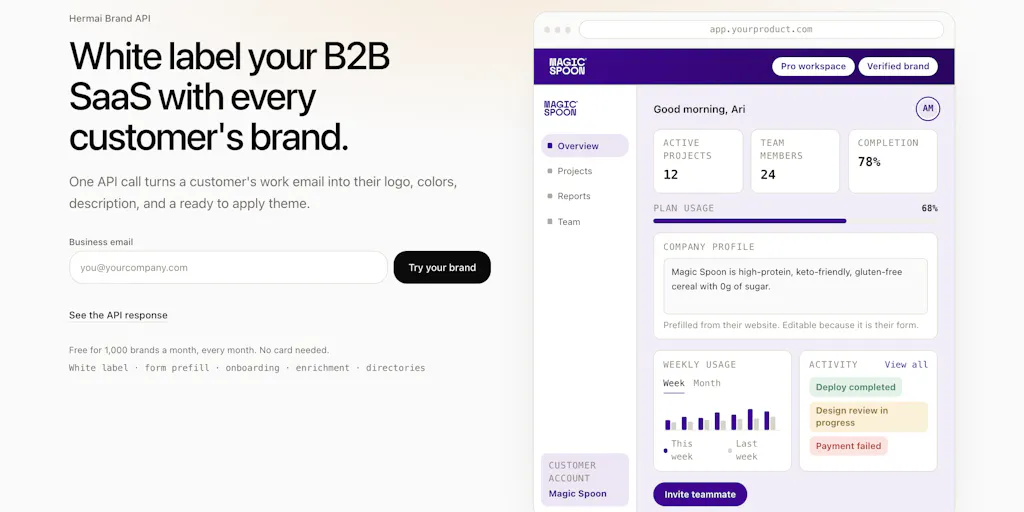
The pitch is simple: you feed it a domain or a work email, and it returns the company’s logo, a contrast-checked color theme, and their own description of what they do. The maker, Kingsong Chen, calls it a “brand data API” and frames it primarily for white-labeling SaaS products. But for a social media operator, the implications are much broader. This isn’t just about making your app look like it was built for a client. It’s about automating the grunt work of personalization and context that we all do by hand, and doing it with a level of accuracy and source-tracking that I haven’t seen in the tools I’ve tested.
The Problem: Brand Consistency Is a Data Problem, Not a Design Problem
For years, we’ve treated brand consistency as a design challenge. We hire brand managers, create elaborate style guides, and police every pixel. But the moment you step into the world of multi-tenant SaaS, agency work, or even a large creator operation with multiple sub-brands, the problem shifts. It’s no longer about one brand; it’s about thousands of brands, each needing to be represented correctly in a different context. As Chen noted in the comments, “One brand is a folder of assets, a thousand brands is a data problem.” That’s the core insight here, and it’s one that most social media teams haven’t fully grasped.
When I’m scheduling posts for a client, I don’t just need their logo. I need to know their brand voice, their target audience, their unique value proposition. I need to tailor the caption, the hashtags, and the visual style to fit their identity, not my own. Right now, that means a discovery call, a questionnaire, and a lot of manual research. The Hermai API aims to automate the first layer of that research. It pulls the company’s self-description from their own site, which is gold for pre-filling profiles and suggesting relevant content topics. It gives you the color palette, which is crucial for creating on-brand graphics in Canva or CapCut. And it does all this with a source attached to every field, so you can verify the data and trust it.
This is a significant departure from the status quo. Tools like Buffer and Hootsuite have made scheduling and analytics easier, but they haven’t touched the onboarding and personalization layer. You still have to manually set up each client’s profile, manually create their brand kit, and manually adjust your content strategy. Hermai is attacking a different part of the stack. It’s not a scheduling tool; it’s a context engine that can feed into your scheduling tool, your CRM, your email marketing platform, and your design workflow. It’s the connective tissue that’s been missing.
The maker’s own story resonates with my experience. He built this because “white label kept showing up as a deal requirement the moment we sold past one company, and doing it by hand doesn’t survive self serve signup.” I’ve been on the agency side of that, and it’s a nightmare. You land a big client, and they want their portal to look like it’s theirs. You can’t just slap a logo on top; you need the whole theme to match. Doing that manually for every new client is a full-time job. Hermai’s approach — a one-call API that returns a ready-to-apply theme — is precisely the kind of automation that can save an agency from drowning in its own success.
How It Differs: Deterministic, Not AI-Powered
The most interesting part of the Hermai story, at least for someone who’s been burned by the hype cycle, is what it’s not. It’s not another AI wrapper. In a Product Hunt comment exchange, Chen explicitly states that there’s “no LLM in our request path.” The extraction is deterministic, using parsers, ranking rules, and contrast math. This is a deliberate and, in my view, brilliant choice.
I’ve tested similar tools that rely on large language models to parse websites and extract brand elements. They work great in a demo and then fall apart in production. Model drift is a real killer. As one commenter, Peter Pezaris, noted about his own experience building a similar system, “with every new version of claude or chatgpt, our prompts broke or we got new edge cases that didn’t work.” This is the dirty secret of the AI content generation space — the tools are powerful, but they’re also unpredictable. For a task like brand extraction, where accuracy is paramount, you don’t want a model that’s going to hallucinate a logo or misread a color code.
The Hermai approach is “boring on purpose,” and that’s a feature, not a bug. For social media operators, this means reliability. When I’m building a report template for a client, I need the colors to be exact. I need the logo to be the right file. I need the description to be accurate. I don’t want a model that’s going to “interpret” the brand and give me something close. I want the data, sourced and verifiable. The fact that every field carries its source is a huge trust signal. It means I can click through and see exactly where the logo came from, which page the description was pulled from. This transparency is something I’d demand from any tool that’s going to represent my clients’ brands.
This deterministic approach also has implications for scale. Because there’s no LLM in the request path, the API is likely faster and more cost-effective to run. The free tier of 1,000 brands a month is a generous starting point for testing. It’s enough to onboard a substantial client list or to run a thorough proof-of-concept on your own dashboard. The maker even suggests running a “local skill” to render your actual dashboard in real brands before writing any integration code, which is a great way to see the value proposition in action without committing to a full build.
What Creators and Social Media Teams Can Borrow From This
Even if you’re not a SaaS founder, Hermai’s philosophy and features offer valuable lessons for how you operate your social media presence. The core idea — that context is the most valuable commodity — is directly applicable to content strategy.
1. Pre-fill and Personalize Everything. The “sleeper” feature, as Chen calls it, is the company description. For a creator, this is the killer app. Imagine being able to auto-generate a personalized welcome message for a new sponsor or collaborator by simply plugging in their domain. Imagine being able to pre-fill a client’s profile in your project management tool with their own self-description, saving you from copy-pasting from their “About” page. This isn’t just about saving time; it’s about creating a more personalized experience that builds trust and rapport. When you’re reaching out to a brand for a partnership, showing that you understand their business is the difference between a cold pitch and a warm introduction. An API that gives you their context instantly is a competitive advantage.
2. Automate the Grunt Work of Branding. We all know the pain of creating social media kits for clients or collaborators. It’s a tedious process of downloading logos, extracting colors, and building templates. Hermai automates the data collection and even the contrast checking. This is a huge win for accessibility. A theme that’s contrast-checked is a theme that’s readable for everyone, which is not just good practice; it’s often a legal requirement for public-facing content. By automating this, you can ensure your content meets basic accessibility standards without having to manually audit every color combination. I’ve seen too many brand kits with light gray text on a white background that looks good in a design mockup but is impossible to read on a phone screen. A tool that bakes in contrast checking is a step in the right direction.
3. Think About Your Own Brand as a Data Set. The most profound takeaway is to start thinking about your own brand as a structured data set, not just a collection of assets. What is your official logo? What are your primary and secondary colors? What is your company description? If you can’t answer these questions in a machine-readable format, you’re making it harder for others to work with you. I’d bet that in the next few years, we’ll see more tools that require this kind of structured brand data. By getting your own house in order now, you’ll be ready to plug into these systems and take advantage of the automation they offer. It’s the same logic as having a well-organized media kit — you’re making it easy for others to say yes to you.
Where the Math Breaks: Limitations, Open Questions, and Who This Isn’t For
As with any tool, there are limitations and open questions. The most obvious one, which was raised in the comments, is how it handles companies with multiple brands under one domain. The answer is that it doesn’t, at least not yet. One domain resolves to one identity — the parent brand. If you sign up with a pg.com email, you get P&G, not Tide or Gillette. This is a sensible default for a signup flow, but it could be a problem for agencies that work with clients who have complex brand architectures. If your client is a conglomerate with a single homepage for all their sub-brands, this tool won’t give you what you need.
Another major question is around trademark rights and opt-outs. Benjamin Reed raised this concern in the comments, asking how customers should handle the fact that some companies don’t grant permission to use logos because it could imply endorsement. The maker’s response is that the primary use case is showing a customer their own brand inside their own account, which is a closed loop. The concern about pulling logos into a public marketing showcase is acknowledged, but not fully addressed. There’s a takedown link in the footer, but the onus is on the brand owner to find it and request removal. For a social media operator, this means you need to be careful about using this tool to generate public-facing content that features a client’s logo. The safe use case is internal — theming your client’s dashboard, pre-filling their profile, creating their report templates. Using it to automatically generate a public “Our Clients” page with logos is legally riskier, and you should get explicit permission first.
The tool is also not for everyone. If you’re a solo creator with a single brand, you don’t need an API to tell you your own colors. You already know them. This is a tool for operators — agencies, SaaS companies, and creator teams that manage multiple brands or need to onboard clients at scale. If you’re at that stage, the free tier is a no-brainer to test. If you’re not, it’s easy to dismiss this as a niche B2B tool. But I’d argue that understanding the underlying mechanics is still valuable, because it points to a future where brand data is as standardized and accessible as, say, social media metrics.
Why TikTok Creators Should Care More Than LinkedIn Ones
Let’s be specific about who benefits most from this kind of context API. In my experience, the creators and operators who will feel the biggest impact are those working in fast-moving, visual-first platforms like TikTok and Instagram. Why? Because the algorithm rewards authenticity and relevance. When you’re creating content for a brand on TikTok, you need to speak their language, visually and verbally. A generic template won’t cut it. The platform’s algorithm is designed to surface content that resonates with a specific audience, and if your video looks like it was made for a different brand, it will underperform.
Hermai’s ability to pull a company’s self-description is a goldmine for this. It gives you the raw material to craft a hook that speaks to their specific niche. It gives you their color palette to create a background or a text overlay that feels native to their feed. It gives you the context to make your content feel less like an ad and more like a natural extension of their brand voice. On LinkedIn, the stakes are lower. A branded graphic is a branded graphic. But on TikTok, the difference between a video that feels “on brand” and one that feels generic can be the difference between 10,000 views and 1 million. This tool gives you a head start on that authenticity, which is the hardest thing to manufacture.
My Take: The Boring Infrastructure Is the Most Exciting Part
There’s a tendency in the creator economy to chase the shiny new object. We get excited about a new AI video tool that can generate a deepfake of us talking, or a new scheduling feature that predicts the perfect post time. But the real gains often come from the boring, unglamorous infrastructure that makes our workflows more reliable. Hermai is a perfect example of this.
It’s not going to make your content go viral. It’s not going to write your captions for you. But it will make sure that when you do create content for a client, it looks and feels like it was made for them. It will save you hours of manual research and design work. It will make your onboarding process smoother and more professional. And it does all this with a level of transparency and reliability that I find refreshing in a market full of AI hype.
The maker’s decision to keep the extraction deterministic is a strong signal of long-term thinking. It’s a bet on reliability over novelty, and it’s a bet I’d take. In a world where model drift is a constant threat, a tool that works the same way every time is a tool I can build a workflow around. I’m not saying AI doesn’t have a place in this pipeline — it could be used to generate content suggestions based on the company description, for example — but for the core task of brand data extraction, deterministic is the right call.
What I’d Watch / Test Next
If you’re a social media operator or an agency owner, here’s what I’d do this week:
- Test the API with your own domain. Go to the Product Hunt page and try the free tier. Type in a few of your clients’ domains and see what comes back. Is the logo correct? Are the colors accurate? Is the description useful? This is the fastest way to gauge if it’s worth integrating into your workflow.
- Run the local skill. The maker mentioned a local skill that lets you render your actual dashboard in real brands before writing any integration code. This is a brilliant proof-of-concept tool. Use it to see how your project management tool or your reporting dashboard would look if it were automatically themed for each client. The command is
npx skills add hermai-ai/hermai-skills --skill brand-preview. It’s a low-risk way to visualize the value. - Think about your own brand data. Start treating your own brand as a data set. Write down your official logo URL, your primary and secondary colors, and a concise description of what you do. This isn’t just for Hermai; it’s a best practice for the future of the creator economy. The more structured your brand data, the easier it will be to plug into new tools and platforms that are built on this kind of context.
- Evaluate the legal implications for your clients. Before you use this for any public-facing content, have a conversation with your clients about logo usage and endorsement. The tool is safe for internal theming, but for public showcases, you need explicit permission. Use the source tracking feature to show them exactly where the data came from and build a process for requesting takedowns if needed.
The creator economy is maturing, and with that maturity comes a need for better tooling. Hermai is a small but significant piece of that infrastructure. It’s a tool that respects your time, your clients’ brands, and the importance of getting the details right. And in a world of AI-generated noise, that’s a signal worth following.


