The quiet case for local AI in a creator’s file-ops stack
Most social media tooling advice is about reach: post more, repurpose faster, ride the algorithm. But the operational bottleneck for a small creator team is rarely ideation — it’s the unglamorous file work underneath the content. The spreadsheet of 40 UGC creators you need to reconcile against invoices. The PDF brief from a brand that needs fields filled. The folder of raw screenshots you need to rename, crop, and caption. That work is where AI assistants have quietly become useful, and it’s also where sending your files to a hosted model starts to feel uncomfortable. That’s the lens I brought to Hob, an open-source desktop AI app from Christian Mathiesen that runs models locally on Mac, Windows, and Linux. The pitch — no account, no subscription, files never leave your machine — is the part creators should care about, not the model benchmarks.
What Hob actually is, and the problem it’s solving
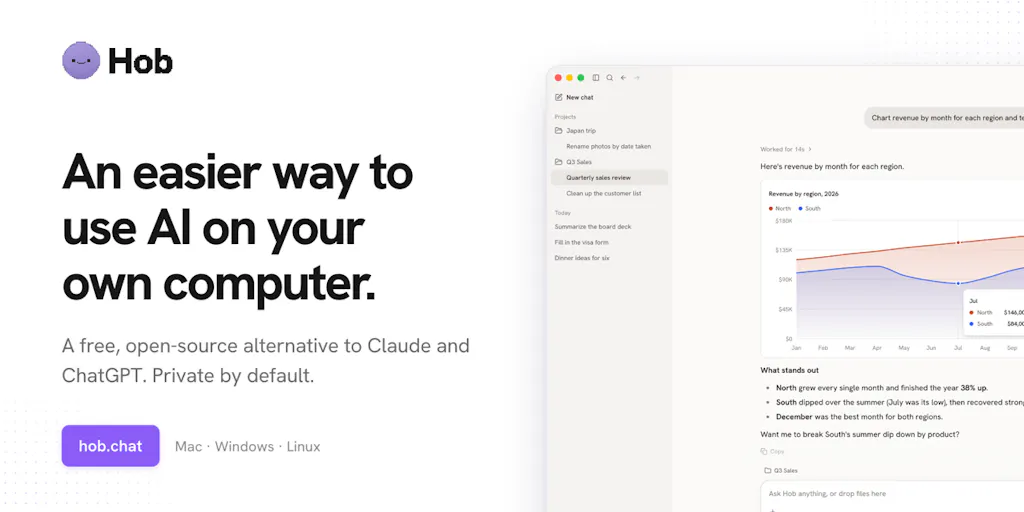
Hob is a free desktop app that works on your local files the way the Claude and ChatGPT desktop apps do, except the inference happens on your own hardware. Per the maker’s launch post, it picks an appropriate open model for your machine and configures it automatically, reads and edits files in folders you explicitly choose, asks before changing anything, and supports undo. It can turn spreadsheets into charts, fill PDFs, work with Word, Excel, and PowerPoint files, look at photos and screenshots, search the web (or run fully offline if you disable that), and connect to other apps through MCP.
The origin story is the most useful part. Mathiesen says he tried “every local AI app I could find” and found each one lacking in a different way: most would paste a text file into a small context window that failed as soon as the file exceeded a few KB, and the ones that could do more defaulted to hosted models or pushed a paid plan. That’s a fair diagnosis of the local-AI category circa now. Tools like Ollama and LM Studio give you model runners but assume you enjoy picking quantizations. Consumer chat apps like ChatGPT and Claude handle files gracefully but are cloud-first by design. Hob is trying to sit in the gap: local inference with the file-handling ergonomics of a consumer chat app.
For a social media operator, the honest framing is that this is not a content-generation tool. It won’t write your hooks or schedule your posts. It’s a file-operations assistant that happens to be private. Whether that’s valuable depends entirely on how much of your week is spent in spreadsheets, PDFs, and folders — which, if you’re running creator ops or a small agency, is probably more than you’d like to admit.
Why the “asks before changing anything” detail matters more than the model
In the comments, Oleksii Sekundant flagged that undo matters specifically when an agent edits files you already use, and Mathiesen’s reply — “don’t want my mom to delete all her photos by accident” — is the whole trust argument in one line. JC pushed further, asking whether Hob shows a diff or preview before writing, and whether it reads just the relevant part of a large file or loads the whole thing. That question went unanswered in the thread as of the scrape. It’s the right question, and I’d treat the absence of an answer as an open item rather than a red flag.
How it compares to the tools you’re probably already paying for
The comparison set here isn’t really ChatGPT versus Hob. It’s three overlapping categories, and each one has different tradeoffs.
Hosted AI chat apps. ChatGPT and Claude are genuinely good at reading a folder, looking at an image, and drawing a chart — the exact things Mathiesen says local apps couldn’t do. The tradeoff is that your files go to a server, and you’re on a subscription. For a solo creator uploading a public brand brief, that’s fine. For an agency handling client contracts, unreleased campaign assets, or creator payment data, it’s a compliance conversation you may not want to have.
Local model runners. Ollama and LM Studio are the plumbing. They’re excellent if you already know what you’re doing. They are not what you hand to a social media coordinator who just wants the spreadsheet turned into a chart. Hob’s auto-detection of hardware and model selection is the differentiator here — Omri Ben-Shoham called the runtime-selection logic “the real win,” noting that most local apps “default to cloud or force you through setup hell.” That matches my experience testing local tools: the failure mode is almost never the model, it’s the onboarding.
Social media management suites. Buffer, Hootsuite, Later, and Metricool own scheduling, analytics, and inbox. None of them are trying to be a local file agent, and Hob isn’t trying to be them. If you were hoping this replaces your scheduling stack, it doesn’t — and the maker isn’t claiming it does.
Where the math breaks on the “16GB is enough” claim
Mathiesen says computers with 16+ GB of memory “do really well,” and that 8GB is enough for “a decent Gemma model.” Nicholas Zakas pushed back with a real-world data point: 32GB with an older GPU still struggled, and CPU-only inference meant only the smallest Gemma variant ran at usable speed. Mathiesen’s answer — try it and see — is honest but not reassuring.
My take: RAM is the wrong single metric to optimize around. What matters is whether your machine has a capable GPU (Apple Silicon unified memory counts here) and whether the model Hob selects fits in VRAM. A 16GB M-series MacBook will likely outperform a 32GB Windows laptop with a weak discrete GPU for this class of work. The maker’s “16GB” guidance is directionally right for Apple Silicon and optimistic for older x86 machines. If you’re on a five-year-old laptop, test before you build a workflow around it.
What creators and social teams can actually borrow from this
Even if you never install Hob, the design decisions are worth stealing for your own content operations.
Treat file-handling as a first-class AI use case. Most creators think about AI as a writing tool. The higher-leverage use is the boring middle: reconciling a creator roster spreadsheet, extracting deliverable terms from a brand PDF, generating a chart for a pitch deck. When I’ve tested similar workflows with hosted models, the time saved on spreadsheet-to-chart tasks was consistently larger than on copywriting tasks — because the copy still needs your voice, but the chart just needs to be correct.
Build the “ask before write” norm into your own automations. If you use Zapier or Make to move data between your content calendar and your analytics sheet, you already know the terror of a misconfigured step overwriting a column. Hob’s explicit confirmation step and undo are the right pattern. Adopt it: any automation that writes to a file your team depends on should have a preview step and a rollback path.
Keep a local-only lane for sensitive assets. Unreleased product shots, influencer contracts, payment spreadsheets — these are the files you shouldn’t be pasting into a cloud chat window. A local tool gives you a place to do that work without a policy exception. Whether Hob is the right local tool for you depends on your hardware, but the lane itself is worth defining.
Why TikTok and Instagram creators should care more than LinkedIn ones
This is an opinion, not a sourced claim, but it follows from the workflow. Short-form video creators live in folders: raw clips, exported cuts, thumbnail candidates, caption drafts, and a spreadsheet tracking which clip went to which platform and when. That’s exactly the file-ops surface Hob is built for — image inspection, spreadsheet work, folder reads. LinkedIn-first creators, by contrast, tend to work in documents and drafts, where a hosted chat app is already fine and the privacy premium is lower. If your week is 60% file wrangling, local AI is worth the setup cost. If it’s 10%, it isn’t.
Where my judgment says it falls short
The launch post is a couple of weeks of noodling, by the maker’s own description. That’s not a criticism — open-source projects ship early — but it sets expectations. Here’s what I’d want answered before recommending it to a team.
The large-file question is unresolved. JC’s question about whether Hob reads only the relevant part of a large file or loads the whole thing is the crux of reliability. A 40MB PDF brand guide or a 200-row creator roster will break a naive implementation. Mathiesen didn’t answer in the thread. Until someone tests it, treat large-file handling as unproven.
MCP support is promising but early. The maker lists MCP connections to other apps, and Ben-Shoham said he’s watching how it scales. MCP is the right bet — it’s becoming the standard way to connect models to tools — but “connects through MCP” in a two-week-old project usually means a narrow set of tested integrations, not a broad ecosystem. Not disclosed: which MCP servers are actually supported and tested.
No scheduling, no publishing, no analytics. If you were hoping for a social media tool, this isn’t one. It won’t post to Instagram, TikTok, YouTube, X, LinkedIn, Facebook, Threads, or Pinterest. It won’t pull engagement rate or watch time. It’s a file agent. Judge it on that.
Local models are weaker, and the maker says so. Mathiesen is refreshingly direct: “local models are weaker than the newest frontier models.” His argument is that most tasks for most people don’t need the frontier. I’d mostly agree for file-ops work, less so for nuanced copywriting or complex multi-step reasoning. Set expectations accordingly.
Who it’s not for: teams that need audit trails and centralized admin (no account system means no admin console), anyone on hardware older than a few years, and anyone whose workflow is already well-served by a hosted chat app and who doesn’t handle sensitive files. Also — and this is the quiet one — anyone who needs support SLAs. It’s a free open-source project from one maker. That’s a feature for some, a risk for others.
What I’d watch / test next
This week, if you want to evaluate Hob or the category it represents, do three things. First, install it on the machine you’d actually use — not your newest laptop, your daily driver — and run one real task: take a spreadsheet you already have and ask it to produce a chart. Note whether it asks before writing and whether undo works. Second, test the large-file edge case JC raised: point it at your biggest PDF or a folder with mixed file types and see whether it reads selectively or chokes. Third, define your local-only lane: list the three file types your team handles that shouldn’t touch a cloud chat window, and decide whether a local tool earns a place in that workflow.
What I’m watching from the maker side: whether the large-file question gets a public answer, which MCP integrations get documented, and whether the project attracts contributors beyond the initial launch. Open-source local AI is a crowded category with strong incumbents in the runner layer — Ollama especially — and the differentiator will be ergonomics, not models. Hob’s bet on file-handling ergonomics and privacy is the right bet for creator ops. Whether a two-week project can execute on it is the open question. I’d bet on the category; I’m not yet betting on the specific tool.