The multi-agent era is quietly becoming a social media operations problem
If you run social for a living, you’re already living in a multi-tool world: one tab for scheduling, another for analytics, a third for asset review, a fourth for community replies, plus whatever AI assistant you’ve bolted on to draft captions. The next wave — running several AI coding agents side by side — looks like a developer problem, but it’s really the same operational headache creators and social teams already know: too many parallel processes, no single pane of glass, and a constant fear that something is silently failing while you’re looking the other way. That’s why Hypervibe, a new macOS app from maker Lucio, caught my attention even though it’s not marketed at social media managers at all.
What Hypervibe actually is, and the problem it’s chasing
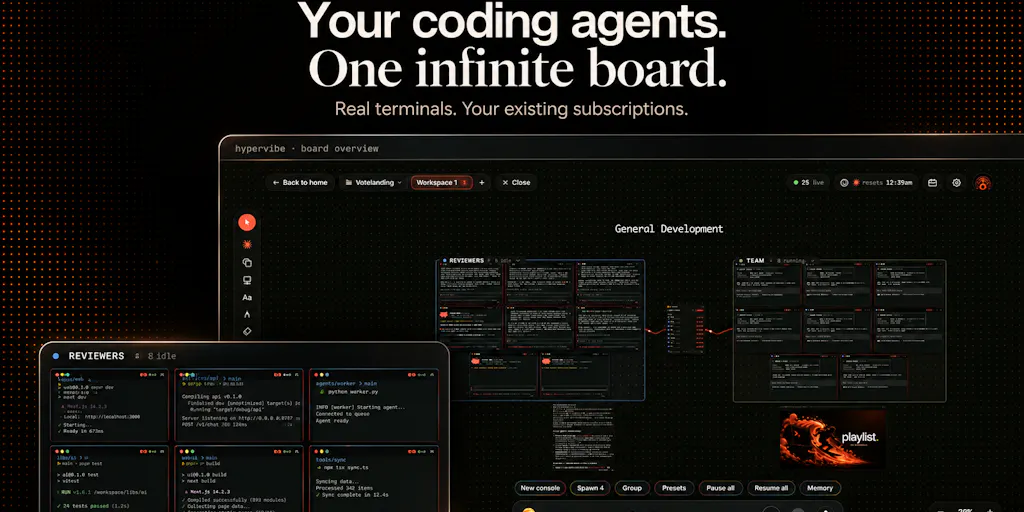
The pitch, per the maker’s own launch post, is narrow and specific: running several coding agents is easy, but keeping track of what each one is doing “gets messy fast: terminals in different tabs, a browser somewhere else, and notes disconnected from the work.” Hypervibe’s answer is an infinite board on your Mac where each agent runs in a real terminal, using its own CLI and your existing account. You can place Claude Code, Codex, and Gemini side by side, then arrange the workspace around the task.
A few concrete affordances the maker lists: seeing which agents are working or need your attention; keeping live web previews, a kanban, and notes beside your terminals; grouping agents into teams and coordinating the board by voice; and keeping project memory close so you can push it to an agent when you choose.
The constraints matter too. Hypervibe is built for macOS 14+ on Apple Silicon. Agent subscriptions are separate. Dictation is transcribed on your Mac, but voice planning and spoken replies use hosted services. Those are the kind of details I want up front, because “runs locally” and “runs locally except the parts that don’t” are very different promises.
Why a social media operator should read past the “coding agents” framing
Here’s my take: the underlying pattern Hypervibe is selling — many autonomous processes, one visual control surface, human attention routed to whatever needs it — is exactly the pattern social teams are about to face. If you’ve ever had Buffer queued, Metricool pulling analytics, a CapCut export rendering, and an AI caption tool churning in another tab, you already understand the cognitive load. Now imagine each of those is an agent that can act on its own. That’s the world Hypervibe is prototyping for developers first — and I’d bet social tooling copies the interface within a year.
How it differs from the tools you already stack
The honest comparison set isn’t Hootsuite or Later — those solve publishing and scheduling, not agent orchestration. The closer analogues are terminal multiplexers like tmux and iTerm2, plus general-purpose project boards like Trello or Notion. Hypervibe’s differentiation is that it fuses the terminal, the board, the preview, and the notes into one canvas, and treats each agent as a first-class object you can see the state of.
Where the incumbents win: tmux is free, scriptable, and runs anywhere — Linux servers included. Trello and Notion are cross-platform and already where your content calendar probably lives. Hypervibe is Mac-only, Apple Silicon-only, and requires you to bring your own agent subscriptions. That’s a lot of “yes, but” for a solo creator on a Windows laptop.
Where Hypervibe wins, if the demo holds: visibility. The maker’s framing — “see which agents are working or need your attention” — is the same value proposition that made Superhuman feel worth paying for in email. Attention routing is the product.
A concrete scenario from my own workflow
When I scheduled 30 posts across 5 platforms last month, the failure mode wasn’t the scheduling itself — it was that I had no single view of which platform’s asset was still rendering, which caption had been approved, and which one had silently failed an API call. I ended up building a spreadsheet to track state, which is exactly the kind of duct-tape solution Hypervibe’s board is designed to replace. If a social tool shipped that same “state of every in-flight post, visible at a glance” view, I’d pay for it tomorrow. The lesson from Hypervibe isn’t the coding agents — it’s the interface pattern.
Why TikTok creators should care more than LinkedIn ones
TikTok’s distribution rewards volume and speed: you’re often shipping multiple variants per day to test hooks, and the algorithm’s cold-start behavior means a post that flops in the first hour is effectively dead. That cadence is closer to a multi-agent workflow than LinkedIn’s slower, higher-effort posting rhythm. If you’re running five TikTok variants a day across two accounts, a board that shows which variant is drafted, which is scheduled, and which is already underperforming is genuinely useful. LinkedIn’s once-a-day cadence doesn’t create the same tracking pressure.
What creators and social teams can borrow from this launch
Three transferable ideas, regardless of whether you ever install Hypervibe:
1. One board, many processes. Stop treating each tool as its own silo. Whether it’s a Notion database, a Trello board, or a physical whiteboard, the win is having every in-flight piece of work visible in one place with a clear state. The maker’s “kanban beside your terminals” line is the whole thesis.
2. Voice as a coordination layer, not a gimmick. The launch mentions grouping agents into teams and coordinating the board by voice. For social teams, voice-to-task is underrated — dictating “move the Reels draft to review, ping the client” while walking between meetings is faster than opening an app. The caveat from the source: voice planning and spoken replies use hosted services, so it’s not fully local.
3. Project memory as a first-class asset. Hypervibe lets you “keep project memory close and push it to an agent when you choose.” That’s the same discipline good social teams apply with brand voice docs and content pillars — except most teams keep those in a Google Doc nobody reads. Making memory something you explicitly push into a process, rather than something a process has to go find, is a meaningful design choice.
Where the math breaks
Hypervibe’s model assumes you’re already paying for multiple agent subscriptions. The maker is explicit: “Agent subscriptions are separate.” So the true cost isn’t just the app — it’s the app plus Claude Code plus Codex plus Gemini, or whatever subset you run. For a solo creator, that stack adds up fast, and the ROI only clears if you’re genuinely running parallel agents. If you’re running one, you don’t need a board. You need a terminal.
The Windows and Linux question
In the comments, a user named Etienne Lescot raised a real workflow gap: three agents on the same repo, each in its own git worktree, with no quick way to see which branch each is on or whether its tests pass. He asked for branch name and last test result on each card — and noted he’s on Windows, “so I can only watch for now.”
The maker’s reply is worth quoting because it’s unusually candid: Hypervibe “already tracks git per repo: the current branch, pending changes and ahead/behind sit in a corner pill,” and there’s a branches card to switch or create branches on the board. But — and this is the honest part — “what it doesn’t do yet is break that down per agent when each one lives in its own worktree.” He calls that “the next step for the git side,” and agrees branch plus last test result per card “is the right shape for it.”
I’d flag that as a trust signal. The maker didn’t oversell. He named the gap and the fix. That’s rare on launch pages.
Where my judgment says it falls short
Platform lock-in is severe. macOS 14+ on Apple Silicon only. The maker says it’s “fully native,” which explains the choice, but it excludes a huge chunk of the creator economy — anyone on Windows, Intel Macs, or Linux. The maker acknowledged the Windows vote in the comments, but there’s no timeline. Not disclosed.
The social-media use case is speculative, not shipped. I’m connecting dots the source doesn’t connect. Hypervibe is a developer tool today. If you’re a social media manager reading this, you cannot buy Hypervibe and manage your content calendar with it. You’d be buying a developer workflow tool and hoping the pattern migrates. That’s a bet, not a purchase.
Voice features depend on the cloud. Dictation is on-device, but “voice planning and spoken replies use hosted services.” For creators handling client-confidential content, that’s a data-flow question worth asking before adoption. The source doesn’t detail retention or processing terms. Not disclosed.
No pricing in the source. I can’t tell you what Hypervibe costs, whether there’s a free tier, or how licensing works. The launch page doesn’t say. If you’re evaluating it, that’s your first question in the comments.
The “infinite board” could become its own mess. Every tool that promises to end tab chaos risks becoming another tab. Whether Hypervibe’s board stays legible at 15 agents is an open question the launch doesn’t answer. My take: the kanban-plus-terminal hybrid is the right instinct, but infinite canvases reward discipline, and most teams don’t have it.
Who this is NOT for
If you post to one platform, one account, once a day — skip it. If you’re on Windows or Linux — you can’t use it yet. If you want a social scheduling tool — this isn’t one, and no amount of reframing changes that. If you’re allergic to paying for multiple AI subscriptions — the economics won’t work. Hypervibe is for the specific person already juggling three coding agents on a Mac and losing track. That’s a narrow slice, and the maker seems to know it.
What I’d watch / test next
If you’re a social operator curious about this pattern, here’s what I’d actually do this week — none of it requires buying Hypervibe:
- Audit your parallel processes. List every tool that’s running something on your behalf right now — scheduler, renderer, analytics sync, AI drafter. If it’s more than three and you can’t see their state in one place, you’ve got the problem Hypervibe solves, just in a different domain.
- Prototype the board. Build a single Kanban column set — Drafting / Rendering / Scheduled / Live / Needs Attention — in whatever tool your team already uses. Force every in-flight post into it for one week. Measure how often you have to ask “where is that thing?”
- Test voice-to-task. Try dictating three tasks into your project tool instead of typing them. If it saves real time, the voice layer Hypervibe is betting on isn’t a gimmick — it’s a habit.
- Watch the git-per-agent feature. If the maker ships per-agent branch and test status, that’s the moment Hypervibe stops being a pretty canvas and starts being infrastructure. That’s the update I’d check the Product Hunt page for.
- Ask about pricing and data handling in the comments before you commit. The maker is responsive — he answered the worktree question in detail within a day. Use that.
The bigger takeaway: the interface pattern Hypervibe is pioneering — many autonomous processes, one visual surface, attention routed to what needs a human — is coming to social media tooling whether or not Hypervibe survives. The creators who internalize that pattern now will be ready when their scheduling tool, their analytics tool, and their AI caption tool all start acting like agents. The ones who don’t will be back to 14 browser tabs, wondering which one failed.