The AI quota problem is quietly becoming a social media operations problem
If you run social accounts for a living, you already know the feeling: it’s 4:40pm, you’ve got a carousel half-written, three hooks to A/B test, and a LinkedIn repurpose pass to finish — and your AI assistant just hit a rate limit mid-sentence. The tool that was supposed to compress your content workflow has become another thing to babysit. That’s the exact friction ilha, a new macOS utility from maker Rafael Khalil, is trying to solve — not for social media specifically, but for anyone who leans on multiple AI coding accounts all day. And while the launch page frames it around Claude Code and Codex, I think the underlying pattern matters far more to creators and social teams than the coding framing suggests.
Here’s my thesis: the bottleneck in AI-assisted content production is no longer model quality — it’s quota visibility and account orchestration. Every social operator I know is now juggling two or three AI subscriptions, a couple of free tiers, and a browser full of tabs, guessing which account still has headroom. ilha is a small, opinionated answer to that guessing game. Whether or not you ever install it, the problem it names is one you should be solving this quarter.
What ilha actually does — and what it deliberately doesn’t
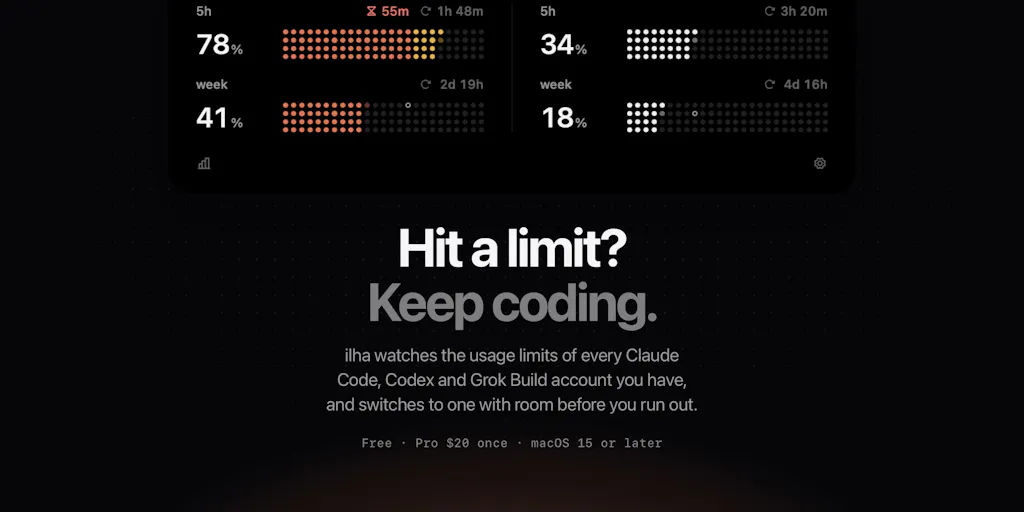
Strip away the launch-page polish and ilha is a menu-bar/notch utility that does three things. First, it surfaces the usage windows for each of your saved AI accounts — the maker describes tracking both the 5-hour and weekly windows across Anthropic, OpenAI, and xAI accounts already logged in on your Mac. Second, when an account runs low, it offers to switch; at the hard limit, it switches automatically by swapping the CLI’s login in place, so running Claude Code sessions carry on rather than dying. Third, it reads usage directly from the providers using the logins already on your machine, and the maker states plainly that nothing about your usage, logins, or logs ever leaves the Mac.
Pricing, per the launch page: Free covers one account per CLI. Pro is $20 once — a one-time charge that includes a year of updates — for every account, switching, and Insights, with a 14-day trial and no account required to try it.
That’s the whole product. It is not a scheduler, not a content tool, not an analytics dashboard. It’s a quota-aware account switcher with a cost view. The scope is narrow on purpose, and I respect that — but it means the “what problem does this solve” question has a very specific answer: it solves the mid-task interruption problem for people running multiple AI CLI accounts. If that’s not your workflow, ilha is not for you, and I’d rather say that up front than dress it up as a universal creator tool.
Where the cost view earns its keep
One detail buried in the comments is more interesting than the headline feature. A commenter notes that pricing each week’s usage at API rates “shows what the plan is actually worth,” and the maker confirms the cost view reads local logs. For a social team paying for multiple AI subscriptions out of a marketing budget, that’s the kind of number that actually justifies a renewal conversation. Most subscription dashboards tell you what you paid. Very few tell you what you used, translated into the equivalent pay-as-you-go rate. That framing — plan value versus API-equivalent cost — is the most transferable idea on the page, and I’ll come back to it.
How it differs from the tools you’re probably already using
The honest comparison here isn’t Buffer or Later — ilha doesn’t touch publishing at all. The closer comparisons are the general-purpose automation and scheduling stacks that social teams already pay for: Buffer, Hootsuite, Later, and Metricool all solve distribution — queueing posts, tracking engagement, pulling analytics across Instagram, TikTok, YouTube, X, LinkedIn, Facebook, Threads, and Pinterest. None of them care whether your AI assistant has quota left, because none of them are in the business of generating the content in the first place.
The other comparison class is the AI tooling layer — Canva Magic Studio, CapCut for video, and the constellation of AI writing assistants. Those tools have their own quota systems, and most of them bury usage meters deep in account settings. ilha’s differentiator is placement: it lives in the notch, always visible, and it acts — it doesn’t just report. The distinction between a dashboard and a switch is the whole product thesis, and it’s the right one. Dashboards assume you’ll check them. Switches assume you won’t.
Why the “switch, don’t dashboard” framing matters
In my experience running multi-account workflows, the failure mode is never “I didn’t know I was near the limit.” It’s “I knew, I meant to switch, and then I lost the thread mid-task and burned twenty minutes re-establishing context.” A usage meter you have to remember to open doesn’t fix that. An automatic login swap that lets a running session continue does. That’s a real operational difference, and it’s the reason I’d bet this pattern gets copied by bigger tools within a year.
What creators and social media teams can borrow from it
Even if you never touch a CLI, there are three transferable lessons here for anyone producing content at volume.
First: treat AI quota as a production constraint, not an afterthought. When I scheduled 30 posts across five platforms last month, the actual bottleneck wasn’t the scheduler — it was the generation step, where I was bouncing between accounts and losing momentum. Social teams plan their publishing calendar meticulously and their AI usage not at all. That asymmetry is costing you throughput.
Second: the cost-translation trick. The idea of pricing your weekly AI consumption at API rates is genuinely useful for budget justification. If you’re the person who has to defend a $200/month AI subscription to a finance team, “here’s what this would have cost pay-as-you-go” is a stronger argument than “it makes us faster.” I’d love to see a social-specific version of this: what did your AI-assisted content actually cost per published post?
Third: local-first as a trust posture. The maker’s insistence that usage, logins, and logs never leave the Mac is a positioning choice, and it’s the right one for a tool that reads your account credentials. For social teams handling client accounts, “your data doesn’t leave your machine” is increasingly a procurement checkbox, not a nice-to-have.
Why TikTok creators should care more than LinkedIn ones
Here’s an opinion, clearly flagged: the creators who feel this problem most acutely are the ones doing high-volume, short-cycle iteration — TikTok and Reels creators pumping out 5–10 hooks a day, testing thumbnails, rewriting captions. That workflow burns AI quota fast and rewards uninterrupted generation. LinkedIn creators working on one long-form post a week will barely notice a rate limit. The volume math is different, and it should shape how you think about tooling spend: high-frequency short-form operators should be optimizing for continuity, while low-frequency long-form operators should be optimizing for quality per generation.
Where my judgment says it falls short
Now the balanced part, because a launch page is a launch page.
The forecast feature — the “on pace to run out” estimate that one commenter specifically called out as the thing they’d actually use — is, by the maker’s own admission, a straight line from the average usage rate since the current window started. It doesn’t learn your weekly work schedule, it’s held back for the first 10% of the window, and the maker concedes that “a long break followed by a heavy session can still throw it off.” That’s refreshingly honest, but it means the headline smart feature is a rough heuristic, not a prediction engine. If you’re the kind of operator who wants reliable forecasting, this will disappoint you.
The platform coverage is also narrow: Anthropic, OpenAI, and xAI accounts. If your content stack runs on Google Gemini, Mistral, or any of the smaller providers, ilha doesn’t help you today. And the switching behavior differs by CLI — the maker notes that Claude Code can move before the limit with auto-switch enabled and running sessions follow it, but Codex switches at the limit, and you need to restart open Codex sessions afterward. That asymmetry is a real workflow wrinkle; a restart mid-task is exactly the interruption the tool is supposed to eliminate.
Where the math breaks
The one-time $20 Pro price with a year of updates is unusual in a market that’s gone almost entirely subscription. It’s a genuine differentiator on cost, but it raises an obvious open question the source doesn’t answer: what happens after the year of updates ends? Is it feature-frozen, or does it stop working? The launch page is silent, and that’s the kind of ambiguity that should give a procurement-minded operator pause. I’d want that spelled out before recommending it to a team.
There’s also the multi-account question. A commenter asks whether you can switch between accounts when usage is approaching the weekly limit, and the maker confirms yes — ilha watches both windows across saved accounts, and switching is part of Pro. Good. But the free tier covering one account per CLI means the core value proposition — orchestration across multiple accounts — is entirely behind the paywall. That’s a fair business model, but it means the free tier is closer to a demo than a usable product for the target user.
What I’d watch / test next
If you’re a social operator reading this, here’s what I’d actually do this week — none of which requires installing ilha.
First, audit your AI quota reality. Open every AI tool you pay for and find the usage meter. If you can’t find it in under thirty seconds, that’s your first problem, and it’s the problem ilha names.
Second, instrument your generation workflow. For one week, note every time you hit a limit mid-task and what it cost you in lost momentum. If that number is zero, you don’t need this category of tool. If it’s non-trivial, you’ve found a real bottleneck.
Third, steal the cost-translation idea even without the product. Export your AI usage, price it at API rates, and put that number next to what you spend. That single slide will do more for your tooling budget than any pitch deck.
As for ilha itself: watch whether the maker ships a learning forecast, whether Codex session restarts get smoother, and whether the post-year-one update model gets clarified. Those three things will determine whether it becomes a category or a curiosity. The problem it’s pointing at, though — quota-aware orchestration for AI-assisted content work — is real, and it’s only going to get bigger as every social team’s stack gets more model-dependent. My take: the product is small, but the pattern is the story.