The creator economy’s real bottleneck isn’t content production — it’s the operational chaos behind the scenes
Every creator I know has a version of the same confession: the content calendar is under control, the posting schedule is automated, but the business side of being a creator is held together with screenshots, sticky notes, and the vague memory that something important is coming up. A brand deal invoice with a net-30 due date buried in an email thread. A conference panel confirmation sitting in a PDF. A sponsorship contract renewal you meant to calendar three weeks ago. The tools that run our publishing workflows — Buffer, Later, Metricool — are genuinely excellent at getting posts out the door. None of them are built to catch the operational dates that keep a creator business solvent. That gap is why Invited - AI Reminder Scanner, launched by Himanshu and the team at Kraftostech, caught my attention. It’s not a social tool. But the problem it solves is one every operator eventually hits.
What Invited actually does — and why it’s not just another reminder app
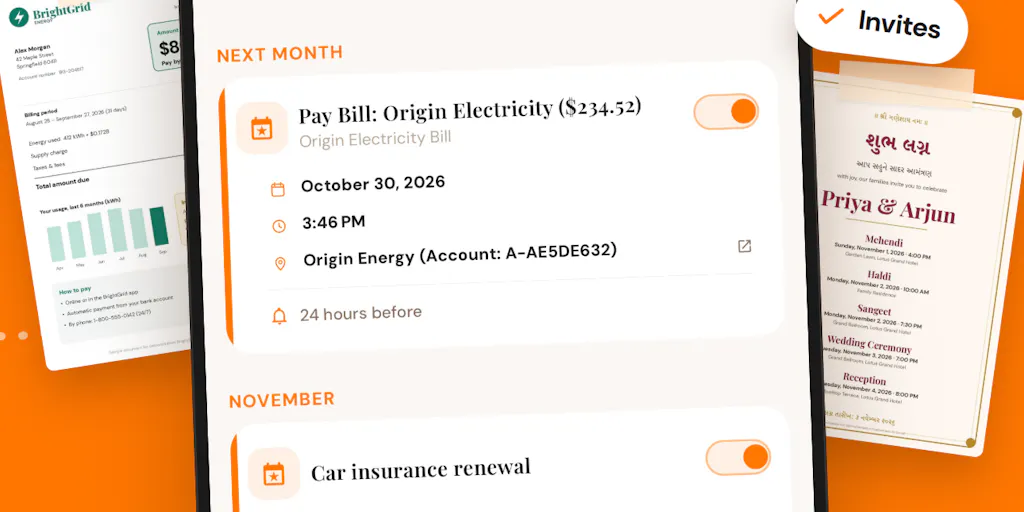
The maker’s framing on the launch page is refreshingly plain: “important dates are everywhere, but creating reminders manually is annoying.” That’s the whole thesis. You take a photo, pick a screenshot or PDF, or share a document directly into the app. The AI reads it and pulls out dates, times, places, and amounts. You review the extraction, correct anything wrong, save it, and Invited reminds you before it matters.
The detail that separates this from the dozen other “AI reads your documents” launches is multi-date extraction. According to the maker, Invited can turn one document into multiple reminders instead of stopping at the first date it finds. That sounds minor until you think about the actual documents creators deal with. A brand partnership contract has a content delivery deadline, an invoice due date, and a campaign reporting window — three dates, one PDF. A wedding invitation (which commenter Ilyas flagged as a strong use case) might contain a ceremony, a reception, and a gift-registry deadline. A utility bill has a due date and a late-fee date, as commenter Oleksii Sekundant pointed out. The maker confirmed that keeping paired dates together was a deliberate design focus.
The product also supports 80+ languages and nine calendar systems, including Gregorian, Vikram Samvat, Hijri, Hebrew, and Chinese Lunar. No account is required to start, and the reminder list stays on the device. It’s available on both iPhone and Android. Pricing is not disclosed on the launch page.
Why the multi-date extraction detail matters more than it sounds
Most reminder apps treat a document as a single event. You scan a receipt, you get one reminder. That model breaks the moment you’re dealing with anything that has more than one consequential date. For creators specifically, the highest-stakes documents — contracts, invoices, campaign briefs — almost always have multiple dates. If a tool forces you to scan the same document three times and manually create three reminders, you’ll stop using it by week two. The fact that Invited treats this as a first-class problem is, in my experience, the difference between a tool that survives the novelty phase and one that becomes part of your operational stack.
How this fits (and doesn’t fit) the creator tool stack
Let me be clear about what Invited is not. It’s not a social media scheduler. It’s not a content calendar. It’s not a client CRM. If you’re looking for something to replace Hootsuite or Sprout Social, this isn’t it. What it is — or at least what it’s trying to be — is the layer underneath all of those tools: the thing that catches the operational dates that fall through the cracks between your publishing workflow and your accounting software.
Here’s how I’d think about the stack:
- Publishing layer: Buffer, Later, Metricool, native schedulers
- Content production layer: Canva, CapCut, Descript
- Analytics layer: platform native insights, Metricool, third-party dashboards
- Business operations layer: invoicing tools, contract management, and — this is the gap — reminder/date tracking
That last layer is where most solo creators and small teams are weakest. When I was running social for a small agency, we had a shared Google Calendar for campaign dates, but the actual source documents — the signed SOW, the invoice, the brief — lived in email and Drive folders. Someone had to manually read each one and enter the dates. That someone was usually me, and I forgot things. Not because I was careless, but because manual date entry is exactly the kind of low-value, high-consequence task that humans are bad at.
The email problem — and why it’s the real test
The most pointed question in the launch comments came from Christian Mardan: “Most of my dates arrive by email: invites, flight confirmations, renewal notices. A forward-to address or a Mail extension that turns them into reminders would be my top request.” The maker’s response was honest: email is “one of the most obvious next steps” but not yet built.
This is the crux. If Invited only works when you manually open the app and scan a document, it’s solving maybe 40% of the problem. The other 60% is the stuff that arrives in your inbox and never gets touched. A forward-to address or an email extension would close that gap. Until then, the workflow requires a conscious step — “I need to remember this, let me open Invited” — which is exactly the step that fails when you’re busy.
My take: the email integration isn’t a nice-to-have. It’s the feature that determines whether Invited becomes a daily habit or a tool you use twice and forget. The maker seems to know this, which is a good sign.
Where the math breaks
There’s a second limitation the maker was upfront about: relative dates. Commenter Neeraj Nathany asked whether Invited can catch dates written longhand, like “third Monday of next month.” The maker’s answer was candid: “the current version works best with explicit dates, so I wouldn’t claim perfect handling there yet. Natural-language date understanding is definitely something we want to improve.”
That’s a meaningful limitation. A lot of real-world documents — especially informal ones like event invites or hand-written notes — use relative date language. If Invited can’t parse “the Friday after next” or “end of quarter,” it’ll miss a chunk of the dates that matter most. The maker’s transparency here is a trust signal, but it’s also a reminder that AI extraction is still a suggestion engine, not an oracle. The review step exists for a reason.
What creators and social media teams can actually borrow from this
Even if you never download Invited, there’s a workflow lesson here that’s worth stealing. The product’s core insight is that documents contain multiple dates, and those dates should be extracted together, not separately. That’s a principle you can apply to your own operations right now, with or without AI.
Here’s what I mean. Most creators I know handle operational dates in one of two ways:
- The calendar dump: Everything goes into one Google Calendar or Notion database, usually entered manually, often after the fact.
- The inbox graveyard: The source document stays in email, and the date lives in your head until it doesn’t.
Both fail for the same reason: they separate the date from its context. When you get a reminder that says “Invoice due,” you have to go find the invoice to remember which client, which amount, which campaign. When the reminder says “Invoice due — Brand X, $4,500, campaign deliverables also due same day,” you can act on it immediately.
The borrowable practice: when you process a contract, brief, or invoice, extract every date in one pass and create a single linked reminder set. Whether you use Invited, a Notion template, or a plain-text file, the principle holds. One document, multiple dates, kept together.
Why TikTok creators should care more than LinkedIn ones
This is a generalization, but I’d bet it holds: TikTok and Instagram creators tend to operate with thinner operational infrastructure than LinkedIn or YouTube creators. The platform rewards volume and speed, which means the business side often gets neglected until something breaks — a missed invoice, a lapsed contract, a forgotten deliverable deadline. LinkedIn creators, by contrast, are often already in a professional context where calendar discipline is expected. YouTube creators sit somewhere in between, but the longer production cycles mean fewer but higher-stakes dates.
If you’re a TikTok creator juggling five brand deals a month, each with its own deliverable schedule and payment terms, a tool like Invited is disproportionately valuable. If you’re a LinkedIn creator with one or two long-term retainer clients, the pain is lower — but it’s not zero.
Where my judgment says Invited falls short
I want to be balanced here, because the launch page is genuinely promising but also genuinely incomplete. Here’s what I’d flag:
No email integration yet. As discussed, this is the biggest gap. The maker confirmed it’s on the roadmap but not built.
No agent/API access yet. Commenter Juan Viera Garcia asked whether Invited could connect to an agent — the idea being that an AI assistant could consume the extracted dates and act on them. The maker’s response: “We don’t have a direct agent integration yet, but it’s definitely something we’re thinking about. API/webhook-style access is high on the list.” For creators building automated workflows — say, a Zapier or Make.com pipeline that triggers when a new contract date is extracted — this is a missing piece. Not disclosed when it might arrive.
Relative date parsing is weak. The maker acknowledged this directly. If your documents use natural-language date phrasing, expect to correct the extraction manually.
No account required is a double-edged sword. On one hand, it’s great for privacy and frictionless onboarding. On the other hand, it means your reminders live on one device. If you lose your phone or switch devices, there’s no cloud sync mentioned. The maker says “your reminder list stays on your device” — which is a privacy feature but also a durability risk. Not disclosed whether there’s any backup or export option.
Pricing is not disclosed. The launch page doesn’t mention cost. That’s not unusual for a Product Hunt launch, but it matters for creators evaluating whether to add another subscription to an already crowded stack.
Who this is NOT for
If you’re a social media manager at a mid-to-large agency with a dedicated ops team, you probably already have project management software — Asana, Monday, ClickUp — that handles date tracking at the team level. Invited is a personal utility, not a team platform. If you’re a creator who already has a robust Notion or Airtable system with automated date extraction, you may not need this. And if your operational dates are few and far between, the overhead of adopting a new tool may not be worth it.
The sweet spot is the solo creator or very small team (1–3 people) who is drowning in document-based dates and doesn’t have a system for catching them.
What I’d watch / test next
If you’re curious about Invited, here’s what I’d actually do this week:
- Download it and test it on your three most date-heavy documents. A brand contract, an invoice, and a travel confirmation are good candidates. See how accurately it extracts multiple dates and whether the review step is fast enough to be sustainable.
- Test the relative-date limitation deliberately. Scan a document with a phrase like “due by end of month” or “two weeks from signing” and see what happens. This will tell you quickly whether the tool fits your document types.
- Watch for the email integration. If the maker ships a forward-to address or mail extension, that’s the moment Invited becomes a daily-driver tool rather than an occasional utility. Until then, treat it as a supplement to your existing system, not a replacement.
- Ask the maker about export and backup. If your reminders are device-only, you need to know what happens when you switch phones. The launch comments are still active — this is a fair question to ask directly.
The broader lesson: as creators, we’ve gotten very good at optimizing the publishing side of our work and very bad at optimizing the operational side. Tools like Invited are a reminder — pun intended — that the business of being a creator is still full of manual, error-prone tasks that AI can plausibly help with. Whether this specific product wins is an open question. But the problem it’s pointing at is real, and it’s one more creators should be solving for.