The Creator Economy’s Real Bottleneck Isn’t Content — It’s the Admin Tax
If you run social media for a living, you already know the dirty secret of the job: the visible work — the Reel, the carousel, the thread — is maybe 30% of the time. The rest is admin. Replying to DMs, tagging UTM parameters, rescheduling a post because the API rate-limited you, chasing a brand deal invoice, remembering which platform rejected a link. Job hunting has the same shape: the “getting hired” part is small, and the “filling in the same form forty times” part is enormous. That’s why Jobmate AI, launched by David Herbert on Product Hunt, caught my eye — not because I’m job hunting, but because the problem it’s solving is structurally identical to the one every social media operator I know is drowning in. The thesis of this essay: the next wave of creator tooling won’t be about generating more content — it’ll be about automating the repetitive operational layer around content. Jobmate is a useful case study in what that looks like, where it works, and where the “auto-apply” instinct should make every operator nervous.
What Jobmate AI Actually Does (And Why It Maps to Your Workflow)
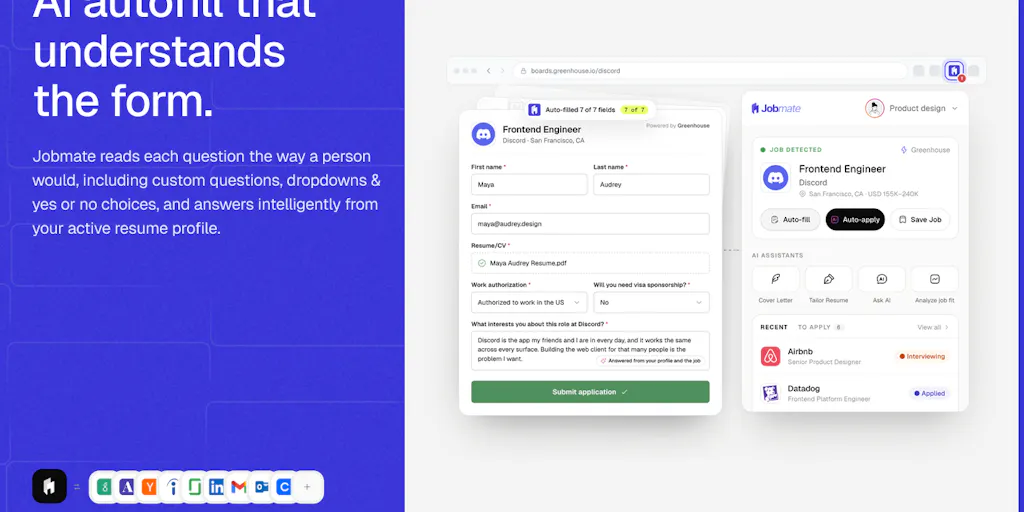
Let me be precise about the product before I editorialize. According to the maker’s launch post, Jobmate AI does six things: it fills application forms from a stored profile (including free-text written questions, with every answer shown before submission); it offers an auto-apply mode that can run through applications with an optional review step; it aggregates new roles from company career pages and job boards into one feed; it tailors resumes and cover letters per role; it surfaces recruiters and hiring managers at the target company; and it tracks applications and pulls interviews from Google or Outlook Calendar. It’s free to start, runs as a Chrome and Firefox extension, and the maker explicitly frames it as early-stage and wants feedback on things that “don’t work the way you’d expect.”
Now strip away the job-search framing and look at the skeleton: profile-based form autofill, a unified intake feed, per-target tailoring, contact discovery, and calendar-synced tracking. That is, almost line for line, the feature spec of a social media management tool. Buffer and Hootsuite are unified feeds plus scheduling. Later is per-platform tailoring. Metricool is analytics plus tracking. The interesting thing about Jobmate isn’t the job-search niche — it’s that it validates the pattern of automating the boring middle layer.
Why the “review before submit” toggle is the whole ballgame
The single most important line in the launch post is the one about showing every answer before it goes in, and the auto-apply mode letting you review each submission. That’s the difference between a tool that saves you time and a tool that gets you blacklisted. In my own experience running brand accounts, the tools that failed weren’t the ones that couldn’t post — it was the ones that posted wrong at scale. A mis-scheduled tweet during a PR crisis, a caption with the wrong client’s hashtag, an auto-reply to a customer complaint that read like a robot. The review gate is not a limitation; it’s the trust mechanism. A commenter on the launch, Saad El Gueddari, made exactly this point — that the AI reviewing written answers before they go in is the part he’d “keep switched on,” because “the application still needs to sound like the person applying.” That’s the correct instinct, and it’s the same instinct every social team should apply to any AI drafting tool: keep the human review step, always.
How It Compares to the Incumbents You Already Pay For
Here’s where I’d place Jobmate in the tooling landscape, because the comparison is what teaches you something transferable.
Against LinkedIn’s native Easy Apply and job-board autofill: the incumbents are platform-locked. LinkedIn wants you to apply on LinkedIn; Indeed wants you on Indeed. Jobmate’s pitch is the aggregation — pulling from company career pages and job boards into one feed — which is the same reason social operators use a Buffer or Hootsuite instead of living inside each native app. Native tools optimize for their platform’s retention; third-party tools optimize for your throughput. That’s the durable wedge.
Against resume/cover-letter AI tools: there’s a crowded field of AI writing assistants, and the tailoring feature here is table stakes — Canva and countless resume builders now generate tailored copy. What’s less common is tying the tailoring to the specific listing in a tracked pipeline. In social terms: everyone can generate a caption; fewer tools can generate the caption, schedule it to the right platform, and log the performance.
Against CRM-style trackers: the calendar-synced interview tracking is essentially a lightweight CRM. Social teams already understand this — a content calendar is a CRM for posts. The lesson is that the tracking layer is where retention lives. Tools that only create (generation) get churned; tools that hold your history (tracking) get kept.
Where Jobmate differs from all of them is the combination: intake feed + tailoring + contact discovery + autofill + tracking in one extension. That’s a lot of surface area for an early product, and it’s also the biggest risk — see the limitations section.
What Social Media Teams Should Steal From This
Four transferable ideas, in order of how fast you can implement them this week.
1. Build a “profile” layer, not a blank-page workflow
Jobmate’s core primitive is a stored profile it fills forms from. Most social teams don’t have this — they have a brand voice doc buried in Notion and a designer who re-types the same bio every time. Build the equivalent: a single structured source of truth for brand voice, approved claims, hashtag sets, link-in-bio URLs, and per-platform bio variants. When you use AI drafting tools (and you should — see CapCut for video, and the various AI caption tools), feed them from that profile rather than a blank prompt. The output quality difference is not subtle. This is the same reason Jobmate’s autofill works: it’s not magic, it’s structured input.
2. Treat “review before publish” as a non-negotiable gate
The auto-apply-with-review pattern should be your default for anything AI-generated and scheduled. In my own tests of AI scheduling features across tools, the failure mode is never “the AI couldn’t write” — it’s “the AI wrote something plausible and nobody caught the factual error.” A review queue where a human sees every AI-drafted caption before it hits the calendar is cheap insurance. If a tool doesn’t offer it, that’s a red flag.
3. Unify intake, then tailor at the edge
Jobmate pulls roles into one feed, then tailors per role. The social equivalent: pull all your content ideas, comments, and DMs into one inbox (many tools do this), then tailor the response per platform at the point of publishing. The mistake teams make is tailoring too early — writing five different versions of the same post before knowing which platform it’s for. Intake first, tailor last.
4. Track outcomes in the same system that creates
The calendar-sync-and-track feature is a reminder that creation and tracking should live together. If your scheduler doesn’t feed your analytics, you’re doing manual reconciliation. Tools like Metricool and the analytics layers in Later exist precisely to close this loop. Pick a stack where a post’s performance is one click from the post itself.
Why TikTok-first creators should care more than LinkedIn-first ones
If your distribution is LinkedIn, the “admin tax” is annoying but survivable — you post less, the platform rewards consistency over volume, and a human can keep up. If your distribution is TikTok or Instagram Reels, volume is the strategy: the algorithm rewards posting frequency and watch-time retention, and the operational load scales linearly with volume. That’s why short-form creators are the heaviest adopters of scheduling and repurposing tools — and why an “auto-apply”-style automation layer matters more to them. The same logic applies to YouTube Shorts pipelines and Pinterest pin scheduling, where the per-item effort is low but the count is high. The higher your volume, the more the admin tax eats your creative time, and the more a structured automation layer pays off.
Where My Judgment Says This Falls Short
I have to be honest about the gaps, because that’s the job.
Auto-apply at scale is a reputational risk, not just a time-saver. The launch post is careful to say you can review each submission, but “auto-apply can go through applications for you” is the kind of feature that, used carelessly, produces the job-search equivalent of spam — hundreds of low-effort applications that hurt the candidate’s reputation with recruiters. The maker doesn’t disclose any rate limits, per-company caps, or anti-spam safeguards, and the source is silent on how the tool handles duplicate applications or companies that explicitly prohibit automated submission. I’d want to see that before recommending it to anyone. My take: the review gate should be mandatory, not optional, for exactly this reason.
It’s early, and the maker says so. “It’s still early” and a request for feedback on things that “don’t work the way you’d expect” is refreshingly honest, but it also means: no disclosed user numbers, no pricing beyond “free to start,” no information on data handling for the resume and profile data you upload. For a tool that stores your employment history and calendar access, data policy is not a footnote — it’s the whole trust equation. Not disclosed in the source, and that’s a gap worth flagging loudly.
Extension-only is a ceiling. Chrome and Firefox only means no mobile, no Safari, and a dependency on browser permissions that some security-conscious users (and corporate IT departments) will block. For a job seeker that’s tolerable; for a social team that lives in mobile apps, it’s a real constraint.
The “find recruiters” feature is the weakest link. Contact discovery is a feature that sounds great and often underdelivers — scraped contact data goes stale fast, and outreach without genuine personalization reads as spam. In my experience with similar prospecting tools, the hit rate on “find the right person” is the feature most likely to disappoint. I’d bet this is the first thing to get cut or rebuilt.
Who it’s NOT for: anyone applying to a handful of senior roles where quality-per-application matters more than volume; anyone in a regulated industry where automated form-filling raises compliance questions; and anyone who won’t read the data policy before uploading a resume. If that’s you, use the manual version of this workflow and skip the tool.
What I’d Watch / Test Next
Three concrete things an operator can do this week, regardless of whether you ever touch Jobmate.
First, audit your own admin tax. For one week, log every minute you spend on non-creative work — form-filling, scheduling, tracking, replying. Most social managers I know are shocked by the number. That audit tells you exactly which automation to buy next, instead of buying the shiniest tool.
Second, build your profile layer. Write the structured brand-voice-and-assets doc I described above, and test it against your current AI drafting tool. If the output improves, you’ve found free leverage. If it doesn’t, your tool isn’t using your input — that’s a signal to switch.
Third, watch Jobmate’s next few months as a leading indicator. The maker is actively soliciting feedback, and the roadmap decisions — whether auto-apply stays optional, whether data policy gets published, whether the extension expands beyond Chrome/Firefox — will tell you how seriously to take this category. I’d bookmark the Jobmate AI Product Hunt page and check back. The product itself may or may not survive; the pattern — structured profile, unified intake, per-target tailoring, gated automation, integrated tracking — is the one I’d bet the next generation of creator tools is built on. Watch the pattern, even if you skip the product.