The Notch Is a Notification Graveyard, and That’s a Creator Problem
If you publish across Instagram, TikTok, YouTube, X, LinkedIn, Facebook, Threads, and Pinterest, your MacBook’s notch is probably the most underused real estate in your entire workflow. Think about what actually lives there right now: a black cutout that eats menu bar space while your DMs, meeting pings, and render progress bars hide behind three clicks. For creators running a one-person content operation, that friction compounds. Every context switch — checking a Slack reply mid-edit, hunting for a meeting link, glancing at AirPods battery before a voiceover session — is a small tax on output. So when I saw Kishi Notch launch on Product Hunt, built by indie developer Özhan Gebeşoğlu, my first reaction wasn’t “cute Mac utility.” It was: this is the kind of ambient, always-visible layer that social media operators have been cobbling together from menu bar apps and widgets for years. Let me explain why it matters, what it actually does, and where I think it falls short for anyone whose job is publishing at scale.
What Kishi Notch Actually Solves (and What It Doesn’t)
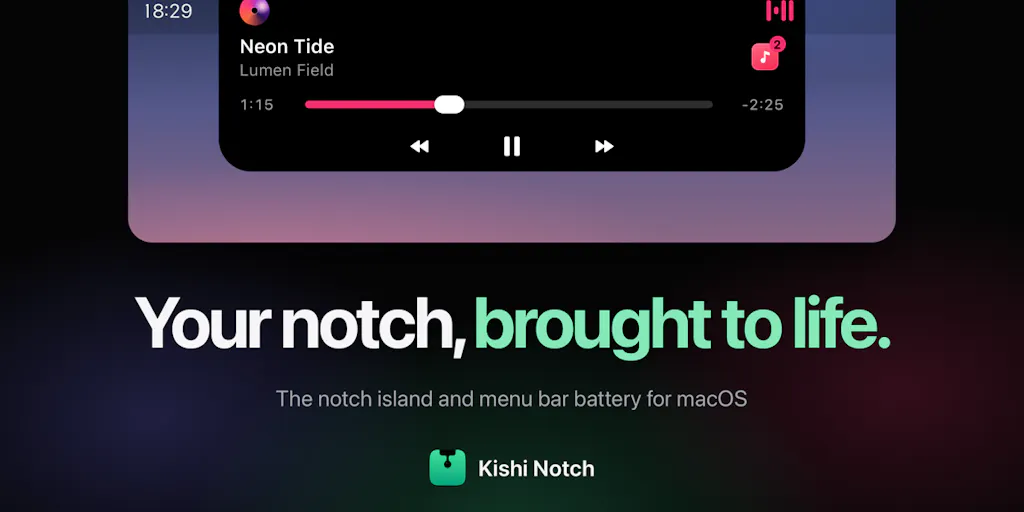
The pitch is straightforward: a native Swift app that turns the MacBook notch into an interactive island. The developer describes it as growing “a soft, interactive island out of the notch,” and the feature list reads like a greatest-hits compilation of small daily annoyances:
- Messages in the notch — WhatsApp, Messages, Mail, and Slack notifications drop into the notch with an inline Reply box. You type, hit Return, and never leave your current app.
- Meeting countdown — your next calendar event shows a live timer, and Join opens Zoom, Google Meet, Teams, Webex, or FaceTime.
- Media controls — Music, Spotify, and video playing in Safari or Chrome, with a vinyl-style player, waveform, and source switcher.
- Earbud battery — AirPods and other earbuds show left, right, and case battery the moment they connect.
- Utility cluster — timer, stopwatch, volume and sound output, camera/mic-in-use indicator, Focus status, and a file shelf with AirDrop.
- Menu bar battery — styleable, with health, cycle count, live power draw, and time remaining.
The developer is explicit about privacy: “No account, no analytics, no tracking. Everything stays on your Mac.” It runs on macOS 14 or later, on both Apple silicon and Intel. Pricing is free for 7 days, then a one-time $19.99 license for 2 Macs, no subscription. Those are the facts as stated on the launch page — I’m not going to dress them up.
Now, the honest framing: this is not a social media management tool. It doesn’t schedule posts, it doesn’t pull analytics, it doesn’t repurpose content. If you came here looking for the next Buffer or Later competitor, this isn’t it. What it is — and why I think it’s worth your attention — is a workflow-density play. It reduces the number of times you leave your editing timeline, your caption doc, or your analytics dashboard to handle the micro-tasks that fracture creative work.
Why TikTok and YouTube creators should care more than LinkedIn ones
Here’s my take, and I’ll flag it as opinion: the value of a tool like this scales with how much interrupt-driven work you do. If you’re a LinkedIn ghostwriter or a B2B content strategist who lives in a browser tab and a Notion doc, the notch island is a nice-to-have. If you’re a TikTok or YouTube creator who spends hours in CapCut or Final Cut or DaVinci Resolve, exporting, re-exporting, checking Slack for brand-deal revisions, and coordinating with an editor over WhatsApp — the friction of alt-tabbing out of a render is real. I’ve lost count of how many times I’ve been mid-export and missed a time-sensitive DM from a collaborator because the notification was buried. An inline reply box in the notch doesn’t fix the underlying chaos, but it removes one layer of it.
There’s also the AirPods battery angle. If you record voiceovers, podcasts, or talking-head content, knowing your left bud is at 12% before you hit record is the kind of small signal that saves a session. I’d bet most creators have a “check battery” ritual that involves clicking through Bluetooth settings. Moving that to a glance is genuinely useful.
The math on the pricing (and where it breaks)
$19.99 one-time for 2 Macs, no subscription. Compare that to the subscription fatigue most creators are drowning in: Metricool starts free but scales with features, Hootsuite is famously expensive, Canva Pro is ~$120/year, CapCut Pro is another subscription, and suddenly you’re paying $50–$100/month just to publish and edit. A one-time $20 utility that sits outside that stack is almost a rounding error. The developer isn’t trying to be your content OS — he’s trying to be the ambient layer that makes your existing OS less annoying. That’s a much smaller, more honest promise.
Where the math breaks: if you’re on an older MacBook Air without a notch, this app has nothing to grow out of. The developer says macOS 14+ and both Apple silicon and Intel, but the notch itself is the hardware hook. If you’re on an external monitor all day, the notch is irrelevant. And if you’re a Windows creator — which is a huge chunk of the gaming and streaming world — this is a non-starter. Not disclosed whether a Windows version is planned; I’d assume not, given the Swift/native framing.
What Social Media Teams Can Steal From This Design Philosophy
Even if you never install Kishi Notch, there’s a strategic lesson here for anyone managing multiple accounts. The best social media operators I know don’t just schedule posts — they design ambient awareness into their day. They have a dashboard that shows what’s publishing, what’s pending approval, what’s trending, and what’s broken, without requiring a tab switch. Tools like Sprout Social and Agorapulse have tried to own that “single pane of glass” idea, but they live in a browser. Kishi Notch’s insight is that the operating system itself can be the pane of glass.
Here’s how I’d translate that for a content team:
- Audit your context switches. For one day, count how many times you leave your primary work app (editor, scheduler, analytics) to check a message, a meeting, or a battery. That number is your friction tax. Any tool that reduces it — even by 20% — pays for itself in focus.
- Move “glanceable” signals to the edge. Battery, next meeting, mic-in-use, Focus status — these are binary states. They don’t need a full app. They need a pixel cluster you can see peripherally.
- Keep the reply loop tight. The inline Reply feature is the killer detail. Most notification systems alert you but don’t let you act. If you’re evaluating any workflow tool — whether it’s Slack, Notion, or a scheduler — ask: can I resolve this without leaving what I’m doing? If not, it’s adding friction, not removing it.
The privacy angle is a feature, not a footnote
“No account, no analytics, no tracking. Everything stays on your Mac.” In 2025, that sentence is doing a lot of work. Creators handle unreleased content, brand contracts, and sometimes sensitive personal data in DMs. Every cloud-connected utility is a small trust exercise. A native app that doesn’t phone home is, in my experience, increasingly rare and increasingly valuable. I’d flag this as a genuine differentiator against the wave of AI-powered “productivity” tools that want your data to train models. The developer isn’t claiming any AI features here — no summarization, no smart replies, no LLM. Just local plumbing. That’s a deliberate, and I think smart, constraint.
Where my judgment says it falls short
I haven’t tested Kishi Notch hands-on — I’m working from the launch page, and I want to be transparent about that. So treat the following as open questions and educated skepticism, not verified criticism.
First, the notification integration depth is unclear. The developer says WhatsApp, Messages, Mail, and Slack “drop into the notch.” But does that mean full message threads, or just the latest message? Can you reply to a specific thread? What happens with group chats? Does it respect Slack’s Do Not Disturb and Focus modes? These are the details that determine whether a tool like this becomes a daily driver or a novelty. Not disclosed on the page.
Second, the media controls claim is broad. “Music, Spotify, and video in Safari or Chrome” — does that include YouTube? Twitch? Vimeo? Does the source switcher handle multiple simultaneous audio sources gracefully, or does it get confused when you have a Zoom call and a Spotify playlist running? I’d want to test that before trusting it.
Third, the file shelf with AirDrop is intriguing but vague. Is it a persistent staging area? Does it survive restarts? Can you drag files out to other apps? Without a demo, I can’t tell if it’s a genuine productivity feature or a checkbox.
Fourth, the “one-time license for 2 Macs” model raises update questions. Does the $19.99 include future macOS versions? What happens when macOS 16 changes the notch behavior? The developer doesn’t say. For a one-time purchase, that’s a real risk — you’re betting on the indie developer’s longevity. I’ve been burned by one-time-purchase Mac apps that stopped working after an OS update and never got patched. Not saying that will happen here, but it’s the trade-off you accept when you avoid subscriptions.
Fifth, who is this NOT for? If you’re a social media manager who works primarily in a browser — scheduling in Buffer, analyzing in Metricool, designing in Canva — the notch is peripheral to your workflow. You might get some value from meeting countdowns and AirPods battery, but the core messaging and media features are less relevant. If you’re on Windows or Linux, it’s irrelevant. If you use an external monitor as your primary display, the notch is invisible. And if you’re already happy with Bartender or Ice for menu bar management, this is a different category — those organize existing menu bar items; Kishi Notch creates a new interaction surface.
The Bigger Pattern: Ambient Computing for Creators
Zoom out for a second. The creator economy has spent the last five years building an enormous stack of destination tools: you go to TubeBuddy for YouTube SEO, you go to Later for Instagram scheduling, you go to Captions for AI editing. Every one of them is a place you visit. The next wave — and I think Kishi Notch is a small signal of it — is ambient tooling: utilities that live in the periphery and surface only what you need, when you need it. Apple’s Dynamic Island on iPhone was the mainstreaming of this idea. The Mac notch is the obvious next frontier.
For social media operators, the implication is strategic: stop thinking about your workflow as a sequence of apps and start thinking about it as a field of signals. What do you need to know at a glance? What do you need to do without switching context? The answers will vary — a TikTok creator needs render progress and DM replies; a LinkedIn ghostwriter needs comment alerts and draft reminders; a Pinterest manager needs scheduled pin confirmations and trend spikes. But the principle is the same: move the signal to the edge, keep the action inline.
I’d also note that this is a very indie play. Özhan Gebeşoğlu is a solo developer from Turkey, and the launch page reads like a personal itch-scratch, not a venture-backed feature matrix. That’s not a weakness — it’s often where the most thoughtful utilities come from. But it does mean the roadmap is one person’s attention span. If you’re evaluating this for a team, factor in the bus factor. If you’re a solo creator, that’s less of a concern.
What I’d Watch / Test Next
If you’re curious, here’s what I’d do this week — concrete, low-risk steps:
- Download the 7-day free trial and run it for three days of real work. Don’t just poke at it; actually edit a video, take a call, and reply to a DM through the notch. The trial exists precisely so you can test the friction reduction in your own workflow.
- Stress-test the messaging integration. Send yourself a Slack DM, a WhatsApp message, and an iMessage while you’re in a full-screen app. See if the notch actually lets you reply inline without breaking focus. If it does, that’s the feature that justifies the $19.99.
- Check the meeting countdown against your actual calendar. Does it handle back-to-backs? Does it respect time zones? Does the Join button open the right app every time? Calendar integrations are notoriously flaky — test before you trust.
- Watch the developer’s response to feedback. The launch page ends with “what would you want to see in your notch next?” — that’s an invitation. If he’s responsive and ships updates, the one-time price becomes a much better bet. If the thread goes quiet, treat it as a snapshot utility, not a platform.
- Compare against your current menu bar setup. If you already use Bartender or Ice, ask whether Kishi Notch replaces them or complements them. My take: it complements, because it’s not organizing existing menu bar items — it’s creating a new surface. But your mileage may vary.
The bigger question I’m watching: does the notch become a real platform for ambient creator tooling, or does it stay a clever one-off? If Apple opens up more APIs, or if other indie developers follow with notch-native utilities for scheduling, analytics, or content capture, this could be the start of something. If it stays a solo app with a fixed feature set, it’s still a useful $20 utility — just not a category. Either way, it’s worth a week of your attention. The best tools are the ones that make you wonder how you worked without them. I’m not there yet with Kishi Notch, but I’m watching.