Why motion is no longer optional — and why Lottie Creator 2.0 might finally make it practical
If you’ve run social accounts for more than six months, you already know the pattern: a static image on the feed gets half the engagement of the same image with a subtle parallax effect or a looping background. TikTok’s algorithm literally weights motion higher in the recommendation engine. Instagram’s Reels push is built on the assumption that movement signals quality. Even LinkedIn — the last holdout where a talking-head video still feels slightly transgressive — now prioritizes native video posts with animated thumbnails.
The problem is that most creators don’t have a motion designer on retainer. We have Canva, we have CapCut, we have a working knowledge of keyframes in Premiere Rush. But the moment you need a micro-interaction for a landing page, an animated logo lockup for a brand kit, or a scroll-triggered illustration inside an article, the tooling gap becomes a canyon. After Effects is the industry standard, but it requires a $55/month subscription and a learning curve measured in centuries. Rive is powerful but leans heavily into game-like state machines. Haiku Animator died a quiet death. And the free browser tools (like the built-in animation in Canva) are too restrictive for anything beyond a bounce-in.
That’s why LottieFiles’ latest launch — Lottie Creator 2.0 — caught my attention. Not because it’s the first browser-based animation tool (it’s not), but because it sits in a specific niche that most creator tools ignore: production-grade motion design that still fits inside a social media workflow. The team claims it “bridges the gap between simple tools and tools that enable you to unleash your full creative potential.” After digging through the Product Hunt launch thread and testing the product myself, I think that framing is half-right. Let me unpack why — and where I’d still keep After Effects open.
The real problem Creator 2.0 is solving (it’s not just “make animation easier”)
When I talk to other social media operators about why they don’t animate more, the answer is rarely “we don’t want to.” It’s “we don’t have the time to learn a complex tool, and the simple tools can’t do what we need.” That’s the classic market gap.
LottieFiles has already built a massive library of pre-made animations — 100,000+ Lottie files available through LottieFiles for Canva and a Figma plugin. Those integrations are great for grabbing a pre-built icon and dropping it into a design. But they’re static in the sense that you can’t easily tweak the timing, add interactivity, or build a custom sequence from scratch. You’re limited to the parameters the original animator exposed.
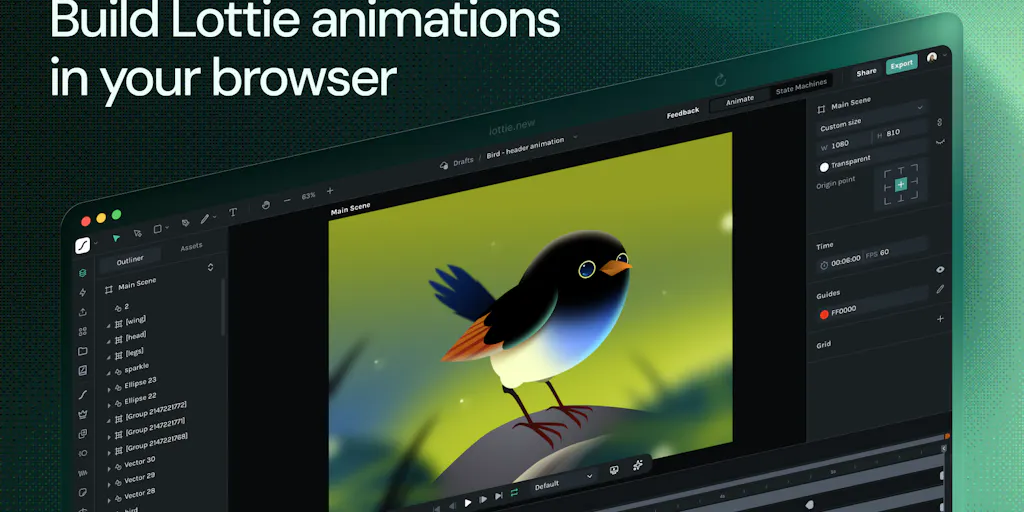
Creator 2.0 is designed to let you go from that “grab and drop” stage to “build and modify.” The maker team, led by Amir Jahanlou, calls it “After Effects for the web.” I think that’s a bit of a stretch — but it’s a useful stretch. What they’ve actually built is a timeline-based vector animation environment that runs entirely in the browser, with no installation, and exports to the dotLottie format. That format already powers animations across web, mobile, and even some social platforms via embedded players.
The key improvements in 2.0, per the launch announcement, include: - A graph editor for precise easing control (similar to what you’d see in After Effects or Curve Editor in Blender) - Motion Copilot — an AI prompt system that generates an editable animation timeline from a text description - State machines for building interactive animations that respond to clicks, hovers, or scroll position - Motion Systems and Motion Tokens for standardizing animation across a brand’s entire library - The ability to package multiple animations and states into a single dotLottie file
What that means for a creator or social media operator: you can now design an animated brand kit — logo reveal, button hover state, slide-in text — without touching After Effects. You can use the State Machine feature to create a single asset that changes behavior depending on where it’s used (e.g., a banner that animates on hover for desktop, auto-plays on mobile). And if you’re working with a developer, the handoff is clean because the logic stays inside the .lottie file.
In the Product Hunt comments, one user named Leopold asked exactly the right question: “Does the dotLottie bundle the state machine logic so the player handles transitions automatically, or does the developer still need to write state-triggering code around it?” A maker from LottieFiles, Inad, answered that the logic is bundled inside the file — the dotLottie player reads the state definitions and handles transitions at runtime. For interactions like clicks or hover, the triggers live inside the file. That means a designer can hand off a single file to a developer and the animation “just works” without extra coding. That’s a big deal for teams that struggle with the handoff gap.
How it differs from the tools you already use
vs. After Effects
After Effects is the elephant in the room. It’s powerful, but it’s also expensive, heavy, and designed for video compositing, not lightweight vector animation. Creator 2.0 is built specifically for Lottie/dotLottie output — it doesn’t support the full range of After Effects features (expressions, third-party plugins, particle systems). As one commenter Abhineet Arora pointed out, “full expressions/effects support is usually where web-based tools hit a ceiling.” The maker team conceded that Creator is “deliberately focused around Lottie and dotLottie” and does not aim for 1:1 parity.
But for a social media operator, that’s often fine. You’re not rendering a 60-second explainer video with particles and 3D camera moves. You’re animating a logo, a loading spinner, a call-to-action button, or a looping illustration for a blog post. Those are exactly the use cases where After Effects is overkill.
vs. Canva Animation
Canva’s built-in animation is great for quick bounces, fades, and slide-ins. But you can’t edit the timing curves, you can’t add interactivity, and you can’t export a vector file that works outside Canva. LottieFiles for Canva already fixed part of that — you can drop a Lottie animation into a Canva design. But if you want to modify that animation, you have to go into Creator. Canva animators who need more control will find Creator 2.0 a natural step up.
vs. Rive
Rive is the closest competitor. It also offers state machines, runtime export, and a browser-based editor. Where Creator 2.0 differs, in my experience, is its deeper integration with the existing Lottie ecosystem — especially the library of 100k+ animations and the Canva/Figma plugins. Rive uses its own format (riv) and focuses more on interactive graphics for apps and games. Creator 2.0 feels more aligned with marketing and brand design, plus the AI Copilot is a differentiate that Rive doesn’t yet have.
vs. CapCut / Motion Graphics for Video
If you’re cutting video for TikTok or Reels, you’re not going to use Creator 2.0 for the edit itself — it’s not a video editor. But you can export a Lottie animation as a GIF or MP4 (via the LottieFiles mobile app or a third-party converter) and overlay it on your footage. The real power is for static posts that need motion — like an animated infographic or an interactive web component that you can embed in a landing page and then screenshot for a LinkedIn carousel.
What creators and social media teams can borrow from this tool (even if you never install it)
I’m not going to tell you to drop everything and migrate your entire motion workflow to Creator 2.0. But there are three operational takeaways that any social media operator can steal, whether or not they use this specific product.
1. Standardize your brand motion with a “Motion System”
The Maker team highlighted Motion Systems as a way to “standardize look and feel across multiple animations.” That’s not just a feature — it’s a workflow principle. Most social media teams have a brand style guide for colors, typography, and photography, but no guide for motion. We default to whatever animation template comes with Canva or the default transition in Premiere. That results in a chaotic visual identity across platforms.
A Motion System in Creator lets you define shared parameters — duration, easing curve, entrance versus exit behavior — and then apply them to every animation you make for the brand. You can export these as Motion Tokens (think of them as design tokens for animation) and share them across your team. Even if you’re not using Creator, you can adopt the same mental model: define a primary easing curve (e.g., ease-out cubic), standard duration (e.g., 300ms for micro-interactions, 600ms for hero animations), and then enforce that in whatever tool you use.
2. Use AI to break through the blank-timeline paralysis
The Motion Copilot is interesting not because it replaces creativity, but because it solves the biggest friction point for non-animators: starting. In the launch thread, user @aditya_phulallwar said “Getting past the empty timeline is the real bottleneck.” The maker replied: “Describe what you want and it hands you an editable animation to start from instead of a blank canvas.”
That mirrors my own experience with other AI design tools. The output is rarely production-ready, but it gives you a scaffold to refine. For social media teams, that means you can describe “a subtle pulsing circle for a ‘Live’ badge” and get a timeline with keyframes already placed, then adjust the timing and color. It reduces the mental overhead of learning where all the menu items are. I’d still want to see how the Copilot handles complex prompts — the launch didn’t disclose specific success rates — but the concept is sound.
3. Build interactive assets that work across platforms
The State Machine feature is the sleeper hit for creators who maintain a website or a landing page alongside their social presence. Many social media operators also manage a Link-in-Bio page or a simple business site. If you want a call-to-action button that glows on hover, an accordion that animates open, or a testimonial card that fades in on scroll, you can now design that in Creator, export the dotLottie file, and drop it into a Webflow or Shopify site with minimal code. The bundle includes the logic, so the animation responds to user interaction without you needing to write JavaScript.
In the comments, Leopold noted that for “small animated microinteractions in web projects,” the handoff friction is usually where the tool breaks down. The answer from the team was solid: the dotLottie file bundles the state machine, and the player handles transitions at runtime. For self-contained interactions (click, hover, animation complete), no additional code is needed. That makes Creator 2.0 a viable tool for a social media manager who also happens to maintain the brand website — which is more common than you’d think.
Why TikTok creators should care more than LinkedIn ones (but only for certain use cases)
Let me draw a distinction. If you’re a TikTok creator who posts raw vertical video, you don’t need Lottie animations. You need CapCut and a good lighting kit. But if you’re a brand that posts on TikTok with animated elements — think of the Duolingo owl’s subtle bounce, or the way a brand’s logo appears at the end of a stitch — that animation is often created in After Effects or a similar tool and then composited onto the video. Creator 2.0 can replace that step with a lighter, cheaper workflow, especially for simple animations.
LinkedIn, on the other hand, is a platform where static images still perform well, but animated infographics and data visualizations are increasingly rewarded by the algorithm. A Lottie animation embed in a LinkedIn article or a native video with an animated headline overlay can boost dwell time. And because LinkedIn runs in a browser, the dotLottie player can display the animation inline — no video export needed. That’s a unique advantage.
The real opportunity is for indie founders who publish on multiple platforms. You can create one animated asset in Creator, then use it as a GIF on Twitter, a video on Instagram, an embed on your blog, and a hover-triggered element on your landing page. That kind of cross-platform repurposing is the holy grail of content operations.
Where my judgment says this still falls short
I’ve been testing Creator 2.0 alongside its predecessor, and I want to be transparent about the limitations — because a hype-free assessment is what separates a trusted industry observer from a PR mouthpiece.
Usability is still rough around the edges
The Product Hunt reviews for LottieFiles (aggregated across past launches) show a consistent theme: users love the library and integrations but find the UI “confusing, sparse, or not fully polished.” The summary AI noted “UI confusion” as a top con. In my own tests, the graph editor is functional but the keyframe interpolation handles are small and hard to click on a laptop trackpad. The layer panel doesn’t support drag-and-drop reordering as smoothly as After Effects. And the color editing feature — which Prashasti Pankaj called “not really proper, with the color palette” — still requires you to manually match hex values rather than offering a branded palette picker.
For a social media operator who isn’t a motion designer by trade, these friction points could be enough to abandon the tool after the first session. The learning curve is lower than After Effects but not as low as Canva. I’d put it somewhere between a novice and intermediate difficulty level.
The export ecosystem for social platforms is immature
Creator 2.0 exports dotLottie files natively. That’s great for web and mobile apps that use the Lottie player. But if you want to use the animation in a TikTok video or an Instagram Reel, you need to convert it to a video format (MP4, GIF) first. The LottieFiles mobile app and some online converters can do that, but the quality and frame rate can vary. If your animation uses complex easing or state machine logic, the video output may not capture the interactivity. That limits the tool’s direct usefulness for the video-first social platforms.
For comparison, Rive offers a similar export but has added a screen-recording mode that captures the interactive playback as a video. Creator doesn’t have that yet. The team may add it — they’re actively soliciting feedback — but for now, you’ll need a separate step.
Pricing is not disclosed
The launch page doesn’t mention pricing for Creator 2.0. Earlier LottieFiles products have free tiers with limited exports and paid plans for commercial use. The absence of pricing in a product launch is often a red flag for eventual sticker shock. If this turns out to be a $30/month tool with a free but watermarked version, it’s still competitive with After Effects’ $55/month, but it’s expensive compared to free tools like Canva’s basic animation. I’ll watch for pricing details before committing workflow time.
It doesn’t replace After Effects for complex projects
Let’s state the obvious: you can’t do particle effects, 3D layers, or advanced expressions in Creator 2.0. The maker team acknowledged this — it’s a deliberate simplification. But if your social media strategy requires intricate motion graphics (think of the animated data visualizations in Vox’s videos), you’re still in Adobe territory. Creator 2.0 is for the middle 80% of motion work: brand assets, micro-interactions, simple logos, and interactive elements.
What I’d watch / test next
If I were running a social media team today, here’s the concrete test I’d run this week:
- Pick three brand assets that you currently animate in After Effects or pay a freelancer for — a logo reveal, a loading spinner, and a call-to-action button hover state.
- Rebuild them in Creator 2.0 using the Motion Copilot for the initial prompt, then polish the timing with the graph editor.
- Export as dotLottie and test the handoff to your developer (if you have one) or drop the file into a Webflow page using the Lottie player.
- Export a video version using the LottieFiles mobile app or an online converter, and post it as a native video on LinkedIn. Track whether the animated version outperforms your static version within 48 hours.
That test will quickly reveal whether Creator 2.0 fits into your actual workflow. The tool is promising — I’d bet it becomes a staple for brand design teams that want to systemize motion without hiring a dedicated animator. But the untested operator should stay skeptical of the “After Effects for the web” claim until they see how it handles real-world complexity. The team is clearly responsive to feedback (the Product Hunt thread shows multiple maker replies within hours), so the product will evolve fast. For now, I’d keep my After Effects subscription for anything beyond micro-interactions, but I’d start leaning on Creator for the 80% of motion work that doesn’t need it.