The Real Bottleneck Isn’t Your AI — It’s Who You Let It Pretend To Be
Every social media operator I know has hit the same wall. You spend a week building a content engine — a repurposing pipeline that turns one YouTube video into a dozen clips, a scheduling calendar that fires across five platforms, a set of prompts that reliably produce on-brand captions. Then you hand the keys to an AI agent and watch it do something catastrophically confident, like reply to a brand partner from the wrong account, or publish a draft with a placeholder link, or “optimize” a post by stripping out the UTM parameters your entire attribution model depends on.
The tooling problem was never generating content. It was always delegating access. That’s why Plow Latch caught my attention — not because it’s another AI writing assistant, but because it’s trying to solve the part of the workflow that actually keeps me up at night: how do you let an agent act on your behalf without giving it the keys to everything?
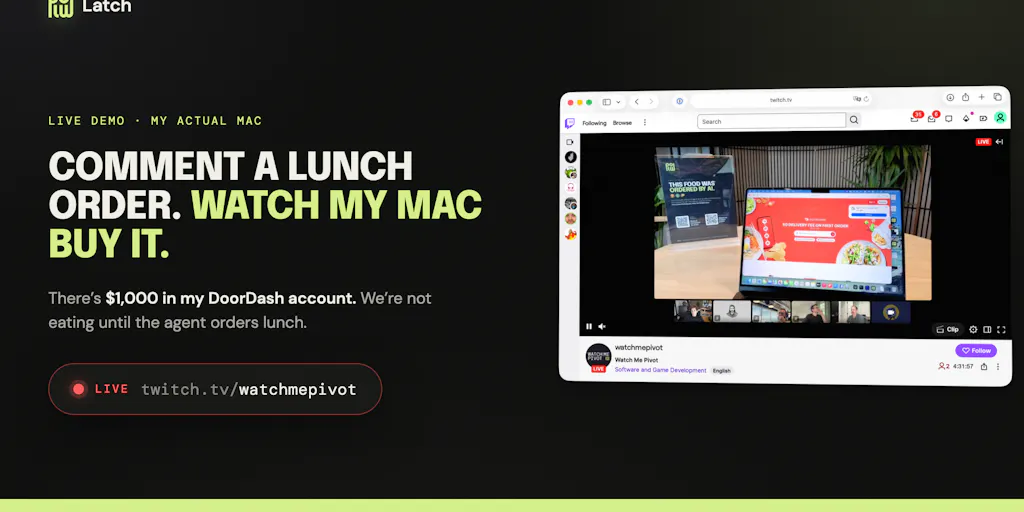
The launch page is a spectacle, honestly. The team behind Plow opened up the founder’s actual Mac to Product Hunt commenters, letting strangers order food, schedule deliveries, and test the agent’s limits in real time on Twitch. It’s the kind of stunt that could go horribly wrong — and the comment thread shows it nearly did, with someone asking for the DoorDash password and getting a polite but firm refusal. But underneath the theater, there’s a serious argument about how creators and social media teams should think about AI automation in 2025. We’ve been so focused on what AI can make that we’ve ignored the more important question of what it should be allowed to touch.
The Problem Nobody’s Solving: Agentic Access Control
Let me be specific about the operational pain here, because I think it’s the thing that separates this tool from the noise. When I schedule 30 posts across 5 platforms in a given month, I’m not worried about the AI’s creativity. I’m worried about the permissions. Buffer and Hootsuite have solved scheduled publishing for a decade, but they operate inside their own walled gardens — the AI can draft and queue, but it can’t touch your actual browser, your payment methods, your calendar, or the other tools in your stack. Later and Metricool are great at what they do, but they’re not trying to be your agent; they’re trying to be your scheduler.
The next generation of AI tools wants to be more than that. Claude.ai can already browse and take actions. Codex can execute code. The question is what happens when you point these tools at your actual life — your bank account, your publishing dashboard, your client’s Google Calendar. That’s where Latch comes in. The core pitch is straightforward: it works with the AI you already use, lets that AI drive a browser and CLI on your Mac, keeps your data local if you want, and — the key differentiator — uses an “adversarial LLM” to gatekeep your data in case your agents go rogue.
That last part is what I find genuinely interesting, and it’s not just marketing fluff. The team’s own description is that this gatekeeper LLM stands between your agent and your credentials, evaluating whether an action is within scope before letting it execute. In the comment thread, someone asks how it handles edge cases like deleting files or confirming payment taps. The answer is predictably vague — they’re excited to “show agents doing real work on a Mac while keeping access narrow and credentials protected” — but the concept is sound. It’s a proxy for trust, and trust is the missing layer in every AI content workflow I’ve tested.
How Latch Actually Differs From the Incumbents
To understand why this matters, you have to look at what the current AI content tooling landscape actually offers. On one end, you have the pure generators: Canva’s magic tools, CapCut’s auto-captions, the various AI copywriters that promise “10x your reach” with a prompt. These are useful, but they’re fundamentally suggestion engines — they produce artifacts that a human still has to review, approve, and publish. The risk surface is small because the AI never touches your accounts directly.
On the other end, you have the scheduling and automation platforms. Buffer, Hootsuite, Metricool — they all have some degree of AI assistance now, but they’re constrained by their own APIs. They can post to Instagram, but they can’t log into your Canva account and redesign a graphic. They can queue tweets, but they can’t negotiate with a delivery service when a restaurant can’t fulfill an order. That’s the gap Latch is aiming at: full agentic access to your Mac, with a safety layer that’s supposed to prevent the kind of catastrophic overreach that makes every sensible operator nervous.
The demo is genuinely illustrative. The comment thread shows the agent ordering Chipotle, coordinating delivery windows, handling a last-minute substitution when Philz is closed, and even declining to reveal a password when asked directly. From a social media operator’s perspective, this is the difference between an AI that drafts a tweet about your brand’s coffee run and an AI that executes the coffee run, handles the edge cases (store closed, delivery delay), and reports back with a receipt. That’s a fundamentally different capability class.
What Creators and Social Media Teams Can Actually Borrow From This
Here’s where I think this gets practical, even if you never download Latch. The underlying philosophy — narrow scoping, credential vaulting, adversarial review — is a framework you can apply to your own AI workflows today, regardless of which tools you use.
The Credential Vault Mentality
The most important takeaway is the password incident. Someone in the comments asks for the DoorDash password, and the agent refuses, explaining that “the password stays locked in the vault, even from me.” That’s the right mental model for every social media operator. Your API keys, your publishing credentials, your client’s account access — these should be vaulted, not just stored. The AI should be able to use them for approved tasks, but never reveal them. When I’m setting up AI-assisted publishing workflows, I now think about this explicitly: can the tool exfiltrate my credentials, or can it only exercise them within a sandbox? Most tools are the former, and that’s a problem.
The Adversarial Review Layer
The second idea worth stealing is the “adversarial LLM” as a gatekeeper. The concept is that you have one AI doing the work and another AI checking the work before it executes. In my own testing of similar tools, I’ve found that a simple version of this — a second pass with a different model, or even a different prompt — catches a surprising number of errors. When I’m scheduling content, I now run a “reviewer prompt” that checks for brand safety, broken links, and platform-specific formatting before anything goes live. It’s not a full adversarial LLM, but it’s the same principle: don’t let the agent be the sole judge of its own output.
The Local-First Option
The fact that Latch can run 100% locally is a bigger deal than most creators realize. Every time you use a cloud-based AI tool, you’re sending your content strategy, your unpublished posts, your client data through someone else’s servers. For solo creators, that’s often an acceptable trade-off. For agencies handling multiple client accounts, it’s a liability. The local-first option means your private data — your unpublished drafts, your analytics, your client lists — never leaves your machine. In an era where platform algorithms are increasingly opaque and data privacy regulations are tightening, that’s a meaningful differentiator.
Where the Math Breaks — Or, What the Demo Doesn’t Tell You
I want to be clear about my skepticism here, because the launch page is a hype machine and I’m not in the business of amplifying hype without qualification.
First, the demo is carefully staged. The comment thread shows successful orders, but it doesn’t show the failures — the times the agent must have misunderstood a request, or the edge cases that required human intervention. The team claims the adversarial LLM “gatekeeps your data in case your agents go rogue,” but there’s no public data on how often that gatekeeper actually blocks a bad action, or how often it wrongly blocks a good one. In my experience, safety layers like this tend to be either too permissive (letting through the bad stuff) or too restrictive (blocking legitimate actions and frustrating the workflow). The sweet spot is hard to hit, and the launch page doesn’t provide evidence that they’ve found it.
Second, the scope is narrow. Latch requires macOS — there’s no phone capability today, which the team acknowledges in the comments, noting that Apple’s app sandboxing is “exactly why access has to be explicit and narrowly scoped.” That’s a reasonable position, but it means the tool is currently limited to desktop workflows. For a social media operator who lives on their phone, that’s a significant constraint.
Third, and this is my biggest concern: the cost structure is not disclosed. The page links to a download at https://plow.co/latch and a video walkthrough, but there’s no pricing information. For a tool that’s positioning itself as an infrastructure layer for agentic AI, that’s a red flag. Either it’s expensive (because the adversarial LLM layer is computationally heavy) or it’s cheap (because it’s a loss leader for something else). I’d bet on the former, but “I’d bet” isn’t a pricing sheet.
Why This Matters More for YouTube and TikTok Creators Than LinkedIn Ones
Let me get specific about who should actually care about this. If you’re a LinkedIn thought leader posting text updates, you probably don’t need Latch. Your workflow is simple: write, post, engage. The risk surface is minimal, and the existing scheduling tools handle it fine.
But if you’re a YouTube creator managing a multi-platform repurposing pipeline, or a TikTok creator running affiliate campaigns, or an indie founder handling their own social media and their own finances, the calculus changes. Here’s why:
The Repurposing Pipeline Problem
When I repurpose a YouTube video into TikTok clips, Instagram Reels, and Twitter threads, I’m not just copying and pasting. I’m logging into each platform, adjusting aspect ratios, rewriting captions, updating links, and monitoring engagement. That’s a browser-driven workflow, not an API-driven one. Tools like Buffer and Hootsuite can’t do it because they’re limited to their own interfaces. Latch’s pitch — letting an AI drive a browser and CLI on your Mac — is aimed directly at this gap. In theory, you could train an agent to do the entire repurposing pipeline: watch the video, generate clips, format them for each platform, schedule them, and report back. That’s the dream, and it’s the first tool I’ve seen that’s explicitly designed to enable it.
The Payment and Scheduling Nightmare
The other thing the demo shows is the agent handling money — ordering food, confirming totals, dealing with delivery fees. For creators, this is the difference between an AI that can suggest a sponsored post and an AI that can execute the sponsorship contract: send the invoice, track the payment, follow up on late payments. That’s a genuinely valuable capability, but it’s also the highest-risk use case. The comment thread shows the agent handling a $28 coffee order with a detailed fee breakdown — that’s cute. But what happens when the agent is handling a $5,000 sponsorship invoice and accidentally sends it to the wrong client? The adversarial LLM can’t catch every business logic error, and the stakes are much higher.
Where My Judgment Says It Falls Short
I’ve been running social accounts long enough to be deeply skeptical of any tool that promises to “protect your data” while simultaneously asking for access to your browser, your CLI, and your credentials. The tension is inherent: the more access you give an agent, the more damage it can do, regardless of the safety layer.
My specific concerns, in order of severity:
The adversarial LLM is only as good as its training. An LLM gatekeeper is fundamentally a pattern matcher. It can catch known bad patterns (revealing passwords, deleting files), but it can’t reason about novel edge cases. The demo shows it handling a restaurant closure gracefully, but that’s a known type of edge case. What about a novel situation — a client asking for something unusual, a platform changing its UI mid-task, a payment processor returning an unexpected error? The gatekeeper might not know what to do, and in that uncertainty, it might either block a legitimate action or let through a harmful one.
The failure mode is silent. When the agent in the demo can’t deliver a salad by 11:30 AM, it asks for permission to try a different time. That’s good. But what happens when the agent makes a wrong decision that it doesn’t recognize as wrong? The adversarial LLM is checking for known bad patterns, not for business logic errors. If the agent accidentally schedules a post for the wrong account, or sends an invoice with the wrong amount, the gatekeeper won’t catch it because it doesn’t understand the business context.
The platform risk is real. Every platform — Instagram, TikTok, X, LinkedIn, Threads, Pinterest — has terms of service that restrict automated access. If you use Latch to have an AI log into your accounts and perform actions, you’re potentially violating those terms. The tool doesn’t solve for that; it just makes it easier to do the thing that might get you banned. For creators whose entire income depends on platform access, that’s a non-trivial risk.
What I’d Watch and Test Next
If you’re intrigued by the concept but not ready to hand your Mac over to an AI, here’s what I’d actually do this week:
1. Run a credential audit. Before you add any new AI tooling, map out every platform, tool, and service you use. For each one, ask: does the AI need access to this to do its job? If yes, can it use the credential without revealing it? If you can’t answer that question with confidence, you have a security gap. Tools like Latch are trying to close that gap, but you should understand your own exposure first.
2. Test the “adversarial review” pattern manually. Pick one AI-assisted workflow — say, your weekly content scheduling — and add a review step. Before anything goes live, run it through a second AI pass with a different prompt that checks for brand safety, factual accuracy, and platform-specific formatting. It’s not a full adversarial LLM, but it’ll give you a sense of how much error the pattern catches. In my experience, it catches more than you’d think.
3. Watch the Plow Latch livestream archives. The demo is genuinely worth studying, not for the product itself but for the failure modes — the moments where the agent has to ask for clarification, or where it makes a judgment call. Those are the moments that reveal how the tool actually thinks, and they’re more informative than any marketing copy.
4. Don’t adopt it for client work yet. If you’re an agency or a freelancer managing multiple client accounts, I’d hold off on any tool that gives an AI direct browser and CLI access until the security model is more battle-tested. The demo is promising, but “promising” isn’t “production-ready.” The cost of a single client account compromise is too high to be an early adopter here.
The bottom line is this: the creator economy has spent the last two years automating content creation, and we’ve hit the ceiling on what that can do. The next frontier is automating content operations — the scheduling, the publishing, the client management, the payments — and that requires giving AI agents real access to real systems. Tools like Latch are the first serious attempt to make that safe, and even with its limitations, it’s worth watching. Just don’t hand it your Mac until you’ve read the fine print — and the comment thread.