Every content operation I’ve run has the same quiet bottleneck: the gap between the AI that can talk about our content and the AI that can touch our content. Cloud assistants are great for a caption draft, but they live in a browser tab, and browsers can’t open the folder of raw exports, transcripts, and brand briefs where actual social work happens. That’s why the most interesting Product Hunt launch I’ve read in months isn’t another scheduler — it’s a desktop app that runs AI fully offline, reads your local files, logs where it got its information, and charges for work instead of the calendar. LumiChats Offline is a small launch, but it points at the next operational shift for creators: AI that earns trust by showing its sources and touching the files you actually work with.
What LumiChats Offline actually is
The Product Hunt page describes LumiChats Offline as a free, open-source desktop app built on GPT4All, with full privacy by default, no internet, no GPU, no cloud. It supports Mistral, LLaMA, Qwen, DeepSeek, and LumiChats’ own fine-tuned models, and it can chat with PDFs and docs via LocalDocs. This is the second launch from the product, and the positioning is sharp: “A Claude Code alternative for people who avoid the terminal.”
That sentence matters more to creators than it looks. The maker says roughly 70,000 people use LumiChats in a browser and kept asking for the one thing a browser can’t do: touch their files. No web app can. A chat box can describe the work perfectly and touch none of it. The tools that get past that ceiling — Claude Code and similar agentic coding tools — run in a terminal, and that’s a non-starter for most non-engineers. The maker’s own example is the researcher with 200 PDFs, the analyst rebuilding the same spreadsheet every Monday, the student writing a thesis at 2am. Swap “thesis” for “content calendar” and you get the same person I talk to every week: a social media manager who has the raw material, but can’t get the AI to open the folder.
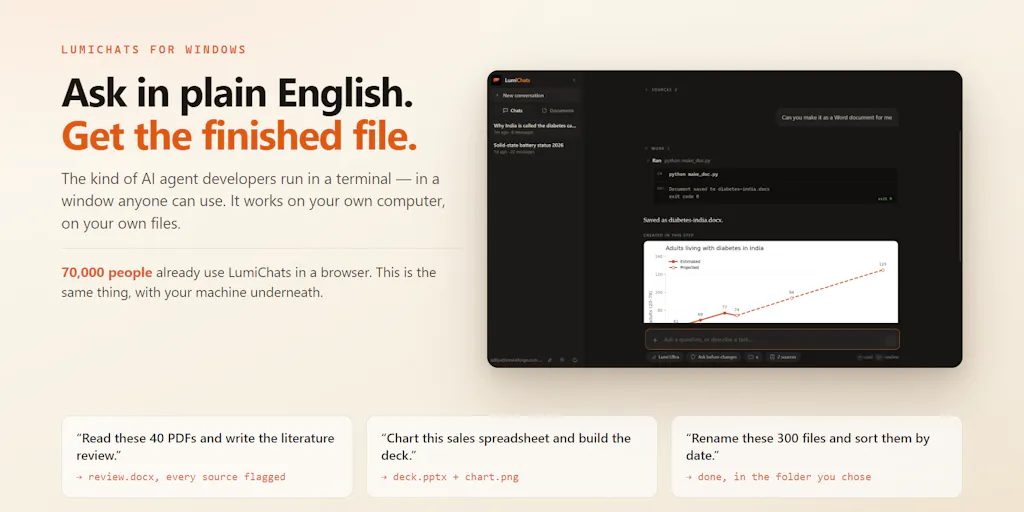
The desktop app’s pitch is that you ask in plain English, it writes the commands, runs them on your machine, works on your real files in your real folders, and hands you a finished .docx, .pptx, or chart. It also supports any MCP server — your database, your issue tracker, your company’s internal search — which is the part that makes this more than a gimmick. For a social media operator, that architecture is the difference between “AI wrote a caption” and “AI read my actual performance export, pulled the three best posts, and drafted a month of variations.”
The problem this solves for social media teams
The creator economy has no shortage of tools that make content prettier or push it out faster. Buffer and Hootsuite are excellent at distribution, but they live downstream of the hard work. They don’t reduce the hours spent turning a podcast episode into a LinkedIn post, a YouTube transcript into a Twitter thread, or a client brief into a 30-day calendar. They just schedule whatever you eventually produce. The same is true of Canva for design and CapCut for video: they make the final mile faster, not the thinking.
The bottleneck upstream is research and repurposing. When I’ve scheduled 30 posts across five platforms for a client relaunch, the part that took longest wasn’t writing captions — it was reconstructing which past post performed best and why. I had three CSV exports, a YouTube transcript, and a brand doc in different folders. A tool that could read those files locally, draft a month of hooks, and log which source each hook came from would have saved me an afternoon of tab-switching.
That’s where LumiChats Offline is aimed. It isn’t competing with schedulers; it’s competing with the manual workflow that happens before you ever open a scheduler. Cloud assistants like ChatGPT can write a month of captions, but they can’t verify them against your actual data. Claude Code can touch files, but it expects you to speak terminal. LumiChats is the attempt to put agentic file access behind a plain-English window. In my experience, that’s exactly the gap the next wave of creator tooling is going to fight over.
The practical difference is trust. Most AI content workflows are a black box: you paste in a prompt, get a draft, and hope the model didn’t invent a stat or misread a source. The maker built a specific fix for this: the app tells you what it actually read. Every source is logged with the query that found it and whether the page was opened or only appeared in a result list. That’s the kind of feature that sounds boring until you’ve had a client ask “where did this claim come from?” and you can’t answer. The source log is the UTM tracking of AI research — you can see which source actually drove the answer, not just which one appeared in the results.
There’s also a governance layer that social media managers should steal even if they never install the app. LumiChats has three modes: ask before changes, auto-apply, or read-only. The maker says read-only genuinely means read-only. For anyone who has accidentally let an AI rewrite a brand voice doc, that permission model is exactly the safety rail that cloud tools still lack. When an AI can touch your files, it needs to ask first. That should be table stakes, but most AI tools treat “save” as an afterthought.
Why TikTok creators should care more than LinkedIn ones
TikTok creators should pay attention to this category for a different reason than LinkedIn creators. TikTok’s algorithm is brutal about initial retention: the difference between a hook that holds viewers for 1.2 seconds and one that holds them for 1.8 seconds can change whether a video gets pushed at all. The only way to win is to generate and test a high volume of hook variations, fast. Cloud AI can do that, but it means feeding your raw transcripts and unposted ideas into a service that may train on or retain them. An offline local model lets you mass-produce hook variations from your own content without sending them anywhere. For a TikTok creator, that’s a legitimate privacy advantage.
LinkedIn creators, by contrast, post less often but with more at stake professionally. The feature they should care about is the source log, not the privacy. If an AI is going to help you write a post citing a study or an industry report, you need to know whether it actually opened the report or just saw it in a search result list. The maker’s point is devastating: a report citing twenty-six sources it never opened looks identical to one citing twenty-six it did — until you can see the difference. For LinkedIn, where a wrong attribution can damage a personal brand, that visibility is the whole ballgame.
What creators and social media teams can borrow from it
Even if you never install LumiChats Offline, the launch is a useful lesson in how to design an AI workflow for creator operations.
First, separate creation from execution. The maker’s approach is to let the model write the commands and run them on your files, while you watch and can stop it whenever you want. That’s a better mental model than “ask AI for a finished post.” In my own tests of similar local-model tools, the models are usually a step behind the frontier cloud models on creative writing, but they’re genuinely good at structured tasks like turning spreadsheets into drafts or pulling highlights from a long transcript. The winning workflow is to use the local tool for the grunt work, then use your judgment — and maybe a cloud tool — for the final voice pass.
Second, make AI show its work. The source log is one of the most underrated features I’ve seen in an AI product aimed at non-engineers. Most creators don’t need to read code, but they absolutely need to know whether an AI actually opened the report it claims to be citing. The maker says the app logs every source with the query that found it and whether the page was opened or only appeared in a result list. If you’re running a brand account, that’s not a nice-to-have — it’s risk management.
Third, rethink the pricing model. The maker says there’s no subscription: you pay for the work you actually run, nothing is running when you’re not using it, and an afternoon of work costs under a dollar. For indie founders, that’s a breath of fresh air compared to the $20-to-$100-per-seat monthly grind. The maker’s line is personal: “I’ve paid enough monthly bills for tools I opened twice to not want to send you one.” That’s the right instinct for a solo creator, though it gets more complicated for teams.
Where my judgment says it falls short
I’m not going to pretend this is the finished article. There are real problems, and the Product Hunt page itself contains a few.
The most obvious one is the “100% free” line. The listing headline says “100% free,” but the maker’s own launch comment describes a pay-for-work model: “An afternoon of that costs under a dollar.” Those two things can coexist if there’s a free tier and usage-based pricing on top, but the source doesn’t explain the exact pricing structure. My take: “free” on a product that runs AI locally probably means the app is free to download, and you pay for compute or work. That’s fair, but it should be stated clearly. If you’re evaluating this for a client, you need the actual per-run numbers before you commit.
The second red flag is the open-source claim. The Product Hunt listing calls LumiChats Offline an open-source desktop app, but in the comments the maker says open-sourcing is “planned rather than done.” That’s a meaningful difference. Something that runs commands on your computer should be something you can read — the maker acknowledges this directly. Until the source is actually published, the “privacy by default” claim rests on trust, not code. I’d want that resolved before pointing a non-technical client at it.
The third issue is platform readiness. The listing says Windows, Linux, and macOS, but the maker clarifies that Windows is the released version today, while macOS and Linux builds are not yet released. The installer also isn’t code-signed yet, so Windows SmartScreen will warn on first run, and you’re told to click “More info, then Run anyway.” That’s a reasonable interim step, and the maker publishes a SHA-256 hash to verify downloads, but it’s a barrier for non-technical users. The moment you tell a social media manager to bypass a SmartScreen warning, you’ve lost half of them.
There’s also the capability ceiling of local models. The source doesn’t disclose model sizes or benchmark numbers, and “no GPU, no cloud” suggests you’re running smaller models than what powers the frontier chatbots. In practice, that means LumiChats is probably better at structured tasks than at punchy, on-brand copywriting. The maker doesn’t claim otherwise, and the product is deliberately aimed at “people who avoid the terminal,” not at people who need a world-class copywriter. But a creator who expects ChatGPT-level prose from an offline model is going to be disappointed.
Where the math breaks
The pay-for-work model sounds fair until you ask what happens when the model spins. The maker addresses this in the comments: a run that produces no file and no answer is never reported as finished, and retries are bounded so the model can’t blindly ask for the same failed action twice. That’s the right design. But it’s still a metered product. The moment people feel a meter running, they start rationing their questions — and the second and third questions are usually the ones that get them the real answer. The maker says an afternoon costs under a dollar, but exact per-run pricing is not disclosed. I’d bet the real cost varies a lot by model size and task length. For a solo creator, that’s fine. For a team running it all day, the bill could look a lot less like “free.”
Who should skip LumiChats Offline entirely
If you manage five brand accounts with a team of four, this is probably not your tool. The source doesn’t show team accounts, approval workflows, or shared libraries. An AI that writes directly to your machine is a single-player utility, not a collaborative content system. You’d still need a scheduler like Buffer or Hootsuite for approval flows, plus a cloud doc system for shared access. Adding a local desktop app to that stack is one more silo.
If you’re a video-first creator whose entire workflow is short-form clips, LumiChats doesn’t claim to edit video; you still need something like CapCut. And if your operation runs on Google Drive, Notion, or Airtable, a desktop app that touches local files won’t integrate with your existing home base unless it’s connected via MCP. The source says the app supports MCP servers, which is promising, but the practical setup for a non-technical social media manager is not disclosed.
What I’d watch / test next
This week, I’d test LumiChats Offline the way I test every new AI content tool: on a disposable machine, with read-only mode, and with files I don’t care about losing. Drop in a folder of old performance exports and a few past posts, then ask it to draft a 30-day content calendar with a source reference for every hook. Check the source log afterward. Did it open the files you expected, or did it only list them? That single check tells you more about the tool than any demo video.
Then test the permission model. Switch to auto-apply on a throwaway .docx and see how the app reports what it changed. Watch how it handles a failed run. The maker says a run that produced no file and no answer is never reported as finished — verify that. Watch whether the run stops when the model repeats the same failed action. That’s the difference between an agent you can trust and a token-burning machine.
Finally, watch the open-source release. When the code is public, the privacy claim becomes verifiable. If that release slips, treat the “zero data collection” claim as marketing until proven otherwise. And keep your cloud subscription for now — local models still aren’t the place to write a brand’s hero copy. But for the boring, high-volume work that actually eats your week — turning transcripts into drafts, exporting analytics into reports, repurposing one idea into forty variations — this is the direction I’d bet on. The tool that can read your files without reading you is the one that will end up in the creator stack.