The CMS Just Became a Content Operations Layer — and That Changes How You Should Think About Your Entire Workflow
If you run social accounts for a living, you’ve probably felt the creeping dread that your content calendar isn’t the bottleneck anymore. The bottleneck is the handoff. You write a script in Notion, move it to a doc, paste it into a scheduler, upload media to a drive, then manually update a website blog post that nobody reads, then remember you have to update the changelog, then realize the landing page copy is outdated. Every one of those transitions is a place where momentum dies, context gets lost, and your week gets eaten by logistics instead of strategy.
That’s why the quiet little update from Marble — a headless CMS that just shipped an MCP server — matters more than the launch page suggests. It’s not about another dashboard. It’s about the shift from tools you visit to systems that meet you where you already work. For creators and social media operators, that distinction is the difference between a tool you use and a tool that becomes part of your operating system. The product itself is aimed at developers and site builders, but the underlying philosophy — that your content management should live inside your AI agent workflow, not in a separate tab — is exactly the kind of thinking that’s about to reshape how we all produce, repurpose, and publish across platforms.
Let me unpack why this matters, what it actually solves, and what I’d steal from it even if you never touch a headless CMS in your life.
The Problem Isn’t Content Creation — It’s Content Logistics
Here’s the thing nobody tells you when you start managing multiple platforms: the creative part is maybe 30% of the job. The other 70% is moving content from one place to another. You write a YouTube script. You pull the key points for a LinkedIn post. You clip a vertical for TikTok. You schedule the Instagram carousel. You update the blog post that embeds the video. You fix the thumbnail. You change a link. You update the embed. You realize the blog post needs a new screenshot. By the time you’ve done all that, you’ve spent more time on transportation than on the actual content.
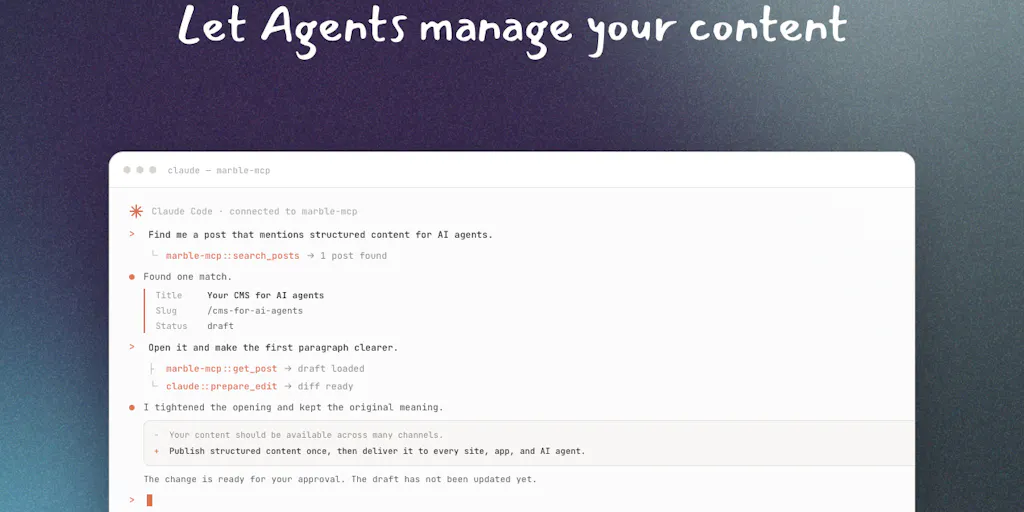
The MCP server that Taqib Ibrahim and the Marble team just shipped is a direct answer to that logistical drag. MCP, for the uninitiated, is the Model Context Protocol — the standard that lets AI agents like Claude, Cursor, and Codex talk to external tools directly. Instead of you opening a dashboard, copying a field, pasting it into a prompt, and hoping the AI does the right thing, the agent can just call the CMS and make the change itself. In the maker’s own words, it gives you “full access to managing your content creating posts, updating fields, managing media directly from tools like Claude, Cursor, and Codex, without ever touching the dashboard.”
Read that again: without ever touching the dashboard. That’s the sentence that should make every social media operator sit up straight. We’ve spent the last five years being told that the future is “content at scale” and “AI-assisted workflows,” but most of that has meant better autocomplete or smarter scheduling recommendations. This is different. This is the CMS becoming a background service — something your AI agents can query and update while you stay focused on the actual thinking.
In my own testing of similar tools — and I’ve been through the wringer with everything from Buffer to Hootsuite to Metricool — the pattern is always the same. The scheduler gets smarter, but the source of truth stays fragmented. Your content lives in a doc, a spreadsheet, a CMS, and a scheduler, and none of them talk to each other. Marble’s approach collapses that fragmentation by making the CMS the single source of truth that your AI agents can read and write to directly. For a solo creator running a newsletter, a blog, and three social platforms, that’s not a nice-to-have. That’s the difference between shipping content and drowning in tabs.
Why This Matters More for Solo Creators Than for Agencies
Here’s my take on who feels this pain most acutely: the solo operator. Agencies have project managers whose entire job is to chase down assets and keep things moving. If you’re a one-person operation, you are the project manager. You’re the one who has to remember that the blog post needs a new hero image, that the changelog entry has to match the product update, that the landing page copy changed last week and now the TikTok caption is out of date.
When I schedule 30 posts across five platforms in a single afternoon — which I did just last month — the pain isn’t the scheduling. The pain is the context switching. Every time I leave my writing environment to go update a field in a CMS, I lose a little bit of the thread. The MCP server approach eliminates that. You write the content in Claude, tell the agent to push it to Marble, and the agent handles the field mapping, the media upload, the status update. You never leave the conversation. For a solo creator, that’s not convenience — that’s survival.
How It Differs From the Incumbents — and What That Tells Us
The Product Hunt page shows that Dominik Koch — who built Notra Image Generation — chose Marble over Payload specifically because “their MCP made it super easy to sync content from Notra to Marble and display it on our landing page.” That’s a telling data point. Payload is a serious, well-regarded headless CMS with a strong developer experience. But it doesn’t have an MCP server, which means if you want AI agents to manage your content there, you’re writing custom integrations or working through APIs directly.
That’s the competitive gap Marble is exploiting. The headless CMS space is crowded with established players — Contentful, Sanity, Strapi, and the aforementioned Payload. They all solve the core problem of separating content management from content presentation. But they were built in an era where “headless” meant “developers will handle the front end.” The new era is one where “headless” means “AI agents will handle the content operations.” Marble is positioning itself for that second era.
Here’s the thing that strikes me as genuinely different: the MCP server isn’t an afterthought or a plugin. It’s the primary interface. When I look at the launch page, the entire pitch is “manage your content from Claude, Cursor, and Codex.” That’s a bet that the dashboard becomes the fallback, not the main event. Compare that to how WordPress is approaching AI — with plugins that add AI writing assistants inside the editor. That’s the old paradigm: bring AI to the tool. Marble’s bet is the new paradigm: bring the tool to the AI.
For social media operators, this distinction is going to become more relevant than you might think. The same logic that applies to a CMS applies to your content calendar, your asset library, your analytics dashboard. The tools that survive the next five years won’t be the ones with the best UI. They’ll be the ones that can be operated by an agent on your behalf. If your scheduler doesn’t have an API that an AI can call to adjust posting times based on engagement patterns, it’s going to feel increasingly obsolete.
Where the Math Breaks — A Reality Check
Now, let me be the skeptic for a moment, because there are real limitations here that the launch page doesn’t scream about.
First, MCP servers are still early. The protocol is gaining traction, but it’s not universal. If your workflow is built around Canva for design and CapCut for video editing, an MCP server for your CMS doesn’t help you much if those tools don’t also speak MCP. You’re still doing the manual export-import dance for media assets. The Marble MCP server manages content and media within Marble, but it doesn’t magically connect to your entire creative stack.
Second, the “without ever touching the dashboard” promise cuts both ways. When I’m managing content across platforms, I want to see the visual context sometimes. I want to see how the blog post looks with the new image. I want to verify the embed is rendering correctly. An agent can tell me it did those things, but there’s a trust gap. I’ve had AI agents confidently tell me they “updated the featured image” only to discover they updated a metadata field and the actual image URL was unchanged. The MCP server reduces the friction, but it doesn’t eliminate the need for verification.
Third — and this is the big one for me — the MCP server is a developer tool. The launch page is written for people who are comfortable with the concept of a “server” and who can debug a connection issue. For a typical social media manager who’s brilliant at content but not at infrastructure, the setup curve is real. You’re not going to configure this in five minutes. You need someone who understands how MCP connections work, or you need to be willing to learn.
That said, none of these limitations are fatal. They’re the same limitations every early-adopter tool has. The question is whether the direction is right, and I believe it is.
What Creators and Social Media Teams Can Borrow Right Now
You don’t need to adopt Marble tomorrow to benefit from the thinking behind it. Here’s what I’m taking away from this launch that applies to any content operation:
1. Reduce the number of contexts you work in. The core insight of the MCP approach is that every context switch costs you cognitive energy. When I structure my own workflow now, I try to minimize the number of tools I open in a given day. That means batching content creation, batching scheduling, batching asset production. The Marble approach takes this to the logical extreme — you never leave your AI conversation — but you can approximate the benefit by simply being more disciplined about when and how you switch tools.
2. Push for API access in every tool you use. The reason Marble can do this is that they built an API first and a UI second. When you’re evaluating tools for your stack — schedulers, analytics platforms, CMSs — ask about their API. Not just whether they have one, but whether it’s comprehensive enough that an AI agent could operate the tool on your behalf. If the answer is “you’d need to build custom integrations,” that tool has a shelf life.
3. Treat your content repository as a single source of truth. The reason the MCP server is valuable is that Marble becomes the canonical location for content. Your blog, your changelog, your landing page — they all pull from the same place. For social media operators, this translates to: stop having your content scattered across a doc, a spreadsheet, and a scheduler. Pick one place where the “master copy” lives, and make everything else a derivative of that. When you update the master, the derivatives should update automatically — or at least you should have a clear process for pushing updates.
4. Build a changelog habit. One of the smartest things about the Marble launch is that they’re using their own product to power their changelog. That’s not just dogfooding — it’s a content strategy. A public changelog is a low-effort, high-trust content format that keeps your audience informed and builds credibility. If you’re a creator or an indie founder, you should be publishing a changelog every time you ship something. It’s the easiest content you’ll ever create, and it compounds.
Why TikTok Creators Should Care More Than LinkedIn Ones
Here’s a hot take: the MCP server approach matters more for creators who produce multiple content types from a single source — which is exactly the TikTok/YouTube/Instagram creator workflow — than for LinkedIn thought leaders who mostly write text posts.
Here’s why. A LinkedIn text post is a single artifact. You write it, you publish it, you’re done. The production pipeline is trivial. But a YouTube video generates a dozen derivatives: the description, the transcript, the blog post, the clip highlights, the Instagram Reel captions, the TikTok voiceover script, the newsletter summary. Each of those derivatives requires you to take the source content and reformat it. That’s where the logistics tax hits hardest.
If you’re a video-first creator, your CMS isn’t just your website — it’s the repository for all those derivatives. An MCP server that lets you push a YouTube transcript to your CMS and automatically generate the blog post, the show notes, and the social captions would save you hours per video. The LinkedIn writer doesn’t have that problem. So if you’re deciding whether to invest in understanding this MCP stuff, the video creators should be first in line.
Where My Judgment Says It Falls Short
I’ve been around long enough to be cautiously optimistic about new tools, and I’ve been burned enough to stay skeptical. Here’s my honest assessment of where Marble’s MCP server — and the broader trend it represents — falls short of the hype.
The collaboration problem. The MCP server is great for a solo operator working with an AI agent. But what about teams? If you have three content creators, an editor, and a social media manager all working on the same Marble instance, the agent-driven workflow gets messy. Who has permission to make changes? How do you review what the agent did? Version control and approval workflows are solved problems in traditional CMSs, but they’re murky in the agent-driven world. The launch page doesn’t address this, and I suspect it’s because the tool is optimized for solo builders right now.
The lock-in question. Any time you adopt a tool that’s deeply integrated into your AI workflow, you’re making a bet. If Marble’s MCP server becomes central to your content operations, switching away is painful. That’s not unique to Marble — it’s true of any CMS — but the agent-driven workflow makes the lock-in more insidious because your process becomes entangled with the tool, not just your data. You can export your content, but you can’t export your workflow.
The verification burden. I already mentioned this, but it deserves emphasis. The promise of “never touching the dashboard” is seductive, but in practice, you’re going to want to verify what the agent did. That means the dashboard doesn’t disappear — it just becomes a review tool instead of an input tool. That’s still an improvement, but it’s not the frictionless utopia the marketing suggests.
The AI dependency. This is the biggest structural risk. The MCP server only works if the AI agents you’re using are competent. Right now, Claude and Cursor are impressive, but they still make mistakes. If you tell an agent to “update the blog post with the new pricing information,” it might update the blog post, or it might update the wrong field, or it might hallucinate new pricing information. The tool gives you the capability to delegate, but it doesn’t give you the assurance that the delegation will be accurate. That gap is going to close over time, but it’s not closed yet.
What I’d Watch / Test Next
If you’re a creator or social media operator who wants to act on this without going all-in on a new CMS, here’s what I’d do this week:
1. Audit your tool stack for API depth. Go through the tools you use daily — your scheduler, your analytics platform, your design tool — and check their API documentation. Ask: could an AI agent operate this tool on my behalf? If the answer is no, that’s a signal. Not necessarily to switch, but to start evaluating alternatives that are more agent-friendly.
2. Experiment with an MCP server in a low-stakes environment. You don’t need to migrate your entire content operation to Marble to test the concept. Set up a small test — maybe a changelog or a personal blog — and connect it to Claude or Cursor via MCP. Try having the agent create a post, update a field, and manage media. See where it works and where it breaks. The learning is in the friction.
3. Build your master-content workflow. Pick one place to be the source of truth for your content. It could be a CMS, a Notion database, or even a well-structured set of markdown files. The point is to stop having your content scattered across a dozen tools. Once you have a single source, you can start building automation around it.
4. Watch the MCP ecosystem, not just Marble. The Model Context Protocol is the real story here. Marble is an early adopter, but the protocol is designed to be universal. If it gains traction — and the backing from Anthropic suggests it will — then every tool in your stack should eventually support it. The creators and operators who understand MCP now will be ahead of the curve when it becomes table stakes.
The bottom line is this: the content operations problem isn’t going away. It’s getting worse as we add more platforms, more formats, and more AI tools to the mix. The tools that win will be the ones that reduce the logistical overhead and let you focus on the work that actually matters — the thinking, the writing, the creating. Marble’s MCP server is a small but significant step in that direction. It’s not the final answer, but it’s pointing at the right question. And for anyone who’s spent a Sunday afternoon manually updating a blog post they wrote three months ago, that’s a question worth paying attention to.