The Quiet Power of Tools That Respect Your Attention
Every creator I know is drowning in software that demands more than it gives. We’ve accepted a bizarre bargain: platforms harvest our attention, analytics dashboards guilt us into posting more, and AI tools promise tenfold reach while quietly mining our content for their own models. We schedule posts at 2 AM because the algorithm supposedly rewards it, we chase engagement metrics that don’t pay rent, and we’ve normalized a workflow where the tool is the boss and we’re the unpaid labor.
So when I see a developer ship a utility that does one thing well, asks for zero permissions, and charges a flat five dollars, my first instinct isn’t “cute indie project.” It’s “why isn’t this the default for everything we use?”
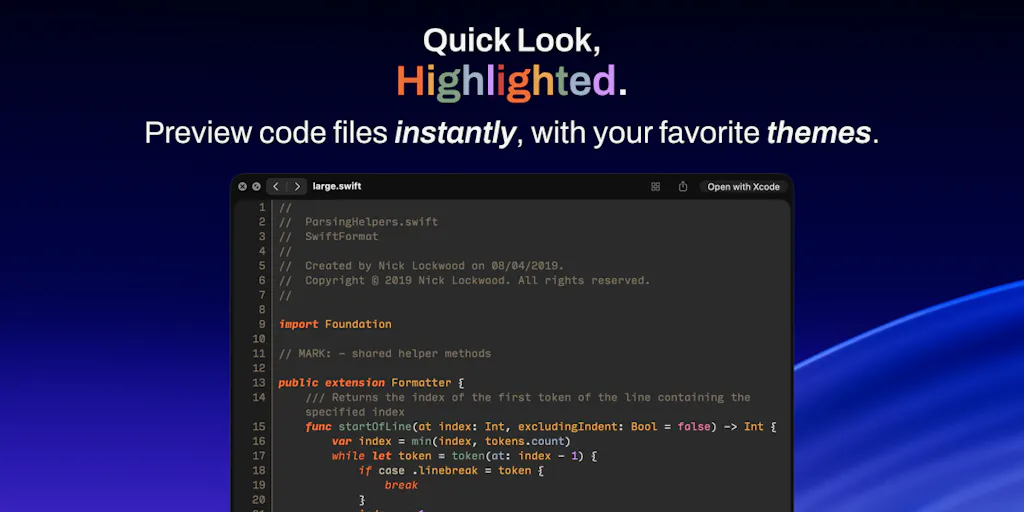
I’m talking about CodeLook, a macOS Quick Look extension that renders source code with real syntax highlighting. On the surface, it’s a developer tool for previewing files without opening an editor. But underneath the 700+ themes and tree-sitter grammars is a philosophy that social media operators desperately need to study: respect the user’s time, don’t collect data you don’t need, and charge a fair price without building a surveillance apparatus around it.
This matters to you because the creator economy runs on tools that treat you as the product. Every scheduling app, every AI content generator, every “growth hack” platform has an incentive to keep you hooked, not to make you efficient. CodeLook is a reminder that software can be the opposite: a quiet utility that does its job and gets out of the way. And that’s a lesson worth unpacking for anyone who manages content across Instagram, TikTok, YouTube, X, LinkedIn, or any of the other algorithmic firehoses we’ve strapped ourselves to.
What Problem This Actually Solves (and Why Creators Should Care)
Let me be direct: you’re not going to use CodeLook to edit your next Reel or schedule your LinkedIn carousel. But the problem it solves — the friction between having a file and actually seeing what’s in it — is the same friction that kills creator workflows everywhere.
The maker, Edden Amber, identifies the core issue in the launch post: Quick Look on macOS is system-wide and convenient, but it “does not show code files well or at all.” That’s it. That’s the whole problem. Not “revolutionize your developer experience.” Not “10x your productivity.” Just: the native preview is broken, so here’s a fix.
In my experience running social accounts, the most expensive moments aren’t the big strategic decisions. They’re the tiny frictions that break flow state. When I’m editing a video and need to check a caption file, or when I’m reviewing a batch of UTM-tagged URLs and need to verify the parameters, or when I’m digging through export logs from a scheduling tool — every time I have to open a separate application just to look at something, I lose momentum. The creator economy is built on momentum. A tool that eliminates a two-second context switch is worth more than a dashboard that gives me forty-seven charts I’ll never read.
CodeLook solves this by integrating directly into the macOS Quick Look system. It works in Finder, Spotlight, Open and Save dialogs, and third-party apps like Raycast. That means the preview is already where you are — you don’t navigate to a tool, the tool comes to you. For creators who manage assets across multiple platforms, this is the difference between a workflow that flows and one that stutters.
But here’s the part that really gets my attention as someone who’s tested dozens of creator tools: the extension “asks for no permissions and has no network access at all.” Files never leave your Mac. No analytics, no accounts. In an era where every free tool is actually harvesting your data to train someone’s AI model, this is a radical stance. The maker even notes the Swift highlighting engine and tree-sitter are open source under MIT, so you can verify the privacy claims if you’re paranoid. I appreciate that level of transparency, even if most creators won’t dig into the code.
How It Differs From the Incumbents (and What That Teaches Us)
To understand why CodeLook matters, you have to look at what creators actually use to manage their content pipelines. The big scheduling platforms — Buffer, Hootsuite, Later — all solve a version of the same problem: getting content from your brain to multiple platforms without losing your mind. But they’re heavyweight solutions. They require accounts, subscriptions, learning curves, and ongoing data collection. They’re built for teams and agencies, not for the solo creator who just wants to post a video without fighting three different dashboards.
CodeLook is the opposite. It’s a single-purpose extension that costs $4.99 one time on the Mac App Store, with no subscription and no in-app purchases. The maker is explicit: “No subscription, no in-app purchases. Fully private.” That’s not just a pricing model — it’s a philosophy. It says: I built something useful, I’m charging a fair price, and I trust you to decide if it’s worth it.
Compare that to the creator tool landscape. We’ve got AI content generators that charge monthly fees and then claim ownership of the content you generate. We’ve got scheduling apps that lock you into annual contracts and then change their API access when platforms like X or Meta tighten their rules. We’ve got analytics tools that collect your audience data and then use it to sell you “growth services.” The entire ecosystem is built on recurring revenue and data extraction, not on solving your problem once and getting out of the way.
Now, I’m not naive. I understand why subscriptions exist — they fund ongoing development and server costs. But CodeLook doesn’t need servers. It runs entirely on your Mac, using tree-sitter grammars that Zed and Neovim also use. The themes come from Zed’s registry, and the maker has a script that checks for updates. There’s no cloud infrastructure, no user accounts, no data to monetize. So the one-time price isn’t just fair — it’s the only honest pricing model for software that doesn’t phone home.
Here’s what creators can learn from this: when you’re choosing tools for your content operation, ask what the tool actually needs from you. If a scheduling app requires your account credentials and access to your posting history, that’s not a feature — that’s a liability. The best tools in your stack should be the ones that ask for the least and deliver the most. CodeLook is a masterclass in that principle.
Why the “No Permissions” Stance Is a Competitive Advantage
Let me drill into this because it’s the detail that separates a thoughtful tool from a typical SaaS product. The maker emphasizes that CodeLook “asks for no permissions and has no network access at all.” In the launch comments, Gal Dayan asks a sharp question: if there’s no network access, how do the 700+ themes get onto the machine? The answer is revealing: themes are stored in a JSON file on disk, and there’s only a network request when you specifically fetch a particular theme. The maker clarifies that the names and repo URLs are listed locally, and only the repo contents are fetched to pull colors.
That’s a design decision that respects your attention and your privacy. The tool doesn’t phone home to check for updates. It doesn’t send usage analytics. It doesn’t build a profile of which themes you browse. It does its job and stops.
In my experience, the tools that respect your boundaries are the ones you keep using. I’ve abandoned more “powerful” platforms because they felt like they were watching me than I can count. The creator economy is already surveillance-heavy — every platform tracks your behavior, every algorithm learns your preferences, every analytics tool wants more access. When a utility comes along that doesn’t, it stands out. And that’s not just a privacy win — it’s a trust signal that makes you willing to recommend it to others.
What Creators and Social Media Teams Can Borrow From This
You might be thinking: “Great, a code preview tool. What does this have to do with my content calendar?” Fair question. Let me connect the dots.
First, there’s the repurposing workflow. Anyone who creates content across multiple platforms knows the pain of managing source files. You’ve got a YouTube video that needs to become a TikTok clip, a LinkedIn post that needs to become a Threads thread, a blog post that needs to become a newsletter. The raw materials are code-adjacent — markdown files, JSON exports, CSV schedules. When you’re moving between tools, you need to preview these files quickly to verify they’re correct. CodeLook’s approach — instant, syntax-highlighted preview without opening a separate app — is exactly what a repurposing workflow needs. You don’t want to open a full editor just to check if your UTM parameters are correct in a CSV export.
Second, there’s the scheduling angle. I’ve tested Metricool and Publer and a dozen other scheduling tools. They all have the same weakness: they want you to stay inside their dashboard. But the best creator workflows are decentralized — you create in one tool, schedule in another, analyze in a third. The tools that win are the ones that integrate seamlessly into your existing flow. CodeLook’s approach — being a system extension that works everywhere Quick Look works — is the right philosophy. It doesn’t try to be your whole operating system; it just makes one thing better.
Third, there’s the analytics angle. The maker notes that CodeLook parses code using “the same tree-sitter grammars Zed and Neovim use, so each token is colored by what it actually is, not by a regex guess.” That’s a meaningful technical distinction. Regex-based highlighters are fast but wrong — they guess based on patterns, which means they miscolor edge cases. Tree-sitter grammars are precise because they understand the actual structure of the language.
This maps directly to social media analytics. Most analytics tools give you surface-level metrics — likes, comments, shares. But those are regex guesses at engagement. They don’t tell you what’s actually happening: which viewers watched past the three-second mark, which ones converted to followers, which content drove actual traffic to your site. The tools that matter are the ones that parse the real structure of platform data, not the ones that give you vanity metrics. When you’re choosing an analytics platform, ask whether it’s doing regex matching or tree-sitter parsing — in other words, is it giving you guesses or actual understanding?
Why the 17-File-Type Limit Is a Feature, Not a Bug
The maker lists 17 file types that CodeLook supports: Swift, Rust, C, C++, Go, Ruby, Python, CSS, JavaScript, JSX, TSX, Shell, Lua, JSON, JSONC, JSONL, YAML. Each gets a dedicated grammar rather than a generic highlighter. And notably, HTML and TypeScript can’t be previewed by any third-party app because macOS reserves those for its own handlers.
A less disciplined developer would have tried to support every language under the sun. This maker didn’t. They focused on the languages that matter for their use case and were honest about the platform limitations. That’s rare in creator tools, where every product tries to be everything to everyone. We’ve got scheduling tools that try to be analytics platforms, analytics platforms that try to be content suggestion engines, and content suggestion engines that try to be full AI copywriters. The result is software that does everything poorly instead of one thing well.
When you’re building your creator stack, take the CodeLook approach: use tools that do one thing exceptionally well, and don’t demand that they also solve your other problems. Your scheduling tool should schedule. Your analytics tool should analyze. Your AI assistant should assist. When you try to consolidate everything into one platform, you end up with a tool that’s mediocre at everything — and you’re locked into its limitations.
Where My Judgment Says It Falls Short
I’ve been singing CodeLook’s praises, but let me be balanced. This is not a tool for everyone, and there are real limitations that matter depending on your use case.
First, it’s Mac-only and requires macOS 26 or later with Apple Silicon. That’s a significant constraint. If you’re on an Intel Mac or a Windows machine, this tool simply doesn’t exist for you. And even if you’re on a modern Mac, the requirement for macOS 26 means you need to be on the latest operating system. That’s a high bar for many creators who are still on older versions because they’re running plugins or tools that haven’t caught up.
Second, the 17-file-type limit is real. If you work with HTML or TypeScript files — and many creators do, especially if you’re managing landing pages or web content — CodeLook won’t help you. The maker is upfront that macOS reserves those formats for its own handlers, but that doesn’t change the fact that you’ll need a different solution for those files.
Third, and this is my biggest concern: the maker describes this as their “first app.” That’s exciting, but it also means there’s no track record of updates, no community of users, no established roadmap. The themes come from Zed’s registry, and the maker has a script that checks for changes, but what happens if the maker loses interest? What happens if macOS 27 breaks the extension and there’s no update? With a one-time purchase model, there’s no ongoing revenue to fund maintenance. This is the classic indie software problem: you’re betting on the maker’s continued goodwill.
In my experience, the best tools are the ones that have survived multiple platform updates. When I look at the creator economy, the tools that have endured — Buffer, Canva, CapCut — are the ones that had the resources to adapt when platforms changed their APIs or algorithms. A solo developer building their first app is a bigger risk, even if the initial product is excellent.
There’s also the question of who this is not for. If you’re a social media manager who never touches code files, CodeLook is irrelevant. If you’re a content creator who works primarily with video and images, this tool solves a problem you don’t have. And if you’re on a team that uses collaborative coding tools or cloud-based IDEs, you might not need a local preview extension at all. The tool is designed for a specific niche — developers and technical creators who work with code files on a Mac — and it serves that niche well, but it doesn’t pretend to be broader than that.
Where the Math Breaks (and Where It Holds)
Let me talk about the pricing math because it’s instructive. CodeLook is $4.99 one time. No subscription, no in-app purchases. For a creator who’s used to paying $20-30 per month for scheduling tools, that’s almost nothing. But here’s the thing: the maker is betting that enough people will pay $5 once to make the development effort worthwhile. That’s a volume game. You need a lot of users to make a one-time price sustainable, especially if you’re going to provide updates and support.
Compare that to the subscription model that dominates creator tools. A tool that charges $10 per month needs fewer users to generate the same revenue, but it also creates a different relationship with users. Subscription tools have ongoing incentives to keep you engaged, to add features you didn’t ask for, to justify the recurring cost. One-time purchase tools have the opposite incentive: they need to be good enough that people recommend them, because there’s no recurring revenue to fund marketing.
In my view, the one-time purchase model is better for users but harder for developers. It forces discipline — you can’t rely on passive income from subscriptions, so you have to either build something genuinely useful or find other ways to monetize. CodeLook’s maker seems to understand this. They’re not trying to build an empire; they’re trying to solve a problem and charge a fair price. That’s admirable, but it also means the tool’s long-term viability depends on the maker’s willingness to maintain it without ongoing revenue.
What I’d Watch / Test Next
If you’re intrigued by CodeLook’s philosophy but don’t need a code preview tool, here’s what I’d actually do this week to apply these lessons to your creator operation:
Audit your tool stack for permission creep. Go through every tool you use for content creation, scheduling, and analytics. For each one, ask: what data does it collect, what permissions does it request, and what does it actually need to do its job? If a tool is asking for more access than it needs, consider whether it’s worth keeping. The tools that respect your boundaries are the ones you’ll trust with your audience’s data.
Test a one-time purchase tool in your workflow. It doesn’t have to be CodeLook — though if you’re on a Mac and work with code files, it’s a $4.99 no-brainer. Find a utility that solves a specific problem and charges a flat fee. Notice how different it feels to use a tool that isn’t constantly trying to upsell you or collect your data. That feeling of being respected is worth paying for.
Build a “no network access” rule for your content. Not literally — you need the internet to post content. But think about which parts of your workflow should be offline. Drafting, planning, and strategizing don’t need to happen inside a platform that’s tracking your every move. Use local tools for the thinking work, and only connect to platforms when you’re ready to publish. Your best ideas deserve to be developed in private.
Watch how CodeLook handles macOS updates. The maker is shipping their first app, and the real test will come when Apple changes something. If they maintain the tool and keep it working, that’s a signal of commitment. If not, you’ll know to be cautious about one-time purchase tools from solo developers. Either way, it’s a useful data point for your tool evaluation process.
The creator economy is full of tools that promise to amplify your reach, optimize your posting schedule, and grow your audience. But the tools that actually make a difference are the ones that respect your time, your data, and your attention. CodeLook is a small example of that philosophy — a utility that does one thing well, asks for nothing, and gets out of your way. If more creator tools followed that model, we’d all be less exhausted and more creative. That’s a future worth building toward.


