The quiet shift from “AI that writes your captions” to “AI that points at the button”
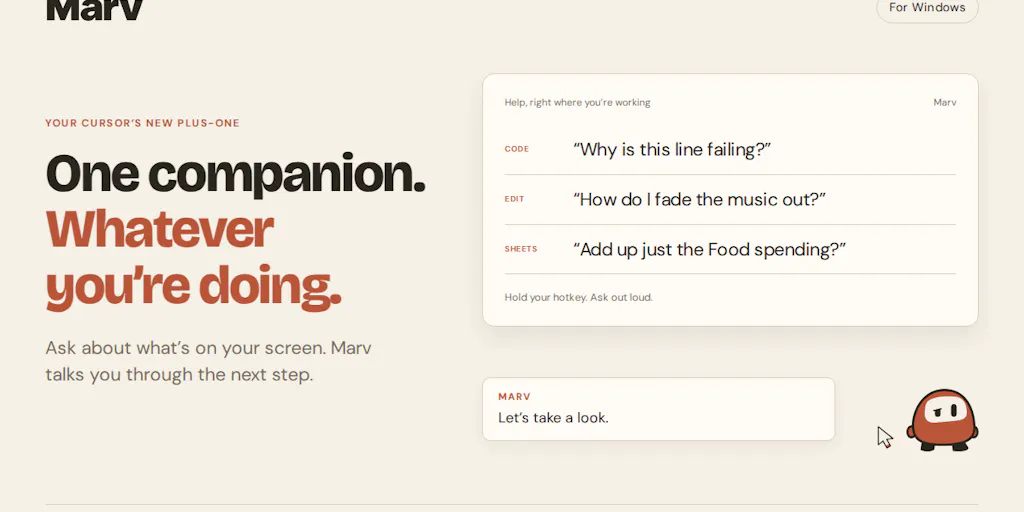
Most social media tooling in 2024–2025 has converged on the same shape: a dashboard, a chat box, and a promise that the model will generate your hooks, repurpose your Reels into TikToks, and schedule the whole thing to Buffer, Later, or Metricool without you touching a calendar. That’s fine, and I use pieces of it daily. But there’s a second, less glamorous category of AI emerging that I think creators and social media operators should be tracking closely — not because it posts for you, but because it collapses the friction of operating the software you already pay for. That’s the space Marv, a Windows desktop companion from maker Cameron McHardy, is pitching. It sits beside your cursor, you hold a hotkey, you ask about whatever is on screen, and it answers out loud while circling buttons and drawing arrows over the actual UI. Early-access signups are being collected at meetmarv.org, and the product is not fully released yet — the maker explicitly frames this as a launch-before-ship strategy. Here’s why that matters to anyone who runs social accounts for a living.
What problem Marv actually solves (and why it’s a creator problem, not just a Windows problem)
Strip away the cute-character framing and Marv is solving a very specific failure mode that anyone who juggles five to nine publishing surfaces knows intimately. You’re inside a tool you don’t use often enough to have muscle memory for. You know the outcome you want — export this at 1080x1920, find the UTM parameter field, locate the “add collaborator” toggle, change the aspect ratio on a template — but you don’t know which submenu hides it. The maker describes the origin frustration plainly: “you’re looking at an app, you know what you want to do, but you have no idea which button or setting gets you there.” That’s not a beginner problem. That’s the daily tax on anyone who lives across Canva, CapCut, Adobe Express, a scheduling tool, a link-in-bio page, and three native platform dashboards.
The comment thread is unusually instructive for a Product Hunt page, because the criticisms are substantive rather than cheerleading. One commenter, Chen Ben-Ari, describes the exact failure I’ve hit with screen-controlling agents: “I cant find the button the LLM is referring to, waste a lot of time looking for it, and eventually just let it control my screen, which burns even more time and tokens.” That’s the real alternative Marv is competing against — not a help doc, but a full agent hijacking your cursor. Another commenter, Gal Dayan, zeroes in on why the visual layer matters: “most AI help ends up describing where to click in words, and words are a bad medium for pointing at a specific pixel.” That’s the whole thesis in one sentence, and I think it’s correct.
Why this is more relevant to TikTok and Reels operators than to LinkedIn ones
If your job is mostly text — drafting LinkedIn posts, writing X threads, replying to comments — Marv’s value proposition is thin. You don’t need a cursor companion to find the “post” button. But if you’re producing short-form video at volume, your week is a tour through some of the most menu-dense, version-churning software on the planet. CapCut reorganizes its export panel every few releases. Canva’s brand-kit and resize flows are buried three clicks deep. Native TikTok and Reels uploaders hide scheduling, cover-frame selection, and sound-attribution fields in different places. Every one of those is a place where a five-second “where is this” question becomes a five-minute forum crawl. I’d bet the compounding time savings for a short-form-first operator is meaningfully higher than for a text-first one — though the maker hasn’t published any benchmark, so treat that as my read, not a claim.
How it differs from the incumbents you’re probably already paying for
The instinct is to file Marv under “AI assistant” alongside ChatGPT, Claude, Gemini, or Microsoft Copilot. That’s the wrong bucket. Those are conversational tools that live in a tab. Marv is a screen-aware overlay — the closest comparison is actually Apple’s screen-awareness features on macOS, or Microsoft’s Recall-style contextual assistance on Windows, except Marv is a third-party indie product and is explicitly Windows-only for now. It’s also adjacent to Loom and Scribe in that all three try to turn “how do I do this in this app” into something faster than a written guide — but Loom and Scribe produce artifacts you watch or read, while Marv answers in the moment, on your screen, and then leaves.
Where it most clearly diverges from the scheduling-and-analytics stack — Buffer, Later, Hootsuite, Metricool, Sprout Social — is that it doesn’t touch your content pipeline at all. It doesn’t draft, it doesn’t schedule, it doesn’t pull analytics, it doesn’t do UTM tracking. It’s a meta-layer underneath your stack. That’s a real limitation, and I’ll get to it, but it’s also why I find it interesting: most creator tools are fighting to be the hub, and Marv is content to be the WD-40.
The multi-monitor answer is the detail that made me take it seriously
Dayan asked the obvious operational question — does the overlay get confused about which screen you’re on when you have multiple monitors? — and the maker’s answer is the kind of specific, unglamorous detail that separates a real product from a demo: “multiple monitors work! The annotations stay with the app or page you asked about too. If you switch away, they dont carry over onto whatever you open next. Come back and theyre still there where you left them.” Per-window annotation persistence is the right default. I’ve tested enough screen-overlay tools to know that global overlays that leak across windows are worse than useless — they actively mislead you. Dayan’s follow-up, “good to know it’s per-screen not global, that’s the right default to ship with,” is the correct read.
The trust problem with a confident circle — and why creators should care more than most
The most important comment on the entire page comes from Asad M., and I want to amplify it because it’s the failure mode that will define whether this category works: “Drawing the arrow is a much stronger claim than saying the answer, and that’s the part I’d be careful with. If a chat reply is wrong I argue with it, but a circle around a button reads as certainty and I’ll have clicked before I’ve thought about it.” That is a genuinely sharp piece of product criticism, and the maker concedes the point: “A circle around a button feels a lot more certain than I think its this one, even if the uncertainty is the same. I like the idea of making that visible, and sometimes the right response is to ask you to clarify rather than draw anything.”
For creators, this isn’t abstract. Imagine Marv confidently circling the wrong export preset in CapCut and you batch-rendering 40 vertical clips at the wrong aspect ratio. Or circling the wrong toggle in a scheduling tool and silently turning off auto-publishing for a week. Visual certainty scales mistakes. I’d want to see Marv visibly hedge — a different visual treatment for low-confidence answers, an explicit “I’m not sure, is it this one or that one?” — before I’d trust it inside a production workflow. The maker says that’s on the roadmap; it’s not shipped, and the product isn’t either. Not disclosed: pricing, release date, or how confidence is currently surfaced.
Where the math breaks for a social media team
Solo creators can absorb a wrong click. Teams can’t, because teams have process. If you’re running a five-person content operation with an approval chain, the value of Marv is mostly in onboarding — new hires asking “where do I set the cover image” without pinging a senior editor. But the risk is that a wrong visual answer gets baked into a shared SOP before anyone catches it. I’d treat Marv as a personal productivity tool for experienced operators, not as infrastructure for a team, until confidence-signaling ships.
What creators and social teams can borrow from the Marv launch itself
Even if you never install Marv, the launch is a good case study in how to talk about a product before it exists. Three things stand out.
First, the maker launched to waitlist, not to GA, and said so. Luca Ardito’s comment — “i think ur strategy of launching before actually releasing the product makes a lot of sense” — is the kind of validation most founders quietly hope for. For creators, the parallel is obvious: you can validate a format, a series, or a paid product with a landing page and a waitlist before you’ve made the thing. The Marv page is essentially a content-marketing playbook: a clear problem statement, a visual demo, and a comment section that doubles as user research.
Second, the character work is not decoration. Germán Merlo’s “loved the character” and the general warmth of the thread suggest that personality is doing real retention work here. For social media operators, this is the same lesson as brand voice on TikTok vs. LinkedIn — the same functional answer lands differently depending on whether it feels like a tool or a companion. I’d argue the character is the single biggest differentiator Marv has against a generic Windows Copilot feature, and it’s the hardest thing for a platform incumbent to copy.
Third, the comment section is the product roadmap. Every substantive critique — multi-monitor, confidence hedging, the difference between pointing and describing — came from users, and the maker engaged each one directly rather than deflecting. That’s the same posture I’d recommend to any creator running a launch: treat your first 50 comments as a spec, not a scoreboard.
Where my judgment says it falls short
I want to be honest about the ceiling here, because the enthusiasm in the thread is real but the product is early.
- Windows-only, and no macOS or mobile roadmap disclosed. A huge share of short-form creators edit on Mac or on mobile. If you’re in that camp, Marv is not for you yet, and the maker hasn’t said when it will be.
- No scheduling, analytics, or publishing integration. This is not a Buffer or Later replacement. It doesn’t touch your content calendar, your UTM tracking, or your engagement-rate dashboards. If you were hoping for an all-in-one, this isn’t it.
- The confidence problem is unresolved. Asad M.’s critique is the sharpest thing on the page, and the maker’s response is a commitment, not a shipped feature. Until hedging is visible, I’d use Marv for low-stakes “where is this” questions and keep it away from anything that batch-affects published content.
- Pricing and availability are not disclosed. Waitlist only. No date, no tier structure, no indication of whether there’ll be a free tier. That’s fine for an early launch, but it means you can’t plan around it.
- The “companion” framing cuts both ways. A character you enjoy having on your desktop is a retention asset. It’s also a thing that can feel intrusive when you’re trying to hit a deadline. I’d want to test how quickly it can be silenced.
Who this is not for
If your workflow is 90% text — LinkedIn, X, newsletters — skip it. If you’re on macOS or an iPad-first creator, skip it. If you need a tool that actually publishes, skip it. Marv is for the Windows-based operator who spends real hours inside dense creative software and loses time to “where the hell is that setting” more often than they’d like to admit.
What I’d watch / test next
Here’s what I’d actually do this week, whether or not you sign up.
- Audit your own “where is this button” tax. For three days, note every time you leave an app to search for a setting, a forum thread, or a help doc. If it’s more than a handful of times, this category is worth your attention regardless of which tool wins.
- Join the waitlist and stress-test the multi-monitor claim at meetmarv.org once access opens. Specifically: does per-window annotation persistence hold when you’re running CapCut, a browser with 30 tabs, and a scheduling dashboard side by side?
- Watch for the confidence-hedging feature. That’s the make-or-break for production use. If Marv ships visible uncertainty signaling, it becomes a tool I’d recommend to editors. If it doesn’t, it stays a novelty.
- Compare it against the screen-aware features shipping inside Windows and macOS. Platform incumbents are moving into this space, and the indie advantage here is character and speed, not capability.
- Don’t rebuild your stack around it. Marv is a layer, not a hub. Keep Buffer or Later or Metricool as your publishing spine, and treat Marv — if it earns it — as the thing that makes operating the rest of the stack less annoying.
The bigger takeaway isn’t Marv specifically. It’s that the next wave of useful creator AI probably won’t be the tool that writes your caption. It’ll be the tool that quietly removes the friction between you and the software you already know how to use. That’s a less exciting pitch, and it’s a much more durable one.