The approval you gave an AI agent six months ago is not the approval it’s operating under today
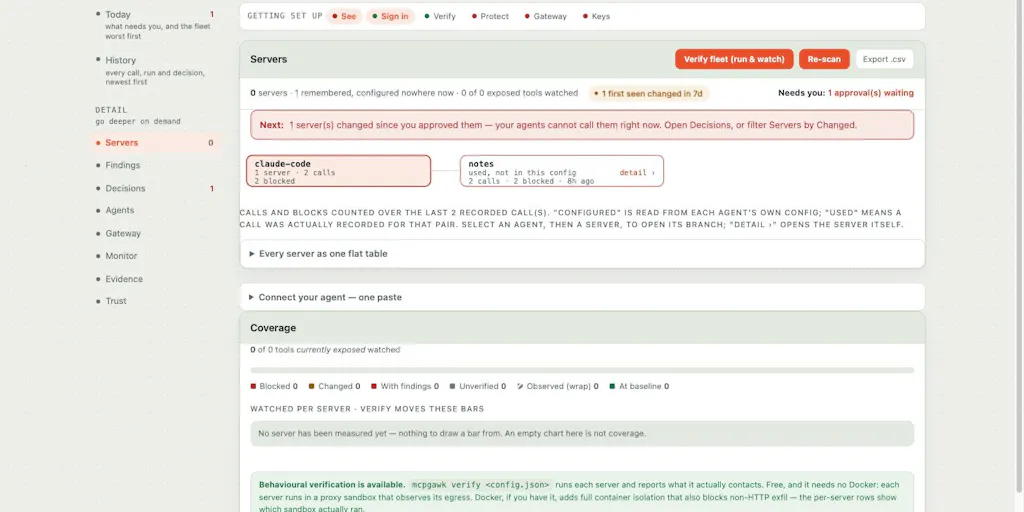
If you run social accounts for a living, you have spent the last year wiring AI into your workflow: a Claude or Cursor session drafting captions, a Model Context Protocol server pulling your analytics, another one pushing scheduled posts into Buffer, a third scraping comments so you can triage DMs. Each of those connections was a one-time “yes” you clicked months ago. The uncomfortable part — the part mcpgawk was built to address — is that the thing you approved is not the thing running now. In the maker’s own words, one server on his machine changed six times across six releases and went from 85 tools to 103, and his agent would have called every new one without a second look. That is the creator-stack problem hiding in plain sight, and it’s why I think this launch matters even though it has nothing to do with editing reels.
What mcpgawk actually solves, and why it’s a social-media problem in disguise
Let me translate the developer framing into operator language. MCP — the Model Context Protocol — is the connective tissue that lets an AI agent reach outside its sandbox and touch real tools: your calendar, your database, your publishing API. When you connect an MCP server to Claude Code, Cursor, or Codex, you’re handing an agent a set of “tools” it can invoke. Approving that server is a single click. But servers ship updates, and an update can silently rewrite what a tool does, change its inputs, or flip a safety flag. The agent doesn’t re-ask. It just calls the new version.
mcpgawk inserts a local checkpoint between your agent and those servers. Per the maker, it lets you see every MCP server your agents can reach across Claude Code, Cursor, Codex and more; approve a server and record exactly what its tools said at approval time; refuse a call once a tool rewrites its description or gains power you never signed off on; and view a side-by-side diff of what changed — description, inputs, or safety flags. Critically, approval is refused inside an agent session, so your agent can’t rubber-stamp its own expansion. Everything runs on your machine: no account, nothing uploaded. The CLI and VS Code extension are free; the team gateway is £29/month with a 7-day trial.
Why should a social media manager care about a developer security tool? Because your stack is quietly becoming an MCP stack. If you’ve connected an agent to your scheduling tool, your analytics warehouse, or your asset library, you have MCP servers in your life whether or not you’ve used that acronym. And the failure mode — a tool silently gaining the ability to publish, delete, or spend — is exactly the failure mode that ends with a brand account posting something nobody approved.
The “85 to 103 tools” detail is the whole story
I want to sit on that number, because it’s the most operator-relevant fact in the launch. A server going from 85 to 103 tools means eighteen new capabilities appeared between two releases. In a publishing context, that could be eighteen new endpoints an agent can hit — new ways to schedule, new ways to edit, potentially new ways to delete. You approved the server when it had 85. In my experience running multi-platform accounts, the dangerous changes are never the loud ones. They’re the quiet permission expansions that nobody flags because the tool still “works.”
How it differs from the incumbents you already pay for
Here’s where I’d place it against tools you actually use. The closest analogy in the social stack is the approval-and-permissions layer inside platforms like Buffer or Hootsuite — but those govern human teammates, not autonomous agents, and they don’t diff a third-party integration’s capabilities between versions. On the developer side, the comparison is to supply-chain and dependency-scanning tools, or to the permission prompts baked into Cursor and Claude Code themselves. Those prompts are one-time and stateless; they don’t remember what a tool looked like when you said yes.
Later, Metricool, and Sprout Social all give you audit trails for scheduled posts and team actions. None of them, to my knowledge, give you a versioned record of what an AI integration was allowed to do at the moment you approved it. That’s the gap. mcpgawk isn’t competing with your scheduler; it’s competing with the vague memory of a permission dialog you dismissed in February.
Why TikTok and X operators should care more than LinkedIn ones
This is a judgment call, so flag it as mine. The blast radius of an agent mistake scales with how fast and how irreversibly a platform punishes it. A bad LinkedIn post can be quietly edited. A bad TikTok or X post can be screenshotted, quote-tweeted, and algorithmically amplified before you notice — and X’s distribution rewards exactly the kind of engagement a misfire generates. If your agent has publish rights on a fast-moving platform, the cost of an unapproved tool call is asymmetric. If your agent only reads analytics, the risk is lower and you can deprioritize this.
What creators and social teams can borrow from it
Even if you never install mcpgawk, the design philosophy is worth stealing for your own AI workflows. Three transferable ideas:
- Version your approvals. When you connect any AI tool to your stack, write down what it was allowed to do on day one. Re-check it monthly. The maker’s “record exactly what its tools said” is just change management applied to AI.
- Make the agent unable to self-approve. The detail a commenter specifically praised — that approval is refused inside an agent session — is the single best idea here. Anywhere your automation can expand its own permissions, it eventually will.
- Keep the sensitive layer local. “Nothing leaving my machine” matters when the thing being processed is unreleased campaign assets or client data under NDA.
The repurposing workflow is where this bites hardest
Think about a realistic AI repurposing pipeline: one long-form video goes in, and an agent fans it out to Reels, Shorts, a CapCut template, a Canva carousel, an X thread, and a Pinterest pin. That pipeline touches a scheduler, a design tool, a storage bucket, and a publishing API — easily four or five MCP servers. If any one of them silently gains a “delete” or “bulk publish” capability, your agent now has a loaded gun pointed at your content calendar. In my own tests of agent-driven publishing, the bottleneck was never the model’s output quality. It was trusting the plumbing underneath it.
Where my judgment says it falls short
Balanced take, because the maker was refreshingly honest and I’ll return the favor. First, this is a developer-shaped product. The interface described — CLI, VS Code extension, side-by-side diffs of tool schemas — assumes you’re comfortable reading JSON and thinking in terms of inputs and safety flags. Most social media managers are not, and shouldn’t have to be. The team gateway at £29/month is priced for engineering teams, not a two-person content shop.
Second, the value is entirely contingent on MCP adoption in the tools you use. If your scheduler, analytics platform, and DAM don’t expose MCP servers yet, mcpgawk has nothing to watch. Adoption figures are not disclosed, and I’d bet the social-media tooling ecosystem is well behind the developer tooling ecosystem on this front.
Third, and this is the open question the launch doesn’t answer: what happens when a server changes mid-session and a call gets refused? Does the agent fail gracefully, or does your scheduled post silently drop? For a publishing workflow, a silent failure is its own kind of incident. The maker didn’t detail the failure behavior, and I’d want to test it before trusting it in a live calendar.
Who it’s NOT for: solo creators with one AI tool and no publishing automation. If your “agent” is you pasting captions into Threads manually, you don’t have this problem yet. Save the £29.
What I’d watch / test next
Concrete steps for this week, in order of effort:
- Audit your actual agent surface. List every AI tool with access to a publishing, analytics, or storage account. Most operators I know are shocked by how long this list is once they write it down. No tool needed — a spreadsheet works.
- Pick your highest-blast-radius connection — the one that can publish or delete on your fastest platform — and manually re-read its current permissions against what you remember approving. If you can’t remember, that’s the finding.
- If you’re technical enough to run a CLI, install the free version and let it watch one server for a week. You’re not buying anything; you’re learning whether your stack is as stable as you assumed.
- Watch for MCP support from your scheduler and analytics vendors. The day Buffer or Metricool ships an MCP server is the day this category becomes a mainstream social-media concern rather than a developer one.
My take: mcpgawk is early, developer-only, and solving a problem most social teams don’t know they have. But the problem is real, it’s growing, and the first tool to make agent-permission auditing legible to non-engineers — with a UI a content lead can read — will own a category that doesn’t have a name yet.