The One-Shot AI Video Trap Is Finally Getting a Fix That Social Media Teams Actually Need
If you’ve ever generated an animated social ad with an AI tool, you know the cycle: prompt → wait → export → realize the logo is too small → regenerate from scratch → wait again → export → notice the timing is off for a 15-second TikTok cutdown → throw your laptop against the wall.
Most AI motion graphics tools treat the output as a final rendered video—a black box you can’t reach inside. The result is what I’ve started calling the “redo tax”: every minor tweak costs a full regeneration, which kills iteration speed exactly when social media managers need it most. We live in a world where a single brand asset has to stretch across Instagram Reels, YouTube Shorts, TikTok, LinkedIn carousels, and a static Pinterest pin, all with different aspect ratios and duration constraints. A tool that can’t adapt to that reality isn’t a creator tool—it’s a demo reel generator.
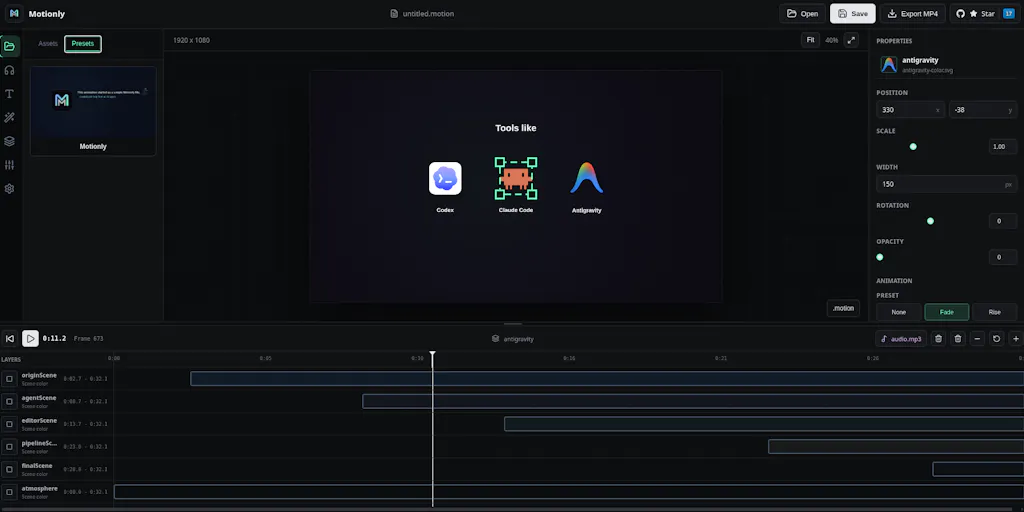
Motionly takes a genuinely different approach. Instead of spitting out a video file, its AI generates an editable .motion project file—think of it as the .fig of motion graphics, not the .mp4. The maker, Prom Sereyreaksa, describes it as “AI generating the entire motion project—a .motion file that describes the scene, timeline, asset placement, animations, easing, transitions, and effects.” That distinction is the difference between being stuck with a one-shot video and having a source file you can open, tweak, and repurpose across platforms without starting over. For anyone who schedules 30 posts across five networks in a week, that editable layer isn’t a nice-to-have—it’s the operational difference between shipping on time and burning out.
What Problem Motionly Actually Solves: The Redo Tax
Let me be specific about the pain point I’ve experienced firsthand. Last month, I was testing a new animated lower-third graphic for a client’s YouTube channel. I used a popular AI video tool that generates clips from text prompts. The first output had the wrong brand color because the AI interpreted “blue” as a specific hex value that clashed with the actual palette. I changed the prompt, regenerated, waited four minutes—and now the animation duration was 12 seconds instead of the 8 I needed. Regenerate again. Finally got a version that worked, but then the client asked for a square crop for Instagram. The AI tool couldn’t do that without regenerating the entire clip with a new aspect ratio prompt, which shifted the composition in a way that broke the text alignment. I ended up re-recording the whole thing in After Effects by hand, which took two hours.
That’s the redo tax. And it’s structural. Most AI motion tools are built as video generators, not motion graphics editors. They optimize for the first impression—a flashy demo—but fall apart when you need to make a single change. Runway and Pika produce impressive clips, but they’re essentially one-shot devices. Even Canva’s animation features or CapCut’s templates give you some editability, but they constrain you to their pre-built templates; you can’t easily swap an easing curve or change a keyframe without reconstructing half the scene.
Motionly flips that model. The AI doesn’t generate pixels—it generates a structured program that describes every element, its timeline position, its animation properties, and its transitions. You can then open that .motion file, make granular edits, and even version it. As one commenter on the Product Hunt thread put it, “the .motion file as an intermediate format is the real differentiator.” If you need to swap an easing curve on one layer without affecting the rest, you can. The maker confirmed: “you can change the keyframe, animation duration without affecting the styling or its positions. Update color, change the text rotation or scale without messing up the current animation.” That’s the difference between a black box and a source file.
For a social media team, this means a single AI-assisted generation can produce a master .motion project. From there, different team members can create platform-specific exports: a 9:16 version for TikTok Shorts, a 1:1 cut for Instagram, a longer variant for YouTube. Each variant is just a different rendering pass from the same source, not a new AI generation. The time saved compounds with every iteration.
How Motionly Differs from Existing Options (and Where It Still Competes)
The Incumbents Are All Selling Different Layers
To understand why Motionly matters, you have to look at what’s already out there and see where each tool stops.
After Effects is the gold standard for motion graphics editability—it gives you full keyframe control, expressions, and render pipelines. But it has a brutal learning curve, requires manual setup for every project, and offers zero AI assistance for initial generation. For a solo creator or a two-person social team, investing the hours to build an animated intro in AE isn’t practical for content that might live for three days.
Canva and Animaker are great for non-designers, but they’re template-based. You’re shuffling pre-animated elements, not controlling timing curves or layer composition. If the template doesn’t have the transition you need, you’re stuck.
CapCut is excellent for fast video assembly and simple text animations, but it’s not a motion graphics tool. You can’t define custom keyframes for a bouncing logo or a multi-layer parallax effect. Its AI features are limited to auto-captions and background removal, not generative motion.
LottieFiles is a runtime format for lightweight animations, but it’s a display layer, not a creation tool. You still need to create the animation in After Effects (with the Bodymovin plugin) or in a vector tool. LottieFiles themselves recognized this gap—they’ve built a web editor. But it’s still primarily a manual design environment.
Motionly sits in a new slot: AI-generated, fully editable, open-source. The maker chose open source “both about extensibility and trust,” as they stated in the thread. That choice matters for creators who have been burned by tools that pivot, get acquired, or raise prices. If Motionly’s .motion format is open, you never lose access to your project files. You can even build custom renderers, plugins, or AI integrations on top of it. That’s a level of ownership that no proprietary tool (Canva, Adobe, Runway) offers.
The Open Source Angle: Not Just a Gimmick
Open source in the AI creative space is rare. Most AI tools keep the model weights and generation pipeline hidden because that’s their moat. Motionly open-sourcing the entire editor—including the file format—is a trust signal. It says: we’re not trying to lock you into an ecosystem; we’re building a standard for editable motion graphics.
For a social media operator managing multiple clients, that means you can standardize on .motion files, keep them in a Git repository, and have a version history of every animation tweak. The thread even discussed conflict resolution—what happens when a designer hand-edits a .motion file while an AI agent generates changes to the same file? The maker admitted they haven’t solved this yet: “We haven’t explored this workflow deeply yet… One direction we might explore is a review-based workflow where AI changes are shown before being applied.” That’s honest, and it’s the right place to start. But for now, if you’re working in a team where multiple people (including AI) touch the same file, you’ll need to coordinate manually.
What Creators and Social Teams Can Borrow from Motionly’s Approach—Even If You Don’t Use It Tomorrow
The Workflow Insight: Iterate on the Source, Not the Output
The biggest operational takeaway from Motionly’s design is the principle of editable generation. When you use any AI tool for content creation, ask: “Is the output a final asset or a source file?” Most AI tools give you the former. Motionly gives you the latter. That insight can be applied even if you stick with other tools—look for workflows that preserve editability. For example, instead of generating a full video with AI, generate individual animated elements (like Lottie files or transparent MOVs) and assemble them in a real editor where you can tweak timing.
A concrete scenario: I run a newsletter for indie founders that also publishes short video trailers. I’d use Motionly to generate a base animation from a script—say, an animated title sequence with logo reveals and transition effects. The AI produces a .motion project. Then I open it and adjust the timing so the key message appears within the first three seconds (for TikTok’s retention curve). I export a vertical version. Later, the same .motion file gets re-exported as a horizontal 16:9 for YouTube. One source, two outputs.
Versioning Without the Pain
If you’ve ever worked on a client that asks for “just move that element 20 pixels to the left” on an AI-generated video, you know the frustration of having to regenerate and hope the AI doesn’t hallucinate a different composition. With Motionly’s .motion file, moving an element is a single parameter change. The maker has confirmed that granular edits like easing curve swaps are possible without cascade effects. That’s the kind of control social media managers need when they’re in a rapid iteration cycle ahead of a campaign launch.
Why TikTok Creators Should Care More Than LinkedIn Ones
This is where I’ll get opinionated: the value of editable motion graphics is asymmetrical across platforms.
TikTok and Instagram Reels reward fast-paced, visually dynamic content that can be cut down to different lengths. A creator who makes a 30-second animated explainer might want a 15-second cut for Stories, a 60-second version for YouTube Shorts, and a still frame for a thumbnail. With a .motion project, you can render each variant from the same source, adjusting timing without regenerating the AI output. For a high-volume creator doing daily content, that could save an hour per week.
LinkedIn, on the other hand, still favors static carousels and text-heavy posts. Motion graphics matter less there, and the editing overhead of a full animation tool isn’t worth it unless you’re producing premium brand content. For LinkedIn-focused creators, Motionly might be overkill—a tool like Canva is sufficient.
YouTube creators who produce long-form content often use motion graphics for intros, outros, and lower thirds. The ability to tweak timing to match a specific voiceover segment is invaluable. Motionly’s approach fits perfectly there, especially for channels that batch-produce content.
Where the Math Breaks: Current Limitations
I don’t want to oversell a product that’s still early. Let me flag the real gaps I see.
1. No export to common video formats yet. The maker states that “playback is handled by Motionly’s own renderer” and that “export targets and runtime integrations are something we’re exploring as the ecosystem grows.” That means right now, you can’t save a .mp4 or .mov directly without exporting through the renderer—which likely means the tool itself is the only way to view the output. For a social media manager who needs to upload to Instagram or TikTok, that’s a blocker unless Motionly adds a one-click export to standard video codecs.
2. The collaborative conflict problem. The maker acknowledged that simultaneous human and AI editing of the same .motion file isn’t solved. “Would love to hear any ideas or suggestions,” they said. This is a non-trivial problem. If your team workflow involves both a designer hand-tuning keyframes and an AI agent generating alternative versions, you need a merge/diff model akin to Git. Without it, the collaborative promise is aspirational, not operational.
3. Limited keyframe control today. The maker noted they are “working on the keyframe and making better, with graph visuals and more keyframe options and also custom keyframes.” As of launch, the keyframe editing is basic compared to After Effects. If you need precise bezier curves or custom easing, you might hit a wall.
4. No pricing or hosting model disclosed. Motionly is open source, which means you can self-host or run it locally. But the Product Hunt page doesn’t mention a hosted cloud version, support, or any paid tiers. For non-technical creators, deploying an open-source editor from GitHub (currently at this repo) isn’t trivial. You need to know how to clone, install dependencies, and run a local development server. Until they offer a hosted version with a login, the audience is developers and technically-minded designers.
5. Not for quick-turn video creation. If your workflow is “open app, describe animation, get video in 30 seconds, post,” Motionly is not that tool. It adds a layer of editability, but that layer comes with complexity. You have to be willing to open a project file, understand timelines, and make manual adjustments. For the creator who just wants to rip a template from CapCut and ship, Motionly is a step too far.
What I’d Watch / Test Next
Here’s my concrete plan for the next week, and I recommend you do the same if you manage motion graphics for social content:
Clone the repo and spin up the local editor. The repo is at github.com/COPPSARY/Motionly. I’ll test a simple scenario: generate an animated title using the AI feature (if available), then manually adjust the duration and a color. I want to see how clean the
.motionfile looks in raw form—whether diffs between versions are human-readable or encrypted bytes.Check for export pipeline options. Even though the maker said export targets are exploratory, there may be a command-line render script that outputs PNG sequences or MP4. If not, I’ll file a feature request. For social media workflows, the ability to render to
./output/9x16.mp4is non-negotiable.Test the AI generation with brand assets. I’ll provide a logo SVG and see if the AI can incorporate it into an animation without mangling the proportions. That’s a common failure point in AI video tools—they treat external assets as optional.
Evaluate the learning curve for a non-developer. I’ll hand the local editor to a designer colleague who doesn’t code and see if they can make a meaningful edit to the
.motionfile without reading documentation. If the visual editor is intuitive enough, that’s a win. If they bounce off, the tool stays in developer territory.Watch for hosted version announcements. The Product Hunt launch is a relaunch with improvements, so the team is actively shipping. I’ll follow Motionly on Product Hunt for updates. If they add a cloud-hosted option with one-click export to MP4, that’s the moment it becomes viable for mainstream social media teams.
Right now, Motionly is a tool for the early adopter who values editability over convenience, and who isn’t afraid of a command line. But the idea—AI that outputs a structured, editable source file instead of a rendered black box—is the direction every AI motion tool should be heading. If you’ve ever cursed at a regenerated video because the AI changed something you didn’t ask for, you know why this matters. The redo tax is real, and Motionly is the first tool I’ve seen that’s designed from the ground up to eliminate it.