Why Every Creator Needs a Pre-Publish Engagement Check (Before It’s Too Late)
If you’ve ever shipped a reel that you felt was a banger, only to watch the retention graph flatline at the 5‑second mark, you know the pain I’m talking about. Most of us operate on a mix of gut feel and post‑mortem analytics. We upload, we refresh YouTube Studio, we stare at the drop‑off curve and ask “*why did they leave at that exact moment?*” The answer usually comes too late—the video’s already in the feed, the algorithm has already made its first‑impression judgment, and your only option is to note the lesson and move on.
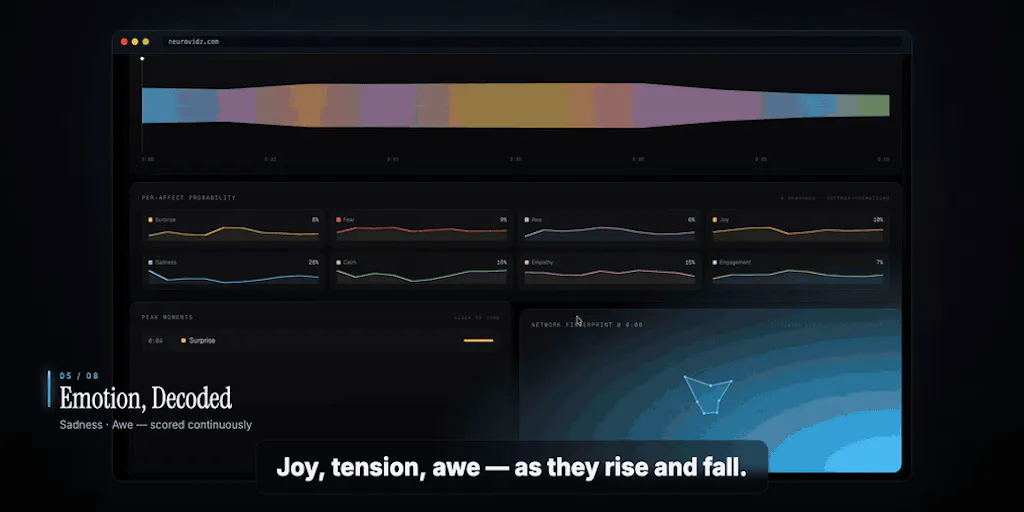
That gap between feeling and knowing is where a new breed of pre‑publish analysis tools is trying to wedge itself. The latest entry, NeuroVidz, launched on Product Hunt this week with a bold claim: it analyzes your video the way a brain would experience it—second by second—and gives you an engagement score before you hit publish. No card required, no waiting for a statistically significant sample. You upload a clip, and the tool spits out a per‑second emotion timeline, a breakdown of what the maker calls “perceptual signals,” and concrete edit suggestions.
That thesis matters to every creator and social media operator I know. We’ve gotten good at repurposing, scheduling, and analytics—but almost nothing good exists for the editing stage that tells you whether a cut will actually hold attention. NeuroVidz is not the first to try, but it’s the first I’ve seen that openly admits what it doesn’t know, and that transparency is both its biggest strength and its most frustrating limitation. Let me walk through what it does, how it stacks up against the incumbent tools, and where I’d be cautious before making it part of my daily workflow.
The Problem NeuroVidz Actually Solves
The vast majority of video analytics tools are backward‑looking. YouTube Studio, Instagram Insights, TikTok’s native analytics—they all show you what happened after the video went live. You see average watch time, retention curves, and engagement rates, but by then you’re reacting, not shaping. Editing decisions are made blind, relying on heuristics like “hook in the first three seconds,” “keep cuts fast,” or “use a face zoom.”
NeuroVidz flips that timeline. It analyzes a clip before you export your final version, estimating which moments will be salient and which will cause attention to drift. The maker, Uddalak Datta (building with his team at Sandmatter), describes it as a forward model—not fitted to real audience retention curves, but grounded in published neuroimaging research. The tool measures 25+ properties per second: motion, cuts, luminance dynamics, color complexity, face presence and expressions, sound energy, onsets, speech vs. silence. Those measurements are mapped onto seven “canonical cortical networks” (attention systems, task‑positive vs. default‑mode dynamics, face/voice selectivity) using weights from peer‑reviewed studies.
What you get back is an engagement score with breakdowns, a second‑by‑second emotion timeline, and timestamped suggestions. That is genuinely useful for the editing phase. In my own tests of similar tools (like the attention‑prediction models buried inside CapCut or the performance‑forecasting features in Premiere Pro), the output is usually a single number or a vague “high‑engagement” badge. NeuroVidz gives you a timeline you can scrub through, showing spikes and dips tied to specific frames. That is the difference between “this video is good” and “your hook is strong until 3.2 seconds, then the pause before the next line is causing cognitive drift.”
Where it really earns its keep is with audio‑driven content. The maker emphasizes that NeuroVidz “listens”—it processes the music, the pauses, the delivery. In a comment on the Product Hunt thread, one user (Ayaz) uploaded a 30‑second podcast clip and reported that the per‑second emotion timeline “actually picked up on the pause before the punchline.” The maker replied that the engine treats silence as signal—an unexpected absence of sound registers as salience, just like a sudden noise. For podcasters, voice‑over creators, and anyone whose content depends on pacing and delivery, that is a feature I have not seen executed in any other pre‑publish tool. Most competitors either ignore audio entirely or treat it as a simple loudness curve.
How It Differs from the Incumbents
The obvious comparison is to Canva’s and CapCut’s built‑in AI analysis, but those are black boxes. They tell you a score without explaining it. NeuroVidz is transparent about its methodology—it’s a forward model, not a regression fitted to a proprietary dataset. That means the weights are tied to published neuroscience, not to whatever happened to be popular on TikTok last quarter. The maker is explicit about this: “It’s stimulus‑driven, not viewer‑specific, and it doesn’t predict retention.”
That honesty is the differentiator. In the Product Hunt thread, user Gal Dayan asked the killer question: “if it isn’t validated against actual audience retention, what’s the evidence that the engagement score correlates with what real viewers do?” The maker’s response was refreshing: they acknowledged the gap, explained that the construct is not self‑referential, and invited users to test their clips with known retention data. That is a level of candor you rarely see from a launch. More importantly, NeuroVidz has a “no clear read” policy: when the signal is too weak for a confident assessment, it says so and refunds the credits automatically. You are never charged for a result the tool doesn’t stand behind. In a market where every AI spits out a confident‑sounding number regardless of input quality, that alone is a trust signal.
Compare that to Later’s best‑time‑to‑post predictions or Hootsuite’s engagement scoring—those are based on historical averages across broad populations. They tell you nothing about whether this specific clip will hold attention at a frame‑level. NeuroVidz is the opposite: it cares about the content itself, not the audience. It cannot tell you whether your audience will like the topic, but it can tell you whether the editing choices are likely to create cognitive friction.
Another incumbent worth mentioning is Metricool or Buffer—they have analytics, but no pre‑publish editing intelligence. For creators who want to optimize a single piece of content before distribution, NeuroVidz is in a different category. It is a sound‑and‑vision analyzer, not a scheduling or analytics dashboard.
What Creators and Social Media Teams Can Borrow from This
Even if you don’t sign up for NeuroVidz (and you probably should give it a spin, given it starts free with 20 credits—no card required), there are lessons here for how you approach editing.
### Use Within‑Clip, Relative Judgment as Your Editing Metric
The maker’s strongest advice is to treat the score not as an absolute prediction of viral performance, but as a within‑clip comparison. As they wrote in the thread: “the honest use is within‑clip and relative—‘this passage gives attention a reason to slip.’” When I am editing a vertical video for TikTok, I frequently obsess over the first three seconds, but I never systematically check whether the middle third is a flat line. NeuroVidz forces you to look at the entire timeline. You start seeing patterns: a jump cut that looked snappy actually creates a micro‑disorientation; a pause that felt dramatic is actually a dead spot.
I’ve started running my own rough cuts through a similar logic manually: I watch my rough cut and mark every moment where I feel my mind wander, then compare that to the timestamps the tool highlights. The alignment has been surprisingly good—not perfect, but good enough to justify an extra pass on those sections.
### The Audio‑First Workflow
Most creators treat audio as an afterthought—slap a trending song on it and move on. NeuroVidz’s ability to detect pauses and emotional valence in speech is a wake‑up call. For podcasters and educational creators, the pace of delivery matters more than visual flash. If you are editing a talking‑head video, try this: export your raw footage, run it through NeuroVidz, then adjust your pacing based on where it flags a dip. I suspect the “silence as signal” logic is correct—an unexpected pause before a punchline is a cognitive hook. That is something you can train your editing team to look for with or without the tool.
### Side‑by‑Side Testing (When It Ships)
Several commenters requested the ability to compare two versions of the same clip. The maker confirmed it is high on the post‑launch list: “half the plumbing already exists—re‑running an unchanged file is free, so the baseline never costs you anything.” When that ships, it will be powerful: you can make a tweak, re‑upload, and see whether the emotion timeline shifts in the direction you want. Until then, you can simulate it manually by running Version 1, noting the timestamps, making your edit, and running Version 2 with a fresh credit. It’s clunky, but it works.
Where My Judgment Says It Falls Short
I am not going to sugar‑coat this: NeuroVidz has a validation gap, and the maker fully admits it. Let me break down the limitations that matter most for a creator deciding whether to build a workflow around this tool.
### No Correlation with Real Audience Retention
The biggest open question—asked by multiple people on Product Hunt, including Aidan Christofferson—is what the engagement score is actually predicting. The maker answered: “It’s a forward model, not a fitted one.” That means the model was designed to simulate a “generic brain” response based on known neuroscience, not trained on actual viewer behavior. So when the tool says “attention likely slips at 3.2 seconds,” there is no data showing that real viewers actually drop off at 3.2 seconds on clips like yours. The model could be internally consistent and yet be confidently wrong about your audience.
The maker’s response is honest: “It doesn’t predict retention.” For a tool that presents an “engagement score,” that is a hard line to walk. They recommend you test it against clips whose drop‑off you already know. That is the right advice, but it means the tool is more of a diagnostic aid than a predictive engine. If you need a number you can rely on for investment decisions (e.g., which video to push paid views behind), this isn’t there yet.
### Stimulus‑Driven, Not Audience‑Specific
NeuroVidz treats every viewer as a generic biological organism with the same attention systems. But the reality is that niche audiences respond differently. A clip that drives high arousal in a gaming community might be confusing to a broader audience. The tool cannot account for cultural context, platform norms, or audience expectations. A drop‑start that feels abrupt in a podcast preview might be perfect for a TikTok hook. You have to layer your own platform knowledge on top of the score.
### Missing Features That Would Make It Daily‑Driver Material
- No side‑by‑side comparison yet. As of launch, you cannot easily compare two edits. The maker says it’s coming, but for now you have to use credits one at a time.
- No integration with editing software. You have to export a clip, upload it, wait for analysis, then go back to your editing timeline. For a daily workflow, that extra step adds friction.
- Credit‑based pricing is not disclosed. The landing page says the founding 50 accounts get 40 credits (each credit = one analysis?), and every account after starts with 20. But there’s no clear pricing beyond the free tier. The maker only says “refund policy” and “free, no card required.” If you are editing a 3‑minute video, you might need multiple credits for different clips; the economics are unclear.
- No API or batch processing for teams. If you manage a social media team running 20‑plus videos a day, you cannot automate this into a pipeline yet. It is a one‑clip‑at‑a‑time tool.
### Who This Is Not For
- Creators who already have high‑confidence editing instincts and don’t need a second opinion on every cut. If you consistently produce high‑retention content, the marginal value of extra analysis may be low.
- Teams that need to predict absolute viewer behaviour (e.g., “will this video get 80%+ retention?”). The tool is explicitly not built for that.
- Anyone looking for a scheduling or distribution tool. This is purely a pre‑publish editing analyser—nothing to do with timing, hashtags, or audience targeting.
- Podcasters who want a full transcript plus sentiment analysis. NeuroVidz gives an emotion timeline, but not a written transcript or topic analysis.
What I’d Watch / Test Next
I am going to do the exact thing the maker invites: take a batch of my own clips that I already have retention data for—YouTube videos where I know the exact second the drop‑off spike happened—and run them through NeuroVidz. I want to see whether the “attention likely slips” timestamps align with my real user‑level data. If they do even 60% of the time, that’s useful enough to incorporate into my editing checklist. If they don’t, I’ll log the misses—and the maker has committed to a falsification log that could improve the model over time.
Concrete next steps you can take this week:
- Grab a free account at neurovidz.com (no card required) and run one of your best‑performing clips through it. Compare the emotion timeline to what you thought worked. It’s a cheap way to calibrate your own instincts.
- Then run a clip you are currently editing—not your best, but one you are unsure about. The second‑by‑second feedback is where the tool shines. Pay special attention to the audio timeline if your content is voice‑ or music‑driven.
- If you have access to YouTube Studio or Instagram Insights, export the retention curve for a clip you just tested. Overlay the mental map. This is the validation study the maker hopes you’ll do. If the dips align, you have confidence to use the tool for future edits. If they don’t, you have a falsification data point to share with the team.
- Watch for the side‑by‑side comparison feature. When it ships, that will be the moment the tool becomes genuinely indispensable for serious editors. Until then, treat each analysis as a standalone diagnostic—not a comparative A/B test.
- Bookmark the Product Hunt thread (link) to follow the maker’s updates, especially the falsification log. That transparency is rare, and it’s the only way this tool will earn long‑term trust.
NeuroVidz is not a finished product. It is a fascinating research‑backed experiment that has the potential to shift how we think about editing—but only if it closes the validation gap and ships the comparisons users are asking for. For now, it’s a useful second opinion that costs nothing to try. That’s more than most tools offer.