The explainer-video bottleneck is real — and it’s a social-media problem before it’s a product one
Every social media operator I know has the same graveyard: a folder of screen recordings, slide decks, and half-written threads that never became video because the edit was too expensive in time. Short-form distribution now rewards explanation — a 45-second “here’s what changed and why it matters” clip out-performs a static changelog post on almost every platform I’ve run. So when ngram shipped its AI Explainer Video Maker on Product Hunt, I paid attention less because of the launch copy and more because it targets the exact step in my workflow that eats the most hours: turning source material into a narrated, structured video without opening a timeline editor. This piece is my read on what it actually does, who it’s for, and where I’d bet it breaks.
What ngram actually solves, stripped of launch-day framing
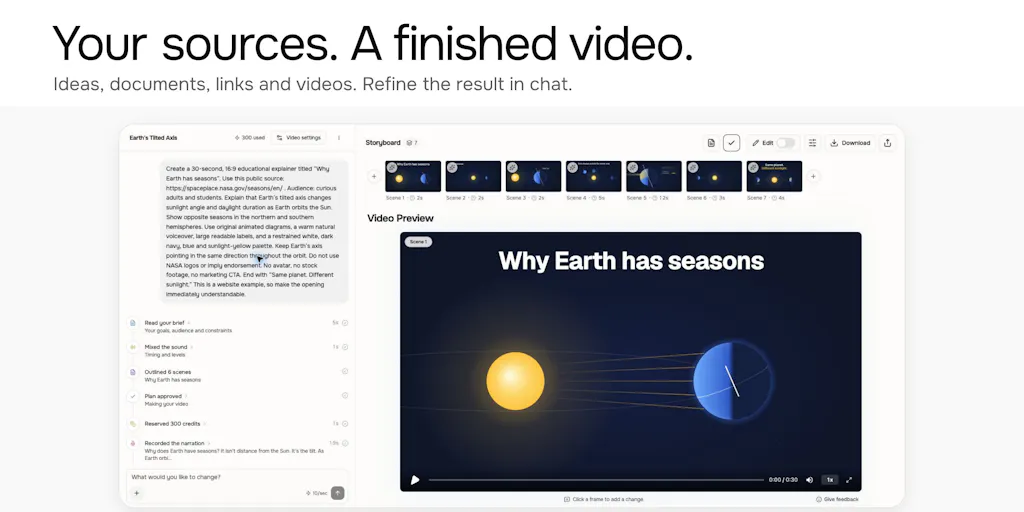
The maker, Rishikesh Ranjan, frames the problem plainly: “A research paper, a slide deck, or a product guide can have everything someone needs to learn a topic. Turning that material into a video still takes a separate round of scripting, recording, and editing.” That sentence is the whole thesis. The input is material you already have — a paper, a training deck, product documentation, a screen recording. The output is a script, narration, and animated scenes, assembled for you.
The workflow as described has three levers: bring the material, tell ngram who it’s for, and choose how much detail to cover. The team claims the material and the chosen depth guide the video’s length. That’s the part worth scrutinizing, because “choose your audience” is where most AI video tools quietly collapse into the same generic output.
Why the audience selector is the real feature, not the animation
A commenter, Oleksii Sekundant, made the sharpest point on the thread: “The same source material needs a different story for someone new to it.” Ranjan’s reply is the tell — “It should change the explanation itself, not just make the same script shorter.” That distinction matters enormously for anyone repurposing content. If “beginner” mode only truncates the same script, you get a worse video, not a different one. If it genuinely rewrites the framing, you get what social teams actually need: one source asset, multiple audience-specific cuts.
In my own tests of similar tools, this is where the seams show. Most “AI video” products generate one plausible script and let you trim it. The ones that hold up let you regenerate with a different audience premise and get a structurally different explanation — different opening, different assumed context, different pacing. I’d bet ngram’s value lives or dies on whether that regeneration is real. The launch thread suggests it is, but I haven’t run it myself.
Where this sits against the incumbents
If you’re a social operator, you’re already paying for some stack. Here’s how I’d place ngram against what most teams actually run:
- Canva — unbeatable for templated social graphics and now decent at short video, but it’s a design tool. You still write the script and record the voiceover.
- CapCut — the default editor for TikTok-native creators. Fast, free-ish, but it assumes you already have footage and a story.
- Descript — the closest philosophical cousin. It’s built around editing video like a doc, and its AI features (Studio Sound, filler-word removal, overdub) are excellent. But Descript starts from recorded media; ngram starts from a document.
- Synthesia and HeyGen — AI-presenter video at enterprise scale. Strong for training and localization, weaker for the scrappy “I have a changelog and 20 minutes” use case.
- Loom — the incumbent for screen-recording walkthroughs. ngram’s makers explicitly name screen-recording walkthroughs as one of the three modes it brings together.
My take: ngram isn’t trying to beat Canva at design or Descript at editing. It’s trying to collapse the scripting layer — the part where you stare at a research paper and figure out how to make it a 90-second story. That’s a narrower wedge, and narrower is usually smarter at launch.
What creators and social teams can steal from this, regardless of whether you buy it
Here’s the part I care about more than the product review. The ngram launch is a useful mirror for how you should be structuring your own video pipeline, whether you use the tool or not.
The “source material first” inversion
Most social teams work backwards: they decide they need a Reel, then scramble for something to say. ngram’s model inverts that. You start with material that already has substance — a doc, a deck, a paper — and the video is a derivative, not an original. That’s the same logic behind repurposing a webinar into clips or a blog post into a carousel. If you’re running Buffer, Later, or Metricool for scheduling, you already know the bottleneck isn’t posting cadence — it’s having enough genuinely good source material to fill the calendar. Build the source library first. The video is downstream.
The audience-and-depth parameter is a repurposing cheat code
When I scheduled 30 posts across 5 platforms last month, the single biggest time sink was re-framing the same idea for different audiences — the LinkedIn version, the TikTok version, the newsletter version. If you can define “who is this for” and “how deep” as explicit variables before you create anything, you stop rewriting from scratch. You write once, then regenerate for the audience. Even without AI, this is a discipline worth adopting: before you script anything, write one sentence naming the audience and one naming the depth. It’ll save you more time than any tool.
The X-thread-to-video trick is quietly the most social-native feature
Buried in the thread, Ranjan notes you can “tag @askngram on a text-heavy thread on X/twitter, and it’ll turn the thread into an explainer video.” For anyone whose growth engine is X — and plenty of indie founders still live there — that’s a zero-friction path from a format you’re already producing to a format YouTube and TikTok reward. Threads are already structured as beats; they translate to video better than almost any other text format.
Why TikTok creators should care more than LinkedIn ones
LinkedIn audiences tolerate a static carousel or a text post with a chart. TikTok and YouTube Shorts don’t — watch time and completion rate are the distribution levers, and a talking-head-plus-slides explainer holds retention far better than a screenshot. If your growth is short-form-first, an explainer-video generator removes a real bottleneck. If your growth is LinkedIn-first, the ROI is thinner, because LinkedIn still rewards text and documents heavily. Match the tool to the platform where your audience actually watches.
Where I think it falls short — and the open questions
The launch thread is unusually honest about limitations, which I appreciate. Let me lay them out.
It doesn’t stay in sync with your product
A commenter, Iman Koma, asked whether ngram can keep a video in sync when the product UI changes. Ranjan’s answer: “Today, you’d provide an updated recording when the UI changes.” A second maker, Anish Muppalaneni, confirmed: “We currently don’t keep the video live with updated product changes, but that’s coming soon.” So the “living documentation” dream isn’t here yet. If you ship weekly, you’re still regenerating, not syncing.
The positioning is genuinely muddled
Liav Lewitt nailed it: the main description centers on product updates, but the rest of the copy frames it as a general explainer generator. Ranjan conceded the point — “The descriptions could connect those dots more clearly.” For a buyer, that ambiguity is a real cost. Are you evaluating a changelog-video tool or a general explainer tool? Those have different competitors and different budgets.
The AI-avatar churn question is unanswered
The most interesting comment came from Nika, who shared that when their team used AI-created people, users churned, and reducing AI improved conversions and trial completion. They asked ngram directly how users perceive AI avatars. As of the scrape, that question had no maker reply. That’s not a knock on ngram specifically — but it’s the question every AI-video tool should be forced to answer. My take: AI presenters work for internal training and localization; they’re much riskier for customer-facing brand content, where audiences punish uncanny.
Accuracy is asserted, not demonstrated
Aryan Mehta asked how ngram keeps narration and visuals accurate to source material. No answer appeared in the scrape. For anything technical — research papers, compliance docs, medical content — this is the make-or-break question. Until there’s a documented accuracy story, I’d treat ngram as a drafting tool, not a publish-without-review tool.
The GitHub integration is a promise, not a feature
Ranjan mentioned a GitHub integration “coming soon” that turns each PR into an explainer video, initially for internal teams, with customer-facing changelogs later. That’s a smart wedge — engineering teams already write PR descriptions — but it’s roadmap, not product. Don’t evaluate ngram on it.
Pricing, plans, and who this is not for
The launch copy states ngram “is part of ngram and uses our existing plans and credits.” Specific pricing tiers and credit costs are not disclosed in the source material. If you’re budgeting, check the ngram site directly before assuming anything.
Who it’s not for, in my judgment:
- Brands with strict visual identity systems. If every asset must match a locked template, an AI-generated animated scene will fight your guidelines.
- Teams that need pixel-perfect, on-brand motion design. This is a speed tool, not a Motion Array replacement.
- Anyone publishing regulated or high-stakes claims without a review step. See the accuracy question above.
- Creators whose entire format is personality-led. If your audience follows you, an AI-narrated explainer isn’t your format — it’s a supplement.
Who it is for: product marketers with a backlog of changelogs, indie founders who need to explain what they built, L&D and internal-comms folks turning decks into lessons, and social operators who need a repeatable way to turn text-heavy source material into short-form video.
What I’d watch / test next
Three concrete things to do this week, whether or not you try ngram:
- Run one real asset through it. Take a deck or doc you already have and generate an explainer. Then generate a second version with a different audience setting. Compare them side by side. If the second version is structurally different — not just shorter — the audience feature is real. If it’s the same script trimmed, it isn’t.
- Audit your source library. Before you buy any AI video tool, count how many documents, decks, and threads you have that should be videos but aren’t. If that number is under five, the bottleneck isn’t tooling — it’s raw material. Fix that first.
- Test the X-thread path. If you post threads, tag @askngram on one and see what comes back. It’s the lowest-effort way to judge output quality before committing credits.
What I’m watching: whether the GitHub integration ships and actually keeps videos current, whether the team publishes any accuracy methodology, and whether the positioning sharpens into something a buyer can evaluate in one sentence. Until then, I’d treat ngram as a fast first-draft engine for explainer video — genuinely useful for the “small updates that never get a demo” problem Nrupen Mandava described — but not yet a system you can set and forget.