The screen-time tool that finally admits the feed is also the office
Most screen-time apps are built on a fantasy: that the person installing them wants to use their phone less. Social media managers, creators, and indie founders don’t. We want to use it better. Instagram is where the DMs live, TikTok is where the trend research happens, X is where the launch thread goes, LinkedIn is where the inbound leads come from. A blocker that can’t tell “reply to a client” from “three reels deep at 1 AM” isn’t a productivity tool — it’s a hostage situation. That’s why Orbit, which launched on Product Hunt this week, is worth a look even if you never install it: the maker’s own comment thread accidentally surfaces the single hardest design problem in the entire focus-app category. And the way the team answers it tells you a lot about where this category is heading.
What problem Orbit actually solves
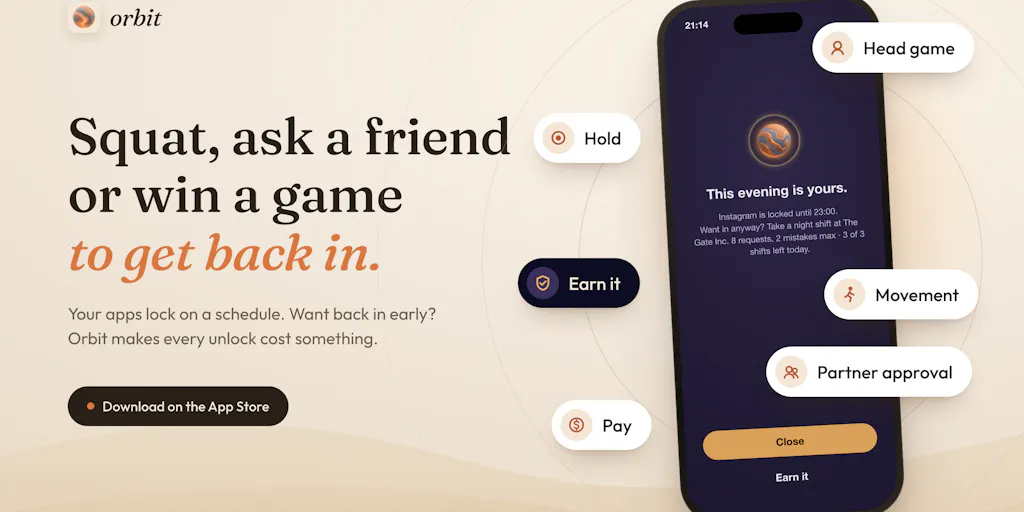
The pitch, per maker Alara Akcasiz, is refreshingly honest: her own Screen Time report read 10h 19m a day, more than 80% of it doomscrolling. She tried deleting apps (reinstalled within the hour), grayscale, a dopamine-detox weekend, and strict blockers she learned to bypass “in two taps.” That last failure is the thesis: getting back in was free. So Orbit makes every unlock cost something — a breathing exercise, squats in front of the camera, a head-movement game, a request to an accountability partner, or money ($0.99, then $1.99, up to $9.99 that week, or sent to a nonprofit instead). There’s also a mini-game called The Gate Inc. where you play a night-shift judge reviewing eight residents’ requests to go online; make two mistakes or fewer and you earn your break.
The results claim: a month later, 10h 19m → 6h 14m a day, social media time cut in half, better sleep. The team also cites WHO/HBSC data that 1 in 9 teens across 44 countries show signs of social media addiction (up from 1 in 14 in 2018) and a 2025 randomized trial in PNAS Nexus where blocking mobile internet for two weeks improved attention and well-being in over 90% of participants. Launch pricing is 20% off annual with code PHA20 and lifetime with PHL20.
My take: the mechanism that matters isn’t the squats or the money. It’s the friction tax. Every unlock requires a deliberate act, which is exactly what infinite feeds are engineered to remove. The research the team leans on — a 12-week study where putting money on the line cut social media use by 39%, with the habit change persisting after the money stopped — is the strongest part of the pitch, because it’s about pre-commitment rather than willpower. If you’ve ever watched a “strict” blocker get defeated by muscle memory, you know why that distinction is everything.
Why this matters more to operators than to everyone else
Here’s the part the launch post doesn’t emphasize enough, and the part I’d bet most social media managers felt in their chest when they read it: the feed is the office. Kaitlyn Bricker, who runs Instagram for two brands, asked the exact question every operator has — does the “What for?” prompt let you save a reason like “replying to DMs” so work sessions don’t eat into the limit? The maker’s answer was honest: not yet. “What for?” has fixed options today — “Reply to someone” opens just that one app for 2 minutes, “Check one thing” for 1 minute — and two minutes is obviously not a work session.
The workaround the team suggests is the interesting bit. Orbit runs on schedules, not a daily time allowance, so you can lock Instagram only outside your work blocks and leave work hours open. Some social media managers, they note, keep Instagram locked and answer DMs from Meta Business Suite, a separate app you simply don’t add to the lock. The second maker, Noyan IDIN, was blunt about why they won’t let a saved “work” reason bypass the block entirely: it would become an easy loophole, “even with the best intentions.”
That’s a real trade-off, and I think the team is right to be cautious — but it also reveals who this product is not for yet. If your job is 90% inbox triage across Instagram, TikTok, and X, a schedule-based blocker is a blunt instrument. You’ll either carve out work windows so wide the block does nothing, or you’ll be doing squats at 2 PM to answer a client. In my experience, the operators who get the most from tools like this are the ones who can cleanly separate “publishing and responding” from “research and lurking” — and that separation is a workflow problem before it’s a software problem.
Where the math breaks
The maker’s own framing is worth interrogating: at 10 hours a day, the next decade costs “4+ years of waking life.” That’s a striking number, and I don’t doubt the arithmetic. But for a social media manager, some of those hours are the job. The question isn’t “how do I cut screen time” — it’s “how do I stop the 20% of scrolling that’s pure autopilot from eating the 80% that’s actually work.” Orbit’s weekly report — which tracks how often you tried to open a locked app and how often you chose not to continue — is the more useful artifact here than the streak counter. If you’re going to use this, treat the report as a diagnostic on your own attention drift, not as a moral scorecard.
How it stacks up against the incumbents
The obvious comparisons are Opal, One Sec, Freedom, and Apple’s built-in Screen Time — and one commenter, Zandy Moyo, made the sharpest point in the whole thread: Opal helped initially, “but once I learned how to interrupt its sessions, the restrictions lost their meaning for me.” That’s the graveyard every blocker ends up in. The maker’s answer is the most technically revealing thing on the page: automatic drift detection isn’t possible on iPhone, because Apple’s Screen Time framework never lets a third-party app see what you do inside another app. Nothing reads your screen or your messages. So Orbit flips the model — instead of detecting the drift, it asks before it starts. Tap a locked app and the bouncer asks “What for?” Pick “Reply to someone” and only that app opens for 2 minutes, then relocks itself.
I’d bet that pre-commitment framing is the right bet, and it’s also why Orbit is a different product from Buffer, Hootsuite, Later, or Metricool — those are publishing tools, and none of them touch the consumption side. The overlap, if any, is with RescueTime on desktop. But the honest comparison is Opal and Freedom, and Orbit’s differentiator is the cost menu: money, physical effort, social accountability, or a game. That variety matters because different people cave to different costs. The maker’s own question — “what would stop you faster: 20 squats, asking your mom, or $9.99?” — got a clear answer in the thread: paying wins. Deokumar Manwar said it plainly: “When you say that I have to pay to do something, I would rather stick to what I am supposed to do.”
Why TikTok creators should care more than LinkedIn ones
This is an opinion, not a sourced claim, but it follows from the mechanics. LinkedIn’s feed is finite-ish and mostly text; the cost of a five-minute scroll is low, and the platform’s own algorithm rewards posting cadence more than consumption. TikTok and Instagram Reels are the opposite: infinite, autoplay, and engineered to erase stopping cues — the maker calls this out directly, noting that infinite feeds remove natural stopping cues, “which is why your thumb keeps going on autopilot.” If your content strategy depends on understanding short-form trends, you’re also the person most exposed to the format’s pull. A schedule-based lock that protects your mornings and your bed — and leaves your work blocks open — is a more realistic fit for a TikTok creator than a daily time budget would be.
What creators and social teams can borrow from it
Even if you never install Orbit, three ideas here are worth stealing for your own workflow:
1. Pre-commitment beats willpower. The 39% figure from the money-on-the-line study is the headline, but the operational lesson is smaller and more portable: decide before you open the app what you’re there for. I’ve started doing a version of this manually — before opening Instagram, I write the one task in a notes app (“reply to 3 DMs,” “check the Reels audio on the launch post”). Half the time I close the app without doing it, which is the point.
2. Separate schedules, not limits. Orbit’s model of locking outside work blocks rather than capping total time is the right shape for operators. If you’re building your own system with Screen Time or Digital Wellbeing, set your downtime for the hours you know you’re not working — early morning, evening, bed — and leave the workday alone.
3. Group locks are an underrated team ritual. The “Together” feature locks a whole group’s phones at once for dinner, a study night, or a trip. Each phone locks its owner’s own apps; the host sets the duration and the shared challenge; nobody sees anyone else’s apps, only “4 of 4, to the end” plus who took a pause. For a small content team, a 30-minute group lock before a shoot or a planning session is a cheap way to force presence — and the privacy design (no one sees which apps you use, only minutes and your reason) is the detail that makes it usable rather than creepy.
Where my judgment says it falls short
The work-session gap is real. The maker concedes “not yet” on saved work reasons, and the schedule workaround assumes you can cleanly define work hours. Many operators can’t. If your job is reactive — community management, real-time trend response, client DMs — this tool will either get bypassed or become a nuisance. That’s not a knock on Orbit specifically; it’s a structural limitation of every iOS blocker, because Apple’s framework won’t let any app see inside another app.
The game could become the new feed. The team is clearly aware — The Gate Inc. caps at three shifts a day “so the game never becomes the new feed” — and I respect the self-awareness. But I’d want to see whether the novelty holds past week three. In my own tests of similar gamified blockers, the mini-game is fun for a fortnight and then becomes another thing to tap through. The money unlock is probably the more durable mechanism, which is why the thread’s consensus answer (“paying would stop me fastest”) is also the least fun one.
The evidence is directional, not decisive. The 10h 19m → 6h 14m result is a single maker’s self-report, not a controlled study. The cited research — the WHO/HBSC figure and the PNAS Nexus trial — is real and relevant, but it’s about social media use and internet blocking broadly, not about Orbit specifically. The team attributes the 39% figure to a 12-week study; I haven’t independently verified it, and you shouldn’t treat any of these numbers as proof the product works for you. Pricing beyond the launch discount is not disclosed in the source, and there’s no user count or revenue figure to sanity-check traction.
Who it’s not for: teams that live in the inbox, anyone who needs a single app open all day for work, and anyone who’s already defeated Opal and Freedom by learning their tells. Orbit’s answer to that last group is “Harder each attempt” — every unlock that week costs a little more — which is clever, but it’s still a bet that friction outlasts muscle memory.
What I’d watch / test next
This week, if you’re curious, do the cheap version before you pay for anything. Open your own Screen Time or Digital Wellbeing report and separate your social hours into “publishing/responding” and “scrolling.” Most operators I know are surprised by the ratio. Then set a single downtime window — bed to morning, nothing else — and see whether the friction alone changes anything.
If you want to test Orbit properly, the launch discounts (PHA20 for annual, PHL20 for lifetime) make a one-month trial cheap, and the weekly report is the feature to judge it on, not the streak. Watch for two things: whether the team ships the saved “work” reason Bricker asked for, and whether the group-lock feature gets adopted by small content teams as a pre-shoot ritual. My take: the pre-commitment model is the right direction for this category, and the honest “not yet” in the comments is a better trust signal than any 10x claim on the page. The tool that wins this space won’t be the strictest blocker — it’ll be the one that understands the feed is sometimes the office, and designs around that instead of pretending otherwise.