The real lesson from Proto-Mind isn’t the floating cube — it’s the “workspace” framing
If you run social accounts for a living, you already know the dirty secret of the AI tool boom: most of these products are built for people who write code, not people who write captions. So when a new Mac app crosses my feed, my first question isn’t “is it cool?” It’s “does this change how a creator or a social team ships content?” Proto-Mind, a hover-to-peek AI workspace built by Yurii Yaremenko for the GPT-6 Astra Challenge, is a Mac productivity tool first and foremost. But the way it thinks about AI — as a persistent, background workspace rather than a chat window you keep re-opening — is exactly the mental model social media operators should be stealing this quarter. Here’s what it actually does, where it fits against the tools you already pay for, and where my judgment says it falls short.
What problem Proto-Mind actually solves
The pitch, per the maker, is a Mac workspace where “AI tasks, browser pages and files could stay together without taking over your desktop.” The centerpiece is a small cube you hover to peek at, click to keep open, and move away from to reclaim your screen. Tasks continue running in the background. You can detach companion windows, run separate AI conversations in parallel, and assign a different model or ChatGPT account to each chat.
That last detail is the one that made me sit up. In my own testing of AI-assisted content workflows, the friction is almost never the generation step — it’s the context-switching. You draft a hook in one tab, pull a stat from a client brief in another, check the brand voice doc in a third, then paste everything into a scheduler. Every hop costs attention, and attention is the actual bottleneck in a social media operation, not ideas.
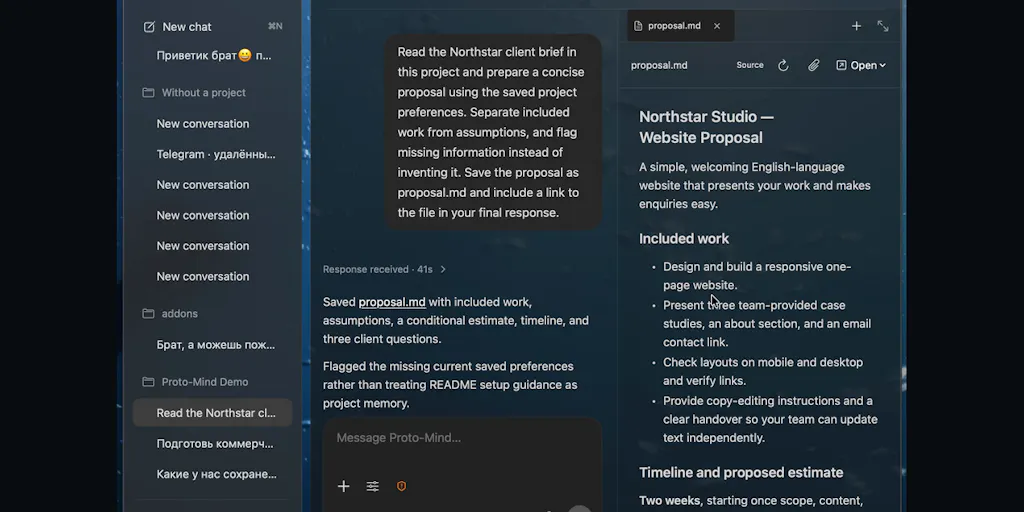
Proto-Mind’s answer is to collapse those hops into one persistent surface. The demo the maker recorded for the challenge shows Astra reading a sample client brief and saving a proposal while the interface is folded away — the result being “a real project file to review, not just a generated answer.” That distinction matters more than it sounds. Most AI content tools hand you a blob of text in a chat log that you then have to copy somewhere useful. This one writes to a file system. For anyone who has ever lost a good caption draft in a ChatGPT thread from three weeks ago, that’s a meaningful difference.
Why this is a repurposing story, not a writing story
Think about how a repurposing workflow actually runs. You record a long-form video, transcribe it, cut it into vertical clips, write platform-specific captions for each, schedule them across Instagram, TikTok, YouTube, and LinkedIn, then track performance. That’s five or six tools minimum, and the handoffs between them are where things break. A workspace that keeps the source file, the AI conversation, and the output file in one place is a quiet but real workflow upgrade — not because the AI is smarter, but because the context survives.
I’d bet the creators who benefit most from this framing aren’t the ones generating the most content. They’re the ones juggling the most clients or the most platforms, where losing context is expensive.
How it differs from the tools you’re already paying for
Let’s be honest about the competitive set. If you’re a social media manager, your stack probably includes some combination of Buffer, Hootsuite, Later, or Metricool for scheduling and analytics; Canva or CapCut for asset creation; and increasingly ChatGPT or Claude for copy. Proto-Mind doesn’t try to replace any of those. It sits upstream of them.
That’s an important positioning choice, and I think it’s the right one. The scheduling layer is commoditized — every tool does multi-platform publishing, and the differentiators now are analytics depth and API reliability. The creation layer is where the real time goes, and it’s the layer that’s least well-served by a browser tab. Proto-Mind’s bet is that AI work belongs on the desktop, adjacent to your files, not in a web app you toggle to.
The multi-account detail is the sleeper feature
The maker notes you can “choose a different model or ChatGPT account for each chat.” For agency folks and freelancers, this is quietly huge. If you manage five client accounts and each has its own ChatGPT workspace or brand-trained context, being able to run parallel conversations with separate accounts in one interface removes a genuinely annoying login-shuffle. I’ve watched social teams burn real minutes every week just switching between client AI accounts. It’s not glamorous, but it’s the kind of friction that compounds.
Where the math breaks
Here’s where I get skeptical. Proto-Mind runs “through Codex using your own ChatGPT account,” and live voice uses “a separate OpenAI API connection and billing.” That means your costs are layered: whatever you pay for ChatGPT, plus API usage, plus the app itself (pricing not disclosed in the launch material). For a solo creator, that’s fine. For a team of five social managers, you’re now provisioning multiple accounts and tracking multiple bills. The economics only work if the time saved is real and measurable — and the maker hasn’t published any numbers on that, which is fair for an early beta but worth flagging.
What creators and social teams can borrow from it
Even if you never install Proto-Mind, there are three operating principles here worth stealing.
First, treat AI as a workspace, not a query. The mental shift from “I ask ChatGPT a question” to “I maintain a workspace where AI tasks live alongside my files” changes how you organize work. In practice, that means keeping your brand voice docs, your content calendar exports, and your AI conversations in one project folder rather than scattered across browser tabs and Slack DMs. You can approximate this today with a shared drive and disciplined folder structure, no new software required.
Second, let tasks run in the background. The “fold the interface away and let it work” pattern is underrated. Most of us sit and watch the spinner. If your tooling supports async generation — and most modern AI APIs do — you should be batching your prompts and doing something else while they cook. When I scheduled a month of posts across five platforms recently, the single biggest time sink wasn’t writing, it was waiting. Async everything.
Third, separate your models per context. The multi-account, multi-model approach isn’t just an agency trick. If you run a personal brand and a client brand, keeping those contexts physically separate prevents the worst kind of AI error: brand voice bleed. One chat that’s been trained on Client A’s tone should never draft for Client B.
Why TikTok creators should care more than LinkedIn ones
This is a volume argument. TikTok and Threads reward posting frequency in a way LinkedIn doesn’t — the algorithmic distribution on short-form video platforms is far more sensitive to recency and cadence, which means more assets, more variations, more hooks to test. A workspace that lets you spin up parallel AI conversations for hook variations is more valuable when you’re shipping five videos a week than when you’re shipping one thought-leadership post. My take: if you’re a short-form-first creator, the leverage here is higher.
Where my judgment says it falls short
I want to be direct about the limitations, because the launch material is candid and I respect that.
It’s Mac-only, Apple Silicon only, macOS 14 or later. That rules out a huge chunk of the creator economy, which skews toward a mix of devices. If your team is on Windows, this is a non-starter today.
The beta is not Apple-notarized. The maker says the download page explains installation and requirements. For a security-conscious agency, that’s a real hurdle — IT departments will balk. Notarization is the difference between “I’ll try this” and “I can’t install this on a work machine.”
API and local-model connections “have different capabilities from the Codex task runner.” Translation: the experience isn’t uniform across connection types. If you’re expecting the same smoothness with a local model as with Codex, temper that. The maker is being honest here, which is a good sign, but it means the product’s best experience is tied to OpenAI’s stack.
No analytics, no scheduling, no publishing. Proto-Mind does not post to social platforms. It doesn’t pull engagement data. It won’t tell you whether your hook worked. It’s an upstream workspace, full stop. If you were hoping for an all-in-one, this isn’t it.
Pricing is not disclosed. For a tool that layers on top of an existing ChatGPT subscription plus API billing, the total cost of ownership is the open question. I’d want to see that spelled out before recommending it to a team.
Who this is NOT for
If you’re a solo creator who posts twice a week and mostly works from a phone, skip it. If your workflow is already clean and your AI usage is light, the overhead of a new desktop app won’t pay for itself. If you need publishing and analytics in the same tool, this isn’t your product. Proto-Mind is for the operator who already lives in AI daily, juggles multiple contexts, and feels the pain of scattered files.
What I’d watch / test next
Here’s what I’d actually do this week if this caught my attention.
First, audit your own context-switching. For two days, note every time you leave one tool to grab something from another while producing content. If that number is high, the workspace thesis applies to you regardless of whether you use Proto-Mind.
Second, if you’re on an Apple Silicon Mac and comfortable with a non-notarized beta, download it and run one real client brief through it end to end — brief in, proposal file out. Judge it on whether the output file was usable, not whether the demo looked slick.
Third, watch for two things the maker hasn’t addressed: pricing disclosure and notarization. Both are signals of whether this is a serious tool or a challenge demo. And keep an eye on whether the “workspace” pattern gets copied — my bet is that within a year, at least one major scheduling platform bolts an AI workspace onto its dashboard, because the logic is too obvious to ignore.
The cube is cute. The workspace is the idea worth stealing.