The clip-finding problem is now a conversation — and that changes the creator workflow
If you’ve ever spent a Sunday afternoon scrubbing a two-hour podcast timeline looking for the one 40-second exchange that would actually perform on TikTok, you already understand the real bottleneck in the repurposing economy. It isn’t editing. It isn’t captions. It’s retrieval — finding the moment before you can do anything with it. That’s why a small Mac-only launch called S-Roll caught my attention this week, even though it’s not pitched at social teams at all. The maker, Ritik Bompilwar, frames it as “an agentic harness for video understanding that turns long videos into clips through natural-language prompts,” and the demo workflow — open a video, type “find the KO clip,” get a clip — is exactly the loop that eats hours out of a repurposing calendar. Whether it survives contact with a real content operation is a different question, and I’ll get to that.
What S-Roll actually does, and why “agentic harness” is the interesting part
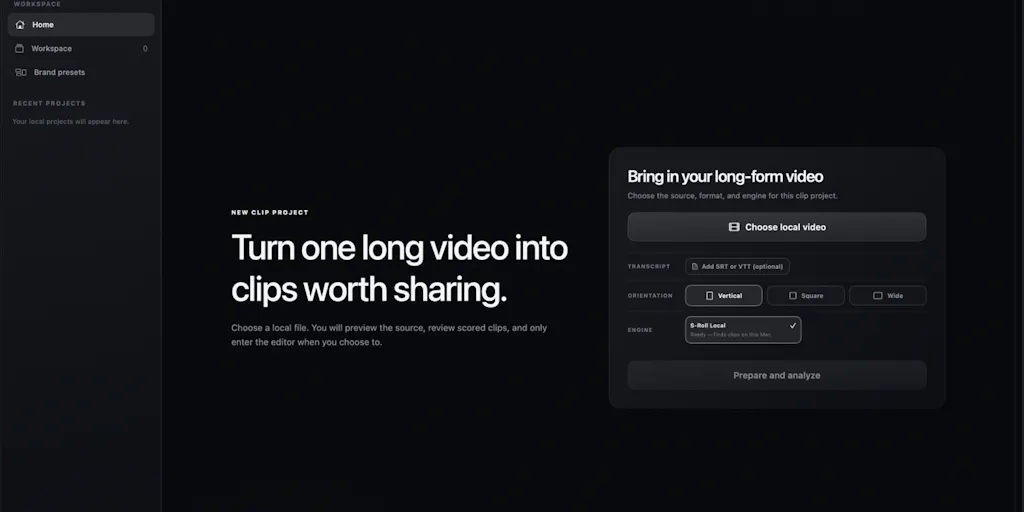
Strip away the positioning language and here’s the mechanics: you load a video locally, describe what you want in plain English, and the system locates the relevant moments, cuts clips for review, then optionally tracks the subject, reframes the shot to a vertical aspect ratio, generates captions, and prepares an export. The whole thing runs on-device on Apple silicon. According to the maker’s launch post, videos, transcripts, and chats stay on the user’s Mac — you can even switch off Wi-Fi after signing in and keep working.
That last detail is the one I’d underline for anyone who runs social for a client. Most clip tools in this category are cloud pipelines: you upload a master file, it gets transcribed and indexed on someone else’s GPU, and you get back a highlight reel. For solo creators that’s fine. For an agency holding unreleased client footage, embargoed product launches, or anything under NDA, “your data never leaves your PC” is not a privacy nicety — it’s the difference between a tool you can use and a tool legal won’t let you touch. I’ve watched social teams quietly abandon otherwise-good SaaS for exactly this reason.
The prompt-to-clip interface is a repurposing primitive, not a gimmick
Here’s why I think the natural-language query layer matters more than the clipping itself. Traditional highlight tools work on proxies: loudness spikes, scene changes, laughter detection, motion. They find energetic moments. They don’t find meaningful ones. If you’re cutting a founder interview for LinkedIn, the clip you want is “where they explain why they turned down the acquisition,” and no audio-energy heuristic will surface that. A prompt like “find where they discuss AI safety” is a semantic query, and semantic retrieval is what unlocks the long tail of B-roll sitting in every creator’s archive.
In my own tests of similar tools over the past year, the failure mode is always the same: the first ten clips are obvious, and clips eleven through fifty — the ones that actually differentiate an account — never get found. If S-Roll’s retrieval is genuinely conversational rather than a thin wrapper over a transcript search, that’s a real wedge. The maker also claims unlimited usage with no 150-minute cap, which is a direct shot at the metered pricing that defines this category.
How it stacks up against the incumbents you’re probably already paying for
The obvious comparison is OpusClip, which a commenter on the launch thread explicitly named when asking the maker for three reasons to switch. OpusClip owns mindshare in the “long video in, shorts out” space, and it’s earned that position with a genuinely good auto-reframe and a workflow built around publishing cadence. But it’s a cloud product with usage tiers, and the free tier’s watermark is a non-starter for client work.
The broader competitive set splits into a few buckets:
- Cloud clippers: OpusClip, Vizard, Klap — strong automation, metered, upload-required.
- Editor-native workflows: CapCut and Descript — you do the finding, the tool does the cutting. Descript’s text-based editing is closest in spirit to prompt-driven retrieval, but you still have to read the transcript yourself.
- Scheduling and distribution layer: Buffer, Later, Metricool — these don’t find clips, they publish them, and they’re where the output of any clipping tool eventually has to land.
What’s notable is that S-Roll is trying to compress the entire front half of that pipeline — find, cut, track subject, reframe, caption, export — into one local app. The maker’s stated ambition is bigger than the launch: he describes S-Roll as “the first step toward Saliency, an operating system for video understanding that will own both the models and the agentic harness around them.” That’s a vertical-integration play, and it’s the kind of thing that either becomes a platform or gets absorbed by one.
Why TikTok creators should care more than LinkedIn ones
Aspect-ratio reframing and subject tracking matter enormously on TikTok and Reels, where a talking head that drifts out of frame kills retention in the first two seconds. On LinkedIn, where most video is watched in-feed with sound off and the frame is more forgiving, auto-reframe is a nice-to-have. So if your distribution is short-form-first, the reframe-and-caption half of this tool is doing real labor. If your distribution is text-and-carousel-first with occasional video, you’re paying (in attention, if not money) for features you won’t use. Not disclosed whether S-Roll exports native vertical ratios for every platform or just 9:16 — worth testing before you build a workflow around it.
What social teams can borrow from this, regardless of whether you install it
The most useful thing about watching a tool like this launch is the workflow logic it exposes. Three transferable ideas:
1. Treat your archive as a queryable asset, not a graveyard. Most creators I know have hundreds of hours of footage and no retrieval layer. Even if you never open S-Roll, the discipline of tagging long-form content by topic rather than date pays off the moment you need a clip for a timely post. A simple spreadsheet with timestamps and topic labels beats nothing.
2. Separate retrieval from production. The reason repurposing stalls is that finding and editing are tangled together. Any workflow that front-loads “here are the 12 candidate moments” and back-loads “now let’s polish three of them” will move faster. This is also how the best human editors I’ve worked with operate.
3. Local-first is a positioning wedge, not a feature. If you’re evaluating any AI tool for client work, ask where the data goes before you ask what it does. The answer determines your procurement path.
Where the math breaks
Here’s my honest read on the economics. The maker’s pitch is “completely free, no subscription, no watermark.” That’s a fantastic acquisition strategy and a terrible long-term business model unless there’s a paid tier coming — and the “first step toward Saliency” language strongly implies there is. The risk for anyone building a workflow on S-Roll today is that free becomes freemium becomes “your archive is now a hostage.” I’d bet the eventual monetization lands on the Saliency OS layer rather than the clipper, but that’s speculation, not a sourced fact.
The second math problem is the Apple silicon constraint. If your team is on Windows, or your editor is on an Intel Mac, this tool doesn’t exist for you. That’s a meaningful slice of the market, and it’s a deliberate tradeoff — local inference needs the unified memory architecture — but it means S-Roll is currently a solo-creator and small-studio tool, not an enterprise one.
Limitations, open questions, and who should skip this
Let me be transparent about what the source doesn’t say, because that’s where the real evaluation happens.
- Format support is partial. The maker confirmed MKV and WebM aren’t supported yet, though he claims no limit on length or file size. If your camera or screen recorder outputs WebM, you’re transcoding first.
- No team features are mentioned. No shared workspaces, no approval flows, no role permissions. For an agency with a review cycle, that’s a gap.
- No analytics or publishing integration. S-Roll exports. It doesn’t schedule. You’ll still need Buffer or Metricool to get clips out the door, and UTM tagging for any link-in-bio tracking is entirely on you.
- Accuracy claims are unverified. The maker says S-Roll “understands the recording” and finds relevant moments. How well it handles accented speech, overlapping speakers, or technical jargon is not disclosed, and I haven’t run it myself. Treat the retrieval quality as an open question until you test it on your own hardest footage.
- Who it’s NOT for: teams on Windows, anyone needing multi-seat collaboration, anyone whose workflow depends on cloud sync across devices, and anyone who needs a guaranteed SLA. This is a free local Mac app from a solo maker — plan accordingly.
The trust question I’d flag
“Free, no watermark, unlimited, local” is a combination that should make a careful operator ask: what’s the actual cost? The most likely answers are a future paid tier, a data flywheel at the model layer (not the video layer, presumably), or an acquisition. None of those are nefarious. But if you’re routing client footage through it, get clarity on the roadmap before you make it load-bearing.
What I’d watch / test next
Three concrete things I’d do this week if I were running social for a creator or a small brand:
Run a retrieval bake-off. Take your single messiest long-form asset — a multi-speaker panel, a noisy interview — and try to pull three specific semantic moments with prompts. Time yourself. Compare against scrubbing the transcript manually. If S-Roll beats your manual baseline on the hard footage, it’s worth a slot in your stack; if it only wins on clean single-speaker video, wait.
Audit your archive’s retrievability. Before adopting any tool, count how many hours of footage you have and how many of those hours you could locate a specific moment in within five minutes. That number is your actual repurposing ceiling, and it’s usually lower than creators think.
Pressure-test the local-first claim. Disconnect Wi-Fi mid-session and confirm the workflow holds. The maker says it does; verifying it takes two minutes and tells you whether the privacy positioning is real or marketing.
My take: S-Roll is a genuinely interesting wedge because it attacks the retrieval bottleneck that every other clipper hand-waves, and it does so with a privacy story that matters to anyone handling embargoed or client-owned footage. But it’s a v0.1 from a solo maker, Mac-only, with no team layer, no publishing integration, and a monetization model that hasn’t been revealed. The right posture is curious, not committed — test it on your hardest footage, keep your existing OpusClip or Descript subscription running, and watch what Saliency turns into. If the “operating system for video understanding” thesis holds, the prompt-to-clip interface will look obvious in eighteen months. If it doesn’t, you’ve lost an afternoon and gained a better mental model of your own archive. Either way, you win.