The Unbundling of the Creator Stack Is Coming for Your Calendar
Every social media operator I know runs their week the same way: a content calendar in Notion or Airtable, a scheduling tool like Buffer or Later pushing posts out, and a personal to-do list that quietly collapses by Wednesday. The tooling has gotten extraordinary at the publishing layer and almost laughably bad at the doing layer. That gap is why I paid attention to the latest launch of Chunk, a macOS time-blocking app from developer Dudley Spence. On its surface it’s a productivity app for people who like dragging tasks onto a calendar. But for anyone who has ever tried to actually execute a 30-post week across five platforms, it’s a quiet argument about where the creator workflow is heading — and why the calendar is the last unconquered surface in the stack.
What Chunk Actually Is (and Isn’t)
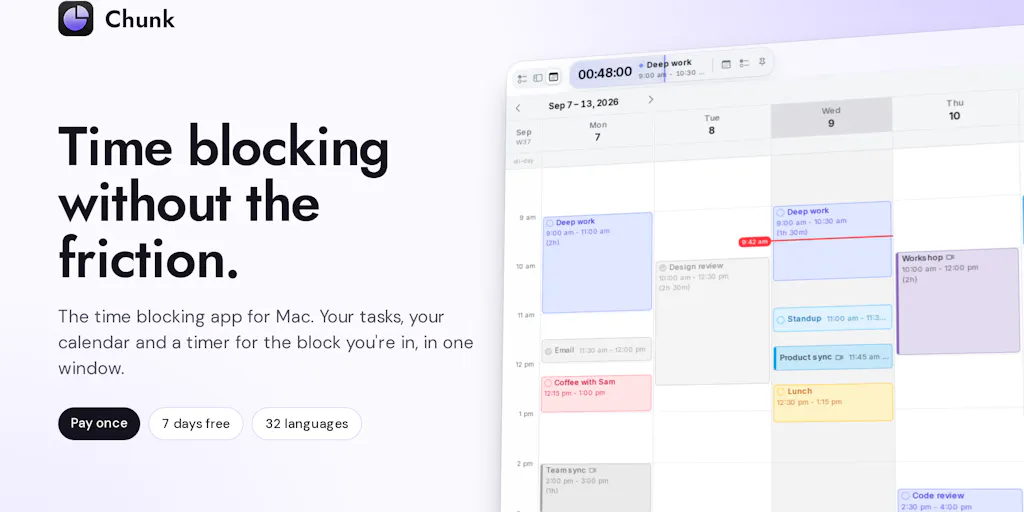
Let me get the facts straight, because the Product Hunt page buries them under launch-day enthusiasm. Chunk is a native macOS app that puts your tasks on one side of the screen and your calendar on the other. You drag a task onto a time slot and it becomes a “block.” While you’re inside a block, a countdown shows how long is left, and a small floating timer stays visible even when Chunk is closed. When the block ends, you get a fullscreen alert where you can tick it off, take more time, or push it later.
The current version — this is the fourth or fifth launch under the same product listing, depending on how you count the earlier menu-bar iterations — adds a full window with three layouts (Tasks, Plan, and Calendar), faster Apple Reminders sync with notes and priority, search across tasks and calendar events, priorities and Markdown notes on tasks, private iCloud sync between Macs with no account required, and a Claude integration that can create tasks and move things around on your calendar.
Pricing is a one-time $29.99 with no subscription and a 7-day free trial that doesn’t require a card. That’s it. No team tier, no “Pro” upsell, no per-seat nonsense.
The maker is upfront in the launch thread that the previous version was a menu-bar panel that people liked for seeing the week but found restrictive for planning it. That’s a refreshingly honest framing, and it tells you something about how the product evolved: from glanceable to operational.
Why this matters more to a solo creator than to a team
If you run social for a brand with a team of five, you already have a project management layer — Asana, ClickUp, Monday, whatever your org standardized on. Chunk isn’t trying to replace that. But if you’re a solo operator, an indie founder doing your own content, or a freelancer juggling three client accounts, you don’t have a project management layer. You have a calendar and a prayer. That’s the gap Chunk is aimed at, and it’s a much bigger market than the productivity-app chattering class usually admits.
The Real Problem: Your Content Calendar Doesn’t Know About Your Actual Calendar
Here’s the operational reality that no scheduling tool has solved. I can queue 30 posts across Instagram, TikTok, LinkedIn, X, and Threads in Buffer in about 45 minutes. That part is solved. What is not solved is the fact that producing those 30 posts — scripting, filming, editing in CapCut, writing captions, sourcing assets, pulling analytics — is somewhere between 15 and 25 hours of actual work that has to fit into a week that also contains client calls, a dentist appointment, and the two hours you lose every day to Slack.
Most creators I know handle this by lying to themselves. They block “content day” on Friday, then spend Friday morning in reactive mode, then panic-produce at 9pm. The block existed on the calendar; the work didn’t happen inside it.
What Chunk does — and this is the part I’d actually steal — is make the block enforced rather than aspirational. The countdown timer, the floating persistent timer, the fullscreen alert at the end: these are friction mechanisms. They’re designed to make it harder to silently abandon a block. For ADHD-adjacent creators (and the Product Hunt review from D COOPER explicitly calls out the ADHD crowd as a core audience, with the maker agreeing the timer is “a popular feature with our ADHD users”), that friction is the whole product.
Why TikTok creators should care more than LinkedIn ones
If your primary channel is LinkedIn, your content cadence is probably 3–5 posts a week, mostly text, mostly written in one sitting. Time-blocking is nice-to-have. If your primary channel is TikTok or Reels, you’re looking at a production pipeline — hook writing, filming, editing, sound selection, caption, cover frame, posting time optimization — and every step has its own failure mode. A time-blocking app that treats “film 3 TikToks” as a single block is going to fail you, because that block is actually five blocks. My take: Chunk’s real value for short-form creators isn’t the block itself, it’s the sub-task structure you can build with Markdown notes and priorities. If you’re not breaking production into discrete blocks, no app will save you.
How It Compares to the Incumbents You’re Probably Already Paying For
Let me be specific, because “productivity app” is a useless category. Here’s where Chunk sits against the tools a social media operator is likely already running.
Against Notion and Airtable: These are where most content calendars live. They’re excellent at tracking — status columns, campaign tags, asset links — and terrible at scheduling time. You can build a “publish date” field, but you can’t drag a row onto Tuesday at 2pm and have it become a two-hour block. Chunk doesn’t replace them; it sits on top of them as the execution layer. In my experience, the creators who fail at content ops are the ones who confuse the tracker with the plan.
Against Motion and Reclaim.ai: These are the AI-scheduling incumbents. They auto-place tasks on your calendar based on priority and deadlines, and they’re genuinely clever. But they’re subscription-priced, cloud-hosted, and — critically for this audience — they want to own your calendar. Chunk is the opposite: local-first, one-time payment, and you place the blocks yourself. That’s a philosophical difference, not just a pricing one. Motion optimizes; Chunk commits.
Against Sunsama and Akiflow: These are the closest competitors in spirit — daily planning tools that pull tasks from everywhere and let you time-block them. Sunsama is $20/month, Akiflow is around $19/month. Over two years, that’s roughly $480 versus Chunk’s $29.99. Whether that math matters depends on whether you value the cross-platform integrations (Sunsama and Akiflow both work on Windows and web; Chunk is macOS-only) more than you value not paying a subscription forever.
Against Todoist and Things: Task managers, not time-blockers. Different job. But if you’re already living in one of these, the question is whether Chunk’s calendar-first view is worth adding a second app. My answer: only if you’ve already tried and failed to make calendar blocks stick.
Where the math breaks
The one-time $29.99 is the headline, and it’s a genuinely good deal if you’re on macOS and if you don’t need mobile. The maker confirmed in the launch thread that there’s no mobile app yet — a reviewer from a year ago was already asking for it, and the maker’s reply was essentially “a few updates still before we get to a mobile app.” That’s not disclosed as a roadmap item with a date. If you’re a creator who does most of your planning on your phone between shoots, this is a real limitation, not a nitpick.
The Claude Integration Is the Interesting Bet — and the Riskiest
The feature that made me sit up is the Claude integration. According to the maker, Claude can create tasks and move things around in your calendar via a local MCP (Model Context Protocol) connection. A reviewer asked whether you could say “move my afternoon tasks to tomorrow” and have it just happen. The maker’s answer to a related question clarifies the scope: the Claude integration operates on tasks, not on actual calendar meetings. So if you have a 1:1 on your Google Calendar, Claude is moving the task labeled “move 1:1,” not the meeting itself.
That distinction matters enormously for anyone running a content operation. If I could tell Claude “push all my filming blocks to Thursday because a client call landed on Wednesday,” that would be genuinely transformative — it’s the kind of thing that saves 10 minutes a day and 40 hours a year. But task-level manipulation is a narrower promise. It’s still useful, just not the “AI assistant runs my week” fantasy the launch page might imply.
The privacy architecture is the other half of this story, and it’s where Chunk makes a real stand. The maker states plainly that all data is stored on-device, not in a hosted database, and that the Claude integration uses a local MCP for exactly this reason. That’s why there’s no web app and no browser extension. For creators handling client NDAs, unreleased campaign assets, or just sensitive DMs, local-first is a meaningful differentiator in a category where every competitor wants your data in their cloud.
What I’d want to see tested
The obvious open question: how does the local MCP behave when you’re on a laptop that’s asleep, or when Claude Desktop isn’t running? The maker didn’t address this in the thread. I’d also want to know whether the Claude integration can read your existing calendar events (not just tasks) to avoid double-booking — that’s the failure mode that would make me stop trusting it. Neither question is answered in the source, so I’m flagging both as unknowns, not criticisms.
What Creators and Social Teams Can Borrow From This
Even if you never install Chunk, the design decisions here are worth stealing for your own content operations.
1. Separate the tracker from the plan. Your Notion content calendar is a tracker. Your week is a plan. Most creators collapse these into one artifact and then wonder why nothing ships. Build the tracker for visibility and the plan for execution, and accept that they’re different documents.
2. Make abandonment visible. The countdown timer and fullscreen alert aren’t gimmicks — they’re accountability mechanisms. If you run a content team, the equivalent is a daily standup where someone has to say out loud what didn’t ship yesterday. Silent slippage is how content calendars die.
3. One-time pricing is a positioning weapon. $29.99 once versus $20/month forever is a 16x difference over two years. For indie founders and solo creators, that’s not a rounding error. If you’re building or buying tools in this space, ask whether the subscription is buying you ongoing value or just ongoing access.
4. Local-first is a feature, not a limitation. The maker’s insistence on on-device storage is why there’s no web version. That’s a trade-off, and it’s the right one for a certain kind of user. If you handle sensitive client work, start asking your tools where your data actually lives.
5. Integrations are table stakes; the question is which ones. Chunk syncs both ways with Google Calendar, Outlook, and Apple Calendar, plus Apple Reminders. It does not integrate with Slack — the maker said they’d add it “if enough of our user-base requests it.” For a social media operator, the missing integration that would matter most isn’t Slack; it’s whatever scheduling tool you’re actually publishing from. There’s no Buffer, Later, Hootsuite, or Metricool integration mentioned anywhere in the source. That’s the gap I’d watch.
Where My Judgment Says It Falls Short
I want to be balanced here, because the launch thread is uniformly positive and that’s a yellow flag in itself.
The platform lock-in is real. macOS only, no mobile, no web. For a creator who works across a Mac at home and an iPhone on the go, Chunk covers maybe 60% of your planning surface. The maker hasn’t committed to a mobile timeline.
The AI feature is task-scoped, not calendar-scoped. That’s a meaningful limitation for anyone hoping to hand their week to Claude. It’s a v1 feature, and it shows.
There’s no publishing integration. This is the big one for my audience. Chunk helps you plan content work, but it doesn’t know about your actual posts. It won’t pull your Buffer queue, it won’t show you what’s scheduled for tomorrow, it won’t flag that you have three Reels going out on the same day. For a general productivity user, that’s fine. For a social media operator, it means Chunk is a layer in your stack, not a replacement for anything.
The review base is thin. One review on the product page, from a year ago. The comment thread is active and the maker is responsive, but “5.0 based on 1 review” is not a signal. I’d want to see 50+ reviews across a few months before treating this as a settled recommendation.
Who it’s NOT for: Windows users, Android users, teams that need shared calendars and permissions, anyone who wants their task manager to also publish content, and anyone who needs their planning tool to work offline across multiple devices without iCloud. If you’re in any of those buckets, this isn’t your app — and that’s fine, because it isn’t trying to be.
What I’d Watch / Test Next
Here’s what I’d actually do this week if I were evaluating Chunk for a creator workflow, in order:
Install the 7-day trial and time-block one real production day. Not a fake test — pick your actual next filming or writing day and put it in blocks. See whether the countdown timer changes your behavior. If it doesn’t, no app will.
Test the Claude integration against a real scenario. Try “move all my afternoon content blocks to tomorrow” and see what actually happens. Note whether it touches tasks only or also calendar events. That tells you whether it’s a toy or a tool.
Audit your current stack for overlap. If you’re paying for Sunsama or Akiflow, do the two-year math against $29.99. If you’re paying for Motion, ask whether you actually use the auto-scheduling or just the calendar view.
Watch for two things the source doesn’t address: a mobile app timeline, and any integration with a publishing tool. Either one would meaningfully change the value proposition for social media operators. Neither is confirmed.
Don’t abandon your tracker. Keep Notion or Airtable as your content calendar of record. Chunk is the execution layer, not the source of truth. If you conflate them, you’ll lose the visibility that makes a content operation legible to clients and collaborators.
The broader signal here isn’t Chunk specifically — it’s that the creator stack is fragmenting into planning, production, publishing, and analytics, and the planning layer is finally getting serious tools. For years, social media managers have been told to “just use a content calendar.” The honest answer is that a content calendar was never the problem. The problem was that nobody built a tool that respects the difference between knowing what to post and actually having the hours to make it. Chunk is one attempt at that. I’d bet we see five more before the year is out.