The screen recording bottleneck nobody talks about in content ops
Ask any social media operator what eats their week and they’ll tell you it’s not the ideas — it’s the production tax. A 60-second product demo, a screen-share explainer for a carousel, a Loom-style walkthrough to embed in a landing page: on paper these are quick. In practice, they’re a graveyard of cursor fumbling, awkward silences, and a timeline editor that demands you manually place twelve zoom keyframes to make a browser tab legible on a phone screen. For anyone publishing across Instagram, TikTok, YouTube, LinkedIn, and X, screen-recorded video has quietly become one of the highest-leverage formats — and one of the most tedious to produce. So when a tool shows up claiming to eliminate the zoom-placement step entirely, that’s worth a closer look, not because it’s shiny, but because it targets the exact friction that stops most creators from shipping demos at volume.
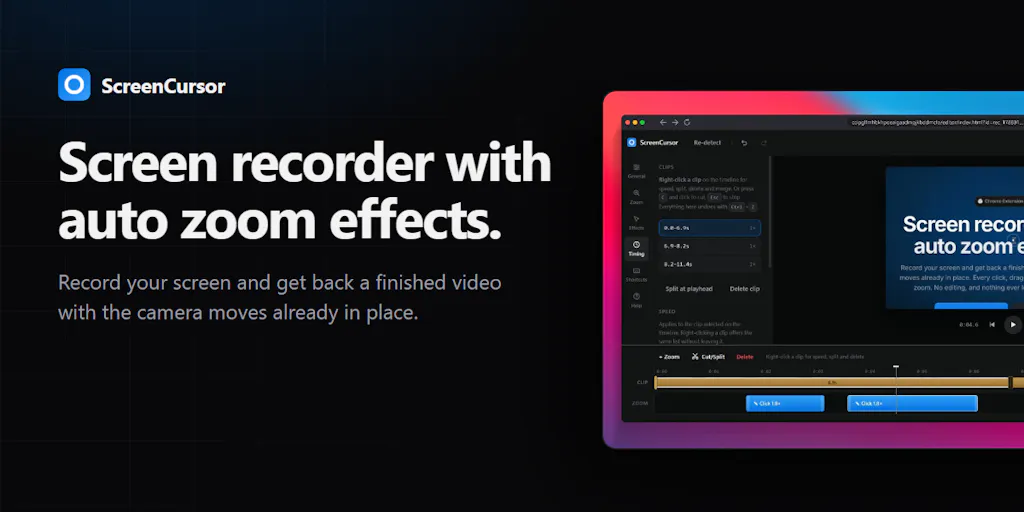
That’s the lens I’m bringing to ScreenCursor, which just launched on Product Hunt. It’s a Chrome extension from maker Phoenix that records your screen, watches where your cursor moves and clicks, and auto-places zoom effects on the timeline before you ever open an editor. The pitch is simple: you hit record, you stop, and the video is already “done” — not a raw clip you have to babysit. Below I want to unpack what problem it actually solves, how it stacks up against the incumbents I’ve used, what’s genuinely clever about the positioning, and where my judgment says it falls short.
What ScreenCursor actually solves (and why it’s a wedge, not a feature)
The core insight is that zoom placement is the single most automatable, least creative part of making a screen recording watchable. If you’ve ever edited a demo in Screen Studio — the Mac-only tool the maker explicitly name-checks as his inspiration — you know the magic is that the zooms feel almost telepathic. The camera follows your intent. ScreenCursor’s bet is that intent is legible from cursor telemetry: where you move, where you click, how long you hover. That’s a reasonable bet. Cursor data is a decent proxy for attention, and attention is what a zoom is supposed to dramatize.
The second bet is distribution. Screen Studio is Mac-only, which locks out a huge chunk of the creator and operator population — everyone on Windows, everyone on Linux, everyone working on a locked-down corporate machine where they can’t install native apps. ScreenCursor runs anywhere Chrome runs, which the maker frames as Windows, Mac, and Linux, with no installer and no admin rights required. If you’ve ever tried to get a video tool approved by IT at a mid-size company, you understand why “no admin rights” is not a footnote — it’s the whole ballgame for the B2B creator segment.
Why TikTok and YouTube creators should care more than LinkedIn ones
Here’s my read on where the format matters most. On TikTok and YouTube Shorts, screen-recorded content lives or dies on retention in the first three seconds, and a static, unzoomed browser capture is death. The auto-zoom is doing real algorithmic work there — it manufactures visual change, which is one of the few reliable levers for holding a thumb. On LinkedIn, the bar is lower and the audience is more forgiving of a plain screen share, so the time savings matter less. If you’re a short-form operator, the value proposition is stronger. If you’re a B2B thought leader posting once a week, it’s a nice-to-have.
The privacy angle is doing more work than the maker admits
The maker’s third pillar — “nothing is uploaded, the recording never leaves your computer, no account, no server” — reads like a technical footnote but is arguably the sharpest differentiator. In the launch thread, a commenter named Sumon Khan said the “nothing leaves your computer” part is what sold them, noting they’d stopped using Loom because they didn’t want client recordings sitting on someone else’s servers. That’s a real, under-served pain point. Agencies and consultants record client dashboards, internal tools, unreleased products. Cloud-first recording tools are a compliance headache. Local-first is a genuine moat against the entire Loom-Atlassian stack — assuming the tradeoffs are acceptable, which I’ll get to.
How it stacks up against the incumbents I actually use
Let me be concrete about the competitive set, because “Screen Studio alternative” undersells how crowded this space is.
Screen Studio is the aesthetic benchmark. It’s Mac-only, and its output is gorgeous — smooth motion, tasteful backgrounds, the kind of polish that makes a demo look expensive. If you’re on a Mac and you make demos weekly, it’s probably still the better tool today. ScreenCursor’s edge is platform reach and price, not output quality. I’d bet Screen Studio’s motion smoothing is still ahead; the maker doesn’t claim to match it.
Loom owns the async-video category and the enterprise workflow around it — comments, transcripts, view analytics, integrations into Slack and Notion. But Loom is cloud-first and subscription-based, and it’s built for communication, not for producing publish-ready social assets. You don’t post a Loom to TikTok. Different job.
CapCut and Descript are the editing-layer alternatives — you record raw and fix it in post. They’re more powerful and more flexible, but they reintroduce exactly the manual work ScreenCursor is trying to delete. The tradeoff is control versus speed.
CleanShot X and native OS recorders are the free baseline. No auto-zoom, no polish, but zero cost and zero learning curve.
Where ScreenCursor sits: cheaper and more cross-platform than Screen Studio, more publish-oriented than Loom, faster than CapCut or Descript, more polished than a native recorder. That’s a defensible middle. The pricing is the loudest part of the pitch — the maker frames it as $49 once, lifetime, versus $108 a year, and there’s a launch discount: 50% off with code PRODUCTHUNT, bringing it to $24.50 for the next 7 days. Commenter Elias Leo called the one-time payment the thing they liked most. That’s the classic indie-tool wedge against subscription fatigue, and it’s smart positioning in a market where every adjacent tool bills monthly.
Where the math breaks
I want to flag one thing the “lifetime deal” framing glosses over. A $49 one-time price is only a bargain if the tool keeps working. Chrome extensions live and die by Chrome Web Store policy and browser API changes; a solo maker with no recurring revenue has less incentive to maintain a product through five years of platform churn than a funded competitor does. I’m not saying it won’t happen — the maker is clearly engaged in the thread, promising a “custom focus point” update for non-browser recording. But operators should price the risk honestly. If you record demos for a living, the annual subscription you’re avoiding is also the maintenance budget you’re no longer funding. That’s the real trade.
What creators and social teams can borrow from this launch
Even if you never install ScreenCursor, there are three operational lessons in this launch worth stealing.
One: automate the boring 80% of production, not the creative 20%. The maker didn’t try to build a better editor or a smarter AI scriptwriter. He found one repetitive, mechanical task — placing zooms — and automated it while leaving every zoom editable. Commenter Nancy Brown asked for more real-time editing features, and the maker pointed out the tool already has a fully customizable editor: adjust zooms, add backgrounds and frames, split and cut clips, customize speed, depth, and motion. That’s the right shape. Automate the default, preserve the override. If your content workflow has a step you do identically every single time, that’s your automation candidate — not the step that requires judgment.
Two: pick the platform the incumbents ignore. Mac-only tools leave Windows and Linux creators stranded. Cloud-only tools leave privacy-sensitive clients stranded. Every time you find a “everyone in this category assumes X” assumption, you’ve found a wedge. For social operators, this applies to your own content strategy too: the format everyone in your niche ignores because it’s inconvenient is often the one with the least competition.
Three: local-first is a positioning choice, not just an architecture choice. “Nothing leaves your computer” is a feature you can put on a landing page and a sales objection you can preempt. If you’re selling to agencies or regulated industries, lead with it.
A sidebar on the Chrome-extension constraint
One exchange in the thread matters a lot for anyone planning to use this for app demos. Commenter Charlie Titherley asked whether, as a Chrome extension, it can capture other windows and the whole desktop, or only what’s inside the browser tab. The maker’s answer was refreshingly honest: it works perfectly inside the browser, and it can still record your screen outside the browser, but “the zoom effects won’t work perfectly right now.” A custom focus point feature is promised for future updates. Sumon Khan followed up asking for a rough ETA on that update, and as of the scrape, there’s no timeline given — not disclosed.
For me, this is the single biggest practical limitation. If your demo lives in a browser — a SaaS dashboard, a web app, a design tool, a Figma prototype — you’re in the sweet spot. If your demo is a native desktop app, a mobile emulator, or a mix of browser and app windows, the auto-zoom is unreliable today. The maker even said he’d love to hear what breaks, “especially if you’re on Windows or Linux,” because that’s where he has the fewest testers. That’s an honest signal about where the product is mature and where it isn’t.
Where my judgment says it falls short
Let me be balanced, because this is a launch-day product and launch-day products always have gaps.
No trial or refund policy is confirmed. Commenter Justin Johns asked directly whether there’s a trial or money-back period. As of the scrape, there’s no answer. That’s a real friction point for a $49 impulse purchase — and a bigger one for a team evaluating it. Until that’s clarified, I’d treat it as a no-refund purchase and decide accordingly.
Single-maker maintenance risk. This is a solo project. That’s not a knock — solo makers ship fast and care deeply — but it means roadmap velocity, browser-compatibility fixes, and long-term support all depend on one person. If you’re building a content pipeline around it, don’t make it a single point of failure.
The output ceiling is unclear. The maker doesn’t claim to match Screen Studio’s polish, and the thread doesn’t show side-by-side output. I haven’t seen enough finished examples to judge whether the auto-zooms feel natural or mechanical. My take: expect “good enough for social” rather than “portfolio-grade.” Test it on a real recording before you commit a client deliverable to it.
Who it’s NOT for: Mac-based creators already happy with Screen Studio; teams that need Loom’s async collaboration layer, transcripts, and view analytics; anyone whose demos live primarily outside a browser; and anyone who needs a guaranteed refund path before buying. If you’re in any of those buckets, this isn’t your tool today.
Not disclosed: user counts, revenue, team size, funding, and any concrete roadmap dates. The maker is active and responsive in the thread, which is a good trust signal, but there’s no company-scale data to evaluate.
What I’d watch / test next
If you’re an operator deciding whether this belongs in your stack, here’s what I’d actually do this week — no hype, just tests.
First, download it and record one real browser-based demo — not a toy, the actual kind of clip you’d post. Watch whether the auto-placed zooms land on the moments you’d have chosen manually. If they’re close, you’ve saved yourself ten minutes per video; if they’re off, you’ve learned the tool’s failure mode cheaply.
Second, test the non-browser case deliberately. Record something outside the browser and confirm for yourself how badly the zoom effects degrade, because that’s the boundary the maker flagged. If your workflow is browser-only, you can ignore this. If it isn’t, you can’t.
Third, decide before the discount window closes — the 50% off code PRODUCTHUNT is framed as lasting 7 days, so if you want it, the clock is running. But don’t let a discount rush a decision you’d regret at full price; $24.50 is cheap, but a tool you never open is still a waste.
Fourth, watch the thread for the trial/refund answer and the custom-focus-point ETA. Both are open questions that materially change the value. If the maker ships the non-browser focus feature and adds a refund window, this becomes a much easier recommendation for Windows and Linux operators.
My overall take: ScreenCursor is a well-aimed wedge — it attacks a real, repetitive production task, targets the platform gap the incumbents left open, and leads with a privacy story that actually resonates with agency and client-facing work. It is not a Screen Studio killer, and it doesn’t need to be. It’s a fast, cheap, cross-platform way to turn a raw browser recording into something postable without touching a timeline. For browser-based social and product operators on Windows or Linux, that’s worth a test. For everyone else, watch the roadmap and revisit in a quarter.