The Email Blind Spot Nobody in the Creator Economy Talks About
Every creator I know has a content calendar that would make a media executive weep with envy. We’ve got the Instagram carousels scheduled, the TikTok hooks storyboarded, the LinkedIn thought-leadership posts written three weeks in advance. We’ve mastered the algorithm roulette, the repurposing pipelines, the UTM-tagged link strategies. And then, when it’s time to actually grow an email list — the one channel we actually own, the one platform where the algorithm can’t shadow-ban us — we hit a wall that has nothing to do with copywriting or lead magnets.
The wall is HTML email. Specifically, the fact that email clients are still living in 2005 while we’re trying to send them 2025 designs.
I’ve been running social accounts for a decade, and I’ve watched the same scene play out a hundred times. A creator spends hours designing a beautiful newsletter in Figma — the perfect brand colors, the custom illustrations, the whole aesthetic that took them months to develop. Then they export it to HTML, or worse, paste it into Mailchimp and pray. And the prayer doesn’t work. The email renders fine in their own Gmail, looks passable in Apple Mail, and then completely disintegrates in Outlook. Colors shift, padding collapses, images get stripped. The subscriber who was one email away from buying their course opens a broken visual mess and unsubscribes.
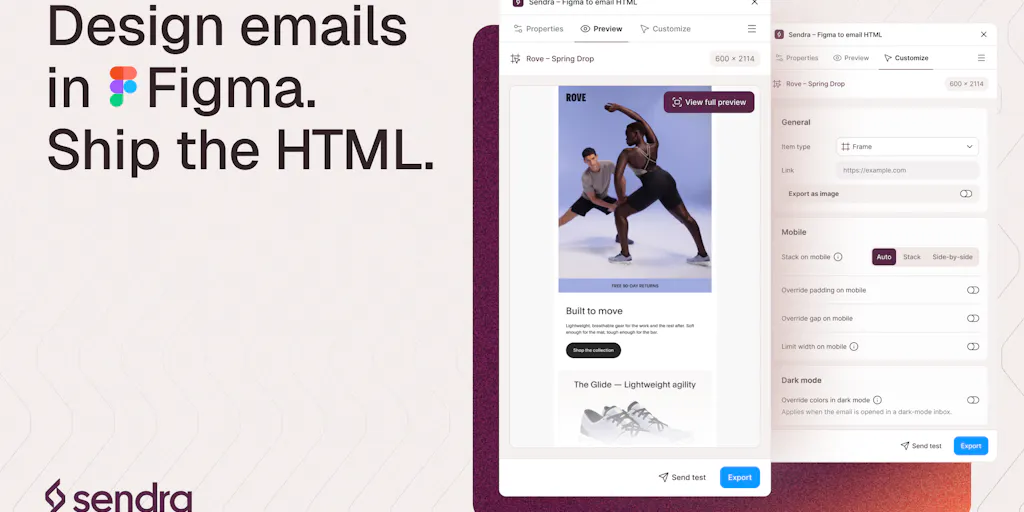
This is the problem that Sendra, a new Figma plugin from product designer Joseph Azzi, is trying to solve. And while it’s pitched at designers, the real audience for this tool — the people who should actually care — is every social media operator who’s ever treated email as an afterthought.
Here’s the thing about the creator economy in 2025: we’ve become obsessed with the front end of distribution — the hooks, the hashtags, the posting times, the platform-specific video lengths — while ignoring the back end. We’ll spend hours optimizing a TikTok caption for search, but we’ll send a newsletter that looks like it was assembled by a robot from 2012. That’s a strategic error, because email remains the only channel where you have a direct relationship with your audience. Instagram can change its algorithm tomorrow and cut your reach in half. Your email list is yours. But only if you treat it with the same design rigor you apply to your Instagram grid.
Let me walk you through why this tool matters, where it fits in the broader creator tech stack, and — because I’m not here to sell you on anything — where it falls short.
The Real Problem: Email Design Is a Compatibility Nightmare, Not a Creative One
When I schedule 30 posts across 5 platforms in a month, I don’t think about rendering engines. I upload a JPEG to Instagram, a vertical video to TikTok, a carousel to LinkedIn, and the platforms handle the rest. The worst-case scenario is a slightly awkward crop. Email is the opposite. Every client renders HTML differently, and the differences are not cosmetic — they’re structural.
The maker of Sendra, Joseph Azzi, puts it better than I could in his Product Hunt launch post: “Email clients are the part nobody warns you about. Your email can look right in every preview and still fall apart in Outlook, or quietly lose its styling on someone’s Phone.” He’s not exaggerating. I’ve sent emails that looked flawless in my own inbox and then discovered — a week later, via a forwarded screenshot — that the entire layout had collapsed for a subscriber on an older Android device.
The root cause is that email clients are stuck in a fragmented past. Gmail strips certain CSS. Outlook uses Word’s rendering engine, which is a sentence I still can’t believe is true. Dark mode on mobile inverts colors in ways that make designers weep. And preview screenshots — the ones built into tools like Mailchimp or HubSpot — don’t catch any of this, because they’re rendering in a controlled environment that doesn’t reflect what your subscriber actually sees.
This is where Sendra enters. It’s a Figma plugin that converts your designs to HTML, but the key claim is that it checks rendering against “real clients on real devices rather than preview screenshots.” That’s a fundamentally different approach than the one taken by the incumbents in this space.
Let me be clear about what the existing options look like. Canva has email design templates, but they export to images or basic HTML that doesn’t handle interactivity or responsive layouts well. CapCut and other video tools don’t touch email at all. The serious players are Mailchimp, ConvertKit, and Bee, which offer drag-and-drop email builders. But these tools are constrained by their own templates — you’re designing within their system, not your own brand system. If you’ve built a custom visual identity in Figma, you’re either rebuilding it in a template (which never looks right) or exporting HTML and praying.
Sendra’s approach is different: design in Figma, where your brand already lives, and let the plugin handle the translation. The two recent additions Azzi mentions are significant for workflow: Sendra hosts your images, so the exported HTML ships with real URLs instead of placeholders, and you can send a test email to your own inbox from inside the plugin. For a creator who’s used to Figma-to-HTML workflows that require manually uploading images to a CDN and then hand-editing the HTML to insert URLs, this removes two of the most tedious steps.
Why This Matters More for Newsletter Creators Than LinkedIn Thought Leaders
I want to be precise about who should actually care about this tool, because the creator economy is not a monolith. If you’re a LinkedIn thought-leader posting text-based content, this tool is irrelevant to you — you’re not designing emails, and you probably never will. But if you’re a newsletter creator — someone running a Substack, a Beehiiv, or a custom email list as part of your monetization strategy — this is directly relevant.
Newsletter design is a competitive advantage that most creators ignore. I’ve seen newsletters from creators with 100,000 Instagram followers that look like they were formatted by a machine from 1998 — plain text, no branding, no visual hierarchy. And I’ve seen newsletters from creators with 5,000 followers that look like they were designed by a professional studio. The second group gets higher open rates, higher click-through rates, and higher conversion to paid subscriptions. Design signals trust, and trust drives revenue.
The dark mode issue that Azzi mentions in the comments — “Gmail on mobile in dark mode… the colors look different” — is a real problem that most creators don’t even know exists. I’d bet that a significant percentage of your subscribers are reading your newsletter in dark mode, and if you haven’t tested for it, your brand colors are probably rendering incorrectly for them. This is the kind of detail that separates a professional operation from an amateur one.
How Sendra Compares to the Incumbent Tools
The honest comparison here is against Mailchimp, ConvertKit, and Bee. These are the tools that most creators use for email, and they all have the same fundamental limitation: they force you to design within their template system. You can customize colors and fonts, but you’re always working within their constraints. If you want a truly custom design — something that matches your Instagram aesthetic pixel-for-pixel — you’re out of luck.
Sendra takes the opposite approach: design freely in Figma, then convert. This is philosophically aligned with how modern creators work. We design our content in Canva or Figma, we don’t design within platform constraints. The idea that email should be the exception — that you should design within Mailchimp’s template system — is an anachronism.
But here’s the caveat: Sendra is a plugin, not a full email platform. It converts your Figma design to HTML, but you still need an email service provider to send that HTML. So the workflow is: design in Figma → export with Sendra → import the HTML into Mailchimp or ConvertKit → send. That’s an extra step compared to designing entirely within your ESP, but the payoff is a design that actually matches your brand.
There’s also the question of whether the HTML that Sendra produces is as clean as what a professional email developer would write. The tool claims to check rendering against real clients, which is a strong signal, but I’d want to see the code quality before I trusted it for a critical campaign. In my experience testing similar tools — and I’ve tested several Figma-to-HTML converters over the years — the output is usually functional but not elegant. It works, but it’s not something a developer would write from scratch.
What Creators and Social Media Teams Can Actually Learn From This
Even if you never touch Sendra, there’s a broader lesson here that I think every social media operator should internalize: the platforms you post on are not the only channels that matter, and the ones you own are the ones you should be designing for with the most care.
I’ve seen the analytics. Social media reach is a rental — you’re borrowing an audience that the platform can take away at any moment. Email is an asset — you own the list, the relationship, and the ability to reach your audience without paying for ads or praying for algorithmic favor. But the asset is only valuable if you treat it with respect, and that means designing emails that look as good as your Instagram posts.
There’s also a workflow lesson here about the value of removing manual steps. Azzi’s launch post mentions that Sendra hosts your images and lets you send a test from inside the plugin. These are small features, but they’re the kind of friction points that kill creative workflows. When I’m producing content, the difference between a tool that requires me to manually upload images and edit URLs and a tool that handles it automatically is the difference between shipping and not shipping.
The broader principle is: the best tools are the ones that get out of your way. I’ve seen this across the creator tech stack. Buffer and Metricool are popular because they simplify scheduling. Later and Hootsuite have their own strengths. But the tools I actually stick with are the ones that reduce friction, not add to it. Sendra appears to be trying to do that for email design — reduce the friction between your visual brand and your email output.
Where the Math Breaks: The Limitations and Open Questions
I promised I’d be balanced, so let me talk about where this tool falls short — or at least where I have questions.
First, the pricing. The launch post says it’s “free for your first 10 exports,” but doesn’t disclose pricing beyond that. That’s a red flag for me. When a tool is free for a limited number of uses and doesn’t list the paid tier, it usually means the paid tier is expensive or the pricing model is still being figured out. I’d want to see the full pricing structure before committing to this as a core part of my workflow.
Second, the rendering checks. The tool claims to check against “real clients on real devices,” but the maker also admits in the comments that “Gmail on mobile in dark mode” and “Outlook” still cause issues. That’s honest, but it also means the tool doesn’t completely solve the problem it’s trying to solve. If Outlook still breaks “the most,” as Azzi says, then the rendering checks are catching problems but not fixing them. You still need to manually test and adjust.
Third, the scope. This is a Figma plugin, which means it’s only useful if you’re already designing in Figma. If you’re a creator who uses Canva for everything — and let’s be honest, most creators do — then Sendra is irrelevant to you. The tool serves a specific niche within a niche: creators who use Figma for design and want to convert to email HTML.
Fourth, and this is my biggest concern: the HTML output quality. The tool claims to handle rendering, but I’ve seen enough Figma-to-HTML converters to know that the output is often bloated, with inline styles everywhere and a lot of table-based layout hacks. That’s not necessarily a problem — email HTML is a special beast that requires table-based layouts and inline styles — but it’s worth testing the output in a real email client before you trust it for a major campaign.
Why TikTok Creators Should Care More Than LinkedIn Ones
Let me get specific about the audience for this tool. If you’re a LinkedIn creator posting text-based thought leadership, email design is probably not your priority. Your content is text, your audience is professionals reading on desktop, and your newsletter is probably just a repurposed version of your LinkedIn posts. Sendra is overkill for you.
But if you’re a TikTok or Instagram creator — someone whose brand is visual, whose content is design-forward, whose audience expects a certain aesthetic — then email is where your brand goes to die. I’ve seen this happen repeatedly: a creator with a beautifully curated Instagram feed sends a newsletter that looks like it was formatted by a 2005-era text editor. The disconnect is jarring, and it erodes trust.
The creators who succeed in the visual-first platforms are the ones who carry their aesthetic across every touchpoint. If your Instagram is a carefully designed grid, your email should be a carefully designed newsletter. Sendra is one tool that can help with that — but more importantly, the lesson is to treat email with the same design rigor you apply to your social content.
What I’d Watch / Test Next
If you’re a creator or social media operator who’s been neglecting email design, here’s what I’d do this week — not next month, this week.
First, audit your last five emails. Open them on your phone, in dark mode, and in a desktop client. If they look broken or unprofessional, you’ve found your problem. The fix might be Sendra, or it might be a better template in your existing ESP, but the first step is knowing the problem exists.
Second, if you’re a Figma user, try Sendra on a small, non-critical email. The first 10 exports are free, so there’s no cost to testing. Export a simple design, send it to yourself, and open it in as many clients as you can. Pay attention to dark mode and Outlook — those are the two that the maker admits are still problematic.
Third, regardless of which tool you use, build a test list. Create a spreadsheet of every email client your subscribers use — Gmail, Apple Mail, Outlook, Yahoo, whatever — and test every email against that list before you send. This is the practice that separates professionals from amateurs, and it’s not something you can outsource to a tool.
Fourth, if you’re not a Figma user, don’t switch just for this. Instead, look at your existing ESP and see if you can create a custom template that matches your brand. It’s not as elegant as designing in Figma, but it’s better than sending broken emails.
The bottom line: email is the only channel you own, and it deserves better than the afterthought treatment most creators give it. Whether Sendra is the solution or not, the problem is real, and it’s worth solving. Your subscribers — and your revenue — will thank you.