The quiet shift from “post more” to “ship smarter” — and why App Store metadata is now a social-media problem
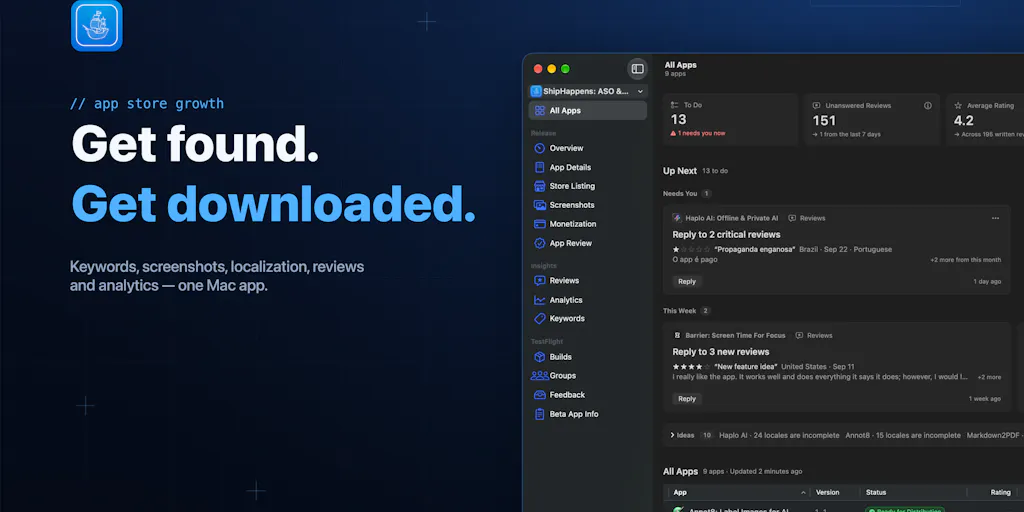
If you run social for a product with a mobile app, you already know the dirty secret: your App Store and Google Play listings are content channels. They have imagery, copy, localization, and a refresh cadence. They just don’t live in your scheduler. That gap is why a launch like Ship Happens — a tool for creating, translating, and uploading app screenshots and metadata — matters more to social media operators than its App Store Connect framing first suggests. The same workflow problems that plague your Instagram carousels (asset versions, locale variants, copy approval, upload friction) are sitting inside your store listing, usually owned by nobody on the content team. This essay is about what that reveals, what’s worth stealing, and where I think the product’s positioning still has holes.
What problem does this actually solve?
Strip away the launch-page language and the core job is narrow: take a set of screenshots and metadata, produce localized variants, and push them to the app stores. The team frames it as “create, translate, & upload screenshots/metadata for apps,” which is a fair summary of a workflow that, in my experience, is normally held together with Figma files, a spreadsheet of translated strings, and one very patient engineer who owns the fastlane config.
If you’ve ever shipped a localized app listing, you know the pain points are not creative — they’re operational. You need per-locale screenshot sets at exact pixel dimensions. You need the caption text baked in or overlaid consistently. You need the metadata fields (title, subtitle, keywords, description) translated and formatted to each store’s character limits. And you need all of it uploaded without breaking the version that’s already live. Multiply that by, say, a dozen locales and you have a project that eats a full sprint.
What’s notable here is the “automate” in the product slug — the pitch isn’t just asset generation, it’s the upload step. That’s the part most design tools punt on. Canva can produce a beautiful localized screenshot set; it cannot push it to App Store Connect. CapCut can cut a promo video; it cannot attach it to a store listing. The upload-and-sync layer is where the real friction lives, and it’s the layer that determines whether localization actually happens or quietly gets deprioritized.
Why this is a social-media adjacency, not a dev-tools story
Here’s my take: social media managers have spent the last three years becoming de facto brand asset managers. The job stopped being “write captions and schedule posts” around the time short-form video ate the feed. Now the same person is expected to own the visual identity across eight surfaces, keep locale variants straight, and not let a campaign go out with last quarter’s logo. Store listings are just another surface with the same requirements — and usually with worse tooling.
So when a tool like Ship Happens shows up, I read it less as “ASO tool” and more as a signal about where content operations are heading: toward unified asset pipelines where the store listing, the paid ad creative, and the organic social post all draw from one source of truth. If you’re a social lead at a consumer app, that’s your problem to solve whether or not you own the store listing today.
How it differs from what’s already out there
The App Store Optimization space is not empty. AppTweak, Sensor Tower, and Appfigures all offer metadata management and keyword research. Fastlane — the open-source deployment tool — handles screenshot and metadata upload for teams with engineering capacity. And App Store Connect itself, plus Google Play Console, are the mandatory destinations everyone ultimately uploads to.
What Ship Happens appears to be betting on is the middle ground: teams that want automation without writing Ruby, and without buying a full ASO intelligence suite when all they need is the production and upload pipeline. That’s a real gap. Fastlane is powerful but assumes a developer owns it. AppTweak is powerful but priced and scoped for growth teams doing keyword strategy, not for a designer who just needs to ship twelve locale variants by Friday.
I’d compare it most directly to the way Buffer and Later sat relative to enterprise social suites a decade ago — narrower scope, faster onboarding, and a bet that most teams don’t need the kitchen sink. Whether that bet pays off in ASO depends on two things the launch page doesn’t answer: how good the translation actually is, and how robust the store API integrations are when Apple or Google change something. Neither is disclosed.
The translation question is the whole ballgame
Machine translation for store metadata is genuinely risky in a way that social captions are not. A clumsy Instagram caption in German gets a shrug. A clumsy App Store subtitle in German can tank your conversion rate in that market, and you won’t know why for weeks because ASO feedback loops are slow. So the interesting question isn’t “does it translate” — everything translates now — it’s “does it give you a review step that a human can actually use, and does it respect per-locale character limits and keyword conventions?”
The launch page doesn’t say. That’s not a knock on the product; launch pages rarely do. But it’s the first thing I’d test, and it’s the thing that separates a useful tool from a liability. If you’re evaluating it, don’t test with English-to-Spanish. Test with English-to-Japanese, where character counts and phrasing conventions diverge hardest, and see whether the output is shippable or just a starting draft.
What creators and social teams can borrow from this
Even if you never touch an app store, there are three operational patterns here worth stealing for your social workflow.
One: treat locale as a first-class dimension, not an afterthought. Most social teams I’ve worked with localize by making a copy of the master asset and editing it, which means the master and the variant drift apart within two campaigns. The better pattern — the one tools like this enforce — is to define the asset once and generate variants programmatically. In practice for social, that means building your templates in something like Figma or Canva with variables for text, then generating locale sets rather than hand-editing each one. It’s more setup. It saves you the week where you discover your French carousel still says “New” in English.
Two: separate the “create” step from the “publish” step, and automate the second one. The reason store metadata is painful is that creation and publishing are tangled. The same is true of social scheduling. If your publishing step is “someone uploads files manually to each platform,” you’ve built a job that cannot scale and cannot be audited. This is exactly the problem Metricool, Hootsuite, and Sprout Social exist to solve on the social side — and it’s why I keep telling teams to invest in the publishing layer before they invest in another design tool.
Three: version your copy, not just your assets. Store metadata has character limits per field per locale. Social has caption limits per platform per format. Both punish you for treating copy as free-form text. Build a spreadsheet or a CMS field structure that enforces limits at the point of writing, not at the point of upload. It sounds bureaucratic. It’s the difference between shipping on time and shipping with truncated captions.
Where the math breaks
I want to be honest about the limits of the analogy. Store listings update on a slow cycle and get crawled by Apple’s and Google’s own systems; social posts compete in a real-time ranking environment where watch time and early engagement velocity determine distribution. The optimization logic is not the same. A tool that’s great at producing locale variants for a store listing tells you nothing about whether your TikTok hook works.
So borrow the pipeline discipline, not the strategy. The operational lesson — templatize, generate variants, automate publishing, version copy — transfers cleanly. The idea that store ASO tactics map onto feed algorithms does not, and I’d be wary of anyone selling that crossover.
Where I think this falls short
Balanced view, because launch pages are marketing and I’ve been burned before.
The product is brand new and unproven. It launched on July 26th, 2025, with no reviews yet at the time of the scrape. That’s not disqualifying — every tool starts there — but it means you’re an early adopter, and early adopters absorb the migration pain when the API changes or the pricing model shifts. If your store listing is revenue-critical in a dozen markets, I would not move your whole pipeline onto a day-one tool. I’d run it in parallel on one low-stakes locale first.
Pricing is not disclosed on the launch page. Nor is the translation engine, the number of supported locales, or the specifics of the store integrations. Those are the four questions I’d want answered before I let it touch production. If a vendor won’t tell you which translation provider they use, assume it’s a commodity API and plan a human review step.
The name is a liability. “Ship Happens” is memorable and I appreciate the pun, but it tells you nothing about what the product does, which matters when you’re trying to get a non-technical marketing hire to adopt it. Minor point. Worth noting.
Who it’s not for: teams with a strong DevOps culture who already have fastlane running in CI. If that’s you, this tool is probably redundant — you’ve already automated the upload, and you’d be paying for a layer you built yourself. It’s also not for solo indie devs shipping in one language, where the manual upload takes twenty minutes and the ROI on automation is negative. The sweet spot is a small team shipping in multiple locales without a dedicated release engineer — which, notably, describes a lot of consumer social apps right now.
What I’d watch / test next
Concretely, here’s what I’d do this week if this is relevant to your stack.
First, audit your own store listing the way you’d audit a social channel. When did the screenshots last change? How many locales are live, and are they actually translated or just copied? You’ll probably find at least one market where the listing has been stale for a year — that’s your test case.
Second, run a parallel experiment: take that one stale locale, produce a refreshed screenshot set and metadata using whatever tool you choose, and ship it. Measure conversion before and after. Store analytics give you a cleaner before-and-after than most social channels do, so this is one of the rare places where you can actually attribute impact.
Third, and separately, apply the pipeline lesson to your social stack. Pick your three highest-volume recurring formats and templatize them so locale or variant generation is a parameter, not a redesign. That’s the transferable win regardless of whether Ship Happens turns out to be good.
What I’d watch on the product itself: whether the team publishes a real changelog, whether they name their translation provider, and whether the pricing lands in the “designer can expense this” range or the “needs a procurement conversation” range. Those three signals will tell you within a quarter whether this is a tool that survives or a launch that fades. My bet is the category — automated, localized app-listing production — is real and growing, even if this particular entrant isn’t the one that wins it.