The audio layer of your content workflow is broken, and most creators just live with it
Every social media operator I know runs a Mac. Not all of them, but the ones doing serious editing, scripting, and repurposing work — the ones juggling a podcast feed, a TikTok clip pipeline, and a live client call inside the same hour — almost always do. And every one of them has, at some point, muted a browser tab because a background video was drowning out the voice memo they were reviewing. That’s not a productivity problem in the abstract. It’s the kind of small friction that compounds across a 10-hour content day until you’re mixing a podcast episode with your monitoring volume set to “guess.”
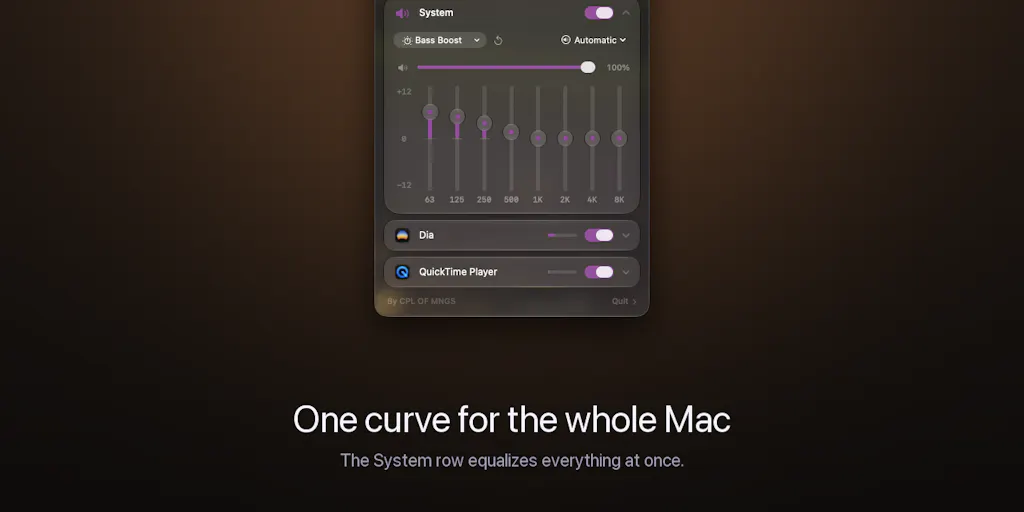
That’s the context I read SOUND against when it hit Product Hunt this week. It’s a menu-bar utility from maker Fekry Aiad that gives every app on your Mac its own 8-band EQ, its own volume slider, and its own output device. On paper it’s a niche audio tool. In practice, if you’re the person who edits a podcast in one window while a sponsor call runs in another and a reference track loops in a third, it’s the kind of utility that quietly rewires how your whole desk works. The question I want to answer here isn’t “is this a good app.” It’s whether the underlying idea — per-app audio routing without virtual drivers — is worth your attention as a creator, or whether it’s another clever macOS toy you’ll forget by Friday.
What SOUND actually solves, and why the “one volume slider” problem is worse for creators than for everyone else
The maker’s framing is honest and specific: macOS gives you exactly one system volume and no equalizer at all. A podcast is boomy, a game is harsh, one browser tab is twice as loud as everything else — and your only lever is to turn everything down together. That’s the launch post in the maker’s own words, and it’s a complaint I’ve seen in creator Discords for years.
Here’s why it lands harder for people who publish content than for the average laptop user. When you’re a social media manager or indie founder, your Mac isn’t a consumption device. It’s a production console. In a single afternoon I might have:
- A raw interview recording open in Descript or a DAW, where I’m scrubbing for clips
- A reference track or trending sound playing in a browser tab so I can match pacing for a TikTok edit
- A Zoom or Google Meet call running for a client check-in
- Slack or Discord pinging with notification sounds that are, for reasons known only to the app developers, three times louder than everything else
- A YouTube tab playing a competitor’s video I’m studying for hook structure
With one system slider, every one of those sources fights for the same headroom. You end up doing the thing every editor does: turning the master down to 30%, then cranking it back to 80% for the call, then forgetting to turn it back down, then blowing your ears out when a Slack notification fires. That’s not a minor annoyance. It’s a real cognitive tax on the exact work — close listening, pacing judgment, audio cleanup — that separates a clip that performs from one that doesn’t.
Why TikTok and podcast creators should care more than LinkedIn-only operators
If your entire content workflow is text — LinkedIn carousels, X threads, a newsletter — SOUND is close to irrelevant to you. You might use it to tame a noisy browser tab, but you won’t feel the pain it’s solving. The value curve changes the moment audio enters your stack.
Short-form video creators live in a world where audio is the hook. A TikTok’s first 1.5 seconds is often a sound cue, not a visual one, and if you’re pulling trending audio, layering a voiceover, and checking it against your own monitoring, you need to hear each layer independently. Podcasters and repurposers — the people turning one 60-minute episode into 12 clips, 3 audiograms, and a newsletter — are doing the same audio triage all day. Those are the operators who should be paying attention here. If you’re a Metricool or Buffer power user who schedules mostly graphics and text, this is a “nice to have” at best.
How SOUND differs from the tools you’ve probably already tried
There’s a long history of Mac audio utilities, and I’ve tested most of them. The honest comparison set is SoundSource from Rogue Amoeba, Loopback (same shop, different job), eqMac, and Background Music on the open-source side. Each solves a slice of the problem. None of them, in my experience, ships as a free, sandboxed, no-driver menu-bar app that gives every playing app its own EQ, volume, and output device in one place.
The architectural difference is the interesting part. SOUND is built on the modern Core Audio process-tap API and Apple’s Liquid Glass design system, which is why it can do per-app processing with zero virtual audio drivers — no kernel extension, no fake output device, nothing to uninstall later. That’s the maker’s claim, and it’s the reason the app requires macOS 26. Older versions simply can’t run it because the API it depends on doesn’t exist there.
If you’ve ever installed a virtual audio driver to route Discord to your headphones while Spotify plays on speakers, you know why this matters. Virtual drivers are the classic Mac audio workaround, and they’re also the classic source of “why did my audio break after the OS update” threads. A process-tap approach sidesteps that entire class of problem. It’s the same architectural shift that’s been quietly happening across macOS utilities for the last two years — Bartender, Raycast, and others have all leaned into native APIs to avoid the fragility of older hacks.
The feature set, concretely
Per the launch post, each playing app gets:
- An 8-band EQ spanning 63 Hz to 8 kHz, with ±12 dB of gain per band
- Its own independent volume level
- Its own output device — so you can pin a call to your speakers while music keeps going to your headphones
- A System master for anything you haven’t individually touched
- Six starting presets: Flat, Reduce Bass, Bass Boost, Vocal, Podcast, Bright
- A single power toggle that reverts every app to untouched audio
It’s free, ships in 10 languages, and follows your system language. No account, no server, no recording — the processing happens locally, in real time, in the audio callback. That last detail is the one I’d underline for anyone handling client calls or unreleased audio: there’s nothing to leak because nothing leaves the machine.
What creators and social media teams can borrow from this
Even if you never install SOUND, the design philosophy behind it is worth stealing for your own content workflow. The app’s core insight is that per-source control beats global control, and that’s a lesson that maps directly onto how most creators run their publishing stack.
Think about how you currently handle scheduling. Most operators I know use one tool — Later, Hootsuite, or Metricool — as the master switch, then manually override for platform-specific quirks. That’s the equivalent of the single macOS volume slider. The better pattern, and the one SOUND embodies, is to treat each platform as its own channel with its own settings: its own posting cadence, its own hook style, its own UTM parameters, its own analytics baseline. Same content, different routing.
The other borrowable idea is the “one power toggle” instinct. SOUND lets you revert everything to untouched audio with a single click. That’s a useful mental model for A/B testing on social: when you experiment with a new format, a new hook style, or a new posting time, you want a clean way to roll back to your baseline if the test underperforms. Most creators don’t build that rollback into their process, and they end up with a feed that’s half-tested, half-abandoned experiments and no clear read on what actually worked.
Where the math breaks
I want to be careful here, because the temptation with any per-app tool is to over-generalize. SOUND is not a content strategy. It’s not going to fix a hook problem, a retention problem, or a monetization problem. What it can do is remove one specific class of friction — audio monitoring — from the production side of your workflow, which frees up attention for the parts of the job that actually move the numbers.
The math breaks in two places. First, if your content is primarily text or static image, the ROI on installing this is close to zero. Second, if you’re on an older Mac that can’t run macOS 26, the ROI is literally zero because the app won’t launch. That second point came up directly in the comments, and the maker was upfront about it: he recommends other tools for earlier OS versions and says he’s waiting for users to update.
Where I think SOUND falls short, and who should skip it
Let me separate what I know from what I’d bet.
What the source tells me directly: SOUND requires macOS 26. That’s a hard gate, confirmed by the maker in the comment thread. It asks for system audio permission once — the OS-level gate for reading an app’s audio so it can be equalized. It’s free. It’s on the Mac App Store. Pricing beyond “free” is not disclosed, and neither are user counts, roadmap, or whether a paid tier is planned.
What I’d flag as open questions:
- The 8-band EQ range stops at 8 kHz. For podcast cleanup and voice work, that’s fine — most of the useful information in speech sits between 80 Hz and 8 kHz. But if you’re doing music production or mixing a track with meaningful high-frequency content, you’re going to want shelves above 8 kHz that this app doesn’t offer. My take: this is a monitoring and casual-listening tool, not a mastering tool.
- Per-app routing on macOS has historically been fragile across OS updates. The whole point of the process-tap approach is to be more robust than virtual drivers, but I’d still want to see how it behaves across a couple of point releases before I’d make it a permanent part of a client-facing workflow. That’s my judgment, not a claim from the source.
- No Windows, no iOS, no web. If you’re cross-platform, this is a Mac-only utility and that’s that.
- The permission prompt is a real friction point for some users. The maker is transparent that nothing is recorded, stored, or uploaded, and that processing happens locally. But “grant system audio access” is a scary-sounding dialog, and if you work with clients who are sensitive about audio privacy, you’ll want to explain what’s happening before you install it on a shared machine.
Who this is not for: Windows users, anyone on macOS 15 or earlier, text-only content operators, and anyone who needs EQ above 8 kHz. If you fall into any of those buckets, close the tab and move on. If you’re a Mac-based video or podcast creator who’s been living with the single-slider problem, this is worth ten minutes of your afternoon.
What I’d watch and test next
Here’s what I’d actually do this week if I were evaluating SOUND for a real content workflow.
First, install it and immediately test the scenario the maker built it for: pin a call to your speakers while music keeps playing to your headphones. That’s the single feature that came up most in the comments, and it’s the one that changes how a workday feels. If it works cleanly across a Zoom call, a Spotify session, and a browser tab, you’ve validated the core value proposition in under five minutes.
Second, build a “Podcast” preset and a “Vocal” preset for your own voice. Most creators have a specific boominess in their recordings that they’ve been fixing in post — usually with a high-pass filter and a mid cut. If you can dial that into the monitoring layer, you’ll catch problems earlier in the edit and spend less time in Auphonic or Adobe Podcast cleaning up after the fact.
Third, watch the app across the next two macOS point releases. If it survives an OS update without breaking your audio stack, that’s your signal it’s safe to build into a client workflow. If it doesn’t, you’ve learned something about the maturity of the process-tap API, which is useful context regardless of whether you keep using SOUND.
And finally, treat this as a reminder to audit your own audio monitoring setup. The single biggest upgrade most creators can make to their output quality isn’t a new mic or a new plugin — it’s actually hearing what they’re publishing. If a free menu-bar app fixes that, it’s worth more than most of the paid tools in your stack.