Why a Notes App Belongs in Your Social Media Stack
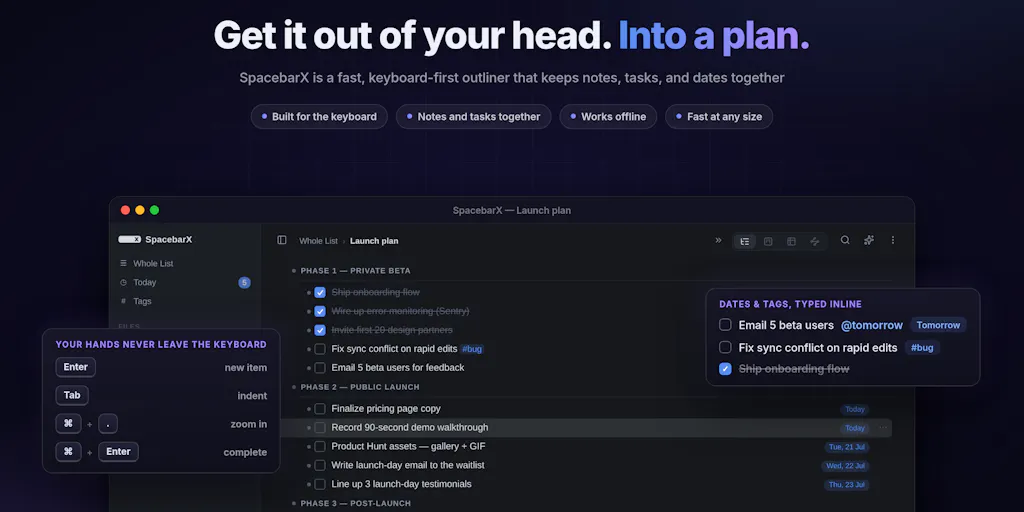
Here’s the uncomfortable truth about running a modern social media operation: your content calendar is not your strategy, and your strategy is not your content. The real work happens in the messy, fragmented space between the two—where a half-formed idea for a TikTok series collides with a client’s feedback on a LinkedIn draft, where a spike in engagement data from last week’s Reel needs to be reconciled with the Q3 content pillars. For years, we’ve tried to solve this with a patchwork of tools: a task manager for deadlines, a notes app for inspiration, a spreadsheet for analytics, and a chat app for team feedback. The result is a workflow that feels less like a system and more like a game of telephone where the message is your brand voice. This is why the launch of SpacebarX on Product Hunt caught my eye. It’s not another AI scheduling tool or a flashy video editor. It’s a deceptively simple offline notes-and-tasks workspace that promises to keep your work on your machine. And while it might seem like a productivity tool for generalists, I think it quietly solves a very specific, very painful problem for creators and social media teams: the loss of context.
When I schedule 30 posts across 5 platforms in a month, the hardest part isn’t the scheduling—it’s remembering why I made a particular creative choice three weeks earlier. The task is done, but the rationale is buried in a Slack thread, a Google Doc, or my own decaying memory. SpacebarX is built around the idea that your notes and tasks should live in the same nested outline, so the context is never separated from the action. As a social media operator, that’s not a luxury; it’s a competitive advantage.
The Real Problem: Context Switching Is Eating Your Creative Output
We talk a lot about algorithm changes and engagement rates, but the silent killer of a content operation is cognitive overhead. Every time I have to switch from a notes app to a task manager to a calendar, I’m not just losing seconds—I’m losing the thread of my creative thought. The maker of SpacebarX, Selvan, articulates this perfectly in the launch post: he was “constantly splitting my brain between two apps: notes in one, tasks in the other, and the context I needed always somewhere else.” That resonates deeply with me. In my own tests of similar tools, I’ve found that the friction isn’t in the writing or the planning; it’s in the transfer. You have to decide where a thought belongs before you can act on it. Do I put this idea for a YouTube Short in a note, or do I create a task to film it? The decision itself is a drain.
SpacebarX’s solution is to eliminate the decision. You start with a thought, and if it becomes a task, you make it a task. There’s no project setup, no predefined templates, and no pre-organizing. This is a fundamentally different approach from something like Notion, which often feels like a blank canvas that demands you build a structure before you can be productive. Notion is powerful, but it can be a procrastination trap for creators; you spend hours building the perfect database to track your content pillars and end up with no time to actually write the script. SpacebarX flips that script. It’s a nested outline first, and a task manager second. The structure is emergent, not imposed. For a solo creator or a small team, this is a god-send. It allows you to capture the raw, unstructured ideas that are the lifeblood of social media—the weird thought you have in the shower about a trending audio track—without forcing you to file it into a taxonomy immediately.
The “Whole View” Advantage for Content Repurposing
The most interesting feature for me is the “Whole View” mode. The launch post mentions you can separate work into files and folders when you need structure, but then switch to Whole View to “see it all as one connected outline.” This is a killer feature for content repurposing. When I’m working on a long-form YouTube essay, I often have a master document with the script, a separate file for research links, and a task list for editing milestones. In a traditional folder structure, those are siloed. But with SpacebarX’s Whole View, I can see the script, the research, and the tasks in one continuous flow. This gives me a holistic view of the project that is usually lost in the tab-switching mayhem of my browser. It’s much easier to spot gaps in my argument or see that I have a task to edit a section that I haven’t actually written yet. It’s a small thing, but it fundamentally changes how you can think about the relationship between your ideas and your action items.
How SpacebarX Differs from the Incumbents (and Where It Fits)
In the creator economy, we have a tendency to over-tool. We see a new app and immediately try to bolt it onto our existing stack. But SpacebarX is not trying to replace your Buffer or your Hootsuite. It’s not a distribution tool. It’s a thinking tool. So, where does it fit? I see it as a hybrid that sits between the pure outline thinking of Workflowy and the all-in-one workspace of Notion. In fact, one of the early commenters on the Product Hunt page, Venkateswaran, calls it “a really nice blend of Workflowy and Notion.” I’d agree, but with a crucial caveat: it’s the ownership model that sets it apart.
The core differentiator here is privacy and data ownership. The maker is adamant that “your files stay local” and that “there is no SpacebarX server storing, reading, or controlling your notes.” For a social media manager, this is a massive deal. We deal with sensitive information—client account credentials, unreleased campaign strategies, performance data that we don’t want competitors to see. The idea that my notes are not sitting on a third-party server is a trust signal that most SaaS tools don’t offer. This is a direct challenge to the cloud-first model of Notion and Google Docs, which, while convenient, are essentially black boxes in terms of data usage. I’m not saying they’re malicious, but the lack of control is a real concern for professional operators.
Why TikTok Creators Should Care More Than LinkedIn Ones
Here’s where my judgment gets specific. If you’re a LinkedIn influencer, your workflow is often linear: write a post, schedule it, engage with comments. You don’t need a lot of deep context. But if you’re a TikTok creator, your workflow is chaotic. You’re pulling audio clips, saving reference videos, jotting down hooks at 2 AM, and tracking which sounds are trending. You need a place to dump all that unstructured chaos and then find it later. SpacebarX’s offline-first approach is perfect for this. You can be on a plane, in a subway, or in a coffee shop with no Wi-Fi, and you can still capture your ideas. You can still work on your content strategy. The sync is on your terms—you connect your own Google Drive or Dropbox if you want it. This is a huge advantage for creators who are always on the move and can’t rely on a stable internet connection. For LinkedIn, the value is less about offline access and more about the structured context of your writing, but for TikTok, it’s about the freedom to capture without friction.
What Creators and Social Media Teams Can Borrow From This Product
Even if you don’t switch your entire workflow to SpacebarX, there are three principles from this launch that you can apply to your social media operation today.
First, adopt a “start with a thought” mindset. Stop forcing your ideas into a rigid content calendar structure at the moment of capture. Have a single inbox—whether it’s SpacebarX, a paper notebook, or a dedicated Slack channel—where ideas live before they are categorized. As the maker suggests, “Start with a thought. If it becomes a task, make it a task.” This lowers the barrier to entry for capturing ideas, which means you’ll capture more of them. I’ve found that my best content ideas are often the ones that don’t fit neatly into a category at first glance. They’re the weird intersections of a news story and a personal anecdote. If I try to file them immediately, I lose the nuance.
Second, keep your research and your tasks in the same place. I can’t tell you how many times I’ve read a great article, highlighted a key stat, and then lost it because it was in a “Reading List” bookmark folder that I never look at. SpacebarX’s model of keeping notes behind each task is the correct mental model. When you have a task to “write a script for the new product launch,” the research for that script should be attached to that task. This is how you build a knowledge base that is actionable, not just archival. I’d bet that this alone could save a social media team hours of “where did I see that stat?” time each week.
Third, re-evaluate your data ownership posture. The launch post makes a strong case for local-first software. The maker’s claim that “there is no SpacebarX server storing, reading, or controlling your notes” is a powerful one. In an era of AI training on user data and constant data breaches, the choice to keep your work on your machine is a legitimate strategic decision for a business. It’s not just about privacy for privacy’s sake; it’s about control and reliability. You are not subject to the uptime of a third-party server, and you are not at the mercy of a company’s changing terms of service. This is a lesson that extends beyond this one tool. When you evaluate your next SaaS subscription, ask the hard questions about data residency and access.
Where the Math Breaks: My Honest Assessment of the Shortfalls
Let’s be clear: SpacebarX is not a silver bullet, and it’s not for everyone. There are some significant limitations that I, as a social media operator, need to flag.
The PWA Problem. Right now, SpacebarX is a Progressive Web App. The maker says that “native desktop and mobile apps are in progress.” In my experience, a PWA is a compromise. It’s better than nothing, but it often lacks the polish and the deep OS integration of a native app. For example, the commenter Venkateswaran notes that “the mobile experience is somewhat good, but I think a native app would make it even better.” I agree. For a creator on the go, the mobile experience is non-negotiable. I need a mobile app that is fast, reliable, and can handle offline sync seamlessly. A PWA, while functional, can be clunky. The lack of a native app is a real friction point for adoption, especially for the Instagram and TikTok crowd who live on their phones.
The Sync Riddle. The maker’s decision to use your own Google Drive or Dropbox for sync is clever for privacy, but it introduces a potential technical headache. What happens when you have a conflict between two devices? What happens if you have a massive outline and you hit the API rate limits of your cloud storage provider? The source is silent on these specifics. In my own tests of similar tools, I’ve found that DIY sync solutions can be fragile. They work fine for a single user with a couple of devices, but they can break down in a team environment where multiple people are editing the same outline. This is a critical open question for me. I’d love to see a detailed technical explanation of how the sync works, but for now, it’s a risk.
The Missing Collaboration Layer. This is the biggest one for me. The launch post focuses heavily on the individual user experience. There is no mention of real-time collaboration, comments, or shared editing. For a solo creator, this is fine. But for a social media team of even two or three people, this is a dealbreaker. We need to be able to comment on a draft, tag a teammate, and see their edits in real-time. Without that, SpacebarX is not a team tool; it’s a personal tool that happens to be able to sync files. The team claims that you can “separate work into files and folders,” but that’s not the same as collaborative editing. This means that for many professional social media operations, SpacebarX will be a complement to, not a replacement for, tools like Notion or ClickUp.
The AI Feature is a “Bring Your Own Key” Affair. The Pro tier includes “bring-your-own-key AI.” This is an interesting choice. It means you can use your own API key for an AI model, which is great for privacy and cost control. But it also means that the AI features are not turnkey. You have to have the technical know-how to set up an API key and manage your usage. For a non-technical content creator, this is a barrier. It’s not as simple as clicking a button to generate ideas. It requires a bit of tinkering. This is a clear signal that this product is built for a more technical, privacy-conscious user, not the mass market.
Where the Math Breaks: Pricing and Value
The pricing model is interesting. The free tier is “free forever,” which is great for testing. The Pro tier is available monthly, yearly, or as a $99 Lifetime plan, normally $199. That lifetime plan is a compelling offer. It’s a one-time cost that gives you access to advanced views like Board, Table, Mind Map, and Calendar, plus saved searches and encrypted documents. For a creator who is tired of paying monthly subscriptions for tools they barely use, this is a refreshing alternative. My take is that the lifetime plan is the value anchor. It’s priced low enough to be an impulse buy for a serious operator, but high enough to signal that it’s a real product, not a toy. However, I would caution against buying a lifetime plan for a product that is still in its PWA phase. The team says native apps are “coming in the next few weeks,” but until I see them, I’d be hesitant to invest in the long-term. It’s a calculated risk. The potential upside is a great tool for a one-time fee; the downside is that the product might not evolve as quickly as a subscription-funded product would.
What I’d Watch / Test Next
I’m not going to throw out my entire stack just yet, but SpacebarX has earned a spot in my testing rotation. Here’s what I’m going to do this week:
Migrate a single project into SpacebarX. I’m going to take one of my active client projects—one that has a mix of research notes, draft scripts, and scheduling tasks—and move it into SpacebarX. I want to see if the nested outline really does help me keep context better than my current setup of a Google Doc and a task manager. I’m specifically going to stress-test the “Whole View” feature to see if it helps me spot gaps in my content plan.
Test the offline mode rigorously. I’m going to spend a day working from a location with no Wi-Fi. I’ll try to capture ideas, edit my outline, and check off tasks. I want to see how seamless the offline-to-online sync is when I connect to my Google Drive. This is the make-or-break test for me. If the sync is smooth, the offline-first value proposition is real. If it’s buggy, it’s a non-starter.
Wait for the native apps before committing. I’m going to keep an eye on the Product Hunt page and the company’s announcements for the release of the native desktop and mobile apps. The maker has stated they are “coming in the next few weeks,” so I’ll give them the benefit of the doubt. But my decision on whether to purchase the Lifetime plan will hinge on the quality of those native apps. If they are polished and the sync is reliable, I’ll likely invest. If they are just a wrapper around the PWA, I’ll pass.
Evaluate the “bring-your-own-key AI” for repurposing. I’m curious about the AI feature. I want to see if I can use it to generate summaries of my long-form YouTube scripts to turn into Twitter threads or LinkedIn posts. The fact that it’s bring-your-own-key means I can use a model I trust and control costs. I’ll test this in my single project to see if it can genuinely speed up my repurposing workflow.
SpacebarX is a thoughtful product that addresses a real pain point in the creator workflow. It’s not a flashy tool, but it’s a foundational one. It’s a bet on the idea that your best work comes from a focused, context-rich environment, not from a chaotic dashboard of notifications. For solo creators and privacy-conscious operators, it’s worth a hard look. For larger teams, it’s a promising complement to your existing stack, but not yet a replacement. The next few weeks will be crucial. If the native apps deliver on the promise of the PWA, this could be a serious player in the “thinking tools” space. If not, it will be a nice experiment that taught us the value of local-first data. Either way, it’s a launch worth watching.