The “AI employee” pitch is back, and this time it’s wearing an approval workflow
Every few months the creator-tools cycle coughs up a new promise: stop doing the work, let the machines do it. Usually it’s a content generator with a chat box bolted on, and usually it dies the moment you try to hand it anything that touches a real account. So when a product shows up claiming to run research, partnerships, ops, and content as a “team of AI employees,” my first instinct as someone who has spent a decade babysitting social accounts is skepticism — not because the tech can’t draft a caption, but because the failure mode is never the draft. It’s the handoff. It’s the approval queue. It’s the post that goes live at 2am because nobody owned the final check. That’s the lens I want to use on SquadRoom, a new launch from SpeedVitals that’s trying to sell exactly that handoff discipline.
What SquadRoom actually is, minus the pitch-deck gloss
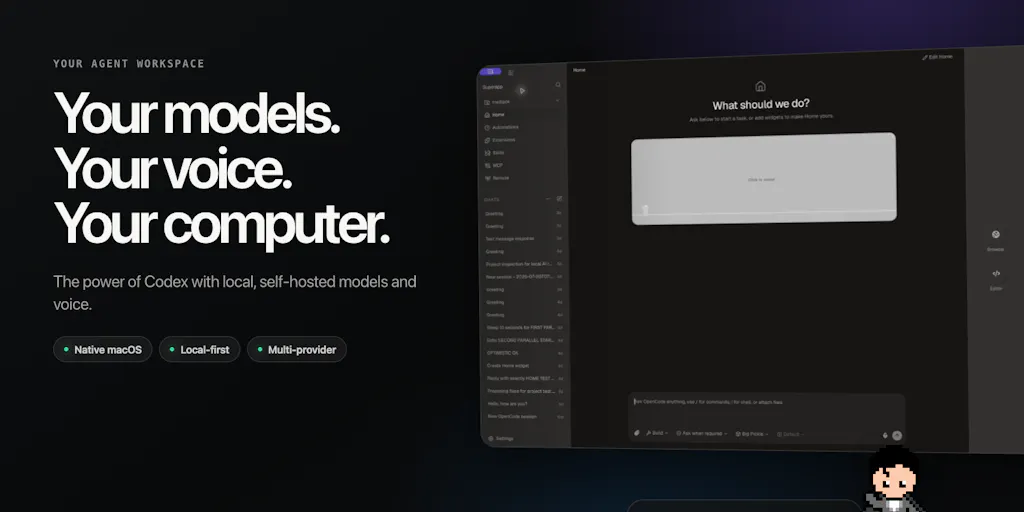
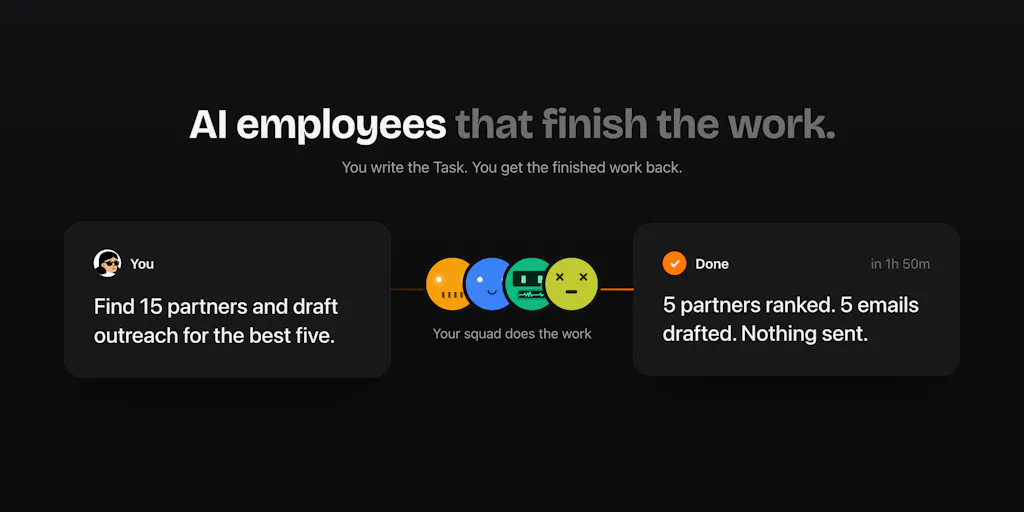
Kartike Bansal, cofounder of SpeedVitals, launched SquadRoom on Product Hunt with a framing that will feel familiar to anyone who has run a small content or growth team: “there was always work nobody owned.” Research a market, find partners, draft the outreach, check the numbers. The pitch is that instead of hiring for each of those, you tell a lead agent what you need in plain words, and it plans the work and hands each piece to a specialist — research, partnerships, ops, content, “or any role you add.” The agents then do the work “with real tools,” and you get back the finished work plus a report of every step and source.
A few mechanics the maker calls out explicitly: one owner per task so work doesn’t get lost between agents; agents only ask when a decision needs you, with one clear question and their recommendation; nothing is sent, posted, or paid without your OK; and you bring your own AI key with no markup. It’s built on Hermes Agent by Nous Research, and there’s a full live demo on the homepage with no signup required. Early access is priced at $49/month for the whole squad.
Here’s the part that matters for social media operators specifically: this is not a scheduler. It’s not a Buffer or a Hootsuite or a Later. Those tools assume you already know what to post and just need a calendar and an API connection. SquadRoom is trying to sit upstream of that — in the messy zone where you’re figuring out what to post, who to partner with, what the research says, and who’s going to write the thing. That’s a much harder problem, and it’s the one that actually eats creator time.
Why this is a social-media story, not just an ops story
Most social media managers I know don’t lose their week to publishing. They lose it to the before and the after. Before: research, competitive scanning, finding the angle, drafting. After: reporting, repurposing, chasing approvals, coordinating with the person who owns the brand voice. Publishing itself — the actual click — is maybe 10% of the job. So a tool that claims to own the research-to-draft pipeline is competing for the exact hours that a good social operator would rather spend on strategy, community, and the stuff that actually moves engagement rate.
The maker’s own example of what a user did with it is telling. In the comments, Kashish Kumawat says they’d been using SquadRoom for about a month and gave it a blog post task. According to that user, it went through their existing posts first, scraped LinkedIn, Reddit, and Twitter for research, did keyword analysis, and came back with a draft that “reads exactly like something I would have written.” They say a post like that usually takes them one to two days, and they had it by the end of the day. I want to be careful here: that’s a single user’s testimonial on a launch page, not a benchmark. But the workflow it describes — pull your own archive for voice, scrape social platforms for current discourse, do keyword analysis, draft — is exactly the repurposing loop that most creators do badly or skip entirely.
How it differs from the incumbents — and where the comparison gets uncomfortable
Let me name the real competitive set, because “AI agent team” is a crowded phrase right now.
On the scheduling side you’ve got Buffer, Hootsuite, Later, Metricool, and SocialBee. These are mature, API-connected, and they own the calendar. They do not, by and large, do your research or write your strategy.
On the content-generation side you’ve got Canva’s Magic Studio, CapCut’s AI features, Jasper, Copy.ai, and a long tail of caption generators. These are good at producing assets and copy in isolation. They don’t own a task, they don’t hand off, and they don’t produce a report of every source they used.
On the “agent that does work” side you’ve got Zapier’s AI features, Make, Relevance AI, and a growing pile of vertical agent startups. These are powerful but they’re workflow builders — you’re still the one designing the logic, and the output is usually a trigger firing, not a finished piece of work with a paper trail.
SquadRoom’s bet is that the gap is ownership plus auditability. The “one owner per task” detail that Oleksii Sekundant praised in the comments is the same thing that makes a good project manager valuable: you can see who’s responsible and what happened along the way. And the “report of every step and source” is the thing that separates a usable AI output from a black box you can’t defend to a client or a founder.
The approval-queue problem is the whole ballgame
The most interesting exchange in the launch thread isn’t about features. It’s about friction. Dounia Boughalem asked the question every operator should be asking: “Nothing goes out without my OK is very important nowadays, but what happens when the queue of approvals gets long? It ends up defying the purpose? Do you have a process to speed it up?” Vasco Ferreira piled on: “There are many tools for this purpose, but they always end up falling short when it comes to validation and the time wasted on it. I haven’t found one yet that manages to strike a balance between the two.”
This is the exact trap I’ve watched kill “AI assistant” tools inside content teams. The tool saves you 40 minutes of drafting and then costs you 50 minutes of reading, re-reading, and second-guessing. You’ve traded a creative bottleneck for an approval bottleneck, and the approval bottleneck is worse because it’s boring.
The maker’s answer is worth quoting because it’s a real product philosophy, not a feature list. Bansal says the bet is “fewer, better asks rather than faster clicking.” Specifically: agents only stop when a decision really needs you, and they batch up to three questions into one ask, each with the finding behind it; they check what you’ve already told them before asking; only the task that’s waiting pauses while everything else keeps moving; approve-and-send is one click, and a recurring job you approve once keeps running without asking again; and there’s an optional morning brief that lists what’s waiting with a recommended answer for each. He also names what’s not there yet: “bulk approve, or ‘stop asking me about this kind of thing.’”
That last admission is the most trustworthy thing on the page. A founder telling you what the product can’t do is worth ten testimonials about what it can.
What creators and social teams can actually borrow from this
Even if you never sign up for SquadRoom, the design decisions here are worth stealing for your own workflow.
1. Assign one owner per task, even if the “owner” is a checklist
The reason work falls through the cracks on a content team isn’t laziness — it’s ambiguous ownership. “Someone should write the LinkedIn version of this” is not a task, it’s a wish. Whether you’re using AI agents or a Notion board or a Trello list, the rule holds: every piece of work gets exactly one name attached, and that name is accountable for the handoff, not just the first draft.
2. Force every AI output to show its sources
The “report of every step and source” feature is the one I’d push hardest on if I were advising a creator team. When you’re using AI to draft a post that makes a claim — “engagement is down on X,” “this format is outperforming,” “this competitor just changed their pricing” — you need the receipt. Not because anyone’s auditing you, but because you need to know whether the claim is real before you put your name on it. A draft without sources is a liability dressed up as a time-saver.
3. Treat “approve once, run forever” as the goal, not “approve everything”
Bansal’s answer to the approval-queue problem — recurring jobs you approve once keep running — is the right instinct. In my own experience running social for small brands, the approvals that eat the most time are the repetitive ones: the weekly roundup post, the evergreen carousel, the standard reply template. If you can define the shape of a recurring piece of content and pre-approve the pattern, you free up your attention for the one-off stuff that actually needs a human eye. The risk, obviously, is that the pattern drifts and you don’t notice. Which is why you need a periodic audit, not just a one-time approval.
Why TikTok creators should care more than LinkedIn ones
Here’s a distinction the launch page doesn’t make but I think matters. The value of an agent that does research and drafts is highest where the volume of research is highest and the cost of a bad draft is lowest. That’s short-form video scripting and trend research, not thought-leadership posting.
A TikTok creator needs to know what’s trending, what sounds are rising, what formats are working, what competitors are doing this week. That’s a research-heavy, fast-moving, low-stakes-per-draft environment — exactly where an agent that scrapes and summarizes earns its keep. A LinkedIn ghostwriter, by contrast, is selling voice and judgment. The draft is the product, and the cost of a generic draft is your reputation. So I’d bet the SquadRoom-style workflow is more useful as a research and briefing layer for short-form creators than as a drafting layer for personal-brand writers. That’s my take, not the maker’s claim.
Where the math breaks
Let me be honest about the economics, because $49/month sounds cheap until you do the math on what it replaces. If you’re a solo creator, $49/month is a real line item — it’s roughly the cost of a Metricool plan plus a Canva Pro seat. The question isn’t whether it’s cheaper than a hire, because it obviously is. The question is whether it’s cheaper than the 3–5 hours a week you’d otherwise spend on research and drafting, and whether the output quality actually clears the bar where you’d publish it with light edits.
In my own tests of similar “agent team” tools, the pattern is consistent: the first draft is 70% there, the research is genuinely useful, and the last 30% — voice, nuance, the specific thing that makes it yours — still takes real time. If SquadRoom’s output is closer to 90% for your niche, it’s a no-brainer. If it’s 70%, you’re paying $49/month for a research assistant, which may still be worth it, but you should price it as that, not as a content team replacement.
Where my judgment says it falls short
Three things I’d want to test before recommending this to anyone running brand accounts.
First, the publishing gap. The maker is upfront that direct publishing isn’t built in yet. Finished posts land in SquadRoom Docs and you copy them into WordPress yourself. He notes you can connect any MCP server (Integrations → Custom → Add custom MCP), and that WordPress.com now has its own MCP server that can write posts, so agents can save drafts directly. Self-hosted WordPress takes more setup. For social platforms specifically, there’s no mention of native publishing to Instagram, TikTok, X, LinkedIn, or Threads — which means for a social media operator, this is a research and drafting tool, not an end-to-end publishing tool. That’s a meaningful limitation, and it’s the difference between “replaces part of my workflow” and “replaces my scheduler.”
Second, the approval-queue problem is acknowledged but not solved. Bansal explicitly says bulk approve and “stop asking me about this kind of thing” aren’t there yet. Those aren’t nice-to-haves — they’re the features that determine whether the tool scales past a handful of tasks. If you’re running 30 posts a month across five platforms, as I have, a queue that requires individual review of every agent decision is going to feel like a second job. The batching (up to three questions per ask) helps, but it’s a mitigation, not a fix.
Third, the “bring your own AI key” model. This is presented as a feature — no markup — and for technically comfortable users it is. But it also means your actual cost is $49/month plus whatever you spend on your AI provider, and it means setup involves managing keys and understanding rate limits. For a solo creator who just wants things to work, that’s friction. For an agency with an ops person, it’s fine. I’d want to see the real all-in monthly cost for a typical usage pattern before calling it cheap.
Who this is not for: Anyone whose bottleneck is scheduling and publishing, not research and drafting. Anyone who needs native social publishing today. Anyone who wants a set-and-forget tool with no setup. And anyone whose brand voice is the entire product — because the last mile of voice is still yours to walk.
What I’d watch / test next
If you’re curious, here’s what I’d actually do this week, in order.
Open the live demo — it’s no-signup, so there’s no excuse not to poke at it. Give it a real task from your actual backlog, not a toy prompt. The one I’d hand over first is the same one Lancelot D’Souza named: partner research. Find companies that serve the same audience and draft the intro. Then check two things — does the ranking table explain why one partner is above another, and does the source column actually hold up when you click through? Bansal says it ranks using what you’ve told it about your customers and goals, and only writes intros for the top few, with nothing sent until you say yes. Test that claim.
Second, run one recurring content task through it and see whether the “approve once, run forever” promise holds. Pick something low-stakes — a weekly roundup, a standard reply template — and watch whether the output drifts over three or four cycles. That’s where the real value or the real pain will show up.
Third, price it honestly. Add $49/month to your actual AI provider spend for a month of typical use, then compare that number to the hours it saved you, valued at your own rate. If the math doesn’t clear, you’ve learned something useful for free. If it does, you’ve found a research assistant that happens to also draft. Either way, you’ll know more than the launch page can tell you — and that’s the only review that matters.