The subscription audit your creator stack has been begging for (and why I’m skeptical it goes far enough)
Every creator I know runs a bloated subscription stack. CapCut Pro, Canva, Later, Metricool, Descript, Notion, a half-dozen AI credits, a hosting plan, a domain, a newsletter platform, a stock library, and at least one tool you signed up for during a launch-week panic and never opened again. The average indie operator I’ve audited is paying for somewhere between nine and twenty recurring services, and most of them cannot name the annual cost without opening a spreadsheet. That’s the problem Subscrr is trying to solve — not by being another budgeting app, but by being a subscription-specific ledger with an AI layer bolted on top that will, in theory, tell you what to cancel. It launched on Product Hunt on August 16th, 2026, from the same maker, Artur Mineev, who shipped the earlier Subscrrr tool back in February. The pitch is narrow and honest: see what you’re actually paying, then ask a chat what to cut. For anyone whose tool budget has quietly become their second-biggest expense after ad spend, that’s worth ten minutes of attention.
What Subscrr actually does, and why it’s not just Mint with a new coat of paint
The core product is a subscription tracker. You import what you’re paying for — the maker’s own launch thread describes an App Store screenshot import as the entry point — and the app surfaces each recurring charge, including a per-day cost breakdown, which one commenter, Raphael stanislas, specifically praised as “a really nice touch.” That per-day framing is the kind of small UX decision that changes behavior. Seeing “$14.99/month” is abstract; seeing “$0.49/day” makes you ask whether the tool is worth half a coffee every morning.
The AI layer, per the maker’s launch post, does three things:
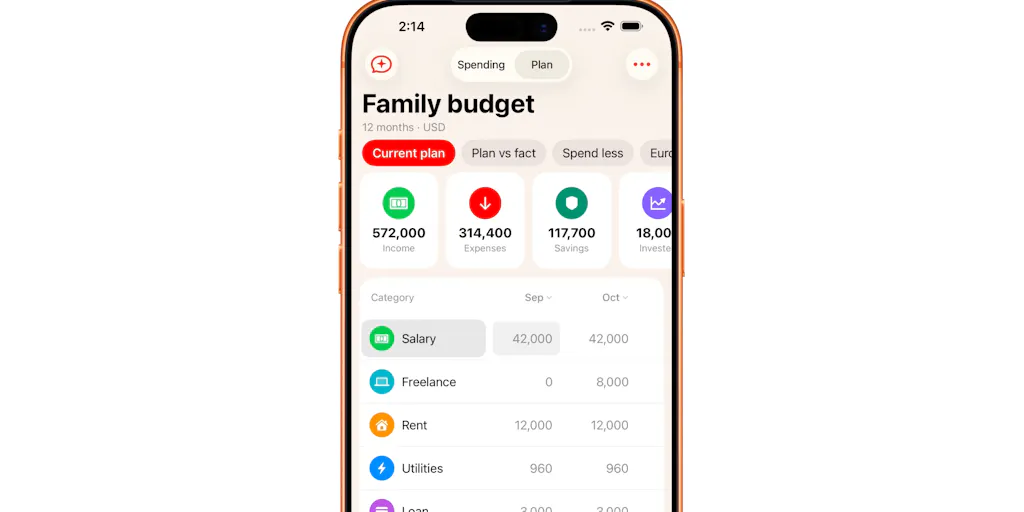
- Build a financial plan. You either fill it in manually or describe your goal to a chat and let it construct the plan. The maker frames the chat as being “for those who can’t be bothered to do the math by hand.”
- Run scenarios. Add a hypothetical subscription, cancel Netflix, change your spend, and see the numbers move. You can also compare your planned spend against actual spend.
- Ask what to cancel. Direct questions like “where am I overpaying?” or “what can I replace?” get answered against your actual subscription list.
Both the financial plan and the AI chat are flagged as beta in the launch post, which the maker is upfront about: “if something feels weird, doesn’t work at all, or, even better, somehow saves your budget, tell us about it.”
The part that matters more than the AI
Here’s what I think the maker under-sold: the yearly rollup. When Jason Wu asked whether users could see annual savings from cancelling multiple subscriptions, the maker admitted that today each finding only shows the monthly saving — the yearly total is coming “in the next update,” at which point the AI will sum multiple findings into a single “about $X a year” line.
That’s the single most important number in the whole product, and it isn’t shipped yet. Monthly savings feel small and easy to rationalize. Annual savings are the number that actually changes behavior. If you’re evaluating Subscrr today, understand that the feature that makes the math land is on the roadmap, not in your hands.
How it stacks up against the incumbents you’re already using
I’ve spent real time inside the subscription-tracking category, and the honest comparison set is small. Here’s how I’d frame the landscape:
Rocket Money (formerly Truebill) is the category heavyweight. It connects to your bank via Plaid, auto-detects recurring charges, and will even cancel subscriptions on your behalf for a cut. The trade-off is that you’re handing over full bank credentials and transaction history to a third party. For a lot of creators — especially anyone with a business account that mixes client payments and personal spend — that’s a non-starter.
Bobby is the minimalist iOS option. Beautiful, manual-entry, no bank connection, no AI. It’s the app Subscrr is most directly competing with on philosophy, but Bobby doesn’t attempt to tell you what to cancel.
Trim sits closer to Rocket Money — bank-linked, negotiation-focused, less about visibility and more about action.
Your bank’s own app is the free option nobody counts. Most modern banking apps now surface recurring charges in a “subscriptions” view. It’s imperfect and it won’t help you if your tools are split across three cards, but it costs nothing.
Where Subscrr differentiates, based on the source material: no bank login, privacy-first framing, and an AI that gives you a specific dollar amount rather than a vague “you’re overpaying” nudge. That last point is the whole thesis. As the maker told Oscar Bennett, “‘you’re overpaying’ is easy to ignore, but a specific number is easy to act on.” I’d agree with that instinct — it’s the same reason UTM-tagged dashboards beat vanity metrics.
Where the math breaks
Here’s the operational problem I keep coming back to. The App Store screenshot import only sees subscriptions billed through Apple. As Raphael pointed out in the thread, that’s a minority for most creators — Netflix, Shopify, Adobe, Figma, Notion, and basically every SaaS tool you pay for directly by card are invisible to that import.
The maker acknowledged this directly and outlined the fix: a “Paid by card? Add a bank statement” step where you screenshot your banking app and Subscrr extracts recurring charges, with deduplication against the App Store list. PDF and CSV statement imports are “on the list next.”
That’s a reasonable roadmap. But it also means the product’s core promise — “discover subscriptions you’d forgotten about” — is only partially delivered today for anyone whose stack isn’t Apple-billed. And for a creator running a business, that’s most of your stack.
The privacy claim, honestly assessed
The maker made a disclosure in the thread that I want to flag because it’s the kind of thing that gets buried in launch-day enthusiasm. Raphael asked for on-device processing to preserve the privacy-first approach. The maker’s response: “recognition runs through our own proxy, not fully on-device. The image isn’t stored and nothing is tied to your identity, since there’s no account.”
That’s still meaningfully better than handing Plaid your bank credentials. But it is not the same as on-device processing, and the maker was right to say so plainly. If “no bank connection” was your reason for choosing Subscrr over Rocket Money, understand that you’re trading bank access for proxy-processed screenshots. Different risk profile, not zero risk.
Why TikTok creators should care more about this than LinkedIn ones
Subscription bloat scales with tool count, and tool count scales with content velocity. A LinkedIn-first operator running one post a day needs a scheduler, maybe a Canva account, and a document. A TikTok creator shipping three to five videos a day is running a small production studio: CapCut Pro, a hook-writing AI, a caption generator, a trending-sound tracker, a thumbnail tool, a scheduler that actually supports TikTok’s API, and probably a second scheduler because the first one rate-limits. That stack compounds fast.
The same logic applies to anyone repurposing across platforms. If you’re running one piece of content through Instagram Reels, TikTok, YouTube Shorts, X, Threads, and Pinterest, you’re paying for tools at every stage: scripting, editing, captioning, scheduling, analytics. The Metricool or Later subscription alone can run $50–$100/month at the tiers that support multi-platform scheduling.
My take: the creators who get the most out of a tool like Subscrr are the ones whose monthly tool spend exceeds their monthly ad spend. If that’s you, the audit isn’t optional — it’s the highest-ROI hour you’ll spend this quarter.
What social media teams can borrow from Subscrr’s design
Even if you never install the app, there are three patterns in this launch worth stealing for your own content operation:
1. The per-day cost framing. When you pitch a client or justify a tool to your team, don’t quote the monthly price. Quote the daily equivalent against the output. “$0.49/day for the scheduler that saves you 40 minutes of manual posting” is a different conversation than “$14.99/month.”
2. The scenario-planning habit. Subscrr lets you model “what if I add this subscription” before you commit. Do the same with content bets. Before you commit to a new platform (say, adding Threads to your rotation or spinning up a Pinterest strategy), model the time and tool cost against the realistic reach you’d get. Most teams skip this and just add the platform because everyone else did.
3. The “specific number” principle. The maker’s insight — that vague warnings get ignored and specific numbers get acted on — applies directly to how you present analytics to clients and stakeholders. “Engagement is down” is ignorable. “Your Reels reach dropped 34% week-over-week while your carousel reach held flat” is actionable. Same psychology, different domain.
A sidebar on the AI chat
The “ask what to cancel” feature is the part I’d want to test hardest before trusting it. The maker’s own framing — the chat is “for those who can’t be bothered to do the math by hand” — suggests the AI is doing arithmetic and pattern matching, not deep financial reasoning. That’s fine, but it means the quality of its recommendations depends entirely on the quality of your input data. If half your subscriptions aren’t imported yet, the AI is reasoning on an incomplete picture and might tell you to cut something you actually need while missing the $200/year tool you forgot about entirely.
Garbage in, confident-sounding garbage out. Test it against a manual audit before you act on it.
Where I think Subscrr falls short
Let me be direct about the limitations, because launch-day threads rarely are:
The import gap is the product’s biggest weakness right now. Until bank statement import (PDF/CSV) ships, the tool can’t see most of a creator’s actual spend. The maker has acknowledged this and put it on the roadmap, but “on the roadmap” is not “in your hands.”
Yearly totals aren’t live. As of the launch thread, findings show monthly savings only. The annual rollup — the number that actually changes behavior — is coming in a future update.
It’s a tracker, not a canceller. Unlike Rocket Money or Trim, Subscrr doesn’t cancel subscriptions for you. You still have to go do the cancellation yourself, which is where most people abandon the process. The friction between “I should cancel this” and “I cancelled this” is where subscription waste actually lives, and Subscrr doesn’t solve it.
No reviews yet. The Product Hunt page shows “No reviews yet” at the time of the scrape. That’s not a red flag on its own — it’s a brand-new launch — but it does mean you’re evaluating on the maker’s word and a handful of thread comments, not a track record.
Who it’s not for: If you run a single tool and a single platform, you don’t need this. If you’re already disciplined about your stack and review it quarterly, you don’t need this. If you’re comfortable handing Plaid your bank credentials and want auto-cancellation, Rocket Money is a better fit. Subscrr is for the operator with a sprawling, half-forgotten stack who wants visibility without giving up bank access.
What I’d watch / test next
If you’re a creator or social media operator reading this, here’s what I’d actually do this week:
1. Do a manual audit first. Before you evaluate any tool, open your last three months of card and bank statements and list every recurring charge. You’ll probably find two or three you forgot about. That list is your baseline — and it’s also the test data you’ll use to judge whether Subscrr’s import actually catches what matters.
2. Test the App Store import honestly. Install Subscrr, run the Apple ID screenshot import, and count how many of your real subscriptions show up. If it’s less than half — which I’d bet it is for most creators — you’re seeing the product’s current ceiling, not its potential.
3. Wait for the yearly rollup before you trust the AI’s recommendations. The specific-number principle only works if the number is annual. Monthly savings are too easy to rationalize away.
4. Watch the roadmap, not the launch. The maker has publicly committed to bank statement import (screenshot first, then PDF/CSV) and yearly totals. If those ship in the next few weeks, Subscrr becomes genuinely useful for creators. If they slip, it stays a nice-looking tracker with a promising AI layer that can’t see most of your spend.
5. If you’re a social media team, steal the framing even if you skip the tool. Per-day costs, scenario planning, and specific numbers over vague warnings. Those three habits will save you more money than any single subscription tracker.
The subscription-audit category has been waiting for a privacy-first, creator-friendly entrant for years. Subscrr is a credible first attempt. Whether it becomes the tool creators actually keep depends entirely on whether the import problem gets solved — and that’s the thing I’ll be watching.