The Browser Tab Is the New Content Calendar
Every creator I know has the same dirty secret: the gap between thinking of an idea and actually capturing it is where content goes to die. You’re mid-scroll on TikTok, you see a format that would work perfectly for your niche, you think “I should save that,” and then the algorithm feeds you three more videos and the thought evaporates. Or you’re in a YouTube script draft, you get a flash of a better hook, and by the time you switch to your notes app, the spark is gone. I’ve tested every capture tool in the creator economy — from the heavyweight note apps to the minimalist text files — and the fundamental problem is always the same: the friction between the moment of inspiration and the act of recording it is too high. That’s why the launch of Tab Notes caught my eye. It’s not trying to be another full-featured notes app. It’s trying to own the one place you’re already looking at dozens of times a day: the new tab page. For anyone who lives in a browser — which is to say, every social media manager and content creator on the planet — that’s a thesis worth examining.
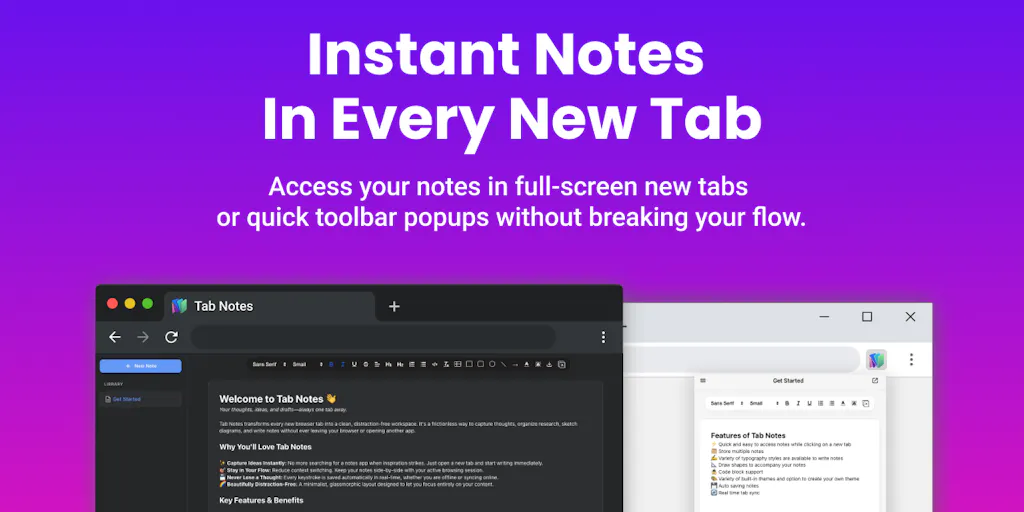
The pitch from maker VINEETH TR is deceptively simple: a local-first scratchpad that lives where your browser already takes you. The key features include Markdown support, an integrated canvas for diagrams, offline browser storage or Google Drive sync, popup and standalone modes, and zero lock-in with export to .txt or .md. On paper, it sounds like a productivity tool for developers. But strip away the syntax highlighting and the flowchart arrows, and what you’re actually looking at is a capture layer for the creator workflow — a way to grab the raw material of content before it slips through the cracks. In my experience, that’s worth more than another analytics dashboard or scheduling tool. You can’t schedule what you haven’t captured, and you can’t repurpose what you’ve forgotten.
The creator economy has spent the last two years obsessing over the output side of the pipeline — better cameras, smarter editing, AI-generated captions, auto-posting to five platforms at once. Meanwhile, the input side has been neglected. We’re all drowning in ideas we never wrote down, references we never saved, and half-formed thoughts that died in the gap between “I should remember that” and “where’s my phone.” Tab Notes is a small product, but it’s attacking a real bottleneck. And in this essay, I want to break down why that matters, who should care, and where I think this kind of tool still falls short.
The Capture Problem: Why Your Content Pipeline Is Leaking
Let me paint a picture from my own workflow last month. I was managing a client’s Instagram account while simultaneously trying to keep my own YouTube channel alive. I had a content calendar in Notion, a draft folder in Google Docs, a Pinterest board for inspiration, and a group chat with my editor where half-finished ideas went to be ignored. The system was a mess, but the real killer wasn’t organization — it was speed. The best content ideas are ephemeral. They hit you in the shower, during a commute, or while you’re scrolling through someone else’s feed. By the time I could navigate to the right app, create a new note, and type out the thought, the context was gone.
This is where Tab Notes gets the mechanics right. The maker’s own framing — “standard note apps felt too heavy, and default browser start pages are cluttered with distractions” — is exactly the pain point. When I open a new tab, I’m already in a state of intention. I’m about to type a URL, search for something, or start a task. That’s a transitional moment, and it’s the perfect place to intercept a stray thought. The popup and standalone modes are the key differentiator here. You can pin it to the toolbar and jot a note over any website without losing your place — which is huge for creators who do a lot of research. When I’m pulling stats for a LinkedIn article or gathering references for a YouTube script, I don’t want to leave the page to write something down. The popup mode solves that.
But here’s what I think is the real genius: the new-tab takeover approach. One of the commenters on the launch page, Gal Dayan, nails it perfectly: “if opening a notepad takes more than the half-second it takes to open a new tab, I just won’t use it.” That’s the entire ballgame. The default browser start page is a wasteland of speed-dial links, search bars, and whatever junk the browser vendor decided to push that week. Replacing that with a scratchpad means your capture tool is never more than one keystroke away. It’s always there, waiting, with zero navigation required. In my own tests of similar tools, that half-second difference is the difference between a tool I actually use and a tool I install once and forget about.
The privacy angle is also worth unpacking. The privacy-first storage — offline browser storage without login, or optional Google Drive sync — is a smart move for creators who are increasingly paranoid about their ideas being scraped. I’ve had clients ask me whether their content drafts are being used to train AI models when they use certain cloud note apps. The answer is usually murky. Tab Notes sidesteps that by making local-first the default. For anyone who works with NDA’d client content or unreleased product launches, that’s a legitimate feature, not a niche concern.
Why TikTok Creators Should Care More Than LinkedIn Ones
Not every creator has the same capture needs. If you’re a LinkedIn writer, your ideas tend to be text-based — a hot take, a personal story, a business lesson. You can capture those in any app. But if you’re a TikTok or Instagram Reels creator, your raw material is often visual. You see a transition effect, a sound that syncs perfectly with a cut, or a framing choice that would work for your niche. Text notes can’t capture that. The integrated canvas with diagrams, flowcharts, and connecting arrows is where this gets interesting for video creators. You can sketch out a storyboard right in the note. You can map the flow of a 60-second video — hook, setup, payoff — with shapes and arrows, all without leaving your browser.
I’d bet that TikTok and Reels creators get more value out of the canvas than LinkedIn writers do. The ability to visually map a video sequence before you shoot it is a workflow that most creators currently do in a separate whiteboard app or with pen and paper. Having that live in the same place as your text notes, with zero friction to access, is a genuine workflow upgrade. For LinkedIn writers, the Markdown support and quick text capture are nice, but they’re competing with tools like Notion and Google Docs that are already good enough. The visual canvas is the differentiator for short-form video.
That said, the canvas is still a browser-based drawing tool. It’s not a replacement for a dedicated whiteboard app like FigJam or Miro. But it doesn’t need to be. It just needs to be fast enough to capture the rough shape of an idea before it disappears. And for that, it’s positioned perfectly.
How Tab Notes Differs from the Incumbent Stack
The creator economy has a well-established set of tools for note-taking and idea capture, and Tab Notes is stepping into a crowded ring. The most obvious comparison is Notion, which has become the default workspace for a huge chunk of creators and indie founders. Notion is powerful — it can handle databases, wikis, and entire project management systems. But that power comes with weight. When I open Notion to jot down a quick idea, I have to navigate to the right page, find the right block, and deal with a loading spinner. It’s not built for the half-second capture moment. Tab Notes is. That’s not a knock on Notion; it’s a clarification of use cases. Notion is where ideas go to live. Tab Notes is where ideas are born.
Then you have the lighter options. Apple Notes and Google Keep are the default scratchpads for millions of people. They’re fast, they sync across devices, and they’re free. But they’re also generic. They don’t live in your browser tab, and they don’t have the visual canvas. Google Keep is a list-making machine, but it’s not a place to sketch out a video storyboard. Apple Notes is getting better, but it’s still a mobile-first experience that feels clunky on a desktop browser. Tab Notes is purpose-built for the browser, which is where most creators actually do their work.
The other incumbent worth mentioning is Obsidian, which has a cult following among creators who want local-first Markdown notes with a powerful linking system. Obsidian is brilliant for building a knowledge graph, but it has a steep learning curve and requires a plugin ecosystem to reach its full potential. Tab Notes is the opposite — it’s zero-config. You open a tab, you write, you close the tab. The zero lock-in export to .txt or .md is a nod to the Obsidian crowd, but it’s not trying to be a second brain. It’s trying to be a first brain — the place where raw thoughts land before they get organized anywhere else.
Where Tab Notes genuinely differentiates itself is in the combination of features. There’s no single feature here that’s revolutionary. Markdown support? Notion does it. A canvas for diagrams? Miro does it. Local-first storage? Obsidian does it. But no one has put all three together in a browser extension that takes over the new tab page. That’s the innovation — not any individual feature, but the packaging. It’s the difference between a Swiss Army knife and a multi-tool that’s actually in your pocket when you need it.
Where the Math Breaks
Let me be clear about where this product doesn’t fit. The new-tab takeover approach is a clever trick, but it has a fatal flaw: the new tab page is contested territory. As Gal Dayan pointed out in the comments, every browser extension wants to override it. You’ve got dashboard extensions, speed-dial tools, password managers, and even some ad-blockers that want a piece of that real estate. The commenter asks the exact right question: “does it detect the conflict and warn you, or is it more ‘whichever extension loaded last wins’ and you’d need to manually disable the other one?”
The launch page doesn’t provide an answer, which is a red flag. In my experience with similar extensions, the behavior is usually “whichever loaded last wins,” and that means you’re constantly fighting with your own browser setup. If you’re a creator who uses a custom dashboard or a productivity-focused start page, Tab Notes is going to conflict with that. You’ll have to pick one, and that’s a hard sell when you’ve already invested in your current setup. This isn’t a dealbreaker for everyone — if you use the default browser start page, you’re fine — but it’s a real limitation that the maker should address head-on.
There’s also the question of scale. Tab Notes is designed for quick capture, not deep work. If you’re writing a 2,000-word essay or scripting a 20-minute video, you’re not going to do that in a browser tab. You’ll move to a proper document editor. That’s fine — it’s not trying to be that — but it means the tool occupies a narrow slice of the workflow. It’s a capture tool, not a creation tool. For creators who are looking for an all-in-one solution, Tab Notes will feel incomplete. You’ll still need your main writing app, your project management tool, and your scheduling platform. Tab Notes doesn’t replace any of those; it just fills a gap.
What Creators and Social Media Teams Can Borrow from This Product
Even if you never install Tab Notes, there’s a lesson here for how you run your content operation. The core insight is that capture speed is a content strategy. The faster you can record an idea, the more ideas you’ll have to work with. And more ideas means more content, which means more opportunities to test what resonates with your audience. I’ve seen social media teams spend thousands of dollars on analytics tools to squeeze an extra 0.5% engagement rate, while ignoring the fact that their idea pipeline is leaking 50% of its potential output. Tab Notes is a reminder that the cheapest content growth hack is a better capture system.
The second lesson is about reducing context switching. When I’m scheduling 30 posts across 5 platforms in a single day, the last thing I want to do is jump between a dozen different apps to gather the raw material. Tab Notes’ popup mode — the ability to jot a note over any website without leaving the page — is a workflow pattern worth stealing. Even if you use a different tool, think about how you can minimize the number of tabs and apps you touch during your content creation sessions. Every switch is a tax on your attention, and attention is the scarcest resource in this industry.
The third lesson is about privacy as a feature. The privacy-first storage approach is a marketing advantage that most tools ignore. In a world where every SaaS product is trying to harvest your data, a tool that explicitly says “your notes stay on your device unless you choose to sync them” is a breath of fresh air. Creators should demand this from every tool in their stack. You’re building a body of work — your ideas are your intellectual property. Don’t hand them over to a platform that might use them to train a competing AI model or sell them to an advertiser.
Finally, the zero lock-in export is a feature that every creator should look for in every tool they adopt. The moment a tool makes it hard to leave, it’s not a tool anymore — it’s a trap. Tab Notes’ commitment to .txt and .md export is a trust signal. It says “we’re confident enough in our product that we’re not going to hold your data hostage.” That’s the kind of attitude that builds long-term loyalty, and it’s a standard that social media teams should hold every vendor to.
Where My Judgment Says It Falls Short
I’ve been positive so far, but let me be honest about the limitations. First, the product is from a solo maker — VINEETH TR — and it launched back in October 2022. The fact that it’s still on Product Hunt with 76 reviews and no written reviews yet tells me it hasn’t achieved significant traction. That could mean it’s a side project that’s been abandoned, or it could mean it’s a niche tool that serves a small audience well. Either way, it’s a risk. When you build your workflow around a tool, you’re betting that the tool will be maintained. A solo developer’s extension is a bigger bet than a product from a funded company with a support team.
Second, the Google Drive sync is a double-edged sword. It solves the cross-device problem, but it introduces a dependency on Google’s ecosystem. If you’re a privacy-focused creator, you might not want your notes touching Google’s servers, even if they’re in your personal Drive. The offline-only mode is the purest experience, but it means your notes are stuck on one machine. For creators who work across a desktop, a laptop, and a phone, that’s a significant limitation. The product doesn’t appear to have a mobile component, which is a dealbreaker for a lot of creators who capture ideas on the go.
Third, the canvas feature is underdeveloped compared to dedicated tools. The launch page mentions “draw diagrams, flowcharts, and shapes with connecting arrows,” but there’s no indication of the depth of that feature. Can you export the canvas as an image? Can you embed it in a document? Can you collaborate on it in real time? The source is silent on all of these questions. In my experience, browser-based drawing tools are usually bare-bones — enough for a rough sketch, but not enough for real work. If Tab Notes’ canvas is just a step above a whiteboard app, it’s not going to replace FigJam or Miro for serious visual planning.
Finally, there’s the discovery problem. Tab Notes is a browser extension, and browser extensions have terrible discoverability. Chrome Web Store search is a graveyard of abandoned projects, and there’s no effective way to browse for quality extensions. Product Hunt is a launch platform, not a distribution channel. Unless the maker invests in content marketing, SEO, or a social media presence, this tool is going to stay buried. For a creator, that means you’re adopting a tool that might not have a long-term future. It’s a classic early-adopter trade-off: you get a better experience today, but you risk the tool disappearing tomorrow.
What I’d Watch / Test Next
If this resonates with you, here’s what I’d do this week. First, install Tab Notes and test the popup mode for a single work session. Don’t commit to it as your primary capture tool yet. Just use it for one afternoon of content research and see if the friction reduction is real. Pay attention to how many times you actually reach for it versus how many times you forget it’s there. The half-second capture test is the only metric that matters.
Second, test the conflict resolution with your existing browser extensions. If you have a dashboard or speed-dial extension, install Tab Notes and see what happens. Does it warn you about the conflict, or does it silently fail? This is the make-or-break question for anyone with a customized browser setup. The maker should address this directly, but until they do, you need to test it yourself.
Third, try the canvas for your next video storyboard. If you’re a short-form video creator, sketch out your next 60-second video using the shapes and arrows. See if it’s fast enough to keep up with your thinking. If it is, you’ve found a new pre-production tool. If it’s clunky, you’ll know to stick with your current whiteboard app.
Finally, export everything to .md and make sure you have a backup plan. Even if you love Tab Notes, treat it as a temporary tool until you’ve verified it’s actively maintained. Check the maker’s profile and see if they’re still shipping updates. The Product Hunt launch page is from 2022 — if there’s no activity since then, that’s a caution flag.
The bottom line is this: Tab Notes is a smart idea with solid execution, but it’s not a platform. It’s a utility. And utilities are only useful if they’re reliable and maintained. If you’re a creator who struggles with idea capture, it’s worth a test drive. But don’t build your entire workflow around it until the maker proves they’re in it for the long haul. The browser tab is a great place to capture ideas — but it’s an even better place to lose them if the tool disappears.