The Teclo Launch Is a Reminder That Creator Tools Win on Delight, Not Dashboards
Most social media tooling is sold on relief from pain: fewer tabs, fewer manual uploads, fewer spreadsheets. That framing has produced a decade of near-identical scheduling dashboards, and it has trained creators to evaluate every new product on the same axis — does this save me time? But the tools that actually change how a creator’s day feels are rarely the ones that shave minutes off a workflow. They’re the ones that make the work itself more pleasant. That’s why a $4.99 Mac menu-bar app that plays mechanical-keyboard sounds while you type — Teclo, launched by maker Andrei under the Perseu handle — is worth a closer look than its tiny category suggests. It solves no distribution problem and touches no API. What it demonstrates is a product-design instinct that far more ambitious creator SaaS should be studying.
What Teclo Actually Is (and What It Isn’t)
Let me be precise about the product before I start drawing lessons from it, because the temptation with a launch like this is to inflate it into something it isn’t.
Teclo is a macOS utility that lives in the menu bar and plays a synthesized sound for every key you press and release, in any app. That “in any app” clause is the interesting engineering detail — it means the app is listening at the system input layer rather than inside a specific editor, which is why it works whether you’re drafting a caption in Notion, replying on X, or cutting a clip in CapCut. The maker’s framing is disarmingly honest: he likes the sound of a mechanical keyboard but types on a MacBook all day. That’s the entire value proposition. No workflow claims, no “10x your output” copy.
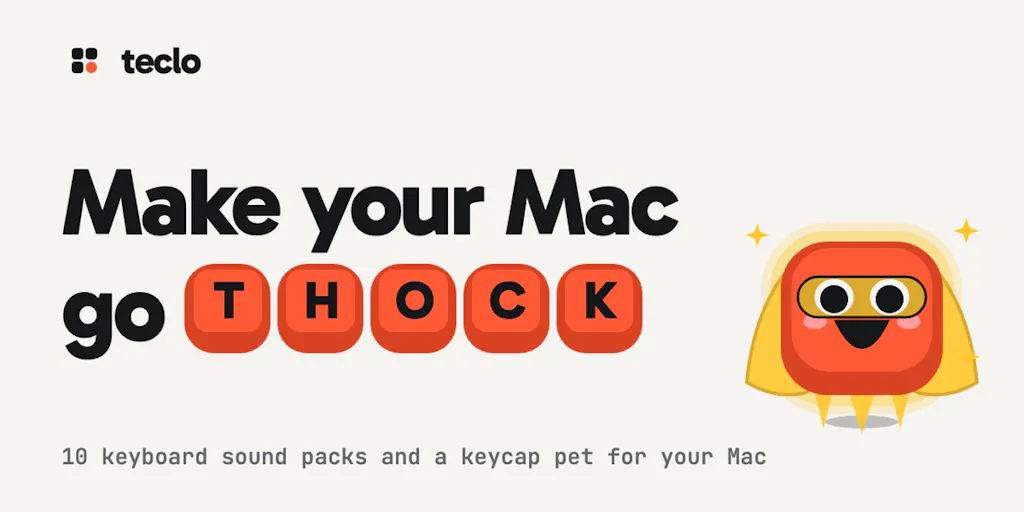
The sounds themselves are synthesized by Teclo’s own code rather than sampled from recordings, and the initial launch shipped ten packs — six mechanical-keyboard variants (the maker describes the range from “lubed linears on foam to a buckling spring”) plus Rain, Typewriter, Pixel, and Laser. In a follow-up comment on the same launch page, the maker says the app has since grown to sixteen packs with additions like Boulder, Cricket, Cushion, Marimba, Terminal, and Bubble, and that a live browser demo now lets you tap keys to preview a pack before buying.
There’s also the delight layer: a small keycap pet that sits next to the sound engine, falls asleep when you stop typing, cheers up as you work, and “powers up” if you sustain a fast pace. It is, functionally, a tamagotchi for your WPM.
Pricing is straightforward and worth stating exactly because it’s part of the story: USD 4.99 for a lifetime licence, a 7-day free trial at teclo.app, and — as a launch-week thank-you — the code PHUNT drops it to $2.99 until October 30, covering up to 3 Macs. The privacy claim is equally specific: Teclo reacts to key presses only and, per the maker, never logs or sends what you type. I’ll come back to why that claim deserves scrutiny even when it’s true.
The Real Problem Teclo Solves Is Attention, Not Typing
Here’s where I think most coverage of a launch like this will miss the point. On its face, Teclo is a novelty. But look at who it’s actually for and the problem it addresses becomes more interesting.
The people who spend the most hours at a keyboard in 2025 are not engineers — they’re creators and social operators. A solo founder running Instagram, TikTok, YouTube, and LinkedIn accounts is writing captions, hooks, comment replies, DM scripts, newsletter drafts, and video descriptions for most of the working day. In my own experience running multi-platform accounts, the writing load is the part nobody warns you about. Scheduling is the visible labor; drafting is the invisible one, and it’s where the hours actually go.
Teclo doesn’t make that writing faster. What it does — and this is my take, not a claim from the maker — is add a sensory feedback loop to a task that is otherwise completely silent and oddly disembodied. Typing on a laptop keyboard feels like nothing. Typing with a mechanical click feels like something is happening. For people whose output is measured in posts shipped and drafts finished, that tiny bit of tactile reward is a legitimate motivational tool, in the same family as a streak counter or a pomodoro timer.
Why TikTok creators should care more than LinkedIn ones
If you publish short-form video, your day is a loop of script → record → edit → caption → schedule, repeated across multiple accounts. The scripting and captioning phases are pure typing, often done in bursts between shoots. A tool that makes those bursts feel less like drudgery has a real, if modest, effect on how many drafts you actually finish. If your output is one thoughtful LinkedIn post a week, the marginal benefit is close to zero — you’ll enjoy the sound for an afternoon and forget it exists. My read: Teclo’s natural audience is high-volume short-form operators and indie founders who write their own everything, not executives who post occasionally.
What Creator SaaS Should Steal From This Launch
I’ve tested a lot of scheduling and analytics tools — Buffer, Hootsuite, Later, Metricool — and the pattern is consistent: they compete on feature matrices and pricing tiers, and they all end up feeling like the same spreadsheet with different logos. Teclo is a useful counterexample because it wins on three things those tools routinely neglect.
First, it commits to a single, narrow feeling. The maker didn’t build a “productivity suite.” He built one sensation — the sound of a good keyboard — and executed it obsessively enough to synthesize sixteen distinct packs in code. Creator tools that try to be everything (scheduler + inbox + AI writer + link-in-bio + analytics) usually end up being nothing memorable. The ones I keep paying for are the ones that do one thing so well I’d miss it if it vanished.
Second, the interactive demo is the marketing. The launch page’s most-liked comment, from Nika, is essentially “I pressed keys on your website for 30 seconds and had fun.” That’s the entire funnel working. For a social tool, the equivalent is letting a visitor paste a real post and see the actual preview, score, or schedule — not a screenshot of a dashboard. If your landing page shows a UI mockup instead of letting someone do the thing, you’re leaving conversions on the table.
Third, the pricing respects the buyer. $4.99 once, three Macs, a free trial, no subscription. For a solo creator juggling five SaaS subscriptions that each cost more per month than this costs forever, that’s a positioning statement. It says: this is a small pleasure, priced like a small pleasure. I’d bet a meaningful share of Teclo’s word-of-mouth comes specifically from people relieved it isn’t another $19/month line item.
The keycap pet is a retention mechanic in disguise
Don’t dismiss the pet. Streaks, progress bars, and companion characters are the cheapest retention loops in consumer software, and creators respond to them because publishing is emotionally volatile — a flop video hurts, a viral one feels great, and the day-to-day is mostly anxiety. A little creature that “cheers up as you type” is a micro-dose of positive feedback in a job that otherwise delivers feedback in 24-hour algorithmic lag. If I were building a creator tool, I’d steal this pattern wholesale: give the user something small and alive that responds to their effort, not just their output.
Where My Judgment Says Teclo Falls Short
Balance matters, so here’s the skeptical section.
The privacy claim needs independent verification, not just a promise. “Never logs or sends what you type” is exactly the right thing to say, and I believe the maker means it — but an app that monitors keystrokes at the system level is, by definition, in a sensitive position. The maker does not disclose, on the launch page, how the app is distributed (Mac App Store vs. direct download), whether it’s notarized, or whether the input monitoring is auditable. For a $3 utility that’s a reasonable trade-off; for anyone recommending it to a team, I’d want to see the distribution and permission model documented before rolling it out on work machines. That’s not an accusation — it’s the standard I’d apply to any keyboard-adjacent tool.
It’s Mac-only. The launch is explicit that the phone flow is just “leave your email and get the download link to your Mac.” No Windows, no Linux, not disclosed whether either is planned. Given that a huge share of creators edit on Windows desktops, that’s a hard ceiling on the addressable audience.
The novelty curve is real. Sound packs are delightful for a week and then become wallpaper — or worse, annoying to anyone in a shared workspace or on a call. The maker is clearly aware (he’s soliciting “which pack next?” and mentions “productivity sounds” in the works), but there’s no disclosed roadmap for keeping the experience fresh beyond adding packs. My take: the pet is the more durable hook than the sounds, and I’d want to see it evolve.
And the honest scope limit: Teclo is not a social media tool. It won’t schedule a post, track a UTM, pull engagement rate from the TikTok API, or tell you why your Reels underperform. If you came here looking for a scheduling or analytics recommendation, this isn’t it. It’s a quality-of-life app for the typing half of the job.
What I’d Watch / Test Next
This week, three concrete things an operator can actually do:
- Try the live demo at teclo.app and pay attention to how it feels to preview before buying — then audit your own landing page or link-in-bio for the same principle. Can a visitor experience your product’s core value in 30 seconds without signing up?
- If you’re Mac-based and write your own captions and scripts, the 7-day trial is free and the lifetime licence is $4.99 (or $2.99 with code PHUNT through October 30, per the launch page). Test it during a real drafting session, not a novelty five minutes — the question is whether it survives contact with a Tuesday afternoon caption grind.
- If you run a team, hold off on company-wide rollout until the distribution and input-permission model is documented. A fun personal utility and a sanctioned work tool have different trust bars.
What I’ll be watching: whether the maker ships the Windows build creators will inevitably ask for, whether the pet gets deeper mechanics (streaks, milestones tied to real writing sessions), and whether the “synthesized, not sampled” approach becomes a genuine differentiator as AI-generated audio floods every app. The launch itself is small. The design lesson — narrow feeling, interactive proof, honest pricing, a little aliveness — is not.