The Quiet Crisis Underneath Your Content Workflow: Why a Mac Menu Bar Utility Just Made Me Rethink Everything
Every social media manager I know has a secret, unglamorous ritual. It’s not about crafting the perfect hook or decoding the algorithm. It’s the moment you paste a caption into Slack or a draft in Notion, and you see it: the red squiggly line under a word you definitely spelled correctly, or worse, the auto-capitalization that turned your carefully crafted “iphone” into “Iphone” in a reply to a brand partner.
We spend thousands on scheduling software, obsess over AI content tools, and track engagement rates down to the decimal. Yet the most basic layer of our professional communication—the text we type into a dozen different apps every single day—is still a mess of inconsistent spellcheckers. The macOS built-in spellcheck is a lottery; it works beautifully in one app and completely ignores you in another. For someone who lives in the comment sections, DMs, and collaboration threads, this isn’t a minor annoyance. It’s a tax on your credibility.
This is why a tiny utility called Tidy caught my eye on Product Hunt. It’s not a viral video editor or a new analytics dashboard. It’s a native macOS app that promises to fix your text in place, using Apple’s local intelligence model. It sounds almost too simple, but the more I dug into the maker’s reasoning, the more I realized this tool is a spotlight on a massive gap in the creator workflow: the gap between the polished content we publish and the messy, error-prone operational text that actually runs our businesses. This essay isn’t just about a spellchecker. It’s about the invisible labor of communication, the rise of “de-slopping” as a necessary skill, and what a tool built for one person’s frustration tells us about the future of our writing tools.
The “Two-Thirds Problem” and the Death of the Universal Spellchecker
Let’s talk about the specific pain point the maker, Eric Greene, built this for. In his launch post, he mentions he was editing about two thirds of the Slack messages he sent, usually for the same reasons: accidental caps lock, and misspellings of common words like “operator” or “recommendations.” As someone who has managed social accounts where response time is a metric, I feel this in my bones. When you’re juggling a crisis comment on Instagram while trying to approve a LinkedIn post, the last thing you need is to manually retype a word because Slack’s spellchecker is either asleep or actively fighting you.
The core problem isn’t that we can’t spell; it’s that the tools we rely on are fragmented. The source notes that macOS checks spelling well in some apps and badly in others, citing Gmail, Docs, and Notes as being inconsistent. In my experience, it’s even worse with browser-based tools like Notion or X’s composer, where the context menu options vary wildly depending on whether you’re on a Chromium or WebKit engine. This is a technical debt that we’ve all just accepted. We’ve built workflows around the idea that we need to copy-paste text into a dedicated editor like Grammarly to get a clean check, which breaks the flow of writing in the native app.
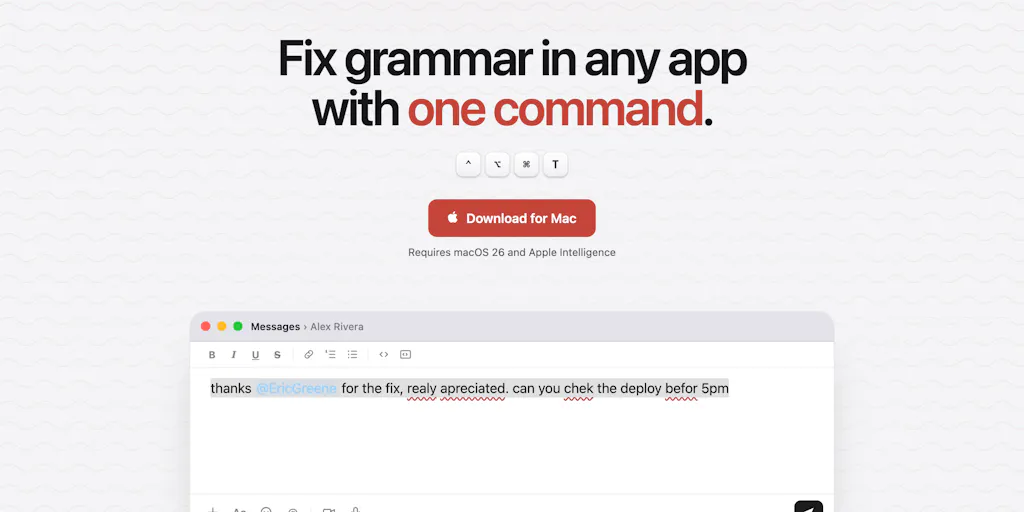
Tidy’s solution is elegantly brutal: one keyboard shortcut (⌃⌥⌘T) that works everywhere. It doesn’t try to be a background daemon that underlines everything; it waits for you to select the text and invoke it. This is a fundamental UX shift. It moves from proactive correction (which is noisy and often wrong) to reactive cleanup (which is precise and on-demand). For a social media operator, this is gold. When I’m writing a caption in the Meta Business Suite, I don’t want the interface littered with red lines while I’m trying to gauge the visual balance of the post. I want to write, then hit a magic button to polish it before hitting publish.
The “why this matters” here is about trust and speed. A typo in a tweet can cost you a partnership. A misspelled brand name in a pitch email can get you ghosted. Tools like Tidy address the operational hygiene of your content, which is just as important as the creative strategy. It’s the difference between sending a message that reads as rushed and unprofessional, and one that reads as deliberate and competent—even if you typed it in a frenzy between meetings.
De-Slopping: The New Editing Skill for the AI Era
The second feature is where this utility punches way above its weight class. The maker added a shortcut (⌃⌥⌘S) that selects a paragraph and rewrites it, ruthlessly “de-slopping” it back to its core truth. This is a direct response to the tsunami of AI-generated text flooding our collaboration tools. We all know the tells: the unnecessary em dashes, the overuse of “delve” and “furthermore,” the listy rhythm that screams “ChatGPT wrote this.”
As a blogger who covers AI content tooling, I’ve seen the backlash against generic AI writing. The platforms are getting smarter, too. LinkedIn’s algorithm has been rumored to deprioritize overtly AI-generated spam, and readers are becoming hyper-vigilant. But the problem isn’t just on the publishing side; it’s in our internal docs, our strategy decks, and our client emails. We use AI to draft, but then we have to spend time “humanizing” the output. Tidy is trying to automate that final step.
The maker’s explanation is interesting: it uses the context of what you wrote to fix it, maintaining your writing style. But the de-slopper is a different beast. One commenter, Gal Dayan, asked a brilliant question: how does it decide what counts as “reads like a machine wrote it” versus just formal writing? If I naturally use “furthermore” or “in order to,” does the tool strip that out? The maker’s response was that it uses the local model to understand context. My take? This is the hardest problem in AI editing right now. There is a razor-thin line between “formal” and “robotic.”
In my own tests of similar tools, like Jasper or the built-in rewriting features in Notion AI, the “professional” tone often comes out stiffer than the original. The promise of “de-slopping” is that it will strip out the clichés of AI (the “In today’s fast-paced digital landscape” openings) without flattening the author’s unique cadence. If Tidy can successfully identify and remove the tells of LLM output—the overly balanced sentence structures, the generic transitions—while leaving the core substance and idiosyncrasies intact, it becomes an essential utility for anyone who uses AI to draft content. It’s the difference between an editor and a copy-paste cleanup crew.
Why TikTok Creators Should Care More Than LinkedIn Ones
You might think this is a tool for corporate writers, but the opposite is true. The most significant impact could be on short-form video creators who are forced to write scripts. When I’m scripting a 60-second TikTok, I write in a very specific, conversational cadence. If I use an AI to help generate ideas, the script often comes back sounding like a Wikipedia entry. The “de-slop” function isn’t just for grammar; it’s for vibe.
For a platform like TikTok, where the algorithm prioritizes watch time and retention, the script is king. A script that sounds robotic will lose viewers in the first two seconds. A tool that can strip away the “AI sheen” and leave behind a raw, punchy, human-sounding script is worth its weight in gold. LinkedIn, on the other hand, has a culture that often welcomes a certain level of corporate formality, even if it’s AI-generated. But TikTok, Instagram Reels, and even YouTube Shorts demand authenticity. The “de-slopper” is essentially an authenticity filter, and that is a feature that directly impacts your bottom line on these platforms.
Privacy as a Feature, Not a Compromise
The most compelling technical aspect of Tidy is its foundation. It runs on the Apple Intelligence local model built into macOS. The maker is explicit: “Nothing you select leaves your machine, no API keys, its free fast and local.” This is a massive differentiator in a market where most AI writing tools are cloud-based.
For a social media manager, this is a double-edged sword. On one hand, you’re often dealing with confidential information—unreleased product details, internal strategy, client data. Sending that text to a cloud API, even with a privacy policy, is a risk. I’ve seen brands get burned by tools that used their data for training. The fact that Tidy processes everything on-device is a huge trust signal. It means you can paste a confidential client brief into a Slack message, hit the shortcut, and clean it up without worrying about data leaving the building.
But the “free fast and local” aspect is also a limitation. Local models are smaller and less capable than their cloud counterparts. The maker notes that it requires macOS 26 with Apple Intelligence. This immediately narrows the user base. If you’re on an older Mac or you haven’t enabled Apple Intelligence, this tool is a non-starter. In my experience, the gap between a local model (like the one powering this) and a frontier model (like GPT-4 or Claude 3) is still noticeable when it comes to nuanced language understanding.
The maker even jokes, “You might have to turn it on if you haven’t already (nobody has by the way).” This is a real friction point. For a tool that promises speed, requiring users to navigate System Settings to enable a beta feature like Apple Intelligence is a hurdle. However, the privacy angle is the killer feature here. In a world where we’re increasingly paranoid about AI data usage, a tool that says “your text never leaves your Mac” is a breath of fresh air. It positions itself not as a feature-rich cloud service, but as a utility—like a spellchecker that you can trust with your secrets. This is the right bet for the future, as Apple continues to push on-device processing as a differentiator.
Where the Math Breaks: The “Style Memory” Conundrum
Here’s where my skepticism kicks in. The maker claims that Tidy “maintains your writing style” when fixing text. But in the comments, he also says he “can add a style memory.” This suggests that the tool doesn’t currently have a persistent memory of your voice. It simply uses the context of the selected text to infer the style. That’s a significant difference.
If I select a sentence that has a typo, the tool will fix the typo and keep the sentence structure. That’s easy. But if I select a paragraph that I want “de-slopped,” how does it know my style? It only has the sloppy paragraph to go on. It might strip out the AI tells, but it might also strip out my unique phrasing that a human editor would have kept. The claim of “maintaining your writing style” is, in my opinion, a stretch. What it likely does is maintain the tone of the text it’s given. If the text is already in your voice, it will fix it while keeping your voice. But if the text is generic AI slop, it will just give you less generic AI slop—not necessarily your voice.
This is the fundamental challenge for all AI writing tools. They can mimic tone, but they rarely capture the idiosyncratic rhythm of a specific human. Until Tidy has a robust “style memory” that requires an initial training sample (like, “here are 10 of my best captions, learn from this”), it is a grammar and cliché fixer, not a true voice clone. That’s okay, but it’s important to set expectations. It won’t make your AI drafts sound like you; it will just make them sound less like a robot.
Who Is Tidy NOT For?
Let’s be clear about the target audience. This is not for the casual user. It’s not even for the average content creator who just writes a few captions a week. Tidy is for the power operator—the social media manager who lives in Slack, the indie founder who writes 50 emails a day, the content strategist who edits AI drafts for hours.
If you fall into these categories, this tool might not be for you:
- The Cloud-Dependent Team: If you rely on shared cloud documents and need version history, Tidy works in place, which is great. But if you need to see a “diff” of what was changed, you won’t get it here. It just overwrites the text.
- The Non-Apple User: This is strictly macOS. If you’re on Windows or Linux, you’re out of luck. There’s no mention of an iOS version, and the maker’s comments about “Foundation models coming to iOS 27” suggest he’s thinking about it, but it’s not here yet.
- The Multilingual Creator: This is a big one. A commenter from Brazil noted he had to switch his Apple Intelligence language to US English to set it up. The maker says localization is a “fast follow,” but for now, if you write primarily in another language, this tool is essentially useless. It’s an English-first utility.
For me, the biggest limitation is the lack of a “style memory.” The de-slopping feature is powerful, but without a persistent understanding of my voice, it’s just another generic rewording tool. I want a tool that knows I prefer sentence fragments for impact and that I hate the word “utilize.” Until Tidy has that, it’s a fantastic spellchecker with a cool party trick, but not the AI editor of my dreams. The maker’s comment about adding “style memory” as a future feature is the most exciting part of the entire launch thread—it signals he understands the limitation.
What I’d Watch / Test Next
I’m not going to throw this tool aside. The core mechanic—a system-wide shortcut for in-place editing—is so obvious and necessary that I’m surprised more developers haven’t built it. The privacy angle is a huge win. Here’s what I’d do this week if you’re an operator:
- Test the De-Slopper on Old AI Drafts: Don’t test it on new writing. Go back to a blog post or an email you drafted with ChatGPT a month ago. Select the paragraphs that feel robotic and run the ⌃⌥⌘S shortcut. Compare the output. Is it actually better? Or is it just different? This will tell you if the tool understands the nuance of “sloppy” or if it just has a list of banned words.
- Try the Fixer in Your Most Error-Prone App: For me, that’s Slack. I type fast and make typos in client channels. Set up the shortcut and force yourself to use it for a day. The goal is to see if it disrupts your flow or enhances it. If you have to stop, think, and hit the shortcut, it might be faster to just fix it manually. If it becomes muscle memory, you’ve found a winner.
- Check Your macOS Version: This is a hard gate. If you’re not on macOS 26 with Apple Intelligence enabled, you can’t even test it. If you are, enable it and see how fast the local model is. If it takes more than a second to correct a sentence, the “speed” advantage is lost.
Ultimately, Tidy is a reflection of a larger trend: the move toward smaller, more focused, privacy-preserving AI utilities. It’s not trying to replace your Buffer or Hootsuite. It’s not trying to generate content for you. It’s trying to make the text you already write cleaner and more human. In a creator economy obsessed with scale and automation, there is a growing need for tools that help us sound less like machines and more like ourselves. Tidy might not be the final answer, but it’s asking the right questions. And for that, it deserves a spot on your dock.