The Creator’s Real Bottleneck Isn’t Ideas — It’s the Un-glamorous Operational Tail
Every social media operator I know has the same dirty secret: the content calendar is rarely the hard part. The hard part is the tail — the invoice you need to chase before you can pay the freelancer who edits your Reels, the PDF rate card you have to convert to a spreadsheet for a brand deal, the competitor price you check every morning before you post a comparison carousel, the three Italian restaurants in Lisbon you need to shortlist for a shoot location. None of that shows up in your content strategy doc, and all of it eats the hours you meant to spend on hooks and thumbnails.
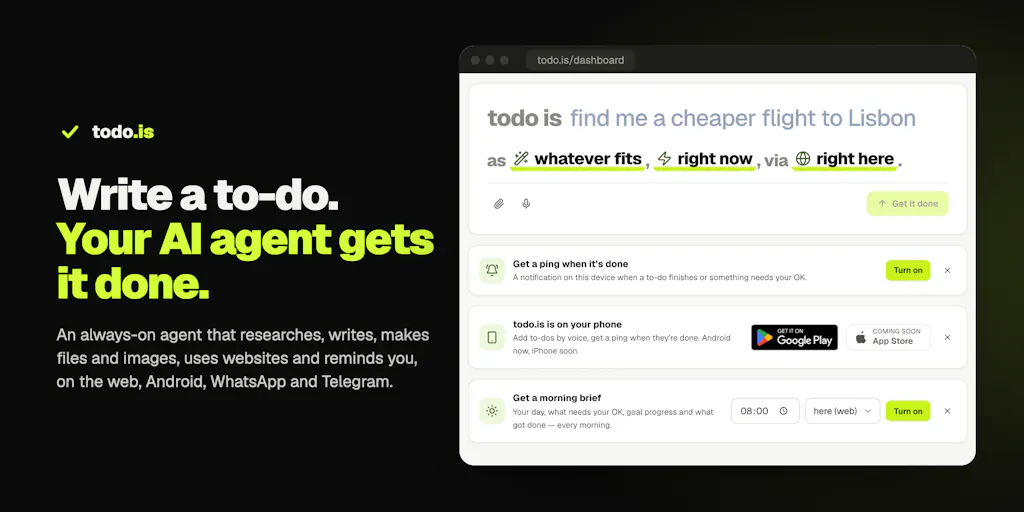
That’s why Todo.is, a new agentic to-do app from maker Ezzaky Abd, caught my attention — not because it’s a social media tool (it isn’t, really), but because it attacks the exact category of work that quietly strangles small content teams. The pitch is deceptively simple: you write a to-do the way you’d text an assistant, and an agent does the work — research with sources, real files, scheduled briefings, browser actions — then asks before it pays, sends, or deletes anything. For a solo creator running five platforms, that’s not a productivity flex. That’s the difference between shipping four posts this week and shipping twelve.
What Problem It Actually Solves (and Why It’s Not Another Notion)
Let me be precise about the gap the maker describes, because it’s one I’ve felt firsthand. Chat assistants are excellent at answering — “give me 20 hook ideas for a TikTok about budgeting.” They are terrible at closing loops. My to-do list never got shorter because the assistant could write the caption but couldn’t log into the affiliate dashboard, pull the commission CSV, and drop it in a folder. The maker frames it exactly this way: AI chat answers, but the to-do list stays full.
Todo.is tries to collapse that gap by treating a to-do as an executable instruction rather than a note. The examples in the launch copy are refreshingly mundane — “find 3 Italian restaurants in Lisbon for Friday,” “convert this bank statement PDF to Excel,” “every weekday at 8, send me a news brief on WhatsApp.” That mundanity is the point. When I’ve tested agentic tools in the past, the demos are always “plan my whole quarter.” The actual value shows up when the tool handles the boring middle: pulling a client’s invoice PDF out of Gmail, converting it, and filing it where your bookkeeper expects it.
The execution surface is broader than most to-do apps dare to go. Per the launch page, the agent does web research with sources, produces real files (Word, Excel, PDF, PowerPoint), images, short videos, and voice notes, and it lives across web, Android, WhatsApp, Telegram, Slack, Discord, and email. It can drive websites either in a cloud browser or in your own Chrome via a Connector extension — with its own window, and you approving every new site. It runs on schedules: daily briefings, price drops, job alerts, reminders. And there’s a safety layer the maker is clearly proud of: it asks before paying, sending, or deleting, and each agent works in its own sandbox. There are 450+ AI models on included credits, or you can bring your own API key, plus 1,000+ ready-made to-dos at todo.is/prompts covering resumes, PDF-to-Word, background removal, trip plans, and lead lists. Pricing for the trial is $1 for the first 24 hours; ongoing pricing is not disclosed on the page.
Why the Approval Model Is the Whole Ballgame
Here’s the part I’d underline for anyone who runs brand accounts. The single biggest reason creators don’t hand real work to AI agents is trust — specifically, the fear that an agent will send the wrong email to a client, book the wrong flight, or delete the wrong folder. Todo.is’s answer is an approval gate that is per action, never per task. In the comments, the maker spells out the mechanics: when a scheduled run reaches a send or a booking, it pauses and shows the exact action — recipient, subject, what it will send or book — at that moment. The OK only executes that exact stored call, and it must be newer than the request, so last week’s “yes” can’t quietly authorize today’s email. Unanswered requests expire after 24 hours. Approvals arrive both in the chat thread where the task runs and as a “Needs your OK” push on Android or browser notifications, collected on an Activity page; you can approve with one tap or just reply “yes.”
That design detail — the freshness requirement on approvals — is the kind of thing you only build if you’ve thought hard about scheduled automation. If you’ve ever set up a Buffer queue and then had a post go out with a stale price because you forgot to update the draft, you already understand the failure mode this prevents. It’s the same class of bug, just with higher stakes.
How It Stacks Up Against the Tools You Already Pay For
I want to be honest about the comparison set, because Todo.is is entering a crowded neighborhood from an unusual angle.
Against task managers like Todoist or Notion, the difference is that those tools store intent; Todo.is tries to execute it. Against agent platforms like Zapier or Make, the difference is the interface: you don’t build a workflow, you write a sentence. The maker leans on this explicitly — “no workflows to build, no prompts to engineer” — and in my experience that’s the real adoption barrier for small teams. Zapier is powerful and I’ve used it for years, but nobody on a two-person content team wants to maintain a 14-step automation that breaks when an app updates its API. A natural-language to-do that an agent figures out is a lower floor, even if it has a lower ceiling.
Against the social-specific schedulers — Buffer, Later, Hootsuite, Metricool — Todo.is isn’t a competitor so much as an adjacent layer. Those tools own the publish-and-analyze loop: queueing posts, pulling engagement rate, tracking UTM links. Todo.is owns the preparation loop: the research doc, the converted spreadsheet, the competitor price check, the brief that lands in your Slack before you sit down to write. In my own workflow, the handoff between those two loops is where time leaks. I’ll spend forty minutes assembling context for a carousel and four minutes actually scheduling it. A tool that compresses the forty is worth more to me than a tool that shaves the four.
Against ChatGPT or Claude used directly, the distinction is persistence and scheduling. A chat session ends; a scheduled to-do keeps running. That’s a meaningfully different product category, and it’s why the WhatsApp/Telegram/Slack delivery matters — the output comes to where you already are, rather than requiring you to remember to open a tab.
Where the Math Breaks
I’d flag one structural tension before you get excited. The value of an agentic to-do scales with how much of your work is delegable but checkable. Research, file conversion, price monitoring, invoice chasing — all excellent fits. But a lot of social media work is judgment-dense: the hook that lands, the tone that fits a brand, the call on whether a trend is worth riding. Todo.is can assemble the raw material for those decisions faster than you can, but it can’t make them, and the approval gate means you’re still in the loop on anything that sends. So the realistic time savings are in the operational tail, not the creative core. If your bottleneck is “I don’t know what to post,” this won’t fix that. If your bottleneck is “I know exactly what to post but I’m drowning in the admin around it,” that’s the sweet spot.
There’s also a channel-fragmentation cost. The agent lives in six or seven surfaces, which is great for reach and slightly risky for focus. Every additional integration is another place where a notification can get missed, another surface where an approval can sit unanswered until it expires. In my experience, approval queues that span multiple apps tend to develop a “check the Activity page” tax — small, but real.
What Creators and Social Teams Can Borrow From This
Even if you never sign up, the launch is a useful blueprint for how to think about your own operations. Three things I’d steal:
First, the “to-do as instruction” framing. Most content teams write tasks as nouns — “Q3 launch brief,” “TikTok batch.” Todo.is’s copy is all verbs with specifics: “find 3 Italian restaurants in Lisbon for Friday.” When I’ve rewritten my own task list that way, the tasks get done faster, because the ambiguity that causes procrastination is stripped out. Try rewriting your next ten tasks as executable sentences and see how many you can actually hand off — to a person or a tool.
Second, the per-action approval pattern. If you manage anyone — a VA, a freelancer, an intern — the “show the exact action at the moment it runs, and require a fresh OK” model is a genuinely better delegation contract than “you have standing permission to post.” It’s the difference between a policy and a checkpoint. I’d bet most social media mistakes happen in the gap between a stale approval and a changed circumstance, and this pattern closes that gap.
Third, scheduled delivery into the channel you already use. The “every weekday at 8, send me a news brief on WhatsApp” example is the highest-leverage pattern in the whole launch. For creators, the equivalent is a morning brief that lands with your niche’s news, your competitors’ latest posts, and your own overnight metrics — before you open the apps. That’s a workflow you can build today with existing tools, no agent required.
Why TikTok and YouTube Operators Should Care More Than LinkedIn Ones
My take: the operators who’ll get the most from a tool like this are the ones with the highest volume and the most fragmented inputs. A TikTok creator shipping daily is juggling sound trends, comment mining, competitor scans, and brand-deal paperwork simultaneously — that’s a lot of delegable tail. A YouTube creator has the same problem at lower frequency but higher stakes, because research and asset management for a long-form video are exactly the kind of multi-file, multi-source work an agent can compress. A LinkedIn ghostwriter or B2B operator, by contrast, lives mostly inside text generation and judgment, where the agentic layer adds less. The tool’s value tracks the operational density of your workflow, not your platform’s prestige.
Where My Judgment Says It Falls Short
Balanced view time, because the launch page is a launch page and I’ve been burned by launch pages before.
The execution claims need independent verification. The maker says it “already executes, beyond research” — logging in with saved logins, filling forms, downloading invoices, drafting and sending Gmail once you OK it. I have no reason to doubt the intent, but browser automation against real sites is where agentic tools historically wobble: logins expire, forms change, CAPTCHAs appear, and API rate limits bite. The cloud-browser-plus-Connector-extension architecture is sensible, and the “approve every new site” rule is a good guardrail, but I’d want to run it against my actual messiest sites before trusting it with anything client-facing. That’s a test, not a criticism.
Autonomy is deliberately capped, and that’s both a feature and a limitation. The maker confirms that for booking and paying, it does the legwork — finds options, fills the reservation — then stops for your OK. Rules-based autonomy (“auto-approve anything under $50”) is on the roadmap, not shipped. If your dream is a fully hands-off assistant that just handles things, this isn’t that yet. If your dream is a careful assistant that never surprises you, this is closer.
Pricing beyond the $1 trial is not disclosed. That’s a real gap for anyone budgeting tooling. The 450+ included models and bring-your-own-key option suggest a credit-based model, but I can’t tell you what a realistic monthly bill looks like for a working creator, and neither can the page.
The social-media-specific integrations are thin. It lives in Slack, Discord, WhatsApp, Telegram, and email — but there’s no mention of native Instagram, TikTok, or YouTube analytics, no scheduling-to-platform, no UTM handling. This is an operations tool that happens to serve creators, not a creator tool. Don’t buy it expecting it to replace your scheduler.
Who it’s not for: teams that need SOC 2 compliance and admin controls (not mentioned), anyone whose work is 90% creative judgment, and anyone who wants a single-purpose tool that does one thing perfectly rather than a generalist agent that does many things adequately. The review on the page is a single 5.0 from one reviewer — statistically meaningless, so treat the social proof as unproven.
What I’d Watch / Test Next
If you’re curious, here’s what I’d actually do this week, in order. First, spend the $1 and throw your real to-do list at it — not a curated demo list. The maker explicitly invites this, and it’s the only way to learn where the agent’s competence ends. Second, pick three tasks that are delegable but checkable — a competitor price scan, a PDF conversion, a scheduled morning brief into WhatsApp or Slack — and run them for five days. Watch specifically for approval-queue friction: does the “Needs your OK” push actually reach you, and does the 24-hour expiry ever bite? Third, test the Connector extension against one site you actually use daily, and note where it stumbles on logins or forms, because that’s where the honest review lives.
What I’m watching from the sidelines: whether rules-based auto-approval ships, whether pricing becomes transparent, and whether the roadmap ever grows native social integrations. My bet is the winning pattern here isn’t “AI does your to-dos” — it’s “AI does the operational tail while you keep the creative core,” and the tools that nail the approval UX will win the creators who’ve been burned by automation before. Todo.is has the right instincts on that UX. Whether it has the reliability is the open question — and the only way to answer it is to hand it your messiest Tuesday.