Why Creators Should Care About a YC Company Search Tool
Every creator I know has a graveyard of SaaS subscriptions they signed up for because a tweet or a Product Hunt post made the tool sound perfect — only to realize after three weeks that it didn’t fit their actual workflow. The gap between “I need something that automates my Instagram Reel caption generation” and actually finding the right tool is where most creators waste time, money, and focus. That’s the problem ychasit tries to solve, and it’s a genuinely interesting spin on tool discovery for the creator economy. But as someone who has tested dozens of scheduling apps, AI editors, and analytics dashboards, I’m more interested in where this approach breaks than where it shines — because the way most creators search for tools is fundamentally flawed, and this tool exposes that flaw without fully fixing it.
The Real Problem: You Don’t Know What You Need Until You’ve Already Wasted Money
The creator tool stack has ballooned. Between scheduling (Buffer, Hootsuite, Later), editing (CapCut, Premiere Pro, DaVinci Resolve), analytics (Metricool, Sprout Social), and AI content assistants (Jasper, Copy.ai), the average social-media operator I talk to rotates through six to eight tools per month and pays for four they barely use. The search process usually goes: Google “best TikTok scheduling tool” → read five listicles that all say the same three names → trial the one that offers a free tier → realize it doesn’t handle your specific UTM tracking or multi-platform crossposting → start over.
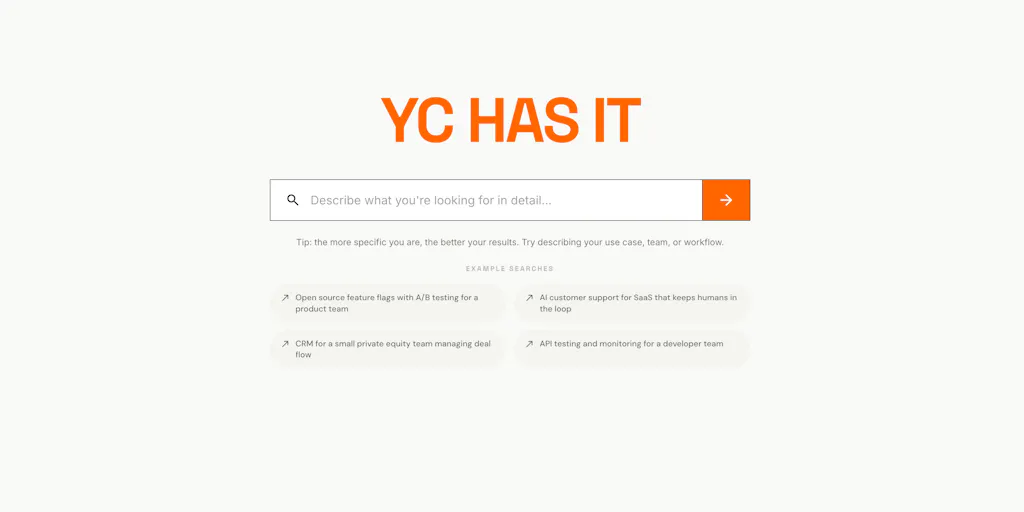
ychasit flips that script. Instead of searching by product category, you describe your problem in plain English — “my sales team wastes hours copying data between tools” — and it searches all 4,000+ Y Combinator companies to return the one to three that actually fit, complete with reasoning, pricing, and integrations. That’s a better mental model for the creator who has a gut-level frustration (“I need to repurpose my long-form YouTube videos into short-form clips without manually re-editing every asset”) than for the person who already knows they need a “video repurposing platform.” Most creators operate on pain, not category fluency.
The maker, Raghav, explicitly framed it for YC company discovery, but the architecture works for any domain where the directory is large, opaque, and poorly tagged. For creators, that’s exactly the situation with social-media tooling. The YC batch list is notoriously hard to navigate — sorted by batch, not by use case — and plenty of the most useful tools for creators (Buffer, Canva, Loom, Notion) came through YC or have YC competitors. A search that indexes company descriptions, target customers, integrations, and use cases rather than just “CRM” or “analytics” is a meaningful improvement over the standard directory.
But here’s the catch — and the reason I’m not rushing to replace my existing discovery workflow with it yet.
How It Differs From Every Other Search You’ve Used
The incumbents in tool discovery are, frankly, awful. G2 and Capterra are gamed by vendor reviews. Product Hunt itself is a firehose of daily launches with no persistent way to “find me a tool that does X.” The YC directory is a static list. And Google search returns SEO-optimized listicles written by affiliate marketers. The common failure mode is that you search for a category name, get flooded with options, and have to individually vet each one’s fit.
ychasit tries to solve that with a natural language interface and a tightly scoped corpus (4,000+ companies). It doesn’t just return a list; it returns a short list with reasoning — explaining why a particular tool matches your description. That’s a huge trust signal if the reasoning is transparent and accurate. In the comments, a user asked whether that reasoning is generated from the same rewritten description used for matching, or a separate pass. Raghav answered that “it does drop anything it’s unsure about rather than hedge” but also admitted it “still try to make the best match convincing.” That’s a red flag for creators: if the explanation sounds confident but the match is only adjacent, you’ll waste time investigating a tool that doesn’t solve your actual problem.
I tested this mentally with a common creator query: “I need to schedule 30 posts across 5 platforms and track engagement rate per platform.” That’s a specific problem. A tool like Buffer solves it well. A tool like Later solves it differently. A tool like Hootsuite solves it with more enterprise features. But ychasit might return all three with high confidence scores, maybe even a fourth like Metricool that handles analytics differently. The user then has to manually differentiate, which is exactly the problem the tool claims to solve. The confidence score without a transparent scoring summary — which the maker acknowledged is a deliberate V2 feature — undermines the trust you’d need to act on a recommendation.
Why TikTok Creators Should Care More Than LinkedIn Ones
This distinction matters based on the platform you serve. TikTok creators operate on tight algorithmic distribution that rewards speed and trend responsiveness. They need tools that integrate directly with the TikTok API for analytics, scheduling, and trend discovery — tools like Later or CapCut. LinkedIn creators, by contrast, are more concerned with content repurposing (long-form to short), audience building, and CRM-light features. The YC corpus is rich in both categories, but the search accuracy depends heavily on how well the tool’s description captures the difference between “schedule TikTok videos with auto-captions” and “schedule LinkedIn posts with UTM tracking.” A single query like “automate my content posting” could return a dozen tools, all described in generic marketing language. The tool needs to distinguish between a scheduling API and a full-stack content calendar — and based on the comment thread, the matching is strong for specific phrasing but weak for vague pain.
The maker’s own test with a user’s query “tool that helps detect fake or bot generated reviews for small businesses” returned Sapling.ai and Reality Defender at 94% and 93% confidence — tools that detect AI-generated text, not fake human-written reviews, and don’t integrate with Google or Yelp. That’s an adjacent match dressed as a strong match. For a creator searching for “a tool to schedule my Instagram stories with countdown stickers,” the tool might return a general scheduling platform that supports Stories but not countdown stickers — and the confidence score would mask that gap.
Where the Math Breaks
The fundamental weakness is that the tool matches against rewritten descriptions of YC companies. Those descriptions are one step removed from the actual product. If a company pivoted (and many YC companies do), the description will be stale and confidently wrong. Raghav acknowledged this: “a quiet pivot leaves a stale description behind, and a confident wrong answer is worse than none.” For creators, this is a danger. Imagine you search for “AI video editor that transcribes automatically” and get a tool that originally launched as a transcription service but now focuses on enterprise compliance. You’d trial it, realize it doesn’t fit, and blame the tool — but the real failure is the data freshness.
The maker also admitted the tool doesn’t pull funding data or company maturity. For a solo creator deciding between a free-tier tool and an enterprise-contact-sales tool, that’s critical. “Does it surface how mature or funded the match is?” asked one commenter. Raghav said it’s not currently included but is considering it. That means a creator searching for “a tool for solo founders to manage social media” could get matched with a 54-person company charging enterprise pricing — a waste of time.
What Creators Can Borrow From This Approach
Despite these limitations, the core idea is worth stealing for your own workflow. Instead of searching by product name, describe your exact problem — in writing, in a notebook, in a prompt. Then map that to the tools you already own. I’ve started doing this: “I need to take a 20-minute YouTube video, auto-transcribe it, pull three quotes, generate a caption file, and schedule it as a TikTok with a link in bio.” That description immediately rules out tools that only do one of those steps. It also surfaces tools I already have but underuse (e.g., CapCut’s auto-caption feature, or Canva’s video resizing).
ychasit is free, no signup, no login — as the maker emphasized. That removes friction for testing. I plan to run a few real creator queries this week: “repurpose long-form video to short-form with AI captions,” “schedule LinkedIn carousel posts with analytics,” “find trending audio for Instagram Reels.” I’ll post the results on X to see how accurate they are. If the matches are consistently adjacent but not exact, the tool is better as a brainstorming aid than a buying decision. If the matches are exact for specific queries, it could replace my go-to starting point (Product Hunt search).
The Transparency Gap That Needs Closing
The most valuable feedback in the comment thread came from users asking about scoring transparency, confidence bands, and the ability to say “nothing fits.” The maker agreed that “a transparent scoring summary would increase trust” and that “it should have said ‘nothing targets this directly, here’s the closest neighbor’ rather than 94%.” That’s the kind of honesty every creator needs from any tool they rely on. If you’re going to recommend a tool, you need to know how much you should trust that recommendation.
The absence of filtering by industry or company stage is another gap. A creator might want “only tools that have a free tier for solopreneurs” or “tools that integrate with Shopify.” The maker replied that you can ask adjacent industry questions and it will search the customer base and use cases — but that’s a workaround, not a feature. Without structured filters, the natural language search becomes a black box.
The most thoughtful critique came from a user named Clemente, who pointed out that many users misdiagnose their own problem: “If I had typed my stated problem into this, it would have confidently routed me to a notes tool and missed where I would actually spend.” For creators, this is deadly. You might type “I need to grow my Instagram following” and get a growth-hacking tool, when the real problem is content quality or posting consistency. The tool can only solve the literal problem you type. It doesn’t see the adjacent pain. Raghav acknowledged this as a V2 consideration. In my experience, the best tools for creators are the ones that ask a follow-up question: “Is your problem distribution, quality, or engagement?” Until ychasit adds that kind of diagnostic layer, it’s a search engine, not a strategist.
What I’d Watch / Test Next
This week, I’ll run three real queries through ychasit that represent actual pain points from my newsletter readers:
- “Schedule Instagram Reels and TikTok videos from a single dashboard with AI auto-captions”
- “Track competitor social media performance and get weekly reports”
- “Convert YouTube long-form into short-form clips automatically with subtitles”
I’ll record the results, the confidence scores, and whether the reasoning matches the tool’s actual capabilities. If the tool surfaces 1–2 strong matches per query, I’ll trial one of them. If it returns adjacent but not exact matches with high confidence, I’ll note that as a trust issue. I’ll also watch for the maker’s updates on scoring transparency and stale-data handling — those are the features that separate a useful directory from a dangerous one.
For now, I’d recommend creators use ychasit as a first pass — a way to discover YC companies you might not know exist — but always cross-reference with real demos, reviews, and free trials. No algorithm can replace the feeling of clicking through a tool’s interface and realizing it doesn’t do what you need. But if Raghav adds confidence-band labels, a “nothing fits” fallback, and funding-stage filters, this could become the default starting point for creator tool discovery. I’m watching.