The Creator’s Automation Gap: Why We’re All Still Doing the Dumb Work
Every social media manager I know has the same secret shame: we preach efficiency, yet we spend hours doing tasks a script could handle. We’ve built content calendars in Notion, scheduled posts in Buffer, and set up IFTTT recipes that break the moment Twitter changes its API. But the real bottleneck was never the publishing—it was the tedious, repetitive work around the publishing. The renaming of 40 exported video files. The resizing of thumbnails. The copying of captions from a Google Doc into five different platform UIs. The checking of a competitor’s profile every morning to see if they posted. We’ve all automated the last mile, but the first mile—the grunt work—still eats our mornings.
That’s why the launch of Trama caught my eye. It’s not another scheduling tool. It’s not another AI content generator. It’s a Mac-native automation tool that promises to let you describe a repetitive task in plain English and have it build the workflow for you. No visual editor, no node-based logic gates, no feeling like you’re failing a programming exam. For a creator who’s been burned by Shortcuts’ steep learning curve, this is the pitch that makes you sit up. But as someone who’s tested every automation fad from Zapier to Hazel, I’ve learned that the promise of “no-code” often just moves the complexity somewhere else. So let’s dig into what Trama actually does, who it’s for, and where I think it’ll hit the wall.
The Problem It Actually Solves: The “Last Open Tab” of Your Workflow
Here’s the operational reality for most solo creators and small teams: we have a content stack that works, but it’s held together with duct tape. My own workflow last month involved exporting a 15-minute YouTube video, clipping three Shorts in CapCut, and then manually renaming each file with a specific date-and-platform convention before uploading to a shared Google Drive folder. It’s the kind of task that takes 10 minutes but feels like 40 because of the sheer monotony. I could have learned to write an AppleScript, but I didn’t have the patience, and honestly, the ROI on learning AppleScript for a task I do twice a week is negative.
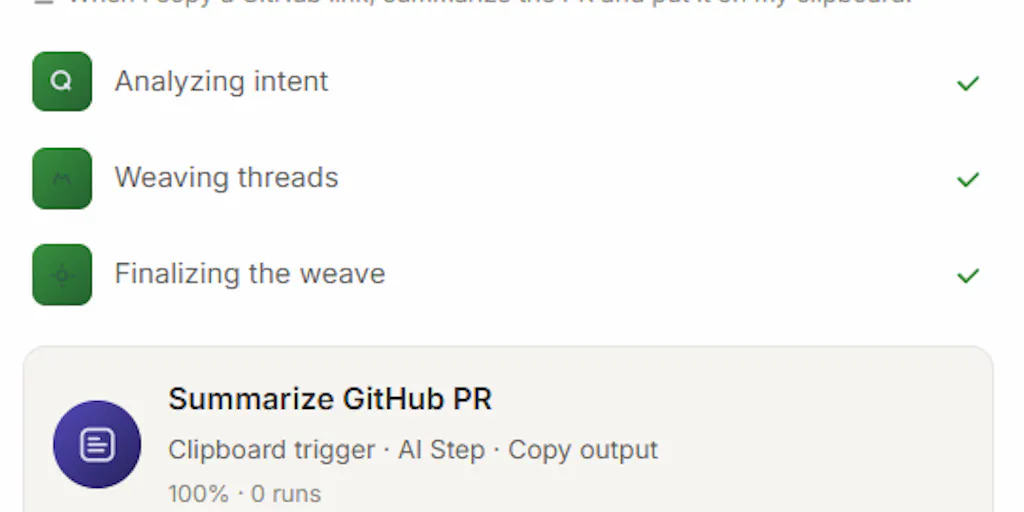
Trama’s maker, ErnandesCavalheiro, describes the core interaction in the Product Hunt comments: you press Cmd+Option+X anywhere on your Mac, describe what you repeat in your own language—English, Portuguese, Spanish, Japanese, ten in total—and it builds the automation. It then shows you the steps in readable language and runs it in the background on whatever trigger fits: clipboard, a schedule, a screenshot, a file change, an incoming email. That’s a fundamentally different approach from the visual drag-and-drop of Automator or the node-based logic of Shortcuts. It’s not about teaching you logic gates; it’s about interpreting intent.
This matters because the biggest friction point in automation adoption isn’t the execution—it’s the specification. When I tried to build a workflow in Shortcuts to download Instagram images and save them to a specific album, I spent 20 minutes fighting with the “Get Contents of URL” action and the encoding. I gave up. The cognitive overhead of translating my goal into the app’s visual language was higher than just doing the task manually. Trama is betting that natural language removes that overhead. And for a certain class of user—the one who is not a developer and not a tinkerer—that bet is probably right. It’s the difference between writing a recipe and just telling the chef what you’re hungry for.
Why This Is a Bigger Deal for TikTok Creators Than LinkedIn Ones
Think about the split in our industry. A LinkedIn ghostwriter’s workflow is mostly text: drafting, editing, scheduling, and engaging in comments. That’s already well-served by tools like Buffer and Hootsuite. But a TikTok creator’s workflow is a nightmare of file management. You’re recording 15 takes, you’re downloading the ones you like, you’re air-dropping them to your Mac, you’re renaming them, you’re editing in CapCut, you’re exporting, and then you’re uploading. The amount of system-level repetition is enormous. Trama’s triggers—file changes, screenshots, clipboard—are exactly the kind of hooks that a video-first creator lives in. A scheduled automation that watches a specific folder for new exports and automatically renames them with the correct date and platform tag would save me an hour a week. That’s the difference between a tool that feels like a utility and one that feels like a teammate.
The platform shift is real too. TikTok’s algorithm rewards volume and consistency, but the operational cost of that volume is high. If a tool can shave 30 minutes off the post-production admin for a creator posting three times a day, that’s a direct ROI on their time. LinkedIn, by contrast, is more forgiving of a slower cadence and has less file-heavy production. So while the tool is platform-agnostic, the value is skewed heavily toward the platforms that demand high output with heavy media assets. That’s where the time sink is deepest.
How It Differs From the Incumbents: Shortcuts, Automator, and the AI Wave
The obvious comparisons are Apple’s Shortcuts and the legacy Automator. Both are powerful, but both are visual and logic-based. Shortcuts, in particular, has a learning curve that feels like a programming language with a friendly face. Trama’s bet is that the natural language layer is the missing interface. The maker’s comment about classifying clipboard content is telling: “It never reads what you copy. It classifies each copy into a type - link, code, email address - then throws the text away.” That’s a thoughtful privacy stance, but it also reveals a key technical difference. Shortcuts can directly access your clipboard contents. Trama abstracts the content into a type, which means it can’t do certain things (like grabbing a specific URL from your clipboard and pasting it into a browser) without you specifying that in the workflow. It’s a trade-off between privacy and granularity.
The other incumbent is the emerging wave of AI-powered automation. Tools like Zapier’s AI or Make are adding natural language features, but they’re cloud-based and designed for web app integrations. Trama is local-first. That’s a massive differentiator for creators who work with sensitive content—unreleased brand deals, client data, or just their own raw footage that they don’t want sitting on a third-party server. The maker explicitly states that the suggestion engine makes zero network calls and that a workflow you build only sends data out when it runs, and only to the AI provider you choose, which can be a local model via Ollama. For a social media operator managing multiple client accounts, that local-first architecture is a compliance-friendly feature that cloud-based tools can’t match.
Where the Math Breaks: The “Noticing What You Repeat” Feature
Let’s talk about the headline feature: “notices-what-you-repeat.” This is the part that sounds magical, but it’s also the part that deserves the most skepticism. In the comments, Lisa from Softorino asks the exact right question: “What is it watching to spot the repetition, and does any of that leave my Mac?” The maker’s answer is reassuring on privacy—it stores a type, a timestamp, and a salted one-way fingerprint, not the content itself. But from a utility standpoint, I’m less convinced. The idea that an algorithm can watch you rename files, detect the pattern, and then suggest an automation is powerful in a demo. But in practice, our workflows are messy. I don’t just rename files; sometimes I rename them, then move them, then delete one, then start over. A pattern-detection engine is going to struggle with that noise.
My take: this feature will be a nice-to-have for discovering automations you didn’t know you needed, but it won’t replace the explicit “I want to do X” prompt. The real power will be in the *suggestion*—it might show you a card that says, “I noticed you’ve converted three images to PNG in the last hour. Want me to build a workflow for that?” That’s genuinely useful. But the detection is a hard problem, and I’d bet the first iteration will be conservative, offering suggestions only for very rigid, repeated sequences. It’s not going to watch you for a week and suddenly understand your entire content pipeline. The trust issue is also real: even with the privacy assurances, having an app “notice” what I do is a psychological hurdle. I’m an adult; I don’t want my computer tattling on my habits, even if it’s just to me.
What Creators and Social Media Teams Can Borrow From It (Right Now)
Even if you don’t install Trama today, the philosophy behind it is worth stealing. The idea of describing a task in plain language and letting the machine figure out the steps is the future of workflow automation. For a social media team, this means you should start documenting your repetitive tasks in plain English. Write down the exact steps you take to resize a thumbnail, or to format a caption for each platform. You might find that once you’ve written it down, you can already see a simpler way to do it, or you can hand it to a junior team member without a 20-minute Loom video.
The second thing to borrow is the privacy-first mindset. In an era where Canva and CapCut are sucking up your data to train their AI models, a tool that keeps your raw materials on-device is a huge competitive advantage for a professional. When I’m working on a client’s unreleased product launch, I don’t want their assets floating around in a cloud-based automation pipeline. The “local-first” approach isn’t just a feature; it’s a positioning statement. It tells the creator, “Your work is yours.” That’s a trust signal that’s increasingly rare in our space.
Finally, the trigger variety is worth studying. Most scheduling tools only care about time. Trama’s triggers—clipboard, screenshot, file change, incoming email—open up a world of event-driven automation. Imagine a workflow that watches for a new screenshot in your Downloads folder, immediately uploads it to a specific Pinterest board draft, and clears the file. That’s the kind of “set it and forget it” automation that turns a chaotic content pipeline into a smooth one. I’d love to see more scheduling SaaS adopt these kinds of file-system triggers, rather than just “post at 9 AM.”
Where My Judgment Says It Falls Short
Let’s be balanced. Trama is not for everyone, and it has significant limitations.
First, the Mac-only constraint. This is a hard blocker for any team that’s not fully in the Apple ecosystem. If you’re a creator using a Windows PC or a Chromebook, this tool doesn’t exist for you. That’s a big chunk of the market, especially in the indie gaming and PC-content-creation space. It’s a classic first-mover trade-off, but it limits the immediate utility.
Second, the “readable language” output is a promise, not a guarantee. The maker says it “shows you the steps in readable language,” but I’ve seen enough AI-generated code to know that “readable” is subjective. If the generated workflow is wrong, you still need to understand the logic to debug it. You might not need to know AppleScript, but you’ll need to know what the automation is doing and why. If it’s a black box that just “works” until it doesn’t, you’re in trouble. This is the classic no-code trap: you can build it, but you can’t fix it.
Third, the AI provider dependency for certain workflows. The maker is transparent that if you want to summarize an email, that email goes to the AI provider you chose. While you can use a local model via Ollama, that requires setup and technical comfort. For a non-technical creator who just wants to “summarize this email,” the default will be a cloud AI provider. That means your data is leaving your machine, and you’re now subject to that provider’s privacy policy. The privacy-first positioning is real, but it’s only as strong as the user’s willingness to configure a local model.
Fourth, the “notices-what-you-repeat” feature is speculative. The source doesn’t provide any metrics on accuracy or how long it takes to learn. It’s a bold claim, and I’d bet the initial version is more “suggestion” than “autonomous.” It’s a feature that will improve, but it’s not the core reason to buy today. The core reason is the explicit, plain-language workflow builder.
Finally, who is this NOT for? If you’re a power user who already has a complex set of Shortcuts or a Hazel setup that works, you probably don’t need this. If you’re a team that relies on cross-platform collaboration, the Mac-only limitation is a dealbreaker. And if you’re deeply uncomfortable with any AI processing, even if it’s local, you’ll want to steer clear. This is for the solo creator or the small team lead who is not technical, who is frustrated by the existing tools, and who wants to automate the boring stuff without learning to code. That’s a real audience, but it’s not everyone.
What I’d Watch / Test Next
This week, if you have a Mac, I’d do three things.
First, download Trama and try to build one single, boring automation. Don’t go for the flashy stuff. Pick the most tedious task you do every day—renaming a file, moving a screenshot, formatting a caption. Describe it in plain English and see what it generates. The test isn’t whether it works perfectly; it’s whether the generated steps make sense to you. If you can read them and understand the logic, that’s a huge win. If you’re staring at gibberish, you’re the wrong user.
Second, audit your own workflow for “plain language” opportunities. Write down the top five repetitive tasks you did yesterday. For each one, ask: “Could I describe this in a sentence to a smart intern?” If yes, it’s a candidate for automation. This exercise will help you see where your time is actually going, which is valuable regardless of the tool you choose.
Third, test the privacy boundaries. Go into Settings → Suggestions & Privacy and see what it’s holding. Turn on the “noticing which apps you open” feature and see what it suggests. This is the part that will either delight you or creep you out. In my experience, the feeling of being watched is a bigger hurdle than the actual data. If you can’t get past that feeling, no privacy policy will help.
I’m cautiously optimistic about Trama. The natural language interface is the right direction, and the local-first architecture is a brave and correct bet for the creator economy. But the proof will be in the execution—whether it can handle the messy, non-standard workflows that real creators have, and whether the “notices-what-you-repeat” feature becomes a genuine assistant or just a party trick. For now, it’s a tool I’m watching, not one I’m building my entire pipeline around. But that’s a more promising start than most “productivity” launches I see.