The Subtitle Workflow Is Broken — And That’s a Bigger Deal Than It Sounds
If you publish video on more than one platform, you already know the dirty secret of the creator economy: the last 20% of the work takes 80% of the time. I’m not talking about filming, scripting, or even editing. I’m talking about the unglamorous, soul-draining grind of repurposing — specifically, the moment your raw footage becomes platform-ready content. For me, that moment has always been subtitles. It’s not the transcription itself; AI has gotten frighteningly good at turning speech into text. It’s the after — the fixing of hallucinated words, the re-timing of a caption that drifts half a second off the speaker’s mouth, the re-styling of burned-in text for a vertical TikTok versus a horizontal YouTube video, and the translation of a track without losing the original. This is where hours disappear. This is where the “AI magic” dies.
That’s why a launch like SubtitleGenerator from Yana Li caught my eye. It’s not trying to be another auto-caption tool that spits out a mediocre SRT file. It’s positioning itself as a finish line for the entire subtitle workflow — from raw transcript to final export — inside a single browser tab. And while the product is early, the thinking behind it speaks directly to a pain point that every social media operator knows too well: the gap between “good enough” AI output and “publishable” content is still a manual labor camp. This essay is about why that gap exists, why this specific tool’s approach to closing it matters, and what you, as a creator or team lead, should actually steal from its playbook this week.
The Problem: AI Gave Us the Transcript, Not the Deliverable
Let’s be honest about the current state of the market. We have a glut of transcription tools. You can get a raw transcript from Otter.ai in minutes. You can get captions auto-generated on YouTube and TikTok without lifting a finger. But ask any serious creator about their workflow, and they’ll tell you the same thing: the auto-generated output is a starting point, not a deliverable.
The problem is that a transcript is a text file. A subtitle is a visual element of a video. The former is about accuracy of words; the latter is about timing, readability, style, and platform context. When I scheduled a batch of 30 short-form videos across five platforms last month, I spent nearly an entire afternoon just reformatting captions. I had to strip out the timestamps from one tool, re-paste them into a style guide for another, and manually adjust the burn-in position so it didn’t sit under the UI elements of a specific app. The transcription was perfect. The process was archaic.
The maker of SubtitleGenerator, Yana Li, seems to have built this tool out of that exact frustration. In her launch comments, she mentions being a YouTuber herself and states, “SubtitleGenerator grew directly out of my own workflow and frustrations.” This isn’t a corporate product built by a committee; it’s a tool built by someone who got tired of the copy-paste shuffle. The core pitch is to eliminate the bounce between tools. You don’t transcribe in one app, fix text in another, and style in a third. You do it all in one browser editor.
But here’s where the nuance comes in. It’s not just about consolidation. It’s about the quality bar of the AI output. The most interesting feature to me is the “Fix” flow. Li describes it as a system where “uncertain source words are flagged, the remaining review count stays visible, and the transcript has a real finish line-All clear.” This is a subtle but profound shift in UX philosophy.
Why “All Clear” is the Most Underrated Feature
Most transcription tools treat the output as a static document. You get a blob of text and you’re left to guess if the AI got it right. Did it hear “their” or “there”? Did it catch that mumbled brand name? With SubtitleGenerator, the tool actively tells you where it’s uncertain. This is a trust signal. It’s the difference between a junior editor handing you a draft and saying “I think this is done” versus a senior editor handing you a draft with red flags on the sentences they weren’t sure about.
For a social media operator, this is gold. It turns the review process from a passive read-through into an active checklist. You’re not hunting for errors; you’re verifying flagged ones. It creates a psychological “finish line” — a state of “All Clear” — which is crucial for maintaining quality when you’re reviewing the 15th video of the day. I’d bet this feature alone saves more time than any other automation in the pipeline, because it removes the anxiety of missing a glaring typo in a caption that will be seen by millions.
How It Differs From the Incumbents
To understand where SubtitleGenerator sits, you have to look at the current landscape. On one end, you have the do-it-yourself video editors like CapCut and Adobe Premiere which have built-in caption tools. They’re powerful, but they’re complex. I’ve used CapCut’s auto-captions, and while they’re fast, the styling options often feel generic, and the text correction interface can be clunky when you’re dealing with a 10-minute video.
On the other end, you have dedicated scheduling platforms like Buffer and Hootsuite which are adding caption tools, but those are often an afterthought — a feature to tick a box, not a core competency. Then there are specialist tools like Rev for human transcription or Descript for editing via text. Descript is brilliant, but it’s a full editing suite; it can be overkill if you just want to fix a subtitle track and export it for a YouTube Short.
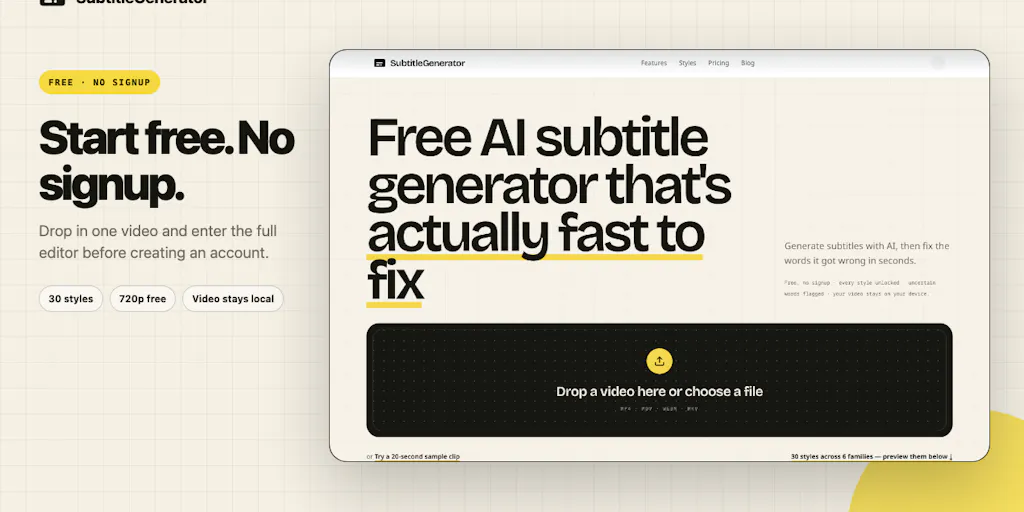
SubtitleGenerator is aiming for the middle lane. It’s not a video editor. It’s a subtitle finishing tool. The key differentiators from the source are: 1) Translation that keeps the original — this is huge for the global creator. 2) 30 styles — a significant library that moves beyond “white text with black outline.” 3) 8 subtitle formats on the Pro tier — this is critical for interoperability. 4) Privacy by design — the video stays in the browser; only the extracted audio is sent for transcription and then deleted.
Why TikTok Creators Should Care More Than LinkedIn Ones
Let’s talk about platform nuance. If you’re a LinkedIn thought-leader posting a talking-head video, your subtitle needs to be clean, simple, and readable. You probably don’t need 30 styles. But if you’re a TikTok creator, the subtitle is the aesthetic. It’s the kinetic typography that jumps around the screen. It’s the neon highlight on a keyword. It’s the difference between a video that feels native to the platform and one that feels like a repurposed YouTube video.
The “30 styles” feature matters more to TikTok and Instagram Reels creators because those platforms are driven by visual trends. A unique subtitle style can be a signature. I’ve seen creators gain traction simply because their caption style was distinct. The fact that SubtitleGenerator offers this variety out-of-the-box, without requiring you to manually adjust keyframes in Premiere, is a massive time-saver for short-form content. For LinkedIn, you’d probably just use the default style and move on — but the tool doesn’t force you into that box.
What Creators and Teams Can Borrow From This Tool (Even If You Don’t Use It)
This is where I want to step back from the product specifics and talk about the operational lessons. Whether or not you switch to SubtitleGenerator, the design philosophy here is a masterclass in solving the “last mile” problem.
1. The “Finish Line” Principle: The “All Clear” flagging system is a workflow principle, not just a feature. As social media operators, we need to build our own “finish lines.” Instead of a checklist that says “review captions,” we need systems that actively flag what needs review. This could be as simple as using a spreadsheet to track which videos have had their captions verified, or using a tool that highlights low-confidence words. The goal is to reduce cognitive load. You want to spend your brainpower on creative decisions, not on proofreading.
2. The Privacy-First Default: In the launch comments, Li explains her reasoning for the audio-only upload: “Keeping the original video in the browser reduces the privacy concern and avoids a large video upload.” This is a smart default. For brands and creators dealing with unreleased content, sending a full video file to a server is a risk. Sending just the audio is a smaller attack surface. This is a lesson for all of us: when evaluating tools, ask about data handling. The default should be minimal data transfer. It builds trust, and it’s just better engineering.
3. The “Translation + Original” Dual Track: The feature to “translate a full track while keeping the original” is a killer feature for international growth. Most tools force you to choose — either you have the original language or a translation. Here, you can have both. This is how you do dubbing or bilingual subtitles. It’s a simple idea, but it’s executed in a way that suggests the maker actually understands the global creator economy. It’s not just about reaching a new audience; it’s about respecting your existing audience by giving them the option.
Where My Judgment Says It Falls Short
I have to be balanced here. This is an early-stage product, and there are limitations. I’m flagging these as my own observations, not as flaws listed in the source.
1. The “Overlap” Problem is Real: In the comments, user Gal Dayan brings up the exact issue that plagues podcasters and interviewers: overlapping speech. The maker admits this is “the harder case” and that speaker labels are “planned for v2.” This is a critical gap. For anyone doing interviews or multi-speaker content, the current version will likely struggle. The maker mentions a promising test with confidence scores between 0.94 and 1.00 for speaker identification, but that was a “clean two-speaker test.” Real-world crosstalk is messy. If your content is mostly solo talking-heads or voiceovers, you’re fine. If you’re a podcast editor, you should wait for v2.
2. The Export Format Question: The source mentions “eight subtitle formats” on the Pro tier. That’s excellent. But the Free tier only does 720p export with a watermark. For a professional, a watermark is a deal-breaker. It’s fine for testing, but it means the free tier is more of a trial than a usable tool for client work. The pricing tiers (Pro and Max) are not fully disclosed in the source, so I can’t judge value-for-money, but the “PAYG” (pay-as-you-go) option is a smart move for those who hate subscriptions.
3. It’s a Browser Tool: While “works in the browser” is great for accessibility, it also means you’re dependent on your internet connection and browser performance. For very long videos (over 30 minutes), a browser-based editor can become sluggish. My take? This is a tool for short-form and medium-form content (think 1-15 minute videos), not for feature-length films.
Where the Math Breaks
Let’s talk about the “Free workflow.” It includes “all 30 styles and 720p export with a small watermark.” For a creator testing the waters, this is generous. But let’s do the math on time. If you spend 20 minutes fixing a transcript manually in another tool, and SubtitleGenerator’s flagging system cuts that to 5 minutes, you’ve saved 15 minutes. If you make 10 videos a week, that’s 2.5 hours saved. That’s significant. But if the tool’s transcription is less accurate than your current solution (which is a big if), you might spend those 15 minutes fixing the AI’s errors instead of verifying them. The “Fix” flow is designed to mitigate this, but the accuracy of the underlying model is the foundation. The source doesn’t specify which AI engine powers the transcription, so I’d bet the early accuracy is variable. You’ll need to test it against your own niche vocabulary.
What I’d Watch / Test Next
So, you’re a social media operator. You’re intrigued but not sold. Here’s what I’d do this week to pressure-test this tool against your own workflow.
Run a “Torture Test” Video: Take your worst-case-scenario video — the one with background music, heavy accents, or industry jargon. Run it through SubtitleGenerator without signing up (the source says you can try it on one video without an account). Pay attention to the “Fix” flow. Are the flagged words actually wrong? Or is it flagging too much? If it flags too much, it’s just as annoying as a tool that flags nothing.
A/B Test the Export vs. Your Current Tool: Export a 30-second clip using their 720p free export. Put it side-by-side with a clip you edited in CapCut or Premiere. Does the styling hold up? Is the timing tight? The “30 styles” might look great in a screenshot, but they need to look great over video.
Check the Translation Quality: If you’re targeting international audiences, do a test translation. Translate a 60-second clip from English to Spanish (or whatever your target is). Does it keep the original timing? Does the translation read naturally? The “keep the original” feature is only good if the translation is actually usable. If it’s garbage, the dual-track feature is useless.
Read the Fine Print on Privacy: The maker claims the original video stays in the browser and only extracted audio is sent. Verify this. Use your browser’s network inspector to see what data is being sent. If you’re handling client work, this is non-negotiable. Trust, but verify.
The subtitle workflow is a grind, but it’s the price of admission for multi-platform success. Tools like TimedSubs and its sibling SubtitleGenerator are trying to make that grind less painful. They’re not there yet — the speaker overlap issue is a big miss for podcasters — but the direction is right. The focus on the “finish line” and the “review count” is the kind of operational thinking that separates hobbyists from professionals. It’s not about the AI doing the work; it’s about the AI telling you where it didn’t do the work. That’s a tool I can respect. Go test it, and let me know if the “All Clear” button feels as good as I think it does.