The Agent That Builds Agents Is Coming for Your Content Ops — and That’s a Good Thing
Let me be blunt about the state of social media operations in 2025: most of us are drowning in the exact kind of work that Caddi, a new AI agent builder that launched on Product Hunt this week, is designed to eliminate. I’m not talking about the creative work — the ideation, the filming, the editing, the caption writing. I’m talking about the soul-crushing operational sludge that sits between you and publishing: downloading the raw footage from your camera roll, renaming it to your content calendar convention, uploading it to your cloud storage, logging it in your Airtable tracker, creating the draft in your scheduler, tagging the collaborators, adding the alt text, scheduling the cross-post. Forty times a month. Every month. For every creator who thinks “I’ll just hire a VA when I scale,” this is the work that never scales — it just multiplies.
The creator economy has a dirty secret: the tools we’ve built to “save time” often just move the time around. Buffer, Hootsuite, Later, Metricool — they’ve solved the scheduling layer, sure. But the operational layer — the file management, the metadata, the cross-platform formatting variations, the approval workflows, the analytics consolidation — is still a patchwork of manual steps and brittle integrations that break the moment a platform changes its API. When I scheduled 30 posts across 5 platforms last month, I spent nearly as much time managing the pipeline as I did creating the content. That’s the gap Caddi is targeting, and while its launch positioning is aimed squarely at law firms, RIAs, and accounting firms, the underlying thesis is one that every serious content operator should be paying attention to.
The thesis is this: the work isn’t hard, it’s just endless. And for the first time, we have a tool that doesn’t just automate a single step — it automates the process of building the automation itself.
What Caddi Actually Does (and Why It’s Different From What You’re Already Using)
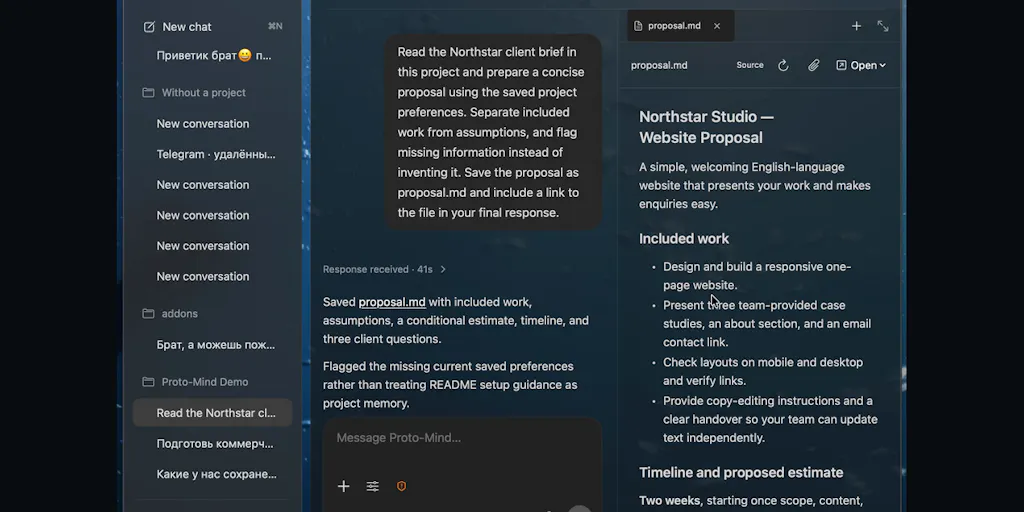
Let me get the product specifics out of the way, because they matter for understanding why this is a category shift rather than just another automation tool. Caddi is an agent that builds agents. The maker, Jason Alafgani, describes it as starting before you build anything: it reads your stack and tells you which work you repeat most, ranked by impact. You pick one, and then you teach it like a new hire — except this new hire already knows the job. It follows your guidance or guides you with best practices, and probes for edge-cases. When it hits something ambiguous, it stops and asks, with the options laid out and a confirm button. Your answers don’t disappear into a transcript; they become rules in the agent.
Now, here’s where I need to stop and flag what’s genuinely different, because I’ve tested the incumbent automation tools extensively, and they all have the same fundamental flaw: they require you to think like a developer. Zapier and Make are essentially visual programming environments. You’re building logic trees, managing data mappings, debugging error handling — you’re not teaching someone your process, you’re writing code with extra steps. I’ve spent hours in Zapier’s interface building multi-step zaps that eventually break because the API rate limit changed or the field mapping shifted. The promise of “no-code” automation has always been undercut by the reality that you still need to think in terms of conditional logic, data schemas, and error handling.
Caddi’s approach is different in a way that matters: it reasons with AI where judgment is needed and runs deterministic code where it isn’t. That’s not just a technical distinction — it’s an operational one. When you’re building a content pipeline, there are steps that are purely mechanical (rename the file, move it to this folder, create the draft in this tool) and steps that require judgment (is this thumbnail on-brand? does this caption match the tone of the platform? is this a draft or a final version?). Traditional automation tools force you to pre-define every possible branch of the logic tree, which is why they break the moment reality throws an exception. Caddi’s approach — AI reasoning for the judgment calls, deterministic code for the mechanical parts — is closer to how you’d actually train a human assistant. You’d say “when a contract comes back signed, file it to the matter” and they’d ask “what if only one party has signed?” — and then they’d remember your answer for next time.
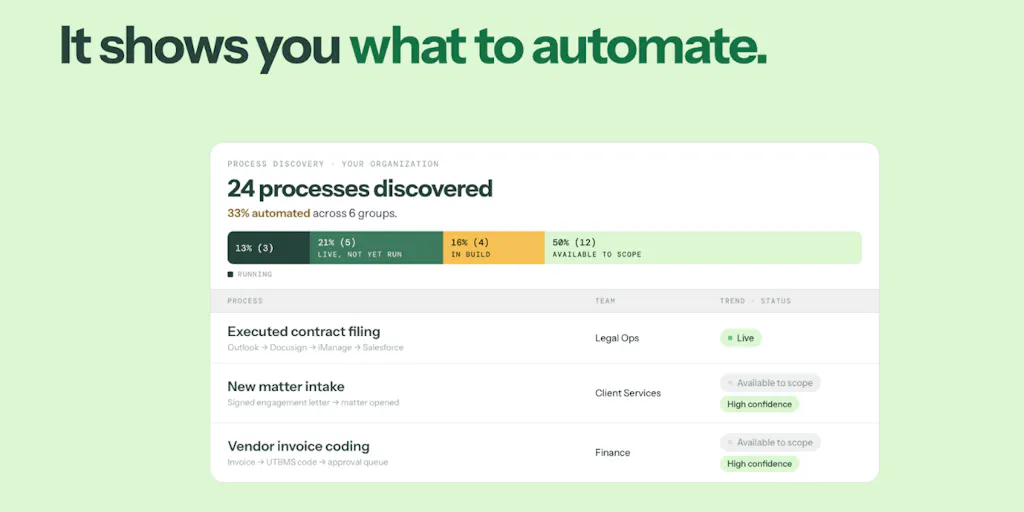
The other differentiation that matters for operators is the “discover” function. Alafgani describes it as proactively checking your tools and finding your most repetitive work, then trying to automate it. This is a genuinely new capability. Most automation tools are reactive — you have to know what you want to automate before you can automate it. But most people don’t actually know where their time is going. I’ve had weeks where I was convinced I was spending all my time on video editing, only to look at my time tracking and realize I was spending more time on file management and metadata entry. A tool that can read your stack and tell you where the repetition is — that’s not a convenience feature, that’s a discovery mechanism.
Why This Matters More for TikTok Creators Than LinkedIn Ones
Here’s where I’m going to make a distinction that the Caddi team probably isn’t thinking about, but should be: the value of this kind of agentic automation is wildly uneven across platforms. TikTok creators are drowning in operational complexity — you’re managing multiple video formats, trending audio tracking, hashtag research, comment moderation, and the brutal reality that the algorithm rewards consistent posting frequency more than any other platform. The operational overhead is relentless, and the margin for error is thin.
LinkedIn creators, by contrast, have a comparatively simple pipeline. Write a post, maybe attach a PDF or a link, schedule it, done. The platform’s algorithm is more forgiving of inconsistent posting, and the content format is less resource-intensive. If I were running a LinkedIn-only content operation, I’d probably skip Caddi entirely — the automation ROI just isn’t there yet.
But for TikTok and Instagram creators running multi-format content operations — long-form YouTube videos repurposed into Shorts and Reels, podcast clips pulled into vertical video, blog posts turned into carousels — the operational complexity is real and growing. Every platform now wants native content, which means you’re not just scheduling one piece of content, you’re managing a content matrix: the master video, the vertical crop, the square crop, the thumbnail, the caption variations, the hashtag sets, the engagement hooks. That’s exactly the kind of multi-step, multi-tool workflow that Caddi claims to be best at. Alafgani says they’re “particularly proud of our accuracy at 6+ steps (and even tools)” — and that’s the sweet spot for content operations.
What Creators and Social Media Teams Can Actually Borrow From This
Let me get practical, because the launch positioning is enterprise-focused, but the underlying patterns are directly transferable to how you run your content operation. Here’s what I’m taking from Caddi’s approach, regardless of whether I adopt the tool itself.
First, the “teach it like a new hire” model is the right mental framework for building any automation, even if you’re still using Zapier or Make. When I’m building a content pipeline now, I’m not thinking in terms of triggers and actions — I’m thinking in terms of onboarding a junior assistant. What would I tell them on day one? What questions would they need to ask me? What edge cases would they encounter in their first week? That shift in framing has made my automation more robust, because it forces me to think about exceptions and ambiguity rather than just the happy path.
Second, the “probe for edge cases” behavior is something I’m now applying manually to my own workflows. When I set up a new content repurposing pipeline, I’m deliberately asking myself: what does “done” look like for this step? What happens if the source file is corrupted? What happens if the platform rejects the format? What happens if the client changes the brand guidelines mid-campaign? I used to build automations that worked 90% of the time and then manually handled the edge cases. Now I’m building automations that explicitly ask me about the edge cases upfront, which means I’m not discovering them at 2am when a scheduled post fails.
Third, the “every run is a log” principle is worth stealing. Caddi’s approach — every run is a log of what it decided, step by step, with the permission it used to do it — is exactly what social media teams need for auditability. When you’re managing multiple client accounts, you need to know what was done, when, and by what. The transparency isn’t just about trust; it’s about debugging. When a post goes out with the wrong link or a campaign underperforms, you need to be able to trace back through the decision chain to find where things went wrong. That’s not a nice-to-have; that’s table stakes for professional operations.
The Permission Model Is the Real Innovation
Here’s the part of Caddi’s approach that I think is genuinely underrated: the permission model. Alafgani mentions that every run is a log of what it decided, step by step, with the permission it used to do it: read, create, send. This is exactly how social media teams should be thinking about AI automation, and it’s a conversation that most tools are avoiding.
When I’m using AI tools for content operations, the question isn’t whether the AI can do the work — it’s whether I can trust it to do the work without supervision. The permission model is the answer. I want an AI that can read my content calendar and create drafts, but I don’t want it to send anything without my approval. I want it to be able to access my analytics and generate reports, but I don’t want it to be able to delete anything. The granularity of permissions — read, create, send — is exactly the right framework for content operations. It acknowledges that AI can be useful at every stage of the pipeline, but it also acknowledges that some actions are irreversible and should require human sign-off.
This is the conversation that the creator economy needs to be having. We’re all rushing to adopt AI tools, but we’re not thinking carefully about where the trust lines are. For me, the line is clear: AI can create, but I need to approve before anything goes live. AI can analyze, but I need to verify before I act on the insights. AI can organize, but I need to audit before I trust it with client data. Caddi’s permission model is a template for how we should all be thinking about AI integration — not as an all-or-nothing proposition, but as a spectrum of trust.
Where My Judgment Says It Falls Short
I’ve been writing about creator economy tools for long enough to be skeptical of Product Hunt launches, and Caddi has some genuine red flags that I want to flag before you get too excited.
First, the positioning is all wrong for the creator economy. Caddi is built for law firms, RIAs, and accounting firms. The maker explicitly says they build for those verticals, and the entire product is designed around the operational patterns of professional services — client intake, conflict checks, pre-billing. That’s not a criticism of the product; it’s a warning about the fit. If you’re a creator or a small social media team, you’re going to be a second-class user. The edge cases that matter to you — platform API changes, content format variations, engagement metric tracking — are not the edge cases that matter to a law firm. You’ll be using a tool that’s optimized for someone else’s workflow.
Second, the HIPAA question is a canary in the coal mine for data security. When asked about healthcare use cases, Alafgani’s response was honest: they haven’t received HIPAA compliance certification, so they don’t recommend putting patient data through their systems. That’s the right answer, but it raises a broader question: what about other sensitive data? If you’re a creator managing brand partnerships, you’re handling confidential campaign information, unreleased product details, and potentially sensitive audience data. Where does that data live in Caddi’s system? What happens if the agent makes a mistake and sends something it shouldn’t? The permission model helps, but it doesn’t answer the underlying question of data residency, retention, and security.
Third, the “self-improving” claim is both the most exciting and the most concerning part of the pitch. Alafgani says Caddi is “constantly looking for things that break and suggests fixes on its own.” That’s either the future of automation or a recipe for cascading failures — and I suspect it’s both. In my experience testing similar tools, autonomous self-improvement is great until it isn’t. The agent identifies a “fix” that actually breaks something else. The agent optimizes for one metric at the expense of another. The agent makes a change that works in the test environment but fails in production. The idea of an agent that can update its own process, test it, and ship it is powerful — but it’s also a potential source of unpredictable behavior. I’d want to see a lot more detail on how the testing works and what guardrails are in place before I’d trust it with anything mission-critical.
Fourth, there’s the question of scale and cost. Caddi claims to execute “thousands of actions at a time” in the cloud. That’s impressive, but it also raises questions about pricing, API rate limits, and the cost structure of running AI agents at scale. If you’re a solo creator or a small team, the economics might not make sense. The makers haven’t disclosed pricing, which is always a yellow flag. I’d want to know: is this a subscription? Per-action pricing? What happens when you hit the limits? These are the questions that determine whether this is a tool for operators or a toy for enterprise teams.
Where the Math Breaks
Let me do some rough math on why Caddi’s current positioning doesn’t fit most creator operations. Say you’re a mid-sized creator team managing 4 platforms, publishing 5 pieces of content per week per platform. That’s 20 pieces of content per week, each requiring an average of 10 operational steps (file management, formatting, scheduling, metadata, analytics). That’s 200 operational actions per week, or roughly 800 per month. At Caddi’s claimed scale of “thousands of actions at a time,” that’s well within the tool’s capacity.
But here’s where the math breaks: the cost of setting up the automation. Even with the “teach it like a new hire” model, you’re going to spend hours defining your workflows, answering edge-case questions, and testing the agent’s outputs. That setup cost is only worth it if the automation is stable and long-running. For a creator whose content formats change weekly, whose platform priorities shift monthly, and whose operational processes are constantly evolving, the automation might be outdated by the time it’s fully built. The tool is designed for processes that are stable and repetitive — like a law firm’s contract management — not for the chaotic, constantly-evolving workflows of content creation.
What I’d Watch / Test Next
If you’re a creator or social media operator who’s intrigued by Caddi’s approach, here’s what I’d actually do this week:
Run a time audit before you buy any automation tool. Caddi’s “discover” function is the most interesting feature, but you can replicate it manually. Track every operational task you do for 5 days — every file rename, every upload, every metadata entry, every cross-post. I bet you’ll be surprised by where your time actually goes. That audit is the foundation for any automation decision.
Map your top 3 repetitive workflows as if you were teaching them to a new hire. Write out the steps, the edge cases, the decisions points. This is the exercise that Caddi forces you through, but you can do it on paper. Once you have the map, you’ll know whether you need a tool like Caddi or whether a simpler Zapier workflow will do.
Test the permission model on your existing tools. Before you adopt any AI automation, define your trust lines. What can AI read? What can it create? What can it send? Write those lines down and enforce them. This is the discipline that Caddi’s design encourages, and it’s worth doing regardless of whether you use their tool.
Watch the Product Hunt comments for real-world usage patterns. The launch page has some genuinely useful back-and-forth, especially around trust boundaries and edge-case handling. Alafgani’s responses give you a sense of how the team thinks about the product — and the questions from users show where the product is still maturing.
Don’t buy yet if you’re a solo creator. My honest take: Caddi is a promising tool, but it’s not built for you. The setup cost is too high, the positioning is too enterprise-focused, and the use cases are too far from content operations. Watch it, learn from its approach, but wait for a creator-economy-specific version before you invest.
The bigger picture here is that Caddi represents a shift in how we think about automation. We’re moving from “build a workflow” to “teach an agent.” That’s a meaningful change, and it’s one that content operators should be paying attention to — not because Caddi is the answer, but because it’s a signpost for where the industry is heading. The tools that win in the next few years will be the ones that understand the difference between automating a task and training a colleague. Caddi gets that distinction. Now we just need to see if they can build a version of it that speaks the language of creators.