The translation tax is eating your content calendar — and a tiny menu-bar app just made a quiet case for fixing it
If you run social for a living, you already know the dirty secret of “going global”: most of us don’t. We localize the brand bio, maybe a pinned post, and then quietly let 80% of the feed stay English because the workflow of translating-and-reposting is a tax nobody wants to pay on a Tuesday. That tax isn’t the translation itself — it’s the context-switching, the copy-paste loop, the “wait, does this sound like us?” second pass. So when a maker ships a tool that collapses that loop into a single keyboard shortcut, my ears perk up — not because translation is glamorous, but because workflow compression is the actual growth lever for lean social teams in 2025. Translate Like Me, built by Victor Kuznetsov, is exactly that kind of unglamorous tool — and the way it’s built tells us more about where creator tooling is heading than a dozen “AI content studio” launches.
Here’s the thesis: the next wave of useful creator tools won’t be dashboards. They’ll be invisible primitives — small, single-purpose utilities that slot into the OS or the browser and shave seconds off repetitive tasks. Translate Like Me is a case study in that pattern, and whether or not you personally need Russian↔English, the design decisions behind it are worth stealing for your own stack.
What the product actually does — and the problem it’s really solving
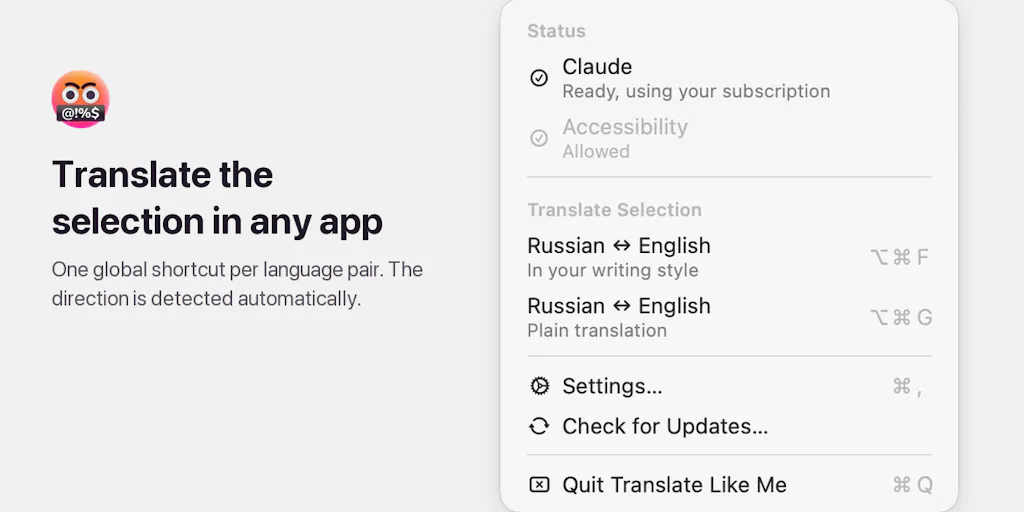
Let me describe it plainly, because the Product Hunt listing is refreshingly honest about scope. Kuznetsov writes in Russian and English daily and got tired of the same loop: copy text, paste into a chat window, ask for a translation that “sounds like me,” paste it back. So he built a macOS menu-bar app that does the loop on one shortcut. You select text in any app, press the pair’s shortcut (Option+Cmd+F by default), and the selection is replaced in place with the translation.
That’s it. That’s the whole product. And that restraint is the point.
The direction is auto-detected per call: text in the pair’s first language goes to the second, anything else goes to the first. Each language pair can carry its own writing style — so Kuznetsov keeps one Russian/English pair tuned to his own voice for his messages, and a second “plain” pair for translating other people’s text. It runs on the AI subscription you already pay for, calling the official CLIs (claude -p, codex exec, grok -p) as subprocesses. API keys work too for Claude and OpenAI. No server, no analytics. It’s written in Swift, licensed Apache 2.0, signed and notarized, and updates in place via Sparkle. Install is a single Homebrew command: brew install --cask wiltodelta/tap/translate-like-me.
Now — why should a social media manager care about a Russian-English translation utility? Because the shape of the problem is universal. Every operator I know has at least three of these micro-loops running in the background of their day: pulling a caption out of one tool to reformat it for another, stripping UTM parameters before pasting into a doc, converting a thread into a carousel outline. Each loop costs 20–90 seconds and a unit of attention. Multiply by 40 posts a week and you’ve found your missing half-day.
The token math is the real story here
Buried in the maker’s description is the detail I’d frame on a wall: for Claude, turning off tools, MCP servers, and session history took a call from 10k+ input tokens and 5 to 8 seconds down to about 150 tokens and 2.4 seconds on Sonnet. That’s the maker’s own measurement, so treat it as a claim rather than a benchmark — but the direction is entirely plausible and it’s the kind of engineering discipline I wish more AI content tools showed.
Why does it matter to you? Because if you’re paying per-token (or hitting rate limits) on any AI feature in your content stack — caption generators, repurposing tools, comment-reply assistants — the single biggest cost driver is usually context you didn’t need. MCP servers, tool definitions, and session history all get stuffed into the prompt by default in a lot of agent frameworks. Stripping them is free performance. I’d bet a meaningful chunk of the “AI is too slow/expensive for our workflow” complaints I hear from content teams would evaporate if they audited their prompt payloads the way this app does.
How it stacks up against the incumbents — and why the comparison is uncomfortable
Let’s be honest about the comparison set, because “translation tool” is a crowded category.
At the consumer end you’ve got Google Translate and DeepL — fast, free or cheap, and genuinely good at literal accuracy. At the prosumer end there’s Smartling, Lokalise, and Crowdin, which are built for localization teams managing strings across product surfaces, with glossaries, translation memory, and reviewer workflows. And then there’s the broader “AI writing assistant” bucket — Grammarly, Jasper, Copy.ai — where translation is a feature, not the product.
Translate Like Me sits in a gap none of those fill well: personal, in-place, voice-preserving translation for someone who lives in two languages and doesn’t want a browser tab. It’s not competing with Lokalise — that would be absurd. It’s competing with the chat window you currently paste into, and that’s a much more winnable fight.
The voice-preservation angle is the genuinely differentiated bit. DeepL will give you a clean translation. It won’t give you your translation — the one with your slang, your rhythm, your annoying habit of starting sentences with “Look,”. The maker’s two-pair setup (one styled, one plain) is a small UX decision with big implications: it acknowledges that tone is context-dependent, and that the same person needs different translation registers for their own voice versus someone else’s. I haven’t seen a mainstream translation tool expose that as a first-class concept, and I think it’s the most copyable idea in the whole launch.
Where the “runs on your existing subscription” model gets interesting
The pricing model is worth pausing on. There’s no Translate Like Me subscription — it rides on your existing Claude, OpenAI, or Grok subscription (or API key). The maker’s framing is “it runs on the subscription you already pay for.”
For a solo creator, that’s a feature: no new line item. For a social team, it’s a procurement headache. If your company pays for Claude Team and your contractor has a personal Pro account, whose tokens are being burned? Who owns the output? What happens when Anthropic changes CLI behavior? These aren’t dealbreakers, but they’re the questions an ops lead will ask before rolling it out to five people. My take: the “BYO subscription” model is great for indie adoption and awkward for team deployment, and I expect that tension to define a lot of 2025’s AI tooling.
What creators and social teams should actually borrow from this
Strip away the translation specifics and there are four operational lessons here that apply to almost any content workflow.
1. Compress the loop, don’t add a destination. The app’s core insight is that the best tool is the one that doesn’t require you to go somewhere. No new tab, no new dashboard, no new login. It lives where the text already is. If you’re evaluating tools for your social stack this quarter, ask a blunt question: does this replace a step, or add one? A surprising number of “productivity” tools add a step and call it integration.
2. Style should be a parameter, not a prompt you retype. The per-pair style setting is a small thing that saves enormous friction. In your own workflow, this maps to building reusable brand-voice snippets — a saved block of tone instructions you paste into whatever AI tool you’re using, rather than re-describing your brand every time. If you’re doing this manually across ChatGPT, Claude, and Gemini, you’re burning the same 200 tokens forty times a week.
3. Audit your prompt payloads. The 10k→150 token reduction is the kind of unsexy optimization that compounds. If your team has any custom AI tooling — a repurposing script, a comment-triage bot, a caption generator — have someone look at what’s actually being sent. I’d wager most teams are paying for context they never use.
4. Localization is a distribution strategy, not a nice-to-have. This is the bigger strategic point. If you’re a creator with any cross-border audience — and on Instagram, TikTok, and YouTube you almost certainly are — the marginal cost of a second-language version of your best-performing content just dropped. Not to zero, but low enough that the math changes. A translated caption on a post that already over-performed is close to free reach.
Why TikTok creators should care more than LinkedIn ones
Here’s a platform-specific angle worth flagging. On LinkedIn, your audience is largely English-fluent professionals and the algorithm rewards dwell time on long-form text — translation matters less because the language barrier is lower. On TikTok and Instagram Reels, the situation is inverted: the algorithm distributes by engagement velocity in the first hours, and a caption in the viewer’s native language measurably improves comment rates and completion. If you’ve got a video that’s already proven its hook, a localized caption is one of the cheapest levers you have. Same logic applies to Threads and X, where text is the primary surface and a translated post can genuinely reach a new audience segment rather than just amusing your existing one.
I’d also note the Pinterest case, which people forget: Pinterest is heavily search-driven, and localized keywords in pin descriptions can unlock non-English search demand that your competitors never bother to capture. It’s unglamorous SEO, but it works.
Where the math breaks
Two honest caveats on the localization argument. First, translated content underperforms native content on most platforms — the phrasing is slightly off, the cultural references don’t land, and audiences notice. Translation is a floor, not a ceiling. Second, platform algorithms treat translated text as a signal of “foreign” content in some cases, which can suppress distribution rather than help it. I’ve seen this pattern anecdotally and it’s worth testing rather than assuming. If you’re going to localize, localize your best content and measure it against a control — don’t blanket-translate everything and assume reach goes up.
Where I think it falls short — and who shouldn’t bother
Balanced take time, because a tool this small has real limits.
It’s macOS-only. The listing is explicit: menu-bar app, Swift, Homebrew install. If your team is on Windows or ChromeOS, this is a non-starter. That’s a significant constraint for agency environments where device fleets are mixed.
It’s a solo-maker tool, not a team tool. No shared glossaries, no review workflow, no audit trail, no admin console. If you need a translator to approve output before it ships — which regulated industries absolutely do — this isn’t it. Look at Lokalise or Smartling for that.
It depends on third-party CLIs you don’t control. The app calls claude -p, codex exec, and grok -p as subprocesses. If Anthropic, OpenAI, or xAI change those interfaces, the app breaks until the maker patches it. That’s an inherent fragility of building on someone else’s CLI, and it’s worth knowing before you make it load-bearing in your workflow.
Quality is entirely on the underlying model. The app doesn’t do translation; it orchestrates translation. If Sonnet mangles your idiom, that’s Sonnet’s problem, not the app’s — but it’s your problem as the operator. Test on your actual content before trusting it with anything public-facing.
No analytics, no server — which the maker frames as a privacy feature, and it is. But it also means no usage visibility. If you’re a manager trying to understand how your team spends time, this tool is a black box by design.
Who is it not for? Localization teams, Windows shops, anyone needing approval workflows, and anyone whose content is already English-first with no cross-border audience. For everyone else — particularly bilingual solo creators and small social teams — the friction-to-value ratio looks genuinely good.
What I’d watch / test next
Concrete moves for this week, in rough order of effort.
If you’re bilingual or run a cross-border account: install it via the Homebrew cask and run it against five of your own recent posts. Compare the styled output against the plain output. You’ll learn more about your own voice in twenty minutes than in a month of brand-guideline debates.
If you’re not bilingual but run AI tooling: do the payload audit. Open whatever custom AI feature your team uses and check how many input tokens you’re actually sending. The 10k→150 reduction in this launch is a template — most teams can find 60–80% waste without touching quality.
If you’re a content lead: pilot localized captions on your top three performing posts of the last quarter, on the platform where they over-indexed. Measure engagement rate against a matched control. Don’t scale until you have data.
If you’re evaluating tools generally: adopt the “does it replace a step or add one?” filter as a standing rule. It’ll kill half your tool trials and save you a fortune in context-switching.
And watch the pattern, not just the product. If invisible, BYO-subscription, single-purpose utilities keep shipping and keep working, the next two years of creator tooling look very different from the dashboard era we just lived through. I’d bet on it — but I’d test it first.