The Terminal Isn’t the Story. The Workspace Is.
If you run social media for a living, your real product isn’t a post — it’s the pipeline that gets a post from idea to published, measured, and repurposed. That pipeline is a stack of tabs, dashboards, asset folders, API keys, scheduled jobs, and half-broken scripts you wrote at 1 a.m. because the native scheduler couldn’t do what you needed. So when a tool shows up that treats “the place where you do the work” as the product rather than a window into it, I pay attention even if the demo is aimed at developers. That’s the lens I brought to Trellis, a free, MIT-licensed native macOS terminal from maker Hélder Vasconcelos. On the surface it’s a terminal. Underneath it’s an argument about reproducible, portable workspaces — and that argument applies to creator ops far more than the launch page lets on.
What Trellis Actually Is (and the Problem It Picks)
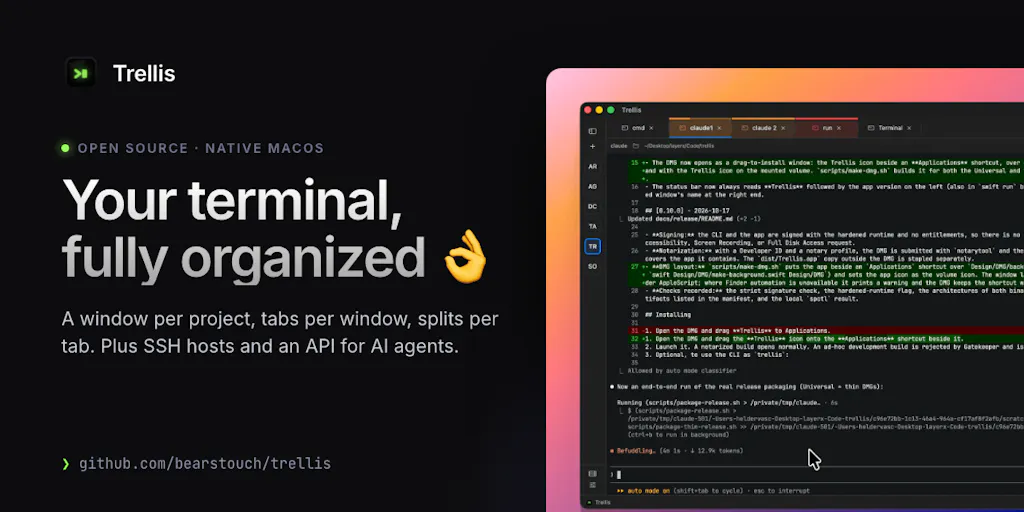
The maker’s own framing is refreshingly unhyped: most terminals “stop at a window with a shell in it,” and he wanted “one place for everything I do around the shell.” The feature list reads like a developer’s wishlist, but each item maps to a workflow problem social teams hit constantly:
- A Smart Workspace with managed windows in a sidebar, color-labeled tabs, nested splits, and sessions that keep running after you quit or can be saved to a file.
- A launchpad that runs
.trellis/launch.jsontasks from the pane header and lets you check your layout into the repo. - Hosts at hand: a saved SSH library plus
~/.ssh/configdiscovery, with optional Keychain passwords. - A command palette (⇧⌘P) that searches actions, windows, tabs, saved hosts, tasks, and themes in one place.
- Privacy and native behavior: no telemetry, and terminal output and typed input are never logged.
- A scratchpad beside your panes for writing a script with syntax highlighting, checking it, running it in the focused pane, or saving it as a task.
The problem it solves isn’t “my terminal is ugly.” It’s that the context for a piece of work — which directories, which hosts, which commands, which layout — lives in your head and evaporates the moment you close the lid. For a social operator, that context is the difference between a repurposing script you can hand to a freelancer and a script only you can run.
Why a terminal matters to someone who schedules Instagram posts
Here’s the honest bridge. Most social managers will never open Trellis, and that’s fine. But the pattern it encodes — a checked-in, reproducible workspace — is exactly what mature social ops teams are missing. When I scheduled 30 posts across five platforms last month, the actual bottleneck wasn’t the scheduler UI. It was the dozen manual steps around it: exporting crops from Canva, renaming files to a convention only I understood, running a thumbnail generator, pushing to a CDN, then pasting UTMs by hand. None of that was documented anywhere a teammate could follow. A tool that lets you save “the layout and the commands” as a file is a quiet rebuke to the way most content teams operate: by tribal knowledge and Slack threads.
How It Differs From the Incumbents You Already Use
I’ve run social stacks long enough to know the incumbents by their failure modes. Buffer and Hootsuite are excellent at the publish-and-approve layer — queues, calendars, team permissions — but they are closed systems. You can’t check your workflow into a repo, and you can’t script against them beyond whatever the API exposes. Later owns visual planning and link-in-bio; Metricool owns cross-platform analytics and reporting. None of them want to be your terminal, and honestly none of them should.
Trellis sits at a different layer entirely — the execution layer underneath the scheduler. The closest comparison isn’t Buffer; it’s the patchwork of iTerm2, tmux, a notes app, and a folder of shell scripts that a technical operator assembles themselves. Trellis’s bet is that this patchwork should be one native app with a command palette and a saveable layout. My take: that’s a real gap. The social-tool market has spent a decade building prettier dashboards and almost no time making the plumbing reproducible. A team that can version its repurposing pipeline is a team that can onboard a new hire in an afternoon instead of a month.
The launch.json idea is the sleeper feature
The most interesting exchange in the launch thread came from JC, who asked the sharp question: checking a layout into the repo “makes the workspace reproducible in a way tabs never are,” but how do you handle the parts that don’t travel — absolute paths, machine-specific tasks? The maker’s answer is the detail I’d underline: it doesn’t matter where the code is checked out, because it opens relative paths and commands. That’s the whole ballgame. Relative paths are what turn “my setup” into “our setup.” If you’ve ever tried to hand a social workflow to a contractor and watched it break because your script hardcoded /Users/yourname/Desktop/campaigns, you understand why this is not a trivial nicety.
What Creators and Social Teams Can Borrow From It
You don’t have to adopt Trellis to steal its operating philosophy. Three ideas are worth importing into your social stack this quarter, regardless of which scheduler you pay for.
1. Treat your publishing pipeline as a file, not a habit
The .trellis/launch.json concept — a checked-in definition of tasks and layout — is the same discipline as a documented content calendar, just at the execution layer. In my own tests of similar “workspace-as-config” tools, the teams that benefit most are the ones already drowning in one-off commands: bulk watermarking, aspect-ratio batch conversion, scheduled exports from analytics dashboards. Write those down as named tasks with relative paths. The next person who runs them doesn’t need you on a call.
2. A command palette is an accessibility feature for your brain
⇧⌘P that finds “any action, window, tab, saved host, task or theme” sounds like developer ergonomics, but it’s really about reducing the cognitive tax of context-switching. Social operators switch contexts more than almost any role I know — Instagram grid to TikTok sound trends to LinkedIn scheduling to a Pinterest export, all before lunch. Every second spent hunting for the right window is a second not spent on the creative judgment that actually moves engagement rate. I’d bet the productivity gain from a good command palette is larger for a social generalist than for a specialist developer, precisely because generalists juggle more surfaces.
3. Privacy-by-default is a positioning gift
“No telemetry, and terminal output and typed input are never logged” is a line most social SaaS can’t honestly write. If you handle client credentials, API keys for scheduling tools, or unreleased campaign assets, the fact that a tool doesn’t phone home is a genuine procurement argument. I’m not saying every social team should run a terminal. I’m saying the next time you evaluate a scheduling or analytics vendor, ask the same question Trellis answers up front: what exactly are you logging, and where does it go?
Where the math breaks
Here’s where I’ll be the skeptic. Trellis is a macOS-only, native Swift app, free and MIT-licensed. That’s wonderful for individual developers and terrible for the average social team, which is Windows-heavy, browser-first, and allergic to installing anything that isn’t in a SaaS login. The feature set assumes comfort with SSH, shell scripts, and JSON config files. A content creator who lives in CapCut and the Instagram app is not the target user, and pretending otherwise would be dishonest. The borrowable ideas travel; the tool itself mostly doesn’t — yet.
Where My Judgment Says It Falls Short
The launch page is silent on several things I’d want before recommending it to anyone technical, let alone a social team. Pricing isn’t really a question — it’s free and MIT-licensed — but sustainability is. Free, no-telemetry, solo-maker tools have a habit of quietly going unmaintained, and a workspace you’ve checked into your repo is a dependency you’ll feel if it disappears. Not disclosed: any roadmap, team size, or funding. I’d treat it as a promising individual tool, not infrastructure to build a team’s ops around.
The MCP server question is also unresolved in a way that matters. JC asked whether an agent can only run checked-in tasks or can open arbitrary panes and hosts too. The maker’s reply: “Right now an agent can only open windows, panes and hosts but we quite easily add the ability to run tasks in the next versions.” Read that carefully. Agent-driven task execution — the thing that would make this genuinely interesting for automated content pipelines — is a maybe, not a shipped feature. If you’re evaluating Trellis because you heard “AI agent terminal,” pump the brakes. What exists today is a well-considered manual workspace with a saveable layout. That’s valuable. It’s just not the autonomous-pipeline story the AI-adjacent framing might imply.
Who this is not for
If your social stack is Hootsuite plus a shared Google Drive and a Monday.com board, Trellis will feel like being handed a scalpel when you asked for scissors. If you don’t write scripts, don’t use SSH, and have never typed a command into a terminal on purpose, skip it. The ideas above are for you; the app isn’t. And if you’re on Windows or Linux, the entire conversation is academic until a port exists — not disclosed whether one is planned.
What I’d Watch / Test Next
This week, I’d do two concrete things. First, audit your own publishing pipeline for the “invisible scripts” — the manual rename, the batch crop, the UTM paste — and write each one down as a named, relative-path task, even if you run it in a notes file rather than a terminal. That alone will tell you whether a reproducible-workspace tool is worth your time. Second, if you’re technical and macOS-based, install Trellis, check a layout into a test repo, and hand it to a teammate to see if it actually travels between machines — that’s the claim worth stress-testing. Watch the MCP roadmap: if agent-run tasks ship, the creator-ops use case gets real. Until then, treat Trellis as a well-argued proof of concept and a prompt to make your own social ops less dependent on tribal knowledge. The terminal was never the point. The reproducibility was.