The résumé builder that thinks like a content pipeline — and why that matters to anyone who publishes for a living
If you run social for a living, you already do a version of what Reactive Resume v6 is trying to formalize: draft in one place, shape the output in another, then audit the thing before it goes public. The maker’s framing — write, design, check — is the same loop I run when I take a long-form YouTube script and cut it into nine vertical clips, and it’s the same loop that breaks every time I try to do it inside a single bloated tab. So when a free, open-source résumé builder ships a workspace organized around that loop, I pay attention less because I need a CV and more because the architecture tells me something about where creator tooling is heading. This is a niche product — a résumé builder, not a scheduler — but the design decisions inside it are worth stealing.
What Reactive Resume v6 actually is, and the problem it solves
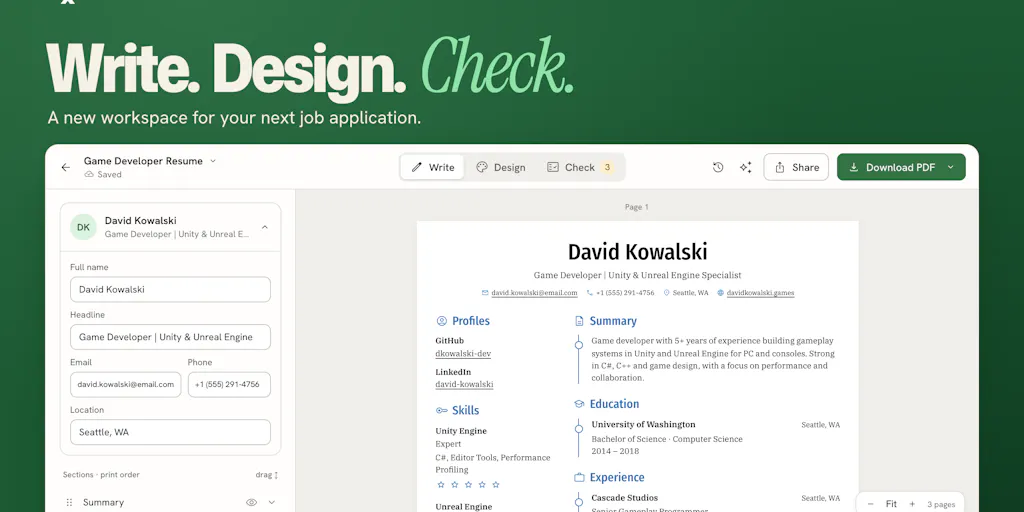
Reactive Resume is a free, open-source résumé builder from maker Amruth Pillai, and v6 is the sixth major iteration of a project he says has been six years in the making. The launch post describes a rebuild around three steps: “Write → Design → Check,” with each stage getting its own space while the résumé stays visible. Review issues point to the specific lines they belong to. AI edits are presented side by side — original text, suggested replacement, explanation — and you accept or reject each change individually. The preview and the downloaded PDF use the same in-browser PDF engine, so what you see is what you get. Résumés and cover letters now live together under Documents, you can import a LinkedIn data export without AI, and there’s a redesigned application tracker. The team says it’s still free, still open source, and self-hostable.
That’s the product. Now here’s why a social media operator should care.
The operational problem this solves is not “I need a résumé.” It’s “I have a document that has to survive a review process I don’t control, and my current tool makes review impossible.” Every creator faces the same shape of problem: a deliverable that goes to an audience or a client, where the cost of a mistake is reputational, and where the draft, the formatting, and the final check are tangled together in one interface. In Canva, you design and you’re done — there’s no separate audit step. In Notion, you write and you’re done. In Buffer or Later, you schedule and you’re done. Almost nothing in the creator stack separates “make it” from “verify it.”
Why the write/design/check split is the actual feature
I’ve scheduled enough multi-platform campaigns to know that the failure mode is never the draft. It’s the thing you didn’t catch. A UTM parameter with a typo. A caption that says “link in bio” on a platform with no bio link. A vertical clip exported at 1:1 because you forgot to reset the aspect ratio. The mistake lives in the gap between composing and publishing, and most tools collapse that gap to zero because they want you to hit publish fast.
The “Check” stage in Reactive Resume v6 is the interesting part precisely because it’s not a publish button. Review issues point to the lines they belong to — that’s an annotation layer, not a spellchecker. If you’ve ever run a client’s LinkedIn post through three rounds of review and lost track of which version had the approved CTA, you understand why an annotated, line-level review surface is worth more than a prettier editor.
The AI edit pattern is the one to copy
The AI integration here is deliberately unglamorous: it shows you the original text, the suggested replacement, and an explanation, and you accept or reject each change. The maker is explicit that AI is optional, uses a provider you connect yourself, and that provider may charge for usage. That’s a very different posture from the “AI writes your whole post” wave.
My take: this is the correct default for anyone whose name is on the output. When I use AI to draft hooks or repurpose a thread, I want diff-style review, not a black box. The reason is simple — I’m the one who eats the reputational cost if the model hallucinates a stat or flattens my voice. Tools that hide the edit behind a “regenerate” button are optimizing for speed over accountability, and for a creator account, accountability is the whole asset.
How it stacks up against the incumbents you already pay for
Let me be fair about the category. Reactive Resume is competing with Zety, which a reviewer on the launch page directly compared it to, praising Reactive Resume’s open-source nature and advanced customization like adjusting line height, line spacing, and fonts. It’s also in the same mental bucket as Resume.io, Novoresume, and the résumé features baked into LinkedIn itself. If your only need is “a clean PDF by Friday,” any of those will do, and several have better template libraries.
Where Reactive Resume differentiates, per the source, is threefold: it’s free, it’s open source, and you can self-host it. The maker points self-hosters to the self-hosting docs and notes it runs as a single image, works on restricted hardware like a Raspberry Pi, and that even without Docker experience you can point an agent at the docs to set it up.
That self-hosting pitch is where the creator-economy relevance gets real. Think about what a self-hostable document tool means for someone whose business is content. It means your client work, your media kit, your sponsorship one-sheets, and your rate card don’t have to live inside a SaaS vendor’s database. For indie founders and freelancers who’ve watched a platform change its pricing or shut down a feature overnight, that’s not ideology — it’s continuity planning.
The WYSIWYG detail that most tools get wrong
One exchange on the launch page is worth reading closely. A commenter asks whether the PDF looks the same when downloaded as in the preview. The maker’s answer: the résumé you’re looking at in the editor is a PDF, rendered in the browser through pdf.js, so the preview and the download are the same thing.
This sounds like a small technical note. It’s actually the single most trustworthy thing about the product. Anyone who has exported a design from one tool and watched it reflow in another knows the pain — the font substitution, the margin drift, the bullet that wraps onto a second line and pushes your whole layout down a page. When the preview and the export share one rendering engine, that class of bug disappears by construction. I’d bet this design choice is why the product has survived six versions while flashier résumé builders churn.
Why TikTok and YouTube creators should care more than LinkedIn ones
Here’s a distinction the launch page doesn’t make, and I will. If your primary platform is LinkedIn — text posts, a static profile, occasional PDF carousels — a résumé builder is a peripheral tool. You update it when you’re job hunting and forget it exists otherwise.
But if you’re a TikTok or YouTube creator, your “résumé” is a living business document. It’s the media kit you send to brands. It’s the one-pager with your audience demographics, your average views, your past partnerships. It’s the thing a sponsorship coordinator skims in ninety seconds before deciding whether to reply. And it changes constantly — every viral video, every follower milestone, every new platform you add.
That document has exactly the same requirements as a résumé: it has to be accurate, it has to render identically for everyone who opens it, and it has to survive a review by someone who doesn’t know you. The write/design/check loop applies directly. So does the WYSIWYG export. So does the “accept or reject each AI edit” pattern, because you are not going to let a model invent a view count on a document you send to a paying sponsor.
What creators and social teams can borrow from this, even if they never open it
I don’t expect most social media managers to migrate their media kits into a résumé builder. But the design patterns here are portable, and I’ve started applying them to my own content workflow.
Separate the compose step from the audit step, in your own stack. I now keep a running “check” pass for every scheduled batch — a literal checklist I run before anything goes into the queue. Aspect ratios. First-frame text legibility. UTM parameters. Alt text. Link validity. The point isn’t the checklist; it’s that the check is a distinct stage with its own time slot, not something I do while drafting.
Demand diff-style AI edits from every tool you pay for. If a tool offers to “improve” your copy, captions, or descriptions and won’t show you what changed, that’s a red flag. The Reactive Resume pattern — original, replacement, explanation, per-item accept/reject — should be the floor, not the ceiling. I’d bet the next wave of scheduling and repurposing tools will get judged on exactly this.
Treat self-hosting as a business-continuity question, not a nerd hobby. You don’t need to run your own server. But you should know which of your critical assets — media kits, client deliverables, brand decks — are locked inside a vendor that could reprice or sunset. For those, a self-hostable or exportable option is worth the friction.
Steal the “documents live together” idea. Reactive Resume v6 puts résumés and cover letters in one place. For creators, the equivalent is keeping your media kit, rate card, past-campaign case studies, and audience stats in a single maintained folder rather than scattered across old Google Docs. When a brand asks, you’re not rebuilding from scratch.
Where the math breaks
I want to be honest about the limits of the analogy, because I’ve seen creators over-index on tooling and under-index on the actual work.
First, a résumé is a document with a known, narrow purpose. A media kit is a sales asset, and sales assets need narrative, proof, and a call to action — things no document builder will write for you. The tool gives you a clean canvas; it doesn’t give you a pitch.
Second, the “Check” stage in Reactive Resume catches structural and formatting issues. It does not catch strategic ones. It won’t tell you that your rate is too low, that the brand is a bad fit, or that the case study you’re leading with is three years stale. Those are judgment calls, and they’re the ones that actually move revenue.
Third, and this is the big one: none of this touches distribution. A beautiful media kit that no brand ever sees is a hobby project. The work that matters is the outreach, the relationships, and the follow-up — which is exactly why the application tracker feature caught my eye, and exactly why I’d want to see it do more.
Where my judgment says it falls short
Let me separate what the source tells me from what I’m inferring, because the launch page is generous with features and silent on a lot.
What the source says, and what it doesn’t. The maker states the product is free, open source, and self-hostable, and that AI is optional and bring-your-own-provider. Pricing beyond “free” is not disclosed, because there isn’t any. User counts, funding, and team size are not disclosed. The launch page shows a 5.0 rating based on 2 reviews, which is a sample size too small to mean anything — I’d treat it as noise, not signal.
The PDF generation bug is a real signal. One reviewer reported that the web app sometimes failed to generate a PDF, which they attributed to traffic from the Product Hunt launch, and noted that cloning the GitHub repo and exporting locally worked flawlessly. That’s a launch-day load problem, not necessarily a product flaw — but it’s a reminder that self-hosted and hosted versions can behave differently under stress, and that “it works locally” is not the same as “it works for your client at 9 a.m. on a deadline.”
A separate reviewer flagged PDF exports as long joined pages and asked for more templates. The maker responded that this has since been implemented — you can now export as multiple A4/Letter pages or as one single page, and more templates have been added. Good on them for shipping the fix, but it’s worth noting the feedback loop here is public and slow-ish. If you need a specific template today, check what’s actually available before committing.
The application tracker is the feature I’d watch hardest. A commenter asked whether the tracker can send reminders before an interview or a follow-up, admitting they forget to follow up all the time. That question was unanswered on the page as of the scrape. If the tracker does eventually handle reminders and next steps, it becomes a genuinely useful lightweight CRM — and that’s a much bigger deal for creators than the résumé builder itself. If it doesn’t, it’s just a list. Not disclosed either way.
Who this is not for
If you need a résumé in the next hour and you’ve never touched Docker, this is not your tool — use a hosted builder with a template you like and move on. If you want AI to write your résumé for you end to end, this is explicitly not that; the AI is optional, provider-connected, and review-gated. If you need team collaboration with roles and permissions for a shared document, the source doesn’t mention it, and I wouldn’t assume it exists. And if you’re a social media manager looking for a scheduling or analytics tool, this is adjacent at best — it’s a document workspace, not a publishing platform.
What I’d watch / test next
Here’s what I’d actually do this week, in order.
If you maintain a media kit or sponsorship one-pager, audit it against the write/design/check loop. Open your current version. Is there a review step, or did you just export and send? Add a five-minute check pass before your next brand outreach: verify every number, every link, every logo usage right. That’s free, and it’s the highest-leverage thing in this entire essay.
Test Reactive Resume yourself if you’re curious about the self-hosting story. Spin it up from the self-hosting docs on a spare machine or a cheap VPS, and see whether the single-image setup is as painless as the maker claims. My take: even if you never use it for a résumé, running one self-hosted document tool is a good calibration exercise for understanding what “you own your data” actually costs in setup time.
Watch the application tracker. If reminders and follow-up nudges ship, it becomes a real lightweight CRM for freelance and creator work — and that’s a category worth paying attention to. If they don’t, file it as a nice-to-have list.
And pressure-test your own AI tools for diff-style review. Next time a tool offers to rewrite your caption or description, look for the accept/reject-per-change pattern. If it’s not there, ask why. The tools that respect your accountability will win the creator market; the ones that don’t will keep shipping plausible-sounding copy that nobody wants to put their name on.
The résumé builder is a small product in a crowded category. But the design instincts inside it — separate the stages, show the diff, keep the export honest, let people own their data — are the instincts I want to see more of across the entire creator stack. That’s the part worth borrowing.